AE2 Better Magnet Card
- By
AE2 Better Magnet Card lets the Magnet Card, when installed in an AE2 wireless/portable terminal, send picked-up items straight into the ME network instead of your inventory.

NuanKi | AE2 Better Magnet Card
Create a server, get 25% off your first month

Description
AE2 Better Magnet Card
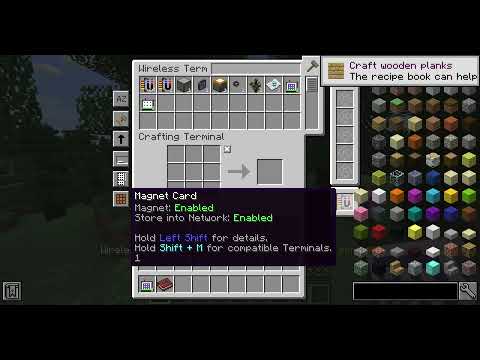
AE2 Better Magnet Card adds a Store to Network option to the AE2 Magnet Card when it is installed in a Wireless / Portable Terminal.
When enabled, items you pick up go straight into your ME network instead of filling your inventory.
Features
- Store to Network toggle on the Magnet Card
- Quick toggle from the terminal UI (middle-click the Magnet Card in the upgrade slot)
- Clear Magnet Card tooltip showing the current state
- Now you can shift click the magnet card, to move it to its slot
- Range upgrade cards for the Magnet Card (increase pickup radius)
- Keybinds to toggle both Magnet and Store to Network
- Configurable keybindings to enable and disable functionality:
- Toggle Store into Network:
Shift+;(Semicolon) - Toggle Magnet:
Shift+Tab
- Toggle Store into Network:
How to use
- Put a Magnet Card into your terminal’s UPGRADES slot.
- Enable Store to Network.
- Pick up items, they will be stored in the ME network automatically.
Compatibility
- Applied Energistics 2 (AE2UEL)
- AE2 Wireless Universal Terminal (AE2WUT)
- Baubles
- Botania (Solegnolia compatibility)
AE2 Better Magnet Card Team

Owner