Bloom Auction House
A little charm. A better marketplace.
Turn everyday trading into a lovely part of your server. Bloom combines fixed-price sales, soft pink menus, and thoughtful features in one welcoming player marketplace.
 Beautiful menus. Simple trading. No resource pack required.
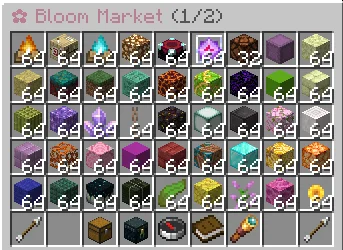
 Browse. Discover. Take it home.
Open /ah and explore what your community has to offer.
 Search for items or sellers.
 Filter listings by category.
 Sort by price, newest listings, or time remaining.
 Browse multiple pages with familiar navigation.
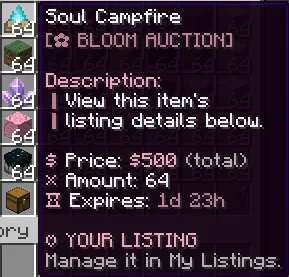
Every listing clearly shows the seller, quantity, total price, and remaining time.
One price for the whole listing. What you see is what you pay.
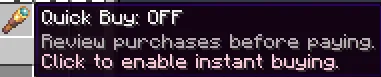
 Your click. Your choice.
Like to double-check? Leave Quick Buy OFF and review your purchase before paying.
Ready to shop? Switch Quick Buy ON and buy with a single click—no confirmation screen.
♡ Your preference is saved across reconnects and server restarts.
 Give your items a new home
Hold an item and type:
/ah sell <price>
Review your item, quantity, asking price, listing duration, and any applicable charges. Confirm when everything looks right.
 Manage your offers through My Listings.
 Cancel listings you no longer want to sell.
 Keep selling while you’re offline.
A peek before you purchase
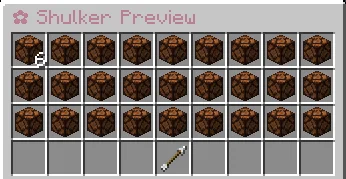
Found a shulker box worth checking out?
Open its read-only preview and inspect the contents before buying. See item names, quantities, and enchantments without taking anything out.
Purchase the box, and its contents come with it.
 Your items, waiting for you
Changed your mind? Missed the listing deadline?
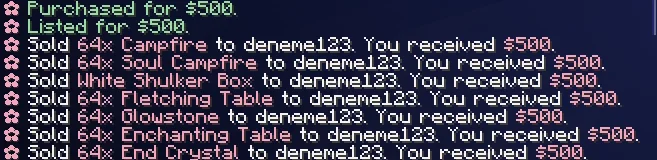
Cancelled and expired items move into your personal Collection, ready to reclaim when you have space.
♡ Full inventory? They stay in Collection.
♡ Logging out? They’ll be there when you return.
♡ Server restarting? Your stored items persist.
 Every trade has a story
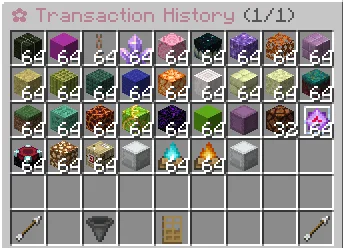
Keep track of completed purchases and sales through Transaction History.
Review the item, buyer, seller, price, and date, with transaction identifiers to help staff trace individual trades.
 From your marketplace to Discord
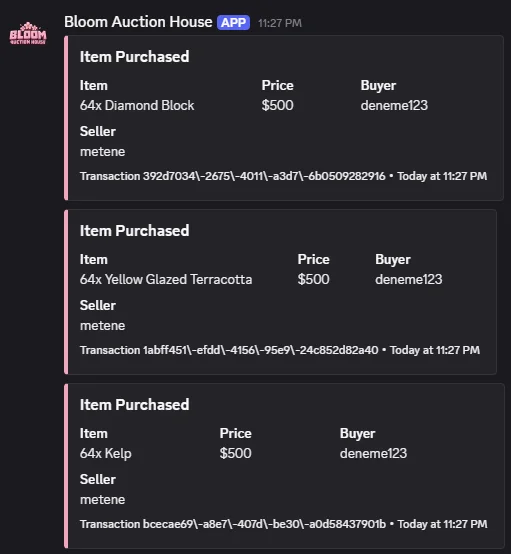
Let your community see the latest sales with Discord webhook notifications.
Each configurable sale embed can display:
 Item and quantity
 Total price
 Buyer and seller
 Transaction ID and timestamp
No separate Discord bot or DiscordSRV required. Connect your webhook, complete a sale, and let Bloom share the news.
 Make it your Bloom
Enjoy the soft pink defaults or create a look that belongs to your server.
Customize titles, icons, button positions, descriptions, messages, sounds, categories, and Discord embeds through organized configuration files.
Set permission-based listing limits for your player groups—keep everyday trading accessible and give your ranks room to grow.
 Thoughtful trading, behind the scenes
Bloom checks availability, balance, ownership, and inventory space before completing a purchase.
Repeated-purchase protections help prevent duplicate transactions. If an interrupted transfer cannot be safely confirmed, recovery records give staff a way to investigate rather than guess.
Administrative tools support listing inspection, marketplace restrictions, transaction review, and item recovery.
Your economy, connected
Bloom uses one currency: your server’s Money, connected through Vault.
Configurable listing fees
Configurable sales taxes
Both disabled by default
Support for compatible Vault economy providers
 What you’ll need
• A supported Paper server
• The appropriate Java version
• Vault
• A compatible economy provider, such as EssentialsX
Check the included compatibility documentation for exact tested versions.
Bloom is a fixed-price marketplace. Competitive bidding, multiple currencies, cross-server trading, and Folia are outside the current release.
 Permissions
A little control. The right access.
Manage player access and staff tools with individual permissions.
Player Permissions
| Permission |
Description |
| bloomah.use |
Allows access to the auction house. |
| bloomah.player |
Grants the plugin’s standard player permission group. |
| bloomah.buy |
Allows purchasing listings. |
| bloomah.sell |
Allows creating sale listings. |
| bloomah.quickbuy |
Allows using Quick Buy for purchases without a confirmation screen. |
Listing Limits
| Permission |
Description |
| bloomah.limit |
Base permission node for the listing-limit system. |
| bloomah.limit.unlimited |
Bypasses the listing-count limit. |
| bloomah.sell.unlimited |
Grants the plugin’s unrestricted selling permission. |
Administrative Permissions
| Permission |
Description |
| bloomah.admin |
Grants access to administrative features. |
| bloomah.admin.backup |
Allows using marketplace backup tools. |
| bloomah.admin.block |
Allows managing marketplace restrictions. |
| bloomah.admin.confiscate |
Allows confiscating listed items. |
| bloomah.admin.history |
Allows reviewing transaction history through administrative tools. |
| bloomah.admin.info |
Allows viewing administrative marketplace information. |
| bloomah.admin.listings |
Allows inspecting listings through administrative tools. |
| bloomah.admin.pause |
Allows pausing and resuming marketplace activity. |
| bloomah.admin.recovery |
Allows accessing transaction and item recovery tools. |
| bloomah.admin.reload |
Allows reloading plugin configuration. |
| bloomah.admin.remove |
Allows administratively removing listings. |
| bloomah.admin.selftest |
Allows running the plugin’s internal diagnostic checks. |
| bloomah.admin.theme |
Allows accessing administrative theme controls. |
| bloomah.* |
Wildcard permission intended for full plugin access. |
♡ Give players the access they need, and keep administrative tools with trusted staff.
Small details. Sweeter trading.
Let your marketplace Bloom.
You can support me via Support Me! Addon.