 Bloom Home
A little charm. A place to return.
From your first shelter to your favorite hideaway, keep the places that matter close. Bloom Home combines simple home management, soft pink menus, and gentle sounds to make returning home feel welcoming.
 Save your spot. Make it yours. Come home.
 Your homes, together
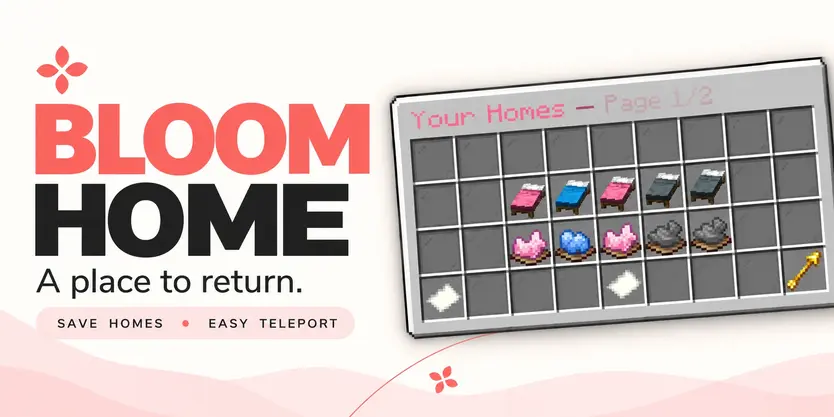
Open /home and manage your saved locations through a clean, easy-to-use menu.
 Five home slots per page, with golden arrows for navigation.
 Blue beds for available slots waiting to be saved.
- Pink accents for your saved homes.
 Clearly marked locked slots, with customizable upgrade information.
Click an available bed to save your current location. Your next home is ready.
 A familiar place. One click away.
Left-click a saved bed to return home, or use /home <number>.
A gentle 3-second countdown appears before teleporting. Moving cancels the countdown, and server owners can customize the delay.
♡ Give selected ranks instant travel with the teleport bypass permission.
 Make every home your own
A cozy cabin? A mountain retreat? Your favorite fishing spot?
Right-click a saved bed to rename it and make your home menu feel personal.
Ready for somewhere new? Click the dye beneath a saved home to open its deletion confirmation menu.
♡ Cancel or close the confirmation without losing your home.
 A little room to grow
Players start with 3 home slots by default, and server owners can change that starting allowance.
Grant additional homes through permissions—5, 10, 15, or another positive number that fits your ranks.
The highest granted limit applies when it exceeds the configured default. Limits do not stack.
Locked slots can send a customizable, clickable store link in private chat, helping players discover your server’s upgrades.
 Your server. Your language.
Bloom Home includes English and Turkish translations, with editable messages and GUI text.
Customize the experience with your own wording, Bloom-inspired colors, menu details, and gentle sounds.
Soft pink styling
 Gentle amethyst chimes
 Editable messages and descriptions
 Configurable teleport delay
 Customizable store messages and links
 Commands
| Command |
Description |
| /home |
Opens the home menu. |
| /homes |
Alias for /home. |
| /home <number> |
Teleports to a saved home, with a countdown unless bypassed. |
| /sethome <number> |
Saves your current location to an empty home slot. |
| /delhome <number> |
Opens deletion confirmation for that home. |
| /bloomhome reload |
Reloads configuration and language files. |
 Permissions
A little control. The right access.
| Permission |
Default |
Description |
| bloomhome.use |
Everyone |
Access to the home menu and player commands. |
| bloomhome.admin.reload |
OP |
Allows /bloomhome reload. |
| bloomhome.limit.5 |
Not granted |
Grants a home limit of 5 if higher than the configured default. |
| bloomhome.limit.10 |
Not granted |
Grants a home limit of 10 if higher than the configured default. |
| bloomhome.limit.15 |
Not granted |
Grants a home limit of 15 if higher than the configured default. |
| bloomhome.limit.<number> |
Not granted |
Supports any positive numeric home limit, resolved at runtime. |
| bloomhome.teleport.bypass |
Not granted |
Skips the home teleport countdown. |
♡ The teleport bypass is not enabled by default, including for OPs. Grant it to the players or ranks you choose.
New adventures. Familiar places.
Let your home Bloom.
You can support me through the Support Me! Addon.