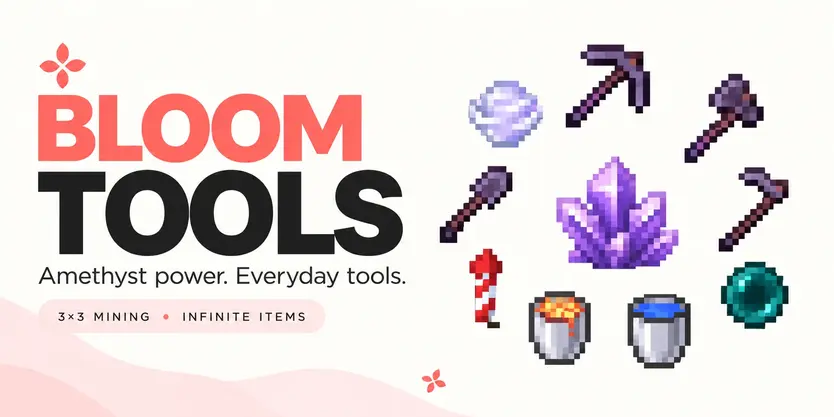
 Bloom Tools — Amethyst Items
A little sparkle. More in every tool.
Make everyday mining, farming, and exploring feel a little more special. Bloom Tools brings nine amethyst-themed items to your server, with useful abilities, purple particles, crystalline sounds, and customizable lifetimes.
 Nine special items. Everyday convenience. No resource pack required.
 Less digging. More discovering.
Make room for your next project with tools that do more with every break.
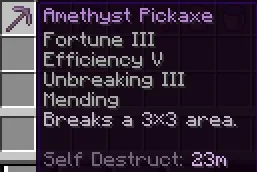
Amethyst Pickaxe — Mine a 3×3 area with each successful block break.
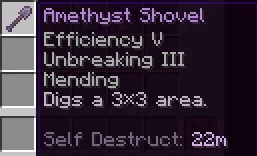
 Amethyst Shovel — Clear a 3×3 area of suitable ground blocks.
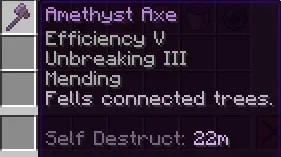
 Amethyst Axe — Fell a connected tree with a single activation.
Purple amethyst particles and crystalline sounds give each successful operation a little extra character.
♡ Sneak with your pickaxe, shovel, or axe when you want precise, single-block control.
 Harvest. Replant. Keep growing.
Take care of your crops with the Amethyst Hoe.
Harvest mature crops in a 3×3 area and automatically replant them, leaving immature crops to keep growing.
Harvested items drop naturally into the world, with planting materials reserved for replanting.
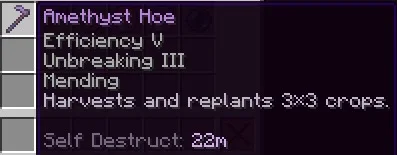
A little purple sparkle for every harvest.
🪽 A little boost for your next adventure.
Move around your world with reusable travel items.
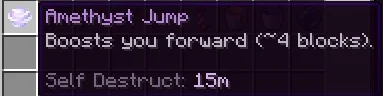
 Amethyst Jump — A glowing Wind Charge item that boosts you toward your viewing direction, with a configurable cooldown.
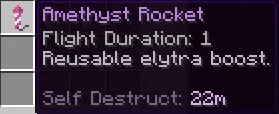
 Amethyst Rocket — Reusable elytra boosts with configurable flight duration.
 Amethyst Pearl — A reusable ender pearl for your next journey.
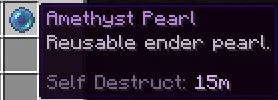
Keep exploring without carrying stacks of replacement consumables.
 Fill more. Carry less.
Two familiar buckets with a useful difference.
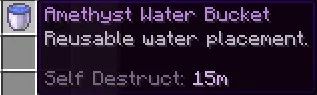
 Amethyst Water Bucket — Place water without consuming your bucket’s contents.
 Amethyst Lava Bucket — Place lava with the same reusable convenience.
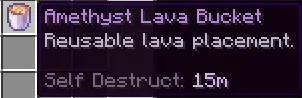
Both feature an enchanted glow and support permanent or timed lifetimes.
 Yours forever. Or just for the weekend.
Choose how long each item lasts when you give it to a player.
 Permanent items — No time-based expiration.
 Timed items — Set a lifetime such as 30 minutes, three hours, or seven days.
Remaining lifetime appears in the item’s lore. Timed items use real elapsed time, so logging out, storing an item, or restarting the server does not pause its lifetime.
Trading an item does not restart its timer. Auction listings that preserve the item’s data retain its original expiration.
♡ Live countdown displays and expired-sale handling inside third-party auction menus depend on that auction plugin’s integration.
Permanent lifetime controls expiration; tool durability is configured separately.
 Make it your Bloom.
Keep the amethyst defaults or adjust the experience to suit your server.
Customize item names, lore, enchantments, messages, sounds, particles, cooldowns, and ability settings through configuration files.
 English and Turkish included, with editable language files.
Utility items feature an enchanted glow, while the tools retain their familiar Minecraft appearance.
No resource pack is needed for the abilities, names, lore, or effects. Custom purple tool textures require an optional resource pack.
 Your worlds. Your rules.
Choose where special abilities can be used and which blocks they can affect.
 World restrictions — Disable abilities in selected worlds.
 Block blacklists — Exclude materials from block-changing abilities.
 Individual permissions — Control access to each tool when needed.
All nine items are usable by normal players by default. No manual permission setup is required for everyday use.
 Simple commands. Useful tools.
All commands also work through /bloomtools and can be executed by players or the console.
| Command |
Description |
Permission |
| /tools |
Displays the help information. |
bloomtools.use or bloomtools.admin.help |
| /tools help |
Displays the help information. |
bloomtools.use or bloomtools.admin.help |
| /tools give <player> <tool> <duration> |
Gives an item to an online player with available inventory space. |
bloomtools.admin.give |
| /tools reload |
Reloads configuration and language settings. |
bloomtools.admin.reload |
 Choose your item
| Tool ID |
Item |
| pickaxe |
Amethyst Pickaxe |
| axe |
Amethyst Axe |
| shovel |
Amethyst Shovel |
| hoe |
Amethyst Hoe |
| pearl |
Amethyst Pearl |
| jump |
Amethyst Jump |
| rocket |
Amethyst Rocket |
| lava_bucket |
Amethyst Lava Bucket |
| water_bucket |
Amethyst Water Bucket |
 Choose its lifetime
Use infinite, forever, or permanent for no expiration.
Timed durations support seconds (s), minutes (m), hours (h), and days (d), including combinations.
| Example |
Result |
| /tools give Metene pickaxe infinite |
A pickaxe with no time-based expiration. |
| /tools give Metene axe 3h |
An axe that expires after three hours. |
| /tools give Metene hoe 7d |
A hoe that expires after seven days. |
| /tools give Metene rocket 2h30m |
A rocket that expires after two hours and 30 minutes. |
| /tools give Metene jump 1d12h |
A Jump item that expires after one day and 12 hours. |
A little control. The right access.
Player permissions
All permissions below are enabled for everyone by default. Server owners can explicitly deny individual permissions when needed.
| Permission |
Description |
Default |
| bloomtools.use |
Base item access and help; parent of all tool-use permissions. |
Everyone |
| bloomtools.use.pickaxe |
Use the Amethyst Pickaxe. |
Everyone |
| bloomtools.use.axe |
Use the Amethyst Axe. |
Everyone |
| bloomtools.use.shovel |
Use the Amethyst Shovel. |
Everyone |
| bloomtools.use.hoe |
Use the Amethyst Hoe. |
Everyone |
| bloomtools.use.pearl |
Use the Amethyst Pearl. |
Everyone |
| bloomtools.use.jump |
Use Amethyst Jump. |
Everyone |
| bloomtools.use.rocket |
Use the Amethyst Rocket. |
Everyone |
| bloomtools.use.lava_bucket |
Use the Amethyst Lava Bucket. |
Everyone |
| bloomtools.use.water_bucket |
Use the Amethyst Water Bucket. |
Everyone |
Administrative permissions
| Permission |
Description |
Default |
| bloomtools.admin.give |
Give Bloom items to players. |
OP |
| bloomtools.admin.reload |
Reload plugin settings. |
OP |
| bloomtools.admin.help |
Access help through the administrative permission. |
OP |
| bloomtools.admin.* |
Grants administrative give, reload, and help permissions. |
OP |
| bloomtools.cooldown.bypass |
Bypass tool cooldowns. |
Disabled |
♡ Cooldown bypass must be granted explicitly. It is not included in normal item access, and OP does not receive it by default.
Small details. More everyday possibilities.
Let your tools Bloom.
You can support me through the Support Me! Addon.