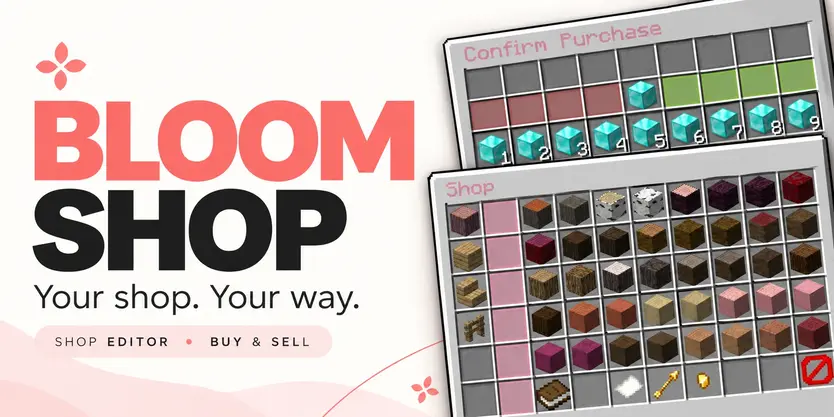
 Bloom Shop
Your shop. Your way.
Make everyday shopping a lovely part of your server. Bloom Shop brings organized markets, simple buying and selling, and an in-game editor together with soft pink menus and gentle sounds.
 Beautiful menus. Easy editing. No resource pack required.
 A little browsing. Plenty to discover.
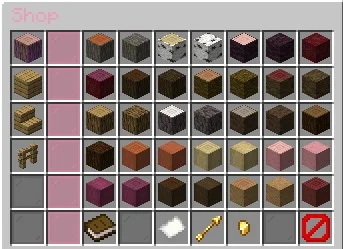
Open /shop, choose a market, and explore its categories.
 Switch between subcategories from the sidebar.
See your selected category highlighted with a gentle glow.
 Browse product pages with familiar golden arrows.
 Check buying and selling prices directly on each item.
From building supplies to everyday essentials, give your players a convenient place to find what they need.
 A few items or a few stacks.
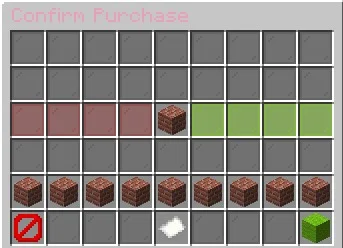
Choose an item, adjust the amount, and review the total before confirming.
Left-click to buy. Right-click to sell.
Use +1, +16, +32, and +64 controls for individual quantities, or choose from 1–9 stack presets for larger purchases.
♡ Clear quantities and total prices.
♡ Stack sizes that match the selected item.
♡ Separate buying and selling settings for each product.
♡ Cancel before confirming whenever you change your mind.
 Build your shop inside the game.
Spend more time creating your market and less time writing configuration files.
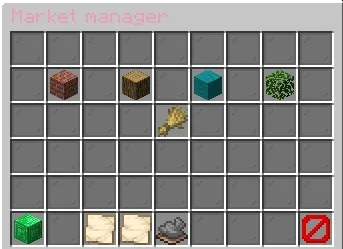
Open /shop editor to manage your shop through an interface that follows the same layout your players see.
Create markets and subcategories.
 Edit names, icons, and descriptions.
 Add products using items from your inventory.
Set prices and enable or disable buying and selling.
 Choose positions, move entries, and leave intentional spaces.
 Add optional permission requirements.
Your layout stays yours. Arrange your market to suit your server instead of squeezing it into a fixed list.
 Add a little faster.
Enable Quick Add and click an inventory item to start creating a product.
Set its price, adjust its settings, and save it into your shop.
Your original item stays in your inventory, and unfinished drafts stay out of the customer menu.
 A shop to start with. Room to make it yours.
Start with a broad default catalog covering building materials, wood, colored blocks, natural items, food, farming supplies, resources, tools, and more.
Keep what fits your server, change the prices, or remove entire markets and build your own.
Every product is yours to adjust.
The included prices are a starting point—shape them around your server’s economy and progression.
 Make it your Bloom.
Enjoy the soft pink defaults or create your own style.
Customize names, descriptions, messages, icons, positions, prices, and sounds. Use supported color codes and hex colors to give your shop a consistent look.
Prefer working with files? Markets, subcategories, and products can also be managed through configuration.
Edit in-game or edit your files—the choice is yours.
 Two languages. The same charm.
Bloom Shop includes English and Turkish language files.
Player messages, menu labels, editor instructions, and confirmations can be adjusted to match your community.
Gentle chimes add a little personality, with configurable sounds for servers that prefer a quieter experience.
Your economy, connected.
Bloom Shop uses your server’s existing money through Vault.
Connect a compatible economy provider and set individual buying and selling prices for your products.
Make an item buy-only, sell-only, or available in both directions.
 Thoughtful shopping, behind the scenes.
Balance, inventory space, item availability, and permissions are checked before a transaction completes.
Confirmation menus let players review their choices, while repeated-click protections help prevent duplicate transactions.
Shop instructions stay on menu previews, keeping purchased items free from extra price labels and interface lore.
 Commands
| Command |
Description |
| /shop |
Opens the market selection menu. |
| /shop <market> |
Opens a market by its ID. |
| /shop editor |
Opens the in-game shop editor. |
| /shop reload |
Reloads configuration, language files, and shop data. |
Permissions
A little control. The right access.
| Permission |
Description |
| bloomshop.use |
Allows access to the shop. |
| bloomshop.buy |
Allows purchasing products. |
| bloomshop.sell |
Allows selling eligible items. |
| bloomshop.admin.editor |
Allows access to the shop editor. |
| bloomshop.admin.reload |
Allows reloading the plugin. |
| bloomshop.admin.* |
Grants the plugin’s administrative permissions. |
Optional permission requirements can also be assigned to individual markets, subcategories, and products.
 What you’ll need
- A supported Minecraft server and its required Java version.
- Vault.
- A compatible economy provider.
Check the included compatibility documentation for exact supported versions and any Folia economy-provider requirements.
Small details. Sweeter shopping.
Let your shop Bloom.
♡ You can support my work through the Support Me! Addon.