Project Silent Breakpoint: Sector Registry Module
Establish, secure, and manage your tactical outposts with advanced base registration, custom territory control, and automated sector systems for Project Silent Breakpoint.
🛑 CRITICAL WARNINGS & INCOMPATIBILITY
- REQUIRED CORE PACK: This is NOT a standalone add-on. The Project Silent Breakpoint (Main Core Add-on) is STRICTLY REQUIRED for this module to function. Loading this add-on without the core pack will cause fatal script errors and crashes.
- MAP INCOMPATIBILITY: This add-on DOES NOT FUNCTION if used alongside the custom map Project Silent Breakpoint: Eastern Front. Please ensure you are running this module on a standard world generation setup.
🛠️ HOW TO USE THE ADD-ON
To initialize and begin using the Sector Registry systems, follow these exact steps in-game:
- Run the Initialization Command: Open the chat console and execute the developer function to enable the simulation framework:
/function developer
- Locate the Configuration Item: Open your inventory or use creative mode to find and obtain the specific setup item named:
Map Settings
Activate the Interface: Equip the Map Settings item in your main hand, then Right-Click (or hold/interact on mobile devices) while holding it.
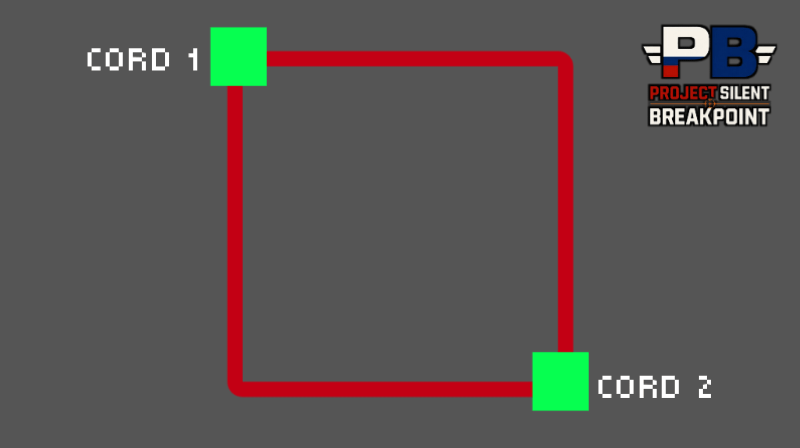
Follow the On-Screen Instructions: An in-game menu and documentation prompt will appear. Read the provided guide inside the interface to configure your sectors, register bases, and set up your tactical infrastructure.
Expand your tactical warfare experience. Sector Registry is the official management and infrastructure core for Project Silent Breakpoint. This module shifts the gameplay from simple skirmishes to full-scale territorial control, allowing squads and solo operators to claim, build, and maintain operational bases.
🔑 Key Features
- Base Registration System: Deploy Core Command Terminals to officially register your base coordinates, establish your faction's presence, and unlock specialized infrastructure.
- Sector & Territory Control: Claim specific chunks or regions. Monitor your sector's grid, track resource generation, and secure your borders from unauthorized entry.
- Automated Defense Systems: Link your registered sectors with automated turrets, early-warning radars, and security grids to protect your assets while offline.
- Logistics & Supply Network: Manage power grids, fuel storage for your armored vehicles, and ammunition resupply stations directly through the Sector UI.
🛠️ Technical Integration
Fully optimized using the latest Minecraft Bedrock Scripting API and JSON UI. Seamlessly integrates with the core Project Silent Breakpoint vehicles, weapons, and rank systems without causing entity conflicts.
TECHNICAL & SETUP GUIDE
To ensure the map and add-on function perfectly, follow these steps in the exact order:
1. Experimental Toggles (CRITICAL)
Before loading the world, ensure ALL Experimental Gameplay toggles are switched ON. The system relies heavily on these features:
- Upcoming Creator Features
- Beta APIs
- Experimental Creator Camera Features
2. Add-on Load Order (Resource & Behavior Packs)
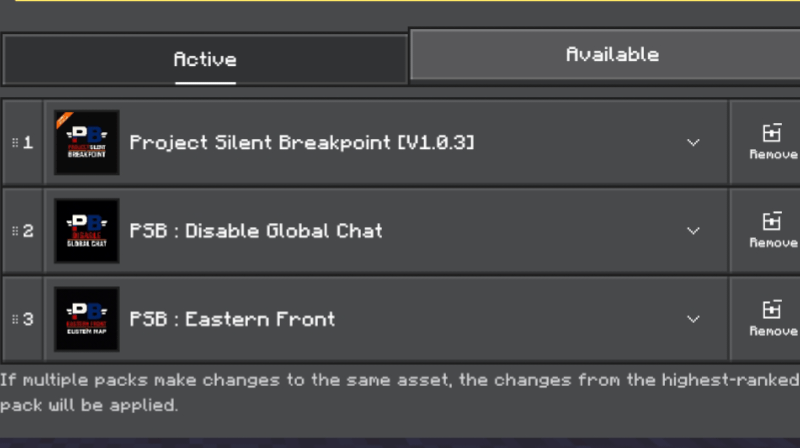
When playing on the custom map Eastern Front or using multiple modules, the arrangement of your packs is crucial to prevent script conflicts. Arrange them in the active list from top to bottom as follows:
- 1st Priority (Top):
Project Silent Breakpoint (Main Core Add-on) — Must always be placed at the very top.
- 2nd Priority:
Project Silent Breakpoint: Sector Registry Module — Must be placed directly underneath the main core add-on.
- 3rd Priority (Bottom): Any other additional add-ons, sub-modules, or resource packs should be placed below the Sector Registry.
3. World Initialization & System Activation (MANDATORY / WAJIB)
- English: Once the world has loaded, a player with operator status MUST run the developer function command. The Sector Registry systems and base management features WILL NOT work unless this initialization is triggered.
- Bahasa Indonesia: Setelah dunia terbuka, pemain dengan status operator WAJIB menjalankan perintah fungsi developer. Sistem Sector Registry dan fitur manajemen base TIDAK AKAN BERFUNGSI sebelum inisialisasi ini diaktifkan.
Run this command in the chat to start the simulation:
/function developer
4. Technical Requirements
- Minecraft Version: 1.21.130+
👥 Development & Community
- Watch the Development: Follow the behind-the-scenes progress, coding, and model showcases on our YouTube Channel.
- Report Bugs: Found a glitch? Let us know in the comments section or join our active Discord Community.
📄 Legal & Licensing
This project is licensed under the Creative Commons Attribution-NonCommercial-NoDerivs 4.0 International (CC BY-NC-ND 4.0).
You are ALLOWED to:
- Use this add-on in your personal single-player worlds or private multiplayer servers.
- Record and share gameplay videos, streams, or screenshots, provided you give proper credit and link back to this official CurseForge page.
You are STRICTLY PROHIBITED from:
- Re-uploading, mirroring, or redistributing this add-on to any other websites, apps, or third-party stores without explicit permission.
- Modifying, "remixing", decompiling, or using any code, Molang definitions, 3D models, or textures from this project for your own public add-ons.
- Placing any content or assets from this add-on behind paywalls, commercial features, or monetized short-links (e.g., AdFly).