R&A Armory:0.02 UPDATE NEW ARMOR AND BUG FIXES
R&A Armory will bring the best customizable Armor and Weapons to the market.
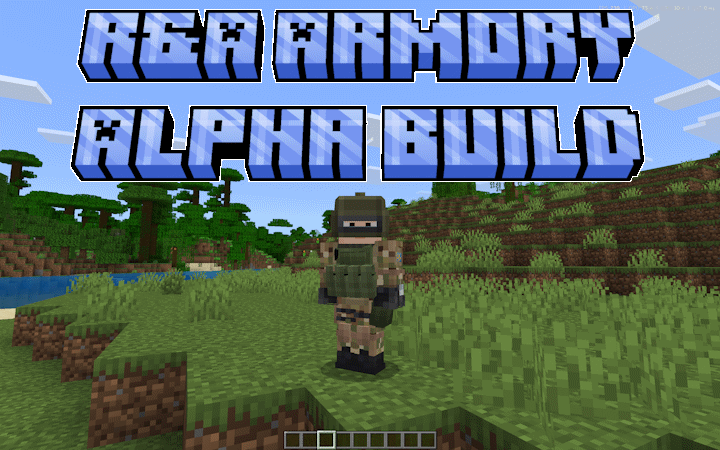
pack_icon.png
Description
Please Read Before Moving On!
R&A: Modular Armor is a standalone tactical armor addon built around customizable helmets, plate carriers, uniforms, belts, backpacks, armor plates, and wearable attachments.
The download contains two Behavior Pack choices:
- Free Behavior Pack – Includes the complete modular armor and attachment system.
- Admin/Patreon Behavior Pack – Includes the same armor content and adds the exclusive R&A Armor Admin Control Tool.
Only activate one Behavior Pack version at a time. Both editions use the same R&A Resource Pack.
R&A uses attachables and does not contain:
player.jsonplayer.entity.json- A replacement player render controller
This makes it more compatible with other addons than armor packs that completely replace the player entity.
The addon is actively developed and may still contain bugs or balancing problems. Report issues through the Discord server with your Minecraft version, pack version, other active addons, screenshots, videos, and Content Log errors.
About the Addon
R&A: Modular Armor introduces a detailed modern tactical equipment system to Minecraft Bedrock Edition.
Players can customize supported equipment using attachments that visually appear on the worn item and may alter its protection, weight, coverage, or functionality.
The addon includes:
- Tactical helmets
- Plate carriers
- Load-bearing carriers
- Uniforms
- Belts
- Backpacks
- Face protection
- Face coverings
- Headgear
- Audio equipment
- Helmet flashlights
- Front armor plates
- Back armor plates
- Side armor plates
- Custom durability
- Armor repairs
- Medical-system integration
Each compatible item has its own attachment categories and limitations. Unsupported attachments cannot be installed on equipment that was not designed to use them.
Main Features
- Standalone modular armor system
- More than 20 wearable gear configurations
- 13 plate-carrier and load-carrier configurations
- Four main tactical helmets
- Uniforms and leggings
- Standalone belts
- Standalone backpacks
- Modular helmet attachments
- Independent front and back plates
- Optional side-plate pairs
- Level IIIA, III, III+, and IV armor plates
- Face protection
- Gas masks
- Face covers
- Headgear
- Tactical audio equipment
- Helmet microphones
- Helmet flashlights
- Double-crouch mask controls
- Custom armor condition
- Repair-kit support
- Attachment data preserved during repairs
- Body-zone protection
- Blunt-damage calculations
- Bleeding and fracture protection
- Armor penetration resistance
- Equipment weight
- SWMC Medical integration
- Attachable-only rendering
- Free and Admin editions
- Patreon-exclusive Admin Control Tool
Included Helmets
R&A includes:
- KZ SSO Helmet
- LSHZ Helmet
- Altyn Heavy Helmet
- Altyn T2 Helmet
Each helmet supports its own compatible attachment categories.
Not every mask, visor, headgear item, or accessory fits every helmet.
For example:
- The Altyn Heavy is designed around heavier face-protection options.
- The Altyn T2 supports its own compatible face-protection combinations.
- KZ SSO and LSHZ helmets support lighter modular accessory combinations.
Included Plate Carriers
Plate-carrier and load-carrier options include:
- KZ SSO Plate Carrier
- 6Sh104 Plate Carrier
- ANA M1 Plate Carrier
- RBAV-AF Plate Carrier
- SP PC V2 Plate Carrier
- Death Kevlar Vest
- Recon Pantsir Carrier
- Pantsir Spectar Carrier
- Grenadier Load Carrier
- Leader Load Carrier
- Medic Load Carrier
- Machine Gunner Carrier
- Assault Load Carrier
Different carriers have different base protection, weight, condition, and visual layouts.
Uniforms, Belts, and Backpacks
Uniform options include:
- KZ SSO Uniform
- OCP Uniform and Leggings
Belt options include:
- Black Utility Belt
- Tactical Belt T2
Backpack options include:
- Scorpion OCP Backpack
- Spectar Backpack
Belts and backpacks can be used as standalone wearable equipment where supported. They can also appear as attachments on compatible uniforms or carriers.
Helmet Attachments
Helmet attachments include equipment such as:
- Maska Heavy Face Mask
- Altyn Face Shield
- Bone Face Cover
- Cloth Face Cover
- Black Face Cover
- Ballistic Face Visor
- Metal Face Mask
- FAST Mask T2
- Gas Mask T2
- Full Gas Mask
- Helmet Head Gear
- Black Helmet Head Gear
- Tactical Headphones
- Helmet Microphone
- Helmet Flashlight
- Helmet Flashlight T2
Attachments are divided into categories such as:
- Face Protection
- Face Cover
- Headgear
- Audio
- Lighting
Only one option from the same attachment category can normally be installed at a time.
Plate System
Compatible carriers can use separate armor plates for different areas.
Supported plate locations include:
- Front Plate
- Back Plate
- Side Plates
Front, back, and side plates are stored independently. Installing one plate does not automatically equip the other positions.
Available plate classes include:
- Level IIIA
- Level III
- Level III+
- Level IV
Higher plate classes generally provide:
- Greater damage reduction
- Greater penetration resistance
- More weight
- Stronger torso protection
These values are intended for addon gameplay and balancing. They are not real-world protective-equipment guidance.
Attachment Interface
To open the R&A attachment interface:
- Hold a supported armor item
- Left-click
- Interact with the temporary attachment helper
- Place compatible equipment into the labeled slots
- Close the interface to save the configuration
Each attachment category uses a fixed slot.
This prevents two attachments from the same category from being installed at the same time.
The interface only accepts attachments compatible with the held equipment.
Repair Kit
R&A uses a custom Armor Repair Kit.
To repair equipment:
- Open the attachment interface for the damaged item
- Place the Armor Repair Kit in the bottom-right repair slot
- Allow the menu to apply the repair
- Close the interface to save the item
The item lore also explains where the Repair Kit should be placed.
Repairing equipment:
- Restores custom armor condition
- Preserves installed attachments
- Does not erase armor-plate selections
- Does not reset the item’s visual configuration
Custom Condition and Attachment Data
R&A separates actual armor condition from visual attachment state.
Attachment Data
The addon uses the item’s vanilla durability-damage channel to encode the installed visual attachments.
Actual Armor Condition
Real armor condition is stored separately through:
- Item dynamic properties
- Compact item data
- Item lore
Because the two systems are separate:
- Installing an attachment does not repair armor
- Removing an attachment does not damage armor
- Repairing armor does not remove attachments
- Changing plates does not reset condition
Foldable Face Protection
The Altyn Face Shield and FAST Mask T2 can be raised or lowered.
To change their position:
- Wear a compatible helmet
- Install the supported foldable face protection
- Double-crouch quickly
When lowered:
- The protective model covers the face
- Its protection values are active
When raised:
- The model remains visible above the face
- Face protection is inactive
- The raised position is primarily visual
An action-bar message confirms the current position.
Armor Protection
R&A can calculate protection using body zones such as:
- Head
- Face
- Upper torso
- Lower torso
- Back
- Side torso
- Arms
- Legs
Final protection can depend on:
- Base equipment
- Installed attachments
- Installed plate type
- Hit location
- Armor condition
- Weapon penetration
- Blunt damage
- Equipment weight
- Server balancing settings
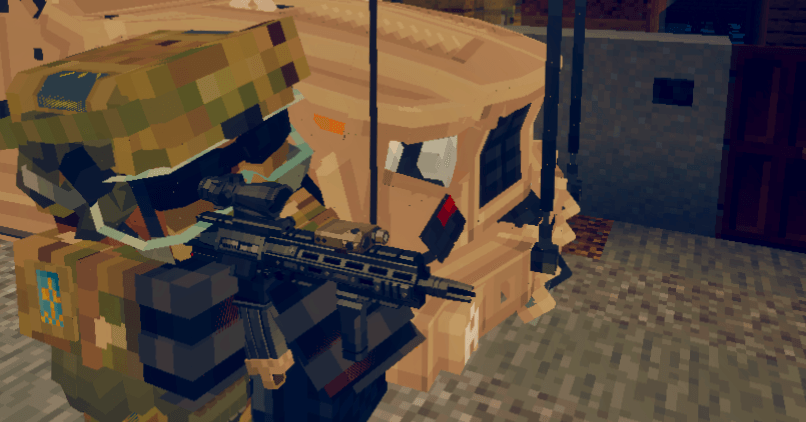
A carrier without plates may still provide limited soft protection, but its strongest ballistic defense comes from installed armor plates.
Medical Integration
When used with a compatible SWMC Medical pack:
- Armor reduces damage before it reaches Medical HP
- Bleeding protection can reduce wound chance
- Fracture protection can reduce broken-leg chance
- Blunt damage can still contribute to pain
- The hit body zone is preserved
- Armor penetration affects the final result
When Medical is unavailable, R&A can use its standalone damage handling where supported.
Uniform System
Uniforms introduces military clothing and equipment system designed for roleplay, factions, organized units, and large multiplayer operations.
Instead of using one complete outfit as a single model, uniforms can be divided into multiple customizable parts. Players can combine compatible clothing and equipment to create uniforms for different factions, units, ranks, environments, and combat roles.
The Uniform system includes:
Uniform shirts
Uniform pants
Different equipment pieces can change the player’s appearance without requiring an entirely separate player skin.
To wear both use the armor system on the pants to equip shirts.
Patreon Access
Support the development of R&A: Modular Armor through Patreon and receive faster updates, development builds, administration tools, and access to the wider SWMC addon collection.
Patreon supporters receive:
- Early access to upcoming updates
- Faster bug fixes and emergency patches
- Development previews
- Testing builds
- Full access to my other supported addons
- The same early-update and quick-fix benefits across supported addons
- Access to the R&A Armor Admin Control Tool
All armor, carriers, helmets, attachments, plates, masks, backpacks, belts, repairs, and normal protection mechanics remain included in the Free version.
Only the R&A Armor Admin Control Tool requires the Admin/Patreon Behavior Pack.
R&A Armor Admin Control Tool
The R&A Armor Admin Control Tool is an in-game balancing system designed for server owners, testers, event hosts, and campaign administrators.
It allows authorized users to:
- Enable or disable the custom armor system
- Enable or disable durability loss
- Enable or disable the attachment interface
- Enable or disable the SWMC Medical bridge
- Enable or disable armor hit sparks
- Adjust global armor protection
- Adjust bleeding protection
- Adjust fracture protection
- Adjust penetration resistance
- Adjust blunt damage passing through armor
- Adjust displayed equipment weight
- Change player damage scaling
- Change maximum blunt damage
- Change damaged-armor effectiveness
- Change durability-drain speed
- Edit maximum condition for individual gear
- Edit Repair Kit amounts for individual gear
- Reset one gear item to its defaults
- Restore the complete R&A system to default settings
Settings are stored per world.
Access is restricted to Operators or players with the ra:armor_admin tag.
Installation
The download contains:
- One R&A Resource Pack
- One Free Behavior Pack
- One Behavior Pack containing the Admin Control Tool
Choose One Behavior Pack
Activate either:
- The Free BP
- The Admin/Patreon BP
Do not activate both at the same time.
Resource Pack
Activate:
- R&A Modular Armor RP
Importing
- Extract the download ZIP when necessary
- Open the selected Behavior Pack with Minecraft
- Open the Resource Pack with Minecraft
- Wait for both packs to import
- Create or edit a world
- Activate the selected Behavior Pack
- Activate the Resource Pack
- Place the R&A Resource Pack above packs that intentionally replace the same R&A item identifiers
- Enter the world
Always back up an important world before updating.
Important Notes
- Designed for Minecraft Bedrock Edition
- Java Edition is not supported
- Uses Minecraft’s Script API
- Targeted for current Bedrock versions used by the pack
- Requires one Behavior Pack and the matching Resource Pack
- Do not activate both Behavior Pack editions
- Contains no replacement player entity files
- Uses attachables for all worn visuals
- Plate ratings are gameplay values
- Higher protection normally increases weight
- Raised face protection does not protect the face
- Repairs preserve attachments
- The Free edition does not contain the Admin Control Tool
- Test addon combinations before server deployment
- Back up worlds before updating
License
This add-on is licensed under Deed - Attribution-NonCommercial 3.0 Unported - Creative Commons
Unless additional permission is provided:
Distribution and Usage
- You CAN download and use this addon for personal, non-commercial gameplay.
- You CAN feature the addon in videos, livestreams, screenshots, and reviews with proper credit and a link to the official download page.
- You CAN use the addon on private or public Minecraft servers, provided access to the addon files is not sold or redistributed.
- You CANNOT reupload, redistribute, mirror, or directly share the addon files.
- You CANNOT sell the addon or place access to it behind payment, advertisements, subscriptions, or paid download links.
- You CANNOT modify and publicly distribute the addon or any edited version.
- You CANNOT extract, reuse, or redistribute the addon’s code, models, textures, animations, sounds, or other assets.
- You CANNOT claim the addon or any part of it as your own.
Videos and streams are allowed, but the description should include a link to the official MCPEDL page or another approved download location.
Plagiarism, unauthorized redistribution, asset theft, and false ownership claims are not allowed. Please respect the work that I went into creating the add-on.
Credits
Code by Ax0wig
Model/Texture by ROIF
Thank you for downloading R&A Armory
JOIN THE DISCORD FOR MORE INFO, LATEST NEWS, BUG REPORTS AND A HOSTED SERVER TO ENJOY THE MOD WITH OTHER PEOPLE
https://discord.gg/4jh9KWqM8H
R&A Armory:0.02 UPDATE NEW ARMOR AND BUG FIXES Team