Keep On Death
- By
Keep your important items safe after death. This addon lets players choose which equipment or inventory items stay with them using a simple menu opened by the custom item `keepon:death`.
screenshot-2.png
screenshot-1.png
Description
Keep On Death is an achievement-friendly Minecraft Bedrock addon that allows players to decide which items they want to keep after death without turning on cheats or changing the world keep inventory gamerule.
The addon uses a custom item called `keepon:death` to open a menu. From that menu, players can quickly protect their normal equipment or manually choose any item from their current inventory. This makes it useful for both vanilla gear and many custom addon items.
Instead of trying to recreate items later, the addon protects the actual items in the player’s inventory. This helps keep important item data such as enchantments, armor trims, durability, custom names, and other item properties.
This addon supports most custom items, as long as they behave like normal inventory items. However, due to differences in how some addons handle items, full compatibility with every custom item cannot be guaranteed.
This addon is manual by design. If a player changes gear, equips different armor, or picks up new items they want to keep, they should open the menu again and update their protected items.
## Features
* Protect standard equipment such as armor, tools, and weapons
* Manually choose any item from your inventory to keep on death
* Supports most custom addon items
* Helps preserve item data like enchantments, trims, names, and durability
* Achievement-friendly design
* Per-player control in multiplayer worlds
## Recipe
Craft the Keep On Death item at a crafting table using:
- 1 Recovery Compass
* 1 Totem of Undying
* 1 Book
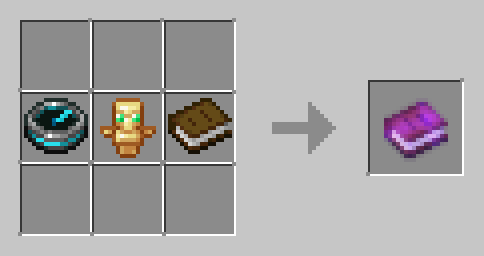
Shapeless recipe:
* Recovery Compass
* Totem of Undying
* Book
Result:
* 1 Keep On Death item (`keepon:death`)
## How to Install
1. Close Minecraft Bedrock if it is open.
2. Import the addon into Minecraft.
3. Make sure the behavior pack is enabled on your world.
4. The addon includes a resource pack, it should activate with the behavior pack. if not enable that as well.
5. Enter the world and confirm the pack is active.
6. Craft the Keep On Death item using the recipe above, or obtain it however your world provides it.
## How to Use
1. Get the `keepon:death` item.
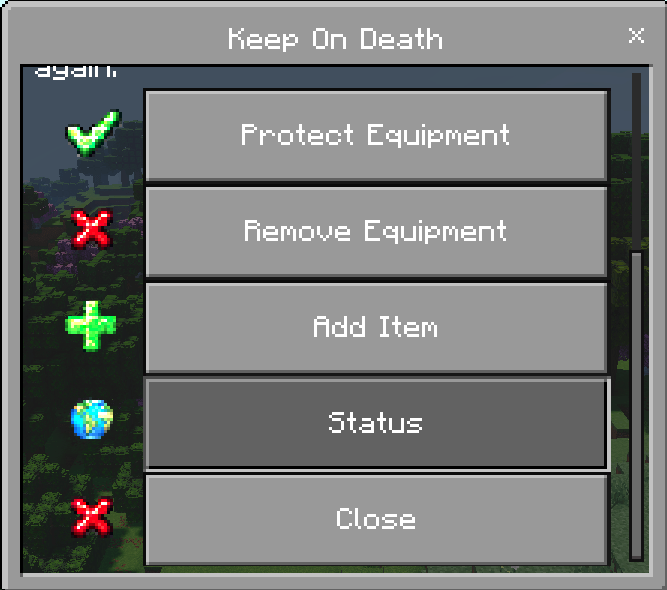
2. Use the item to open the Keep On Death menu.
3. Choose one of the menu options:
* Protect Equipment: protects supported armor, tools, and weapons
* Remove Equipment: removes protection from supported equipment
* Add Item: lets you choose specific items from your current inventory
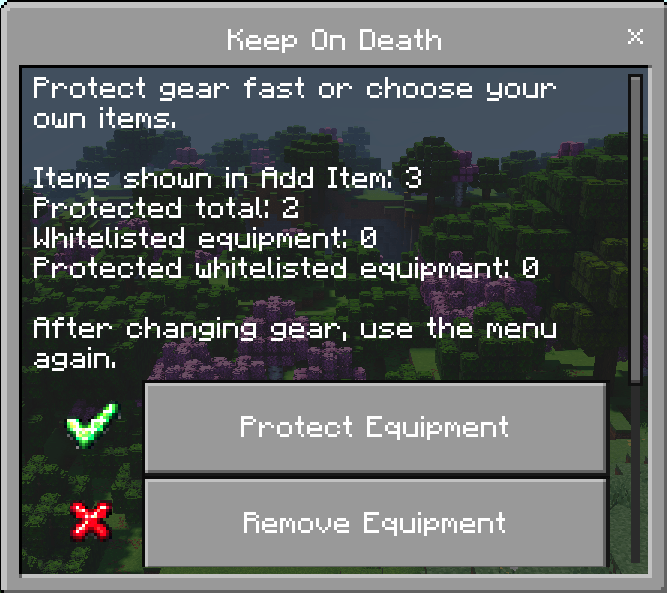
* Status: shows your current protected item counts
4. After changing gear or collecting new important items, open the menu again and update your protection choices.
## Important Notes
* Only protected items will stay with the player after death.
* Items not protected will drop normally.
* The addon is manual, so players need to update protection after changing their inventory.
* The Add Item menu only shows items the player currently has.
## Version 1.0.0
Initial release.
Includes:
* Keep On Death menu item
* Equipment protection option
* Item selection menu
* Status display
* Multiplayer-friendly per-player item protection
* Achievement-friendly design without cheats or gamerule changes
The Keep On Death Team