Builder's Wand | Fast Building Tool
- By
Build lines, matching grids, and connected surfaces faster in Minecraft Bedrock. Pick a material from your inventory or copy any block, preview the result, and undo your last placement.

Screen-1.png

Screen-2.jpg
Description
About
Builder's Wand is a survival-friendly building tool that builds lines, columns, grids, walls, connected surfaces, and simple ready-made structures. Choose a material from your inventory, click any suitable surface, and build without placing every block by hand.
Features
- Selectable building material — choose a supported block from your inventory or copy a block directly from the world.
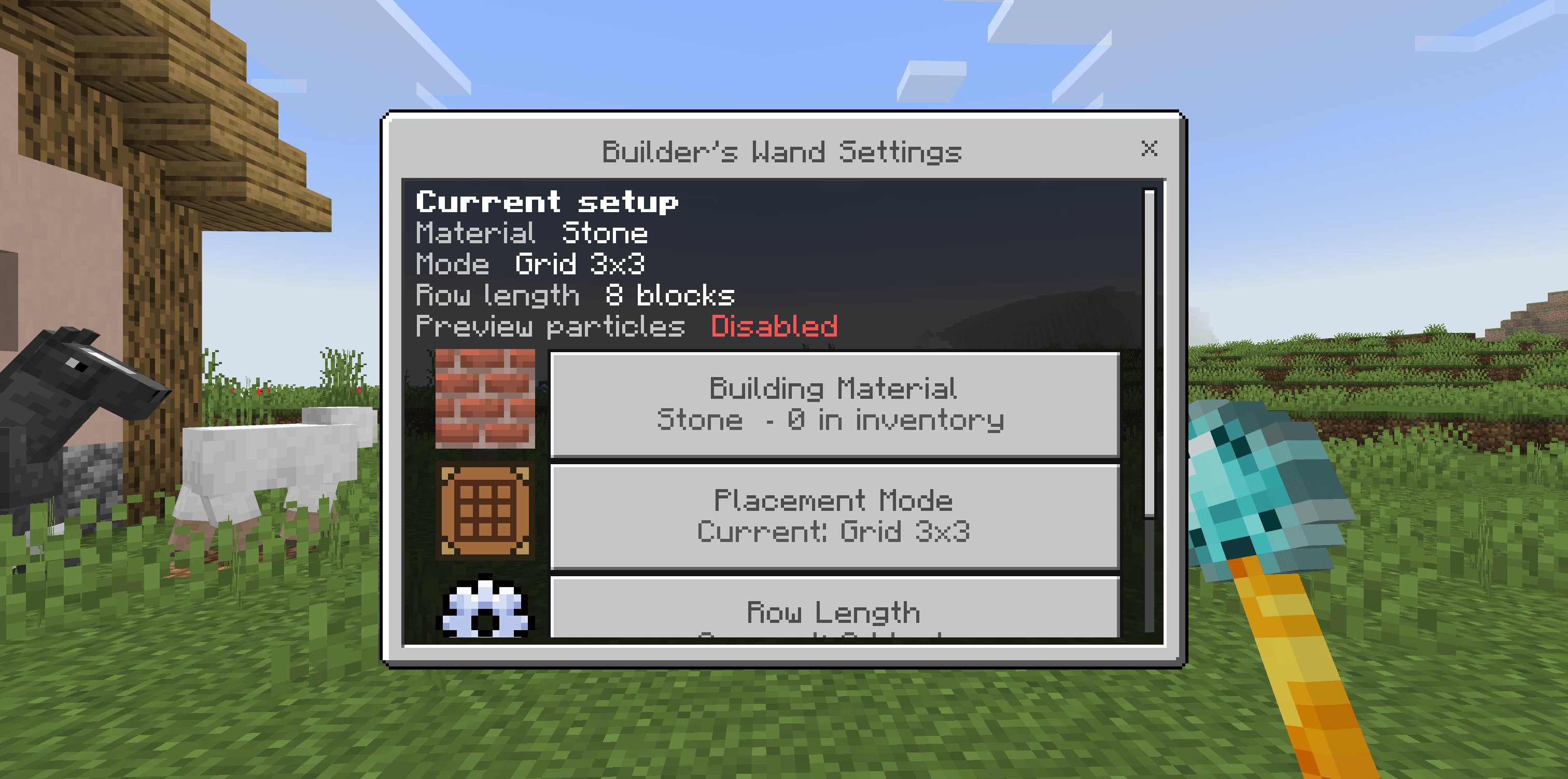
- Five placement modes — Row, Column, adjustable Grid, Wall with separate height and width, and Plane Projection.
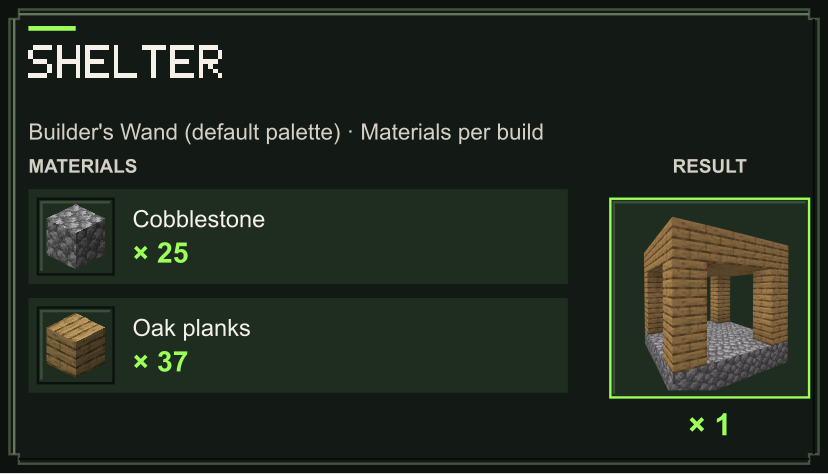
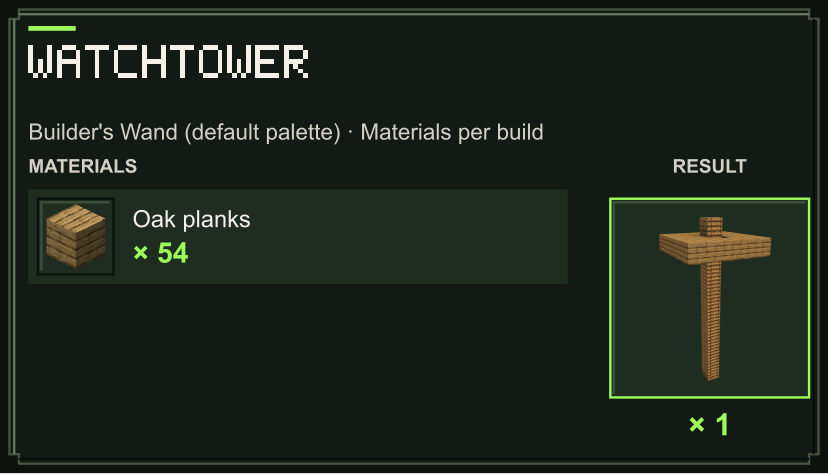
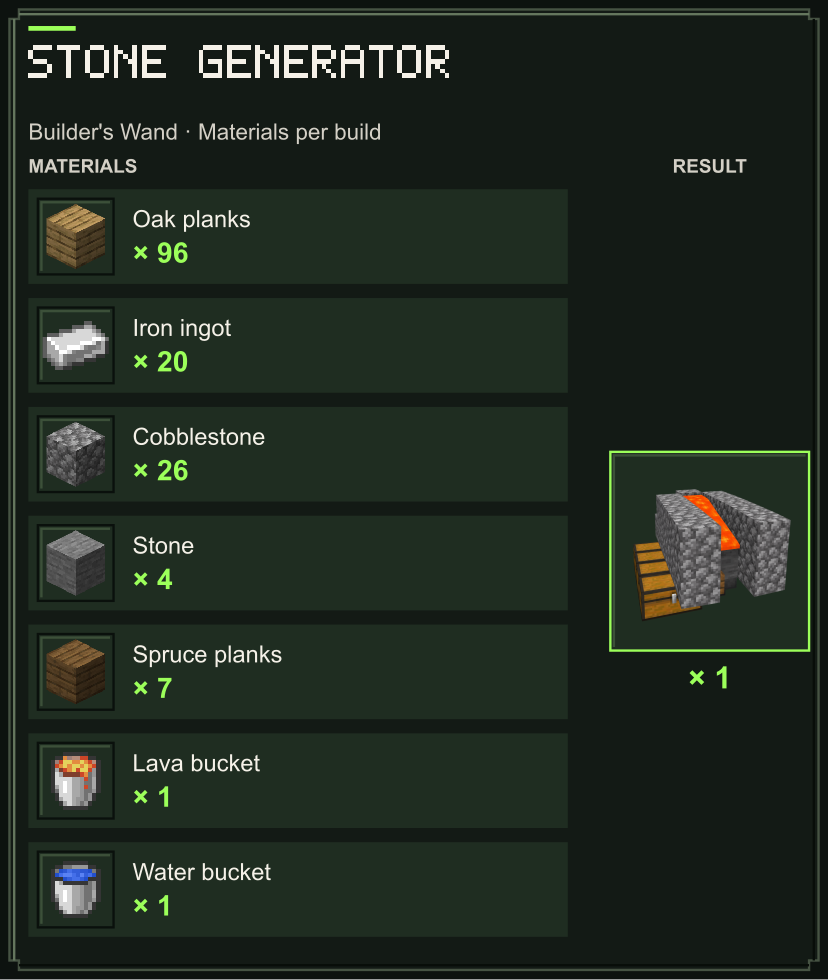
- Building blueprints — a furnished medium house, a small house, an open shelter, a cheap exploration watchtower, a Stone Generator, and an Enchanting Area. Real build previews and material lists help you prepare.
- Visual material picker — block icons and the current selection in the main menu make materials easier to recognize.
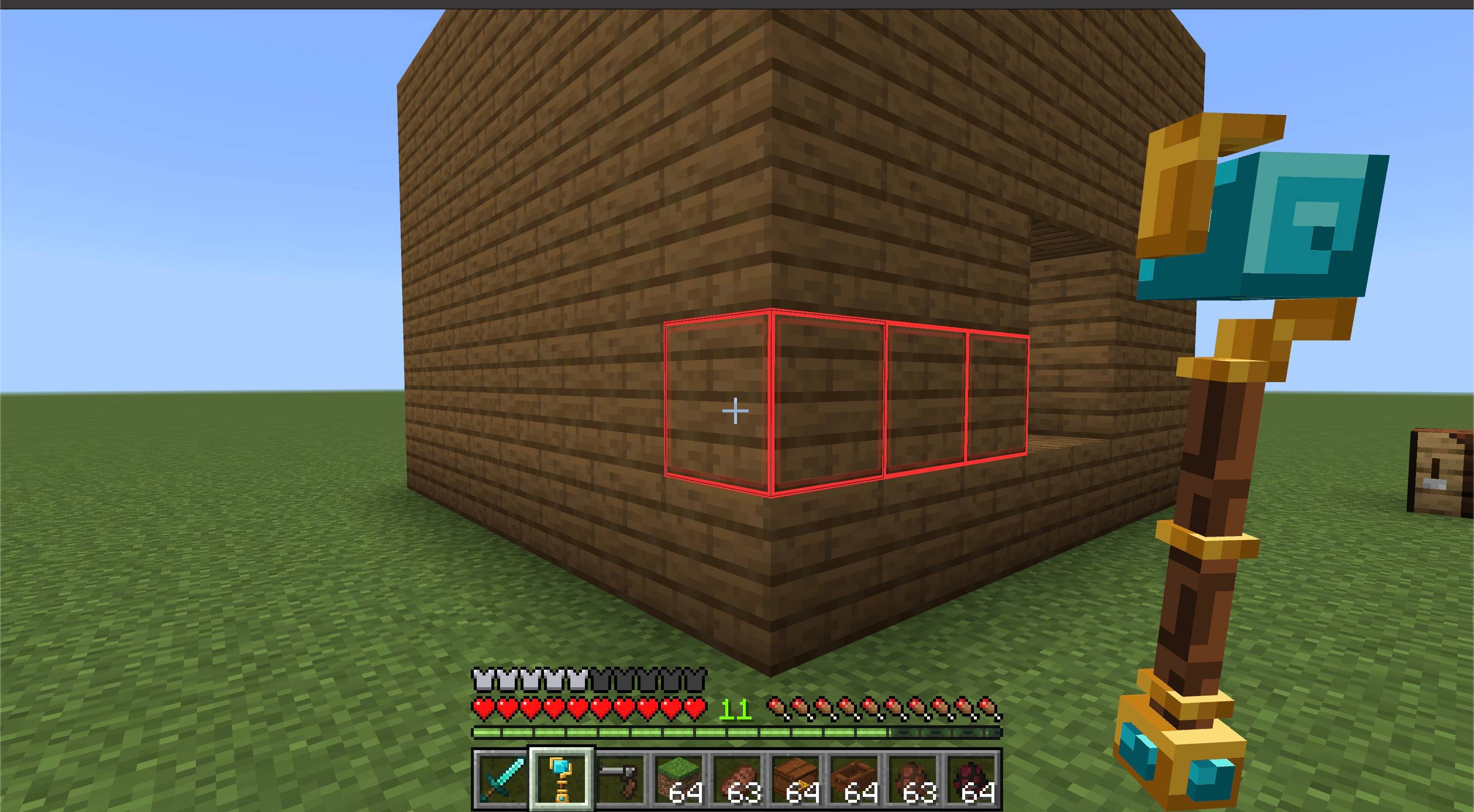
- Live block outlines — cyan for building, red for removal, with a bounding outline for blueprints.
- Survival-friendly resource use — blueprints consume base blocks and crafting ingredients; the Stone Generator returns empty fluid buckets; Creative mode does not consume materials.
- Safe placement — existing solid blocks, liquids, plants, and other occupied positions are not overwritten.
- Five-step undo history — undo building or removal from the settings menu, or sneak + jump while holding the wand. Only unchanged blocks are reverted; Survival refunds and restoration use real materials.
- Per-player settings — mode, each mode’s size, material, and preview preference are saved independently.
- Multiplayer friendly — each player has their own configuration and undo history.
How to use
- Import the
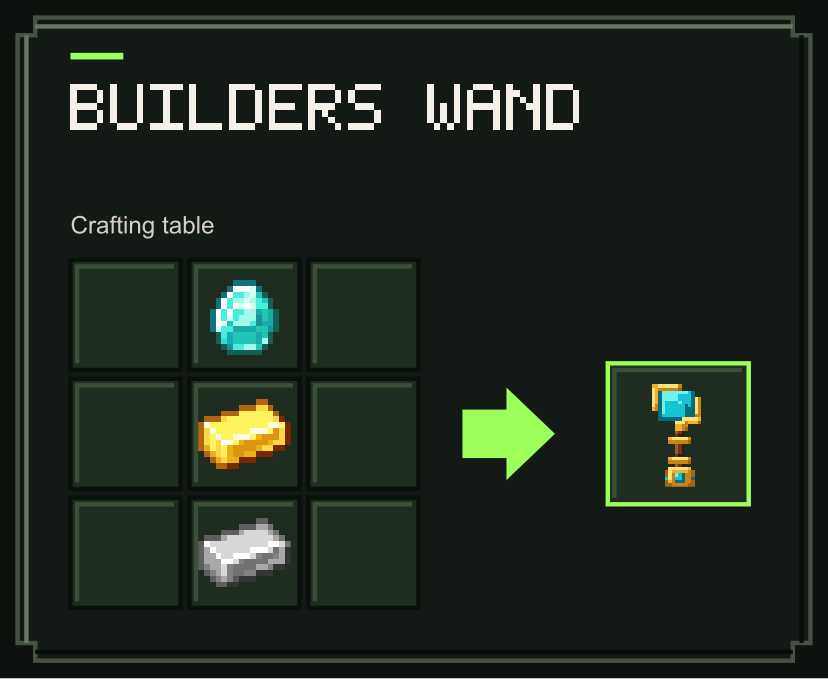
.mcaddonand activate both the Behavior Pack and Resource Pack in your world. - Craft the Builder's Wand at a crafting table.
- Put the blocks you want to use in your inventory.
- Hold the wand and sneak + use to open its settings.
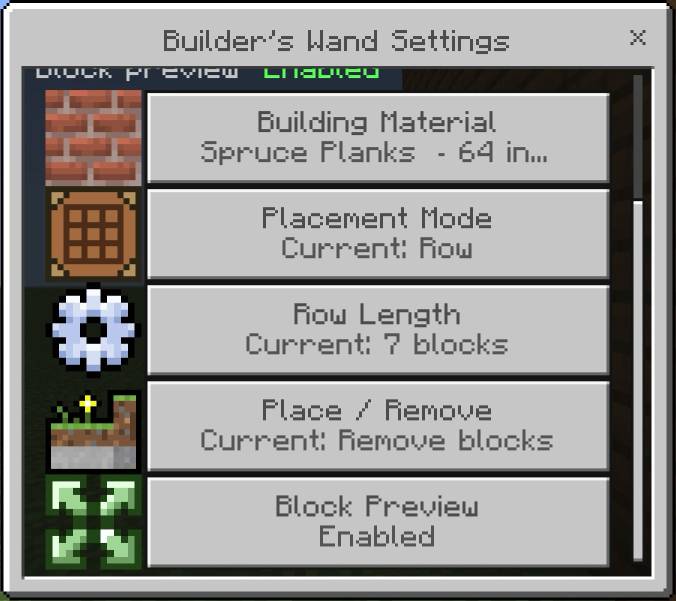
- Open Building Material and choose a supported block from your inventory. Select Auto: Clicked Block to use the material of the block clicked on each use. Choosing an inventory material keeps that selection fixed.
- Choose a placement mode and size. Wall has separate height and width sliders. Use the action setting to switch between placing and removing blocks.
- Stop sneaking and use the wand on a block face. The clicked face controls where the new blocks are placed; the selected material controls which block is placed.
Quick material picker
While holding the wand, sneak + attack a block to select that exact block as the building material without opening the menu. The sampled block is not broken.
Placement modes
- Row — places a straight row, up to the configured length, and stops at the first blocked position. On the top or bottom of a block, the row follows your horizontal view direction.
- Column — builds a vertical column upward.
- Grid — checks an adjustable square from 2×2 to 16×16 and adds a layer over suitable source blocks.
- Wall — builds a rectangle upward and right from its bottom-left corner, with separate height and width from 2 to 16 blocks. It does not need a backing wall.
- Plane Projection — follows a connected solid surface and adds one layer in front of it, up to the configured block limit. Diagonal-only connections are ignored.
Building blueprints
Open Blueprints and choose Medium House, Small House, Shelter, Watchtower, Stone Generator, or Enchanting Area. Check the required materials and choose the available material palette, then press Use Blueprint.
Aim at the top of a block: the space above it is the near-left corner of the build. Turn your camera to rotate the outline in 90° steps, use the wand, and confirm Build. The full area must be empty and Survival requires all listed materials before starting. After a successful build, your previous ordinary wand settings return automatically.
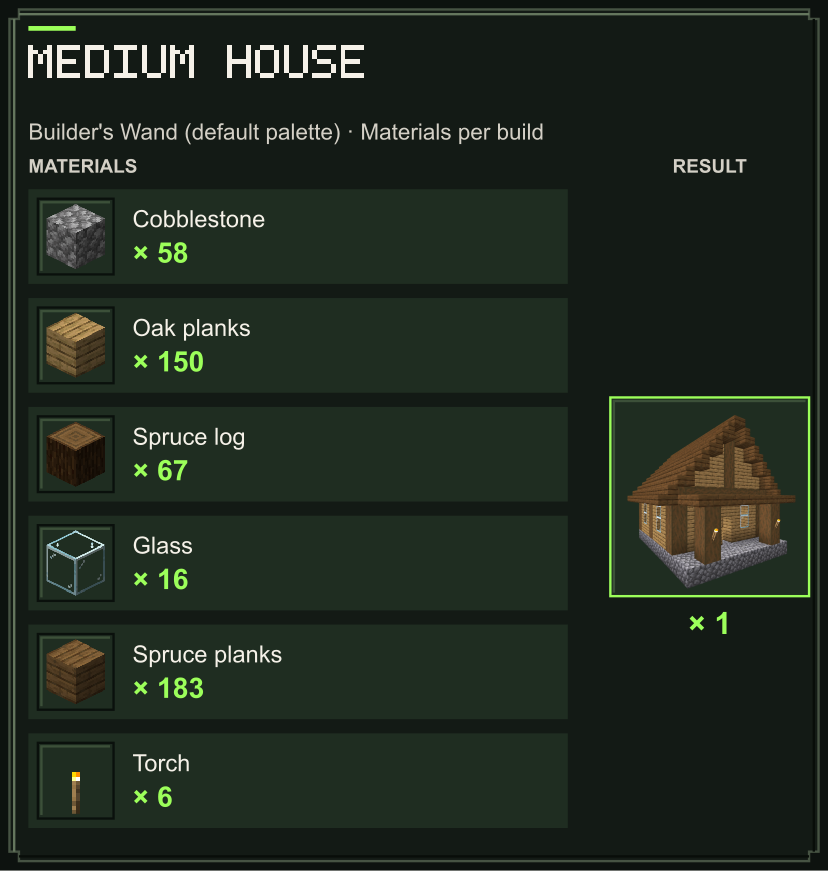
The Medium House includes four torches on the interior walls and two on the porch columns. Lighting requires six ready-made torches, which are returned on undo. The default Medium House has oak walls, spruce framing, a pitched roof and a porch. Inside are a crafting table, furnace and double chest. Furniture costs 20 oak planks and 8 cobblestone, already included in its material bill; undo returns these ingredients. All blueprints use the same base-material rule: no pre-crafted stairs, slabs, ladders, shelves, tables, chests or hoppers are needed. Filled containers are preserved. Choose masonry, wall/floor timber, frame/roof timber and windows independently in Material Palette. Matching logs, stairs and slabs follow the timber selections; furniture plank costs follow the wall/floor timber.
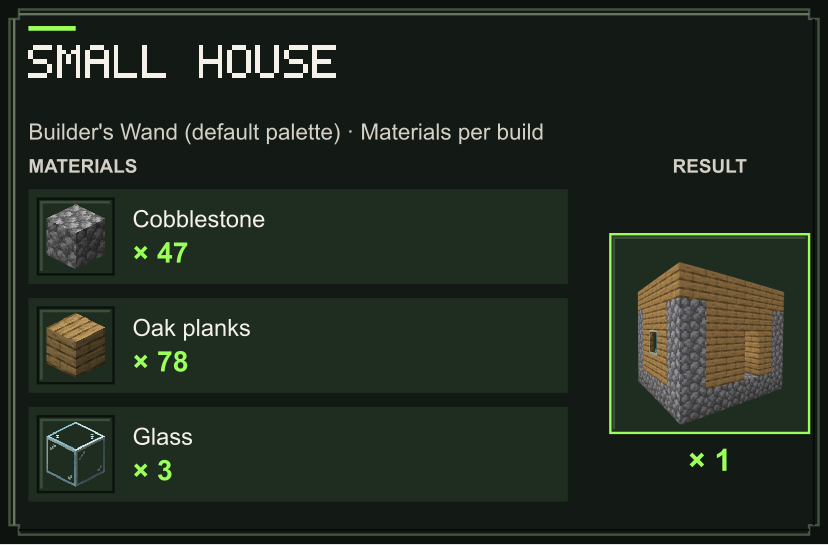
The small house and shelter are simple shells to furnish yourself. The exploration watchtower has an open lookout platform and ladder, built from 54 oak planks with the default palette, with no railing.
The Stone Generator has four stone mining positions with hoppers and chest storage. Mine the stone manually. It uses fixed materials, including one water bucket and one lava bucket, and returns two empty buckets. Undo refunds unchanged building blocks, preserves containers holding items, and does not refund fluids. It cannot be built in the Nether.
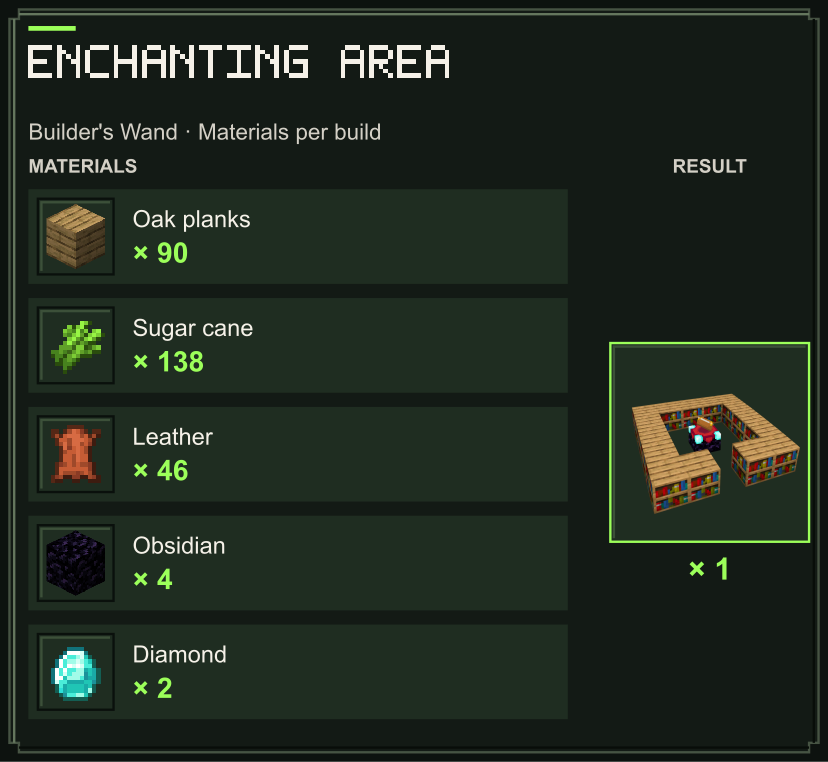
The Enchanting Area places one enchanting table and 15 bookshelves on an existing 5×5 floor, with two blocks of clear space above the floor. It leaves an entrance at the front and an air gap around the table. Keep that gap empty so the bookshelves can power the table. It uses fixed materials and adds no floor or roof.
Preview and undo
- Toggle the preview option in the settings to show or hide planned placement positions.
- After building, open the settings and choose the undo action, or use sneak + jump. Up to five steps are remembered during your session. Undo removes unchanged placed blocks and refunds paid materials. Ingredients shared across crafted blocks are refunded after all their related blocks have been undone; restoring a removal uses the needed blocks from your inventory.
Crafting
Recipes and blueprints use the ingredients and quantities shown below. Blueprint costs include full crafting batches. Planks, ordinary logs, glass and stone are base materials; crafted and stripped variants are supplied automatically.
Builders Wand
Blueprint materials
Each card shows materials for one complete build using the default palette: cobblestone, oak planks, and glass where needed. You can choose other supported palette materials in the wand menu; the ingredient bill follows your selection. The Stone Generator uses fixed materials and returns two empty buckets.
The Enchanting Area builds one enchanting table and 15 bookshelves from oak planks, sugar cane, leather, obsidian and diamonds.
Notes
- The wand needs a block face as an anchor; it does not place a floating block at an arbitrary point in empty air.
- Doors, beds, containers, signs, and other multi-block or data-carrying blocks cannot be selected because copying them would be unsafe.
- If you run out of the selected material, the wand places as many blocks as are available and then stops.
- No experiments, commands, or additional add-ons are required.
Requirements
- Minecraft Bedrock Edition 1.26.50 or newer
- Behavior Pack and Resource Pack must both be active
- No external dependency required

Builder's Wand | Fast Building Tool Team

Owner