Andy's Portable Campsite
- By
Deploy a reusable, color-matched expedition campsite with a functional bed, persistent owner-linked chest, three lanterns, and campfire—then pack it back into one portable kit. Vibrant Visuals compatible for Bedrock 26.30+..
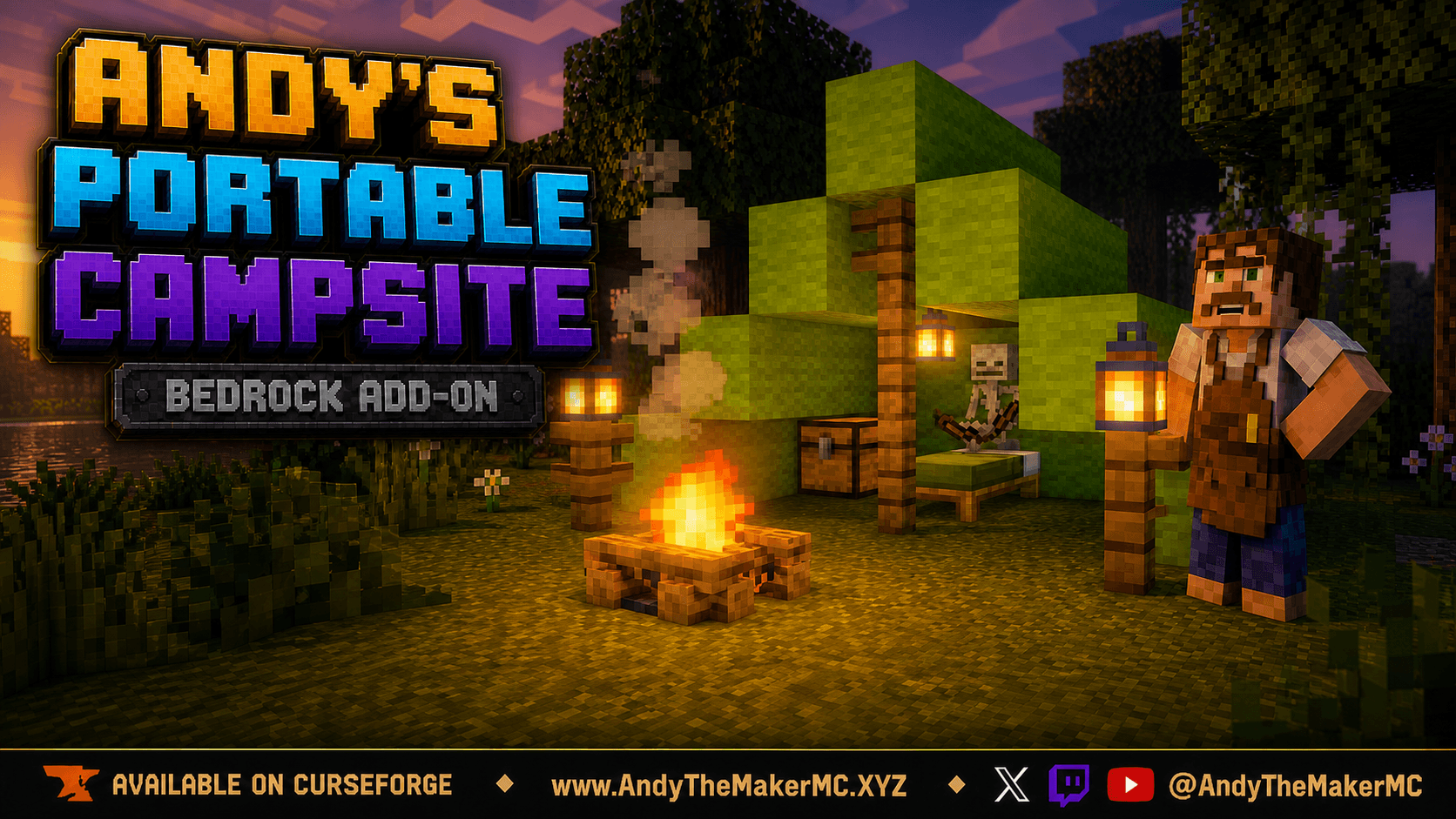
Andys-Portable-Campsite-Hero-16x9.png
Description
Andy's Portable Campsite
Bring a complete base camp anywhere without carrying a pile of loose building blocks. Andy's Portable Campsite turns one reusable kit into a tall, intact expedition tent with a functional vanilla bed, persistent chest, three lanterns, and a campfire. When the trip continues, interact with the campfire and pack the entire campsite back into the kit.
This is the standalone edition of the deployable campsite developed for Andy's Explorers Backpack. The backpack version remains available and unchanged; this release is for players who want the campsite as its own focused add-on. The camp uses native Minecraft blocks and lighting, so it fits naturally into survival worlds and works with Vibrant Visuals.
Already Using Andy's Explorer's Backpack?
Then this add-on is redundant. The portable campsite is already built into Andy's Explorer's Backpack, and both editions deploy the same camp. Install this standalone edition only if you are not using the backpack.
Installation
- Download the
.mcaddonrelease file. - Open it with Minecraft for Windows.
- Edit the target world and activate Andy's Portable Campsite. Its paired behavior and resource packs are linked as dependencies.
- Optional: if Andy's Comforting Campfires is installed, also activate Andy's Portable Campsite - Comforting Campfires Bridge to unlock the hearth crafting recipes. Leave it off otherwise.
- Use Minecraft Bedrock 26.40 or newer.
- Enter the world and craft the kit at a normal Crafting Table.
Crafting the Reusable Campsite Kit
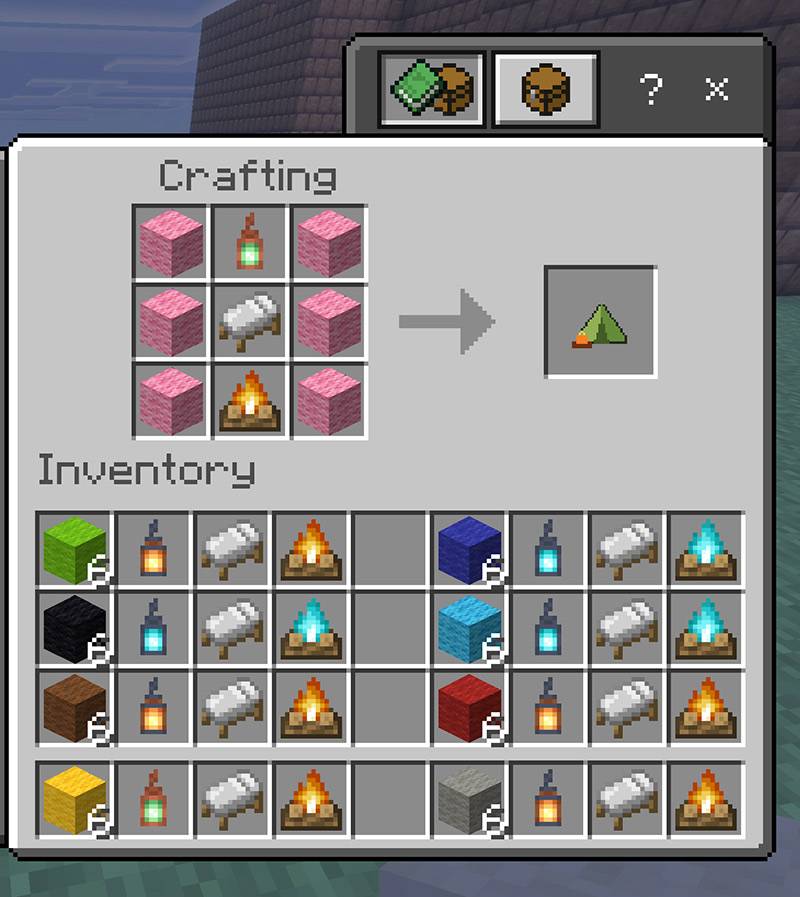
Beds spawn in the same color as the wool used to craft the campsite.
Craft the kit in a normal Crafting Table with this exact pattern:
| Wool | Lantern | Wool |
|---|---|---|
| Wool | Bed | Wool |
| Wool | Campfire | Wool |
All six wool blocks must be the same color. The recipe consumes six wool blocks, one lantern, one bed, and one campfire. No special workstation, command, or menu is used.
The kit remembers the materials used:
- The wool color becomes the tent canvas.
- The selected bed supplies the camp's functional sleeping area.
- A normal Lantern creates warm lantern lighting.
- A Soul Lantern creates soul-flame lighting.
- Any copper lantern creates copper lighting, at the oxidation stage you paid: Copper, Exposed, Weathered, or Oxidized, waxed or unwaxed. Unwaxed copper keeps weathering while the camp stands, and packing up remembers the stage each lantern reached.
- A regular Campfire creates a regular campfire.
- A Soul Campfire creates a soul campfire.
Deploying the Camp
Clear and flatten an 7x8 space free of trees, grass, or other obstructions, and fill in any holes. Move the Reusable Campsite Kit into your hotbar, Stand in the center block (4th block on 7 wide side) edge, and face to the cleared area. Look at the ground 3 blocks ahead and interact click there. The Campsite will deploy.
The deployed campsite contains:
- A tall stepped wool tent with an open front.
- A functional native Minecraft bed for sleeping and spawn-setting behavior.
- A native chest for ordinary inventory interaction.
- Two lantern posts outside the entrance.
- One hanging lantern inside the rear of the tent.
- A center entrance support.
- A campfire positioned two blocks in front of the center support.
Beds maintain vanilla behavior and normal bed rules, including night, nearby monsters, dimension restrictions, spawn setting, and multiplayer sleep behavior.
Persistent Owner-Linked Chest
The campsite chest is linked to the player who crafted the kit. Its contents are archived while the camp is deployed and immediately before pack-up. They return inside the chest the next time that owner deploys the campsite.
If the packed kit is lost, burned, dropped into the void, or otherwise destroyed, craft a replacement kit. The replacement reconnects to the same player-owned chest archive instead of starting over. Recrafting does not duplicate an actively deployed campsite; each player may have only one active camp.
Other players cannot pack up your campsite or use its protected owner chest. This makes the kit suitable for multiplayer exploration while retaining normal native storage behavior for its owner.
Packing Up
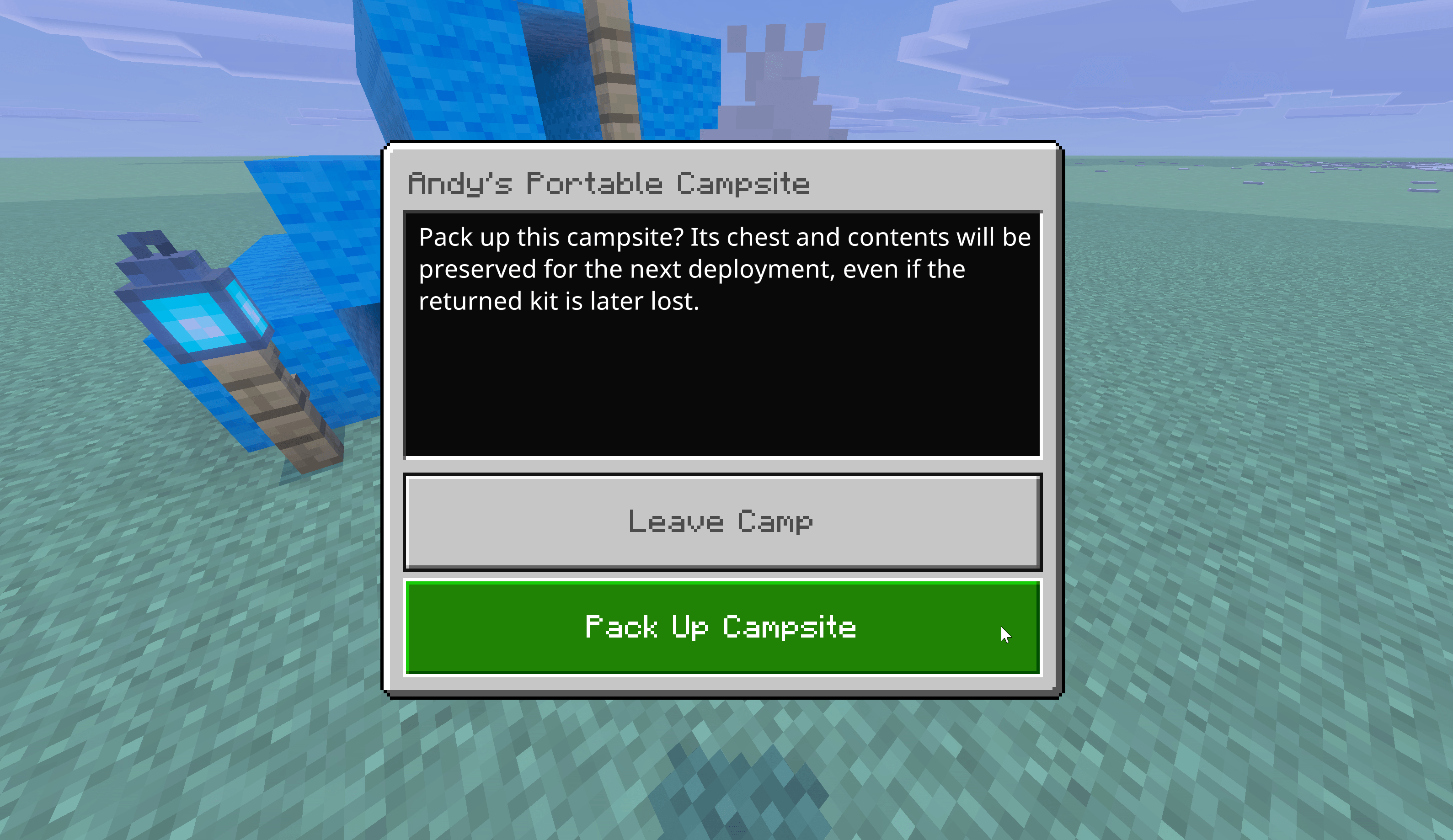
Interact with the campsite's campfire to open the pack-up prompt, then choose Pack Up Campsite. The add-on secures the chest first, removes the temporary camp, and returns the reusable kit to your inventory. If the inventory is full, the kit safely drops at your feet.
The campsite's temporary blocks cannot be harvested for free wool, lanterns, beds, fences, chests, or campfires. Use the campfire control whenever you are ready to move.
Vibrant Visuals
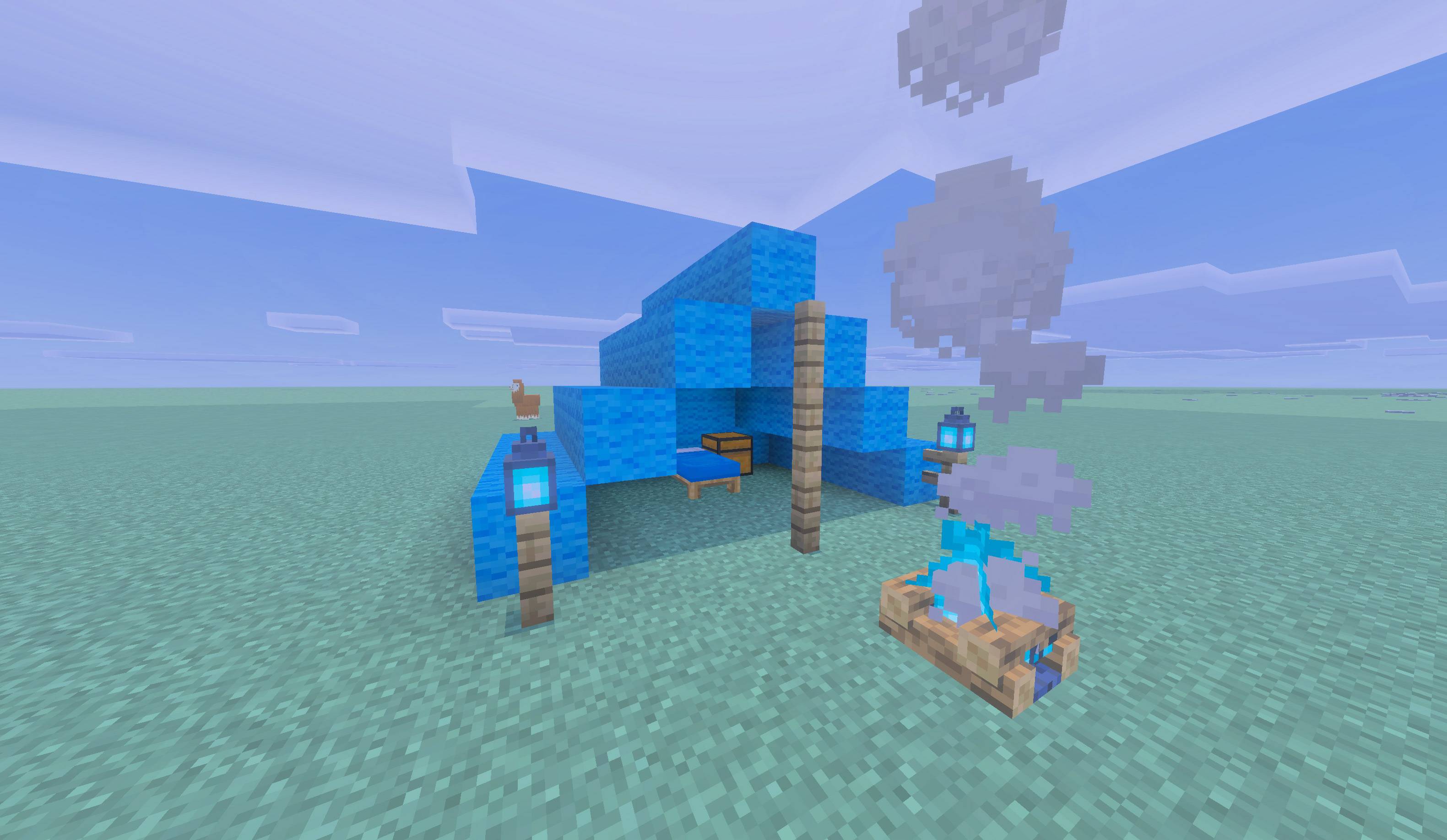
The campsite is Vibrant Visuals compatible. It uses Minecraft's native wool, bed, chest, fence, lantern, and campfire blocks, with no replacement shader or global lighting system. Lantern and fire appearance therefore follows the active Minecraft renderer and compatible resource packs.
Compatibility
- Minecraft Bedrock 26.40 or newer.
- Standard graphics and Vibrant Visuals.
- Single-player, multiplayer, Realms, and supported Bedrock servers.
- Overworld, Nether, and End.
- No experimental gameplay toggles, no Cheats, and no commands are required.
- No required dependencies. The behavior and resource packs are linked to each other and need nothing else.
Andy's Comforting Campfires is the one optional companion. Install it with the included Comforting Campfires Bridge pack activated and you can craft hearth camps; without it, the kit still deploys and packs up normally with a vanilla Campfire or Soul Campfire. Community Comfort campfires are not supported through this interface.
Andy's Explorer's Backpack already contains this campsite, so the two are alternatives rather than companions. Run one or the other. If both are installed in the same world, each edition manages only the camps it deployed and keeps its own separate chest storage.
Good to know before you deploy:
- Only one campsite may be actively deployed per player.
- Kits are owner-stamped, so you cannot deploy or pack up another player's camp, or open their camp chest.
- Temporary camp blocks cannot be harvested for free wool, beds, lanterns, fences, chests, or campfires.
- The tent snaps to 90-degree facing. Face the way you want the entrance before using the kit.
- Give the tent room. There is no flat-area scan, so a cramped spot can fail and roll back safely.
- If a camp block is replaced with a different block, pack-up is refused until the tent is restored.
/clone, structure blocks, pistons, and explosions can desync a deployed camp.
Updates
1.5.0 - Every lantern crafts the kit, and copper keeps its patina
- The recipe now accepts all ten vanilla lanterns: Lantern, Soul Lantern, and every copper stage - Copper, Exposed, Weathered, and Oxidized - plus the waxed form of each. Previously only Lantern, Soul Lantern, and pristine unwaxed Copper Lantern worked, and you had to scrape wax and oxidation off with an axe first. That is no longer necessary.
- Your camp is pitched with the exact lantern you paid. Craft with a Waxed Weathered Copper Lantern and the tent is lit by waxed weathered copper lanterns.
- Copper weathering is now remembered across pack-up. A camp's three lanterns age independently while it stands, and packing up records the stage each one reached, so a camp that has weathered into the landscape keeps its patina instead of resetting to fresh copper every time you move. Waxed lanterns do not weather, which is the point of waxing them.
- Fixed: camps built with a Copper Lantern could become impossible to pack up. Unwaxed copper weathers on its own, so a camp lantern could quietly turn exposed, weathered, or oxidized hours after the camp was pitched. Pack-up compared it against the block it had originally placed, saw something different, and refused permanently with a message about restoring obstructed blocks. Because camp blocks cannot be broken, there was no obvious way out. Camps that are already stuck this way pack up normally after updating. Camps using a plain Lantern or Soul Lantern were never affected.
- If a camp really is obstructed, the refusal message now names the exact coordinates of the blocking cell, what the camp expected there, and what it found instead, so you can go straight to it.
- Nothing needs to be reconfigured or rebuilt. Existing kits, deployed camps, chest archives, ownership, tent colors, and hearth choices are all unchanged.
1.4.2 - Chest duplication fixed and Comforting Campfires bridge pack
This release follows 1.4.0 directly. Version 1.4.1 was an internal test build and was never published here.
- Fixed a code regression that made the campsite chest give back its contents twice. The chest was correctly archived and restored on the next deployment, but packing up also dropped a second copy of everything on the ground.
- Packing up a stocked camp now leaves nothing on the ground, and every item is waiting in the chest when the camp is deployed again.
- Pack-up refuses instead of proceeding if the chest cannot be emptied safely, so the camp is left standing rather than risking your cargo. This also covers the case where you have set your own chest against the campsite chest.
- Comforting Campfires hearth recipes moved into a third pack inside the same download, Andy's Portable Campsite - Comforting Campfires Bridge. If you use Comforting Campfires, activate that pack in your world alongside the behavior and resource packs and the hearth recipes become available. If you do not use Comforting Campfires, leave it switched off; Minecraft will not activate it without Comforting Campfires installed.
- Worlds without Andy's Comforting Campfires no longer report hearth recipe errors in the content log when they load.
- Nothing needs to be reconfigured or rebuilt. Existing kits, deployed camps, chest archives, ownership, tent colors, lantern and campfire choices, and the vanilla Campfire and Soul Campfire recipes are all unchanged.
1.4.0 - Comforting Campfires compatibility
Your reusable camp kit now works with Andy's Comforting Campfires. Build it with a Comforting Campfire, Comforting Soul Campfire, Hearthfire Campfire, or Hearthfire Soul Campfire, and the hearth your camp deploys keeps its Comfort healing, runes, and crouch + interact status menu for as long as the camp stays up, pack it up and deploy again, and the connection comes right back automatically.
Comforting Campfires is entirely optional. Without it installed, the exact same kit still deploys and packs up normally with an ordinary vanilla Campfire or Soul Campfire. Community Comfort campfires aren't supported through this interface.
Note: Beds spawn in the same color as the wool used to craft the campsite. As of 1.5.0 every vanilla lantern crafts the kit, including all four copper oxidation stages and their waxed forms; you no longer need an axe to scrape a copper lantern back before it will craft.
Troubleshooting
The recipe does not appear: Confirm both packs imported successfully, the behavior pack is active, and the world is running Bedrock 26.40 or newer. Arrange the ingredients in the exact pattern shown above and use six matching wool blocks. Every vanilla lantern is accepted from 1.5.0 onward, oxidized and waxed copper included.
The kit will not deploy: Pack up your existing active campsite first. Then select the kit in your hotbar and use it on the ground with enough open space for the tent.
The kit did not enter my inventory after pack-up: Check the ground at your feet. A full inventory causes the returned kit to drop safely instead.
The chest is empty after making a replacement: Make sure the replacement was crafted and deployed by the same Minecraft player identity that owned the original campsite.
The tent faces the wrong direction: Face the direction you want the entrance aligned before using the kit.
Enjoying Andy's Portable Campsites?
Follow the project on CurseForge to receive update notifications, leave a comment with your feedback, and share screenshots or videos of the landmarks, expeditions, libraries, and long-running worlds you document.
If the add-on helps your world, please consider rating or favoriting the project. Those small actions help other Minecraft Bedrock players discover Andy's Addons.
Follow and Support Andy
Visit AndyTheMakerMC.xyz for Andy's add-ons, world lore, tutorials, guides, videos, and other Minecraft content.
Follow @AndyTheMakerMC on:
Support future projects through Ko-fi or a direct Stripe contribution.
End-User Usage Rights
Players may use an official, unmodified release of Andy's Portable Campsite in their personal Minecraft worlds, multiplayer worlds, Realms, and servers. Normal automatic delivery of the official, unmodified add-on to players joining an authorized world, Realm, or server is permitted.
This permission does not allow the add-on file or any project content to be offered as a separate download, redistributed, rehosted, mirrored, modified, reverse engineered, extracted, or reused.
Content Creator Usage Rights
Content creators may use an official, unmodified release of Andy's Portable Campsite in their Minecraft worlds, multiplayer worlds, Realms, servers, videos, livestreams, screenshots, tutorials, reviews, showcases, articles, guides, social posts, and other original gameplay content, including monetized content.
Credit to AndyTheMakerMC and a link to the official CurseForge project page are appreciated whenever practical.
This permission allows normal Minecraft delivery of the official, unmodified add-on to players joining an authorized world, Realm, or server. It does not grant permission to offer the add-on file as a separate download or to redistribute, rehost, mirror, modify, translate, adapt, extract, decompile, disassemble, reverse engineer, or reuse any project content.
All Rights Reserved License
All Rights Reserved. Copyright © 2026 Andy / AndyTheMakerMC.
You may not redistribute, reupload, rehost, mirror, resell, sublicense, bundle, repackage, modify and publish, translate, adapt, decompile, disassemble, reverse engineer, extract, or reuse the add-on, its source code, documentation, branding, textures, models, or artwork. You may not create derivative works or incorporate any portion into another add-on, pack, application, website, download, or project without prior written permission from the copyright holder.
The End-User Usage Rights and Content Creator Usage Rights above provide limited permission to use and display normal gameplay with an official, unmodified release. They do not transfer ownership or grant permission to distribute, modify, reverse engineer, or rehost the project files.
The promotional artwork is original AI-assisted concept artwork directed for this project. It is not an in-game screenshot.
Minecraft is a trademark of Microsoft Corporation. This project is not affiliated with, endorsed by, sponsored by, or associated with Microsoft or Mojang Studios.
The Andy's Portable Campsite Team