Andy's Advanced Hammers, Excavators & More!
- By
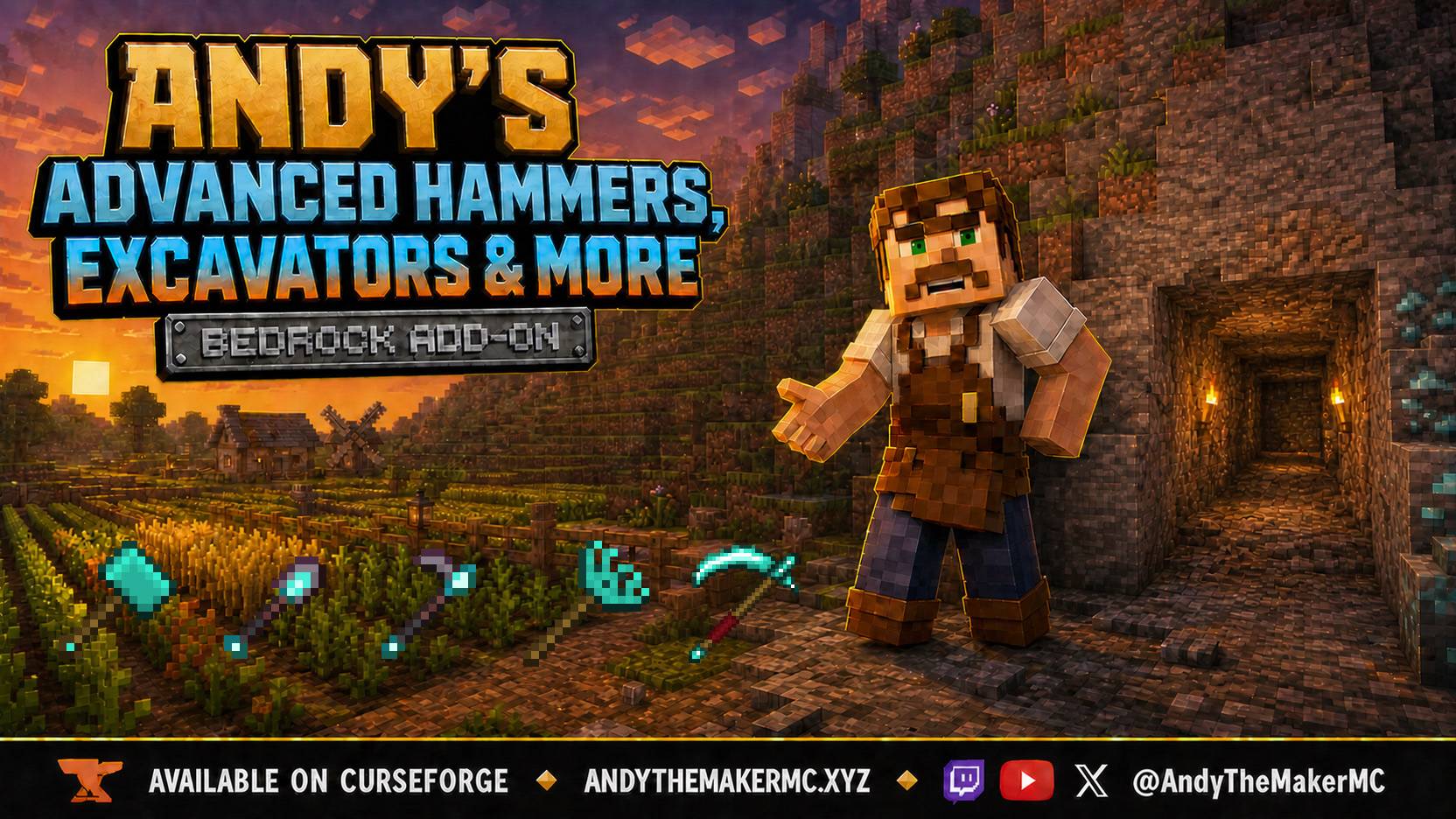
Add Hammers, Excavators, Tillers, Scythes & Seeder Rakes to Minecraft Bedrock! Mine and dig areas, preview selections, create 9x9 farm layouts, harvest crops without replanting & plant 4x4 areas. Supports vanilla loot, enchanting & durability.
operator-overrides.png
recipe-excavator.png
recipe-hammer.png
recipe-scythe.png
Description
Andy's Advanced Hammers, Excavators & More
Five tool families. Seven tiers. Every swing shows you exactly what it will take.
Andy's Advanced Hammers, Excavators & More adds Hammers, Excavators, Tillers, Scythes, and Seeder Rakes to Minecraft Bedrock — a complete set of area tools for the four jobs vanilla makes you do one block at a time. Hammers and Excavators clear a shape you configure yourself. Tillers lay out a whole 9×9 farm, including researched plot layouts for pumpkins, melons, and sugar cane. Scythes sweep vegetation and harvest ripe crops without wrecking the field underneath. Seeder Rakes plant a 4×4 plot straight from your inventory.
Nothing happens by surprise. Hold any of the five tools and a wireframe outline shows the exact blocks that swing will affect, before you commit to it.
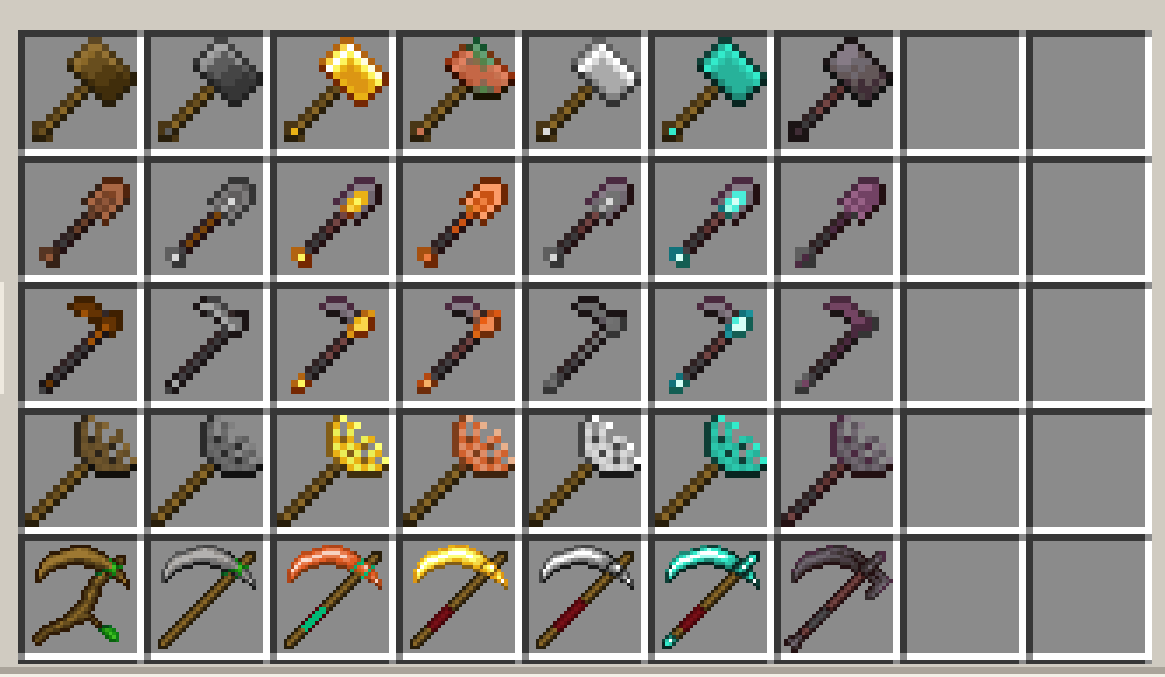
All five tool families across the seven supported tiers — thirty-five tools, from Wooden through Netherite.
Vanilla-friendly by design
- Vanilla loot simulation, so Fortune, Silk Touch, and every block's own loot table behave exactly as they do with a normal tool
- Familiar Crafting Table progression using vanilla materials on original tool shapes
- Standard enchanting through vanilla enchanting-table slots
- Per-block durability with normal Unbreaking behavior, so area tools cost what they should
- Vanilla item-entity lifetime for drops — no proximity collection, scripted deletion, or custom despawn timing
- Containers, technical blocks, portals, and unbreakable blocks are never touched
- No cheats, commands, Beta APIs, experimental gameplay toggles, or required add-on dependencies
- ✅ Achievement compatible — verified in a cheats-off survival world with no experiments
- Standard graphics and Vibrant Visuals/PBR support
- Single-player, multiplayer, Realms, and compatible Bedrock servers
Requirements
- Minecraft Bedrock Edition 1.26.30 or newer
- Both included Andy's Advanced Hammers, Excavators & More packs active on the world
- No experimental toggles and no cheats
- Achievements keep working: both packs declare themselves as add-on content, and nothing here needs cheats or experiments
The add-on uses stable Script APIs supplied by Minecraft. Players do not need to enable cheats or experimental features.
Installation
Windows and supported desktop devices
- Download the current
Andys_Advanced_Hammers_Excavators_And_More_0.1.28.mcaddonfrom the official project page. - Open the
.mcaddonwith Minecraft Bedrock. - Wait for both Andy's Advanced Hammers, Excavators & More [BP] and Andy's Advanced Hammers, Excavators & More [RP] to import successfully.
- Create a world or edit the intended existing world.
- Open Behavior Packs → My Packs, select Andy's Advanced Hammers, Excavators & More [BP], and choose Activate.
- Confirm Andy's Advanced Hammers, Excavators & More [RP] is active under Resource Packs. The packs are mutually linked, but both should still be verified.
- Enter the world and craft your first tool at a Crafting Table.
Android and iOS
Download the .mcaddon, open or share it to Minecraft, allow both packs to import, then activate both linked packs on the intended world. The exact file-sharing steps vary by device and operating-system version.
Consoles through a Realm
Consoles generally do not offer the same local .mcaddon import workflow. Import and activate the add-on on a supported Windows or mobile device, upload that prepared world to a Realm, and join the Realm from the console. Minecraft will deliver the required world packs through its normal Realm process.
Servers and Realms
Install and activate both packs on the world before uploading or starting it. Joining players must accept the Resource Pack so the tool sprites and outline previews appear correctly. Dedicated servers can control which tool families are available from the console — see Server and world settings below.
Updating
- Back up the world.
- Import the newer
.mcaddonand wait for both pack updates to complete. - Confirm the world is using the updated packs.
Your saved shape, crop, and Tiller settings are stored per player and survive updates.
Quick start
- Craft an Iron Hammer: three Iron Ingots across the top, an Iron Ingot–Stick–Iron Ingot row beneath, and a Stick below that.
- Hold it and look at a stone wall. A white wireframe outline shows the 3×3×2 block region the default shape will break.
- Break the block you are aiming at. The whole outlined region goes with it.
- Crouch and use the Hammer in the air to open the shape menu, then change the pattern, orientation, or size.
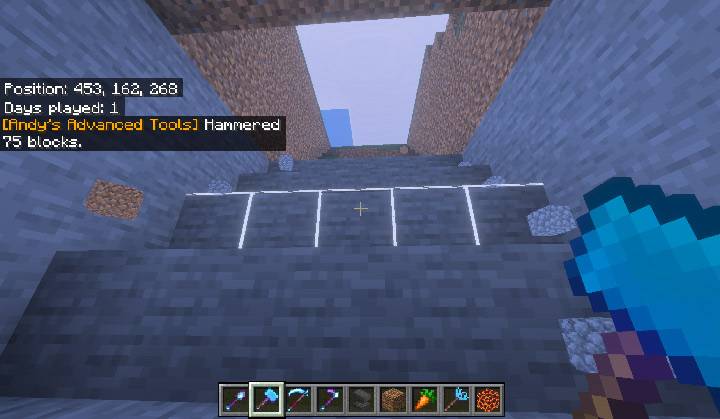
A Diamond Hammer mid-tunnel. The white outline marks the next region, and the chat line confirms the 75 blocks the last swing took.
Five tool families across seven tiers
Every family ships in Wooden, Stone, Copper, Golden, Iron, Diamond, and Netherite. Emerald is deliberately not included.
| Tier | Durability | Attack damage | Enchantability | Repairs with |
|---|---|---|---|---|
| Wooden | 59 | 2 | 15 | Any planks |
| Stone | 131 | 3 | 5 | Cobblestone, Cobbled Deepslate, or Blackstone |
| Copper | 190 | 3 | 13 | Copper Ingot |
| Golden | 32 | 2 | 22 | Gold Ingot |
| Iron | 250 | 4 | 14 | Iron Ingot |
| Diamond | 1,561 | 5 | 10 | Diamond |
| Netherite | 2,031 | 6 | 15 | Netherite Ingot |
Stone and Copper both sit between Wood and Iron, and Gold keeps its vanilla character: very fragile, very enchantable. Repair works at an Anvil or Grindstone with the tier's own material, exactly as vanilla tools do.
Crafting
Each family has its own original shape, chosen so none of them collide with a vanilla Pickaxe, Shovel, Hoe, or Axe recipe. Empty cells must be left empty.
Material in the grids below means whichever tier you are making:
- Wooden — any Planks: Oak, Spruce, Birch, Jungle, Acacia, Dark Oak, Mangrove, Cherry, Pale Oak, Bamboo, Crimson, or Warped
- Stone — Cobblestone, Blackstone, or Cobbled Deepslate
- Copper — Copper Ingot
- Golden — Gold Ingot
- Iron — Iron Ingot
- Diamond — Diamond
- Netherite — not crafted in a grid. Upgrade a finished Diamond tool at a Smithing Table with a Netherite Upgrade Smithing Template and a Netherite Ingot.
The Tiller, Scythe, and Seeder Rake shapes are not symmetric, so each of them also crafts mirrored if you prefer to build it the other way round.
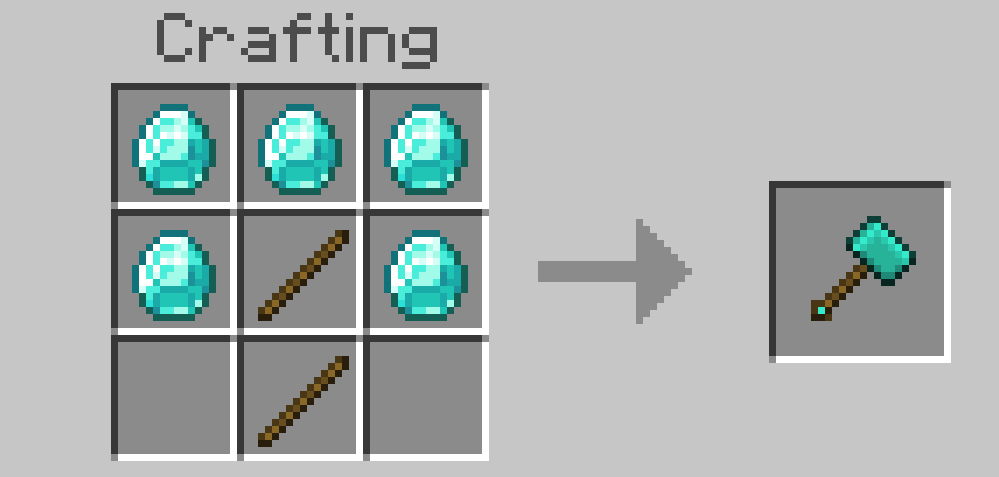
Hammer
| Material | Material | Material |
| Material | Stick | Material |
| Stick |
5 Material + 2 Sticks. Material: any Planks, Cobblestone, Copper Ingot, Gold Ingot, Iron Ingot, or Diamond.
The Hammer at Diamond tier.
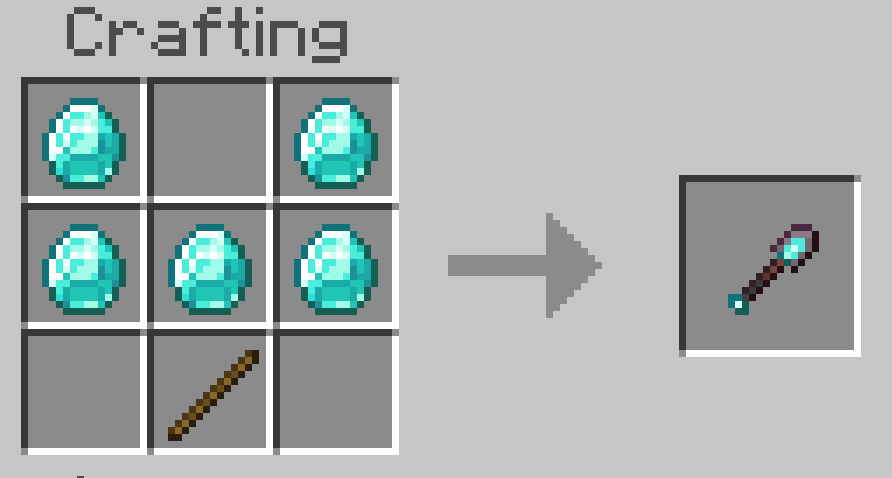
Excavator
| Material | Material | |
| Material | Material | Material |
| Stick |
5 Material + 1 Stick. Material: any Planks, Cobblestone, Copper Ingot, Gold Ingot, Iron Ingot, or Diamond.
The Excavator at Diamond tier.
Tiller
| Material | Material | Material |
| Material | Stick | |
| Stick |
4 Material + 2 Sticks. Material: any Planks, Cobblestone, Copper Ingot, Gold Ingot, Iron Ingot, or Diamond.
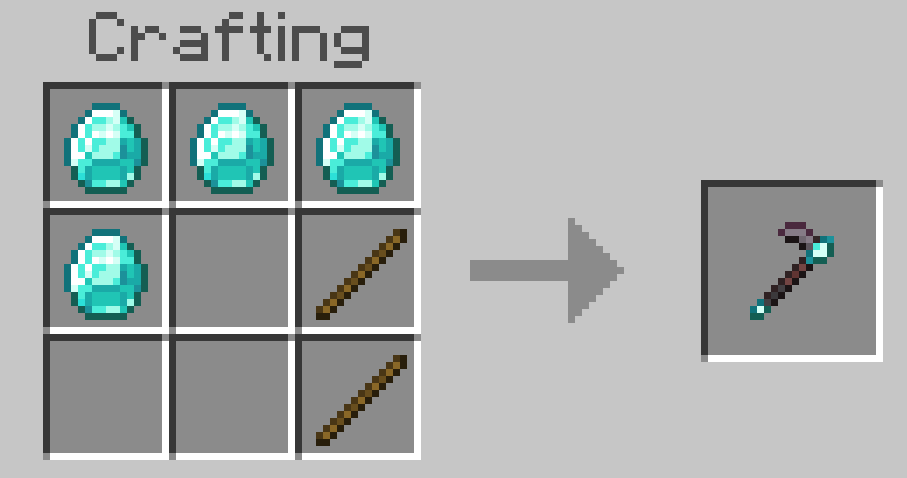
The Tiller at Diamond tier.
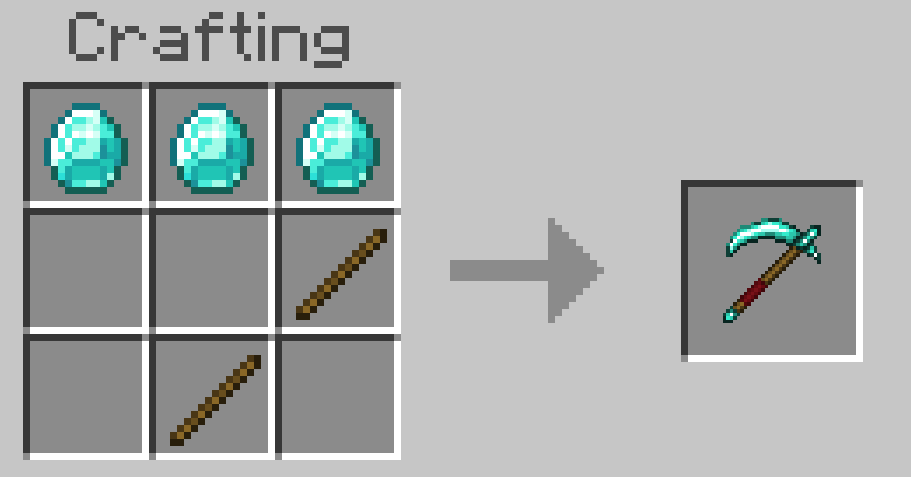
Scythe
| Material | Material | Material |
| Stick | ||
| Stick |
3 Material + 2 Sticks. Material: any Planks, Cobblestone, Copper Ingot, Gold Ingot, Iron Ingot, or Diamond.
The Scythe at Diamond tier.
Seeder Rake
| Material | ||
| Stick | Stick | Material |
| Material |
3 Material + 2 Sticks. Material: any Planks, Cobblestone, Copper Ingot, Gold Ingot, Iron Ingot, or Diamond.
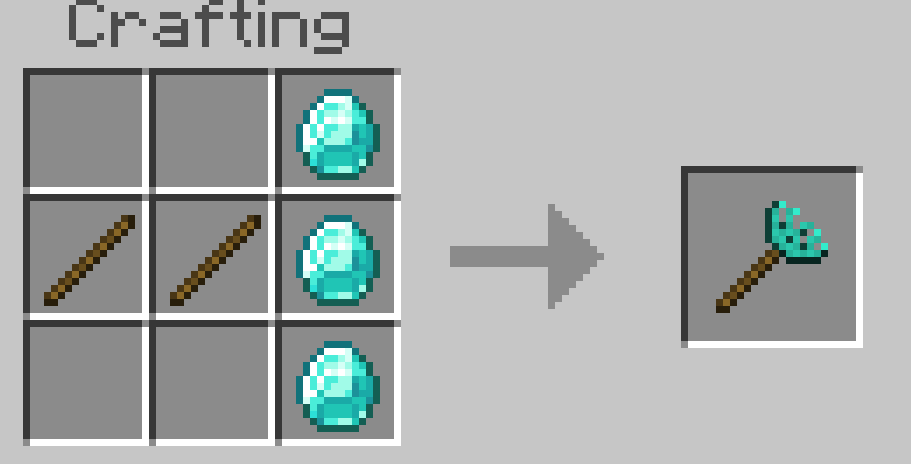
The Seeder Rake at Diamond tier.
All thirty-five recipes appear in the Recipe Book and in five Creative inventory groups, one per family.
Enchanting
Every tool is enchantable at a normal Enchanting Table and through Anvils, using the vanilla slot that matches how the tool is actually used:
- Hammers use the Pickaxe slot — Efficiency, Unbreaking, Fortune, Silk Touch, Mending, and Curse of Vanishing.
- Excavators use the Shovel slot — the same set.
- Tillers and Scythes use the Hoe slot.
- Seeder Rakes use the Flint and Steel slot, which is durability-only: Unbreaking, Mending, and Curse of Vanishing. A Rake plants from your inventory rather than breaking blocks, so Fortune and Silk Touch would have nothing to act on.
Enchantments are not simulated or reimplemented. Fortune and Silk Touch apply through the same vanilla loot path the block would use for a hand-held tool, so ore multipliers, gravel flint chances, and silk-touch variants all come out right. Unbreaking is rolled independently for every block in an area break, at the vanilla one-in-level + 1 rate, so an area tool wears the same as swinging a normal tool that many times.
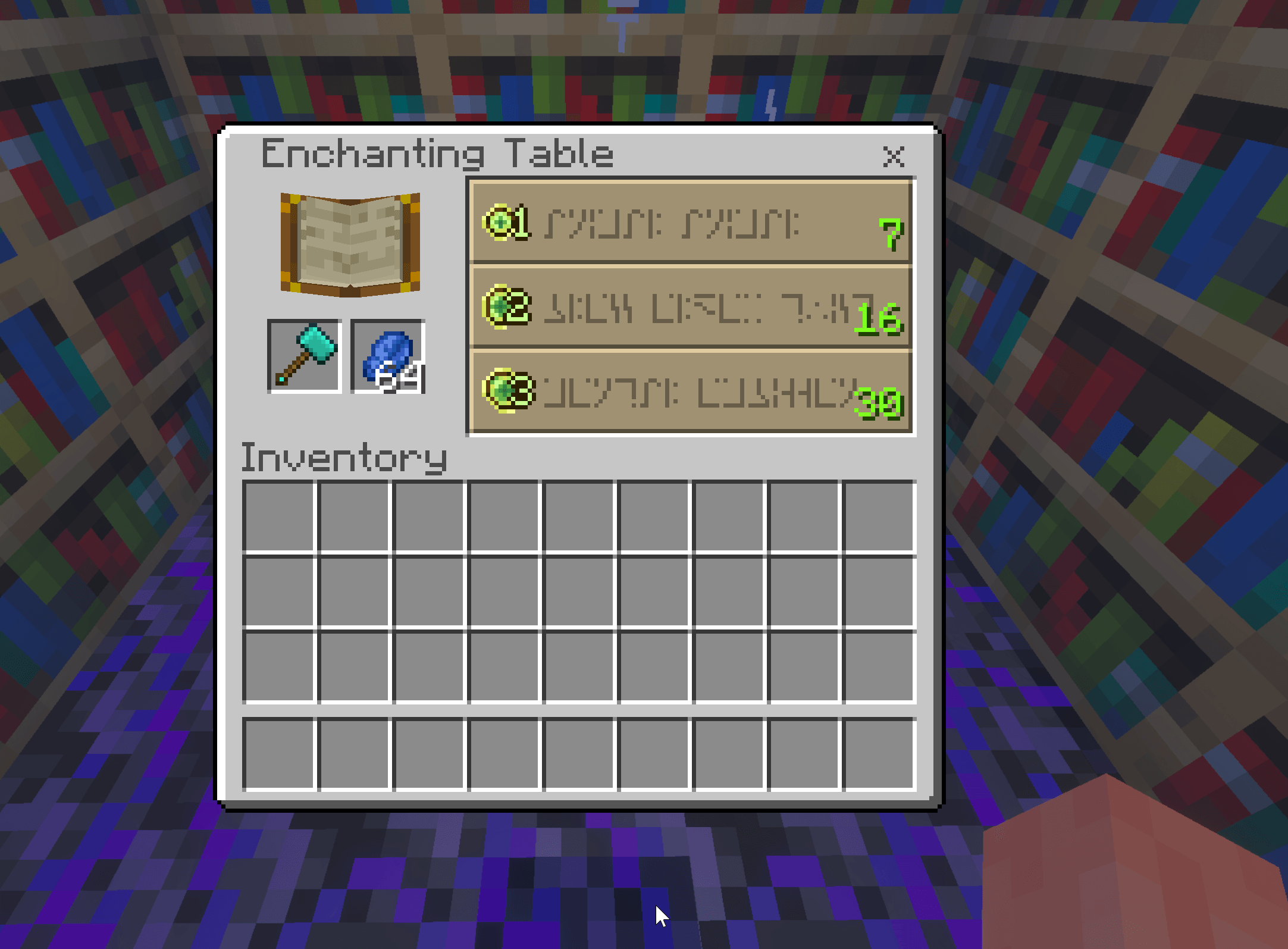
A Diamond Hammer at an Enchanting Table, showing normal pickaxe enchantment offers.
Hammers — area mining for stone and metal
A Hammer breaks a configurable region of stone-family blocks in one swing. It only takes blocks in the same family as the block you actually hit, so a swing into a wall of stone containing one Diamond Ore takes the stone and leaves the ore, and a swing into the ore takes connected ore of the same type.
Ore families group their normal and Deepslate variants together, so a Deepslate Iron Ore swing also takes plain Iron Ore. Copper families strip waxing and oxidation, so an Exposed Copper Block swing takes Weathered and Waxed copper of the same shape.
Mining ore with a Hammer awards experience per ore block, matching vanilla drop ranges for Coal, Diamond, Emerald, Lapis, Redstone, Nether Quartz, Nether Gold, and Sculk.
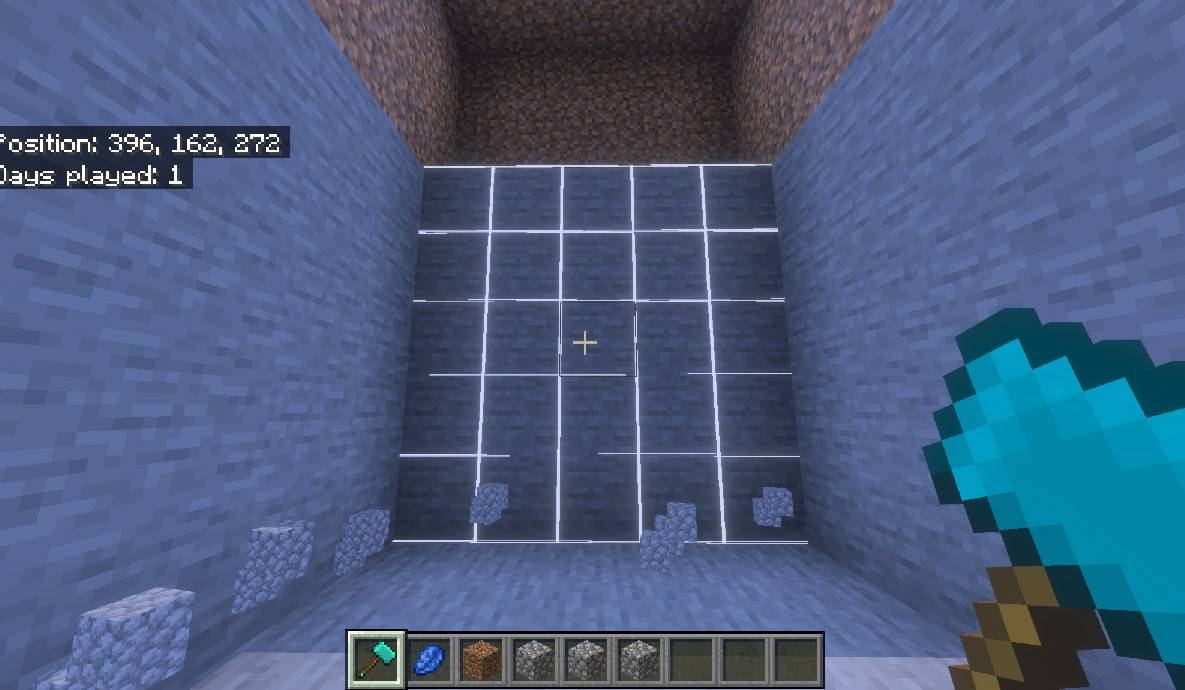
The Hammer mining a stone wall 5x5x5, one swing breaks 125 blocks in a cube.
Excavators — area digging for soft ground
An Excavator does the same job for dirt, sand, gravel, snow, clay, mud, soul sand, soul soil, and concrete powder. Dirt-like terrain is treated as one conservative family, so a swing into a grassy hillside clears grass, dirt, coarse dirt, podzol, and rooted dirt together rather than leaving a ragged edge.
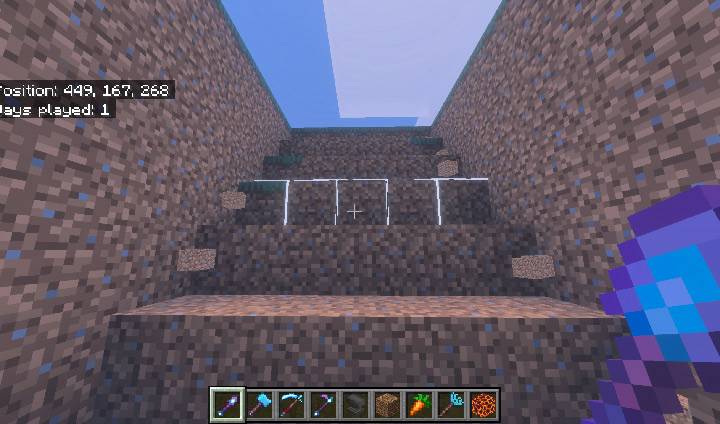
The Excavator cutting a descending stair-step ramp through soft ground, one swing per step set.
The shape menu
Crouch and use a Hammer or Excavator to open the shape menu. It sets the region both tools break — a plain cuboid or a stair-step, up to 5×5×5 and capped at 125 blocks, aimed at the face you hit or locked to a world plane. The shape is saved per player and applies to both tools.
Every control is documented in Menu 1 of the user guide below.
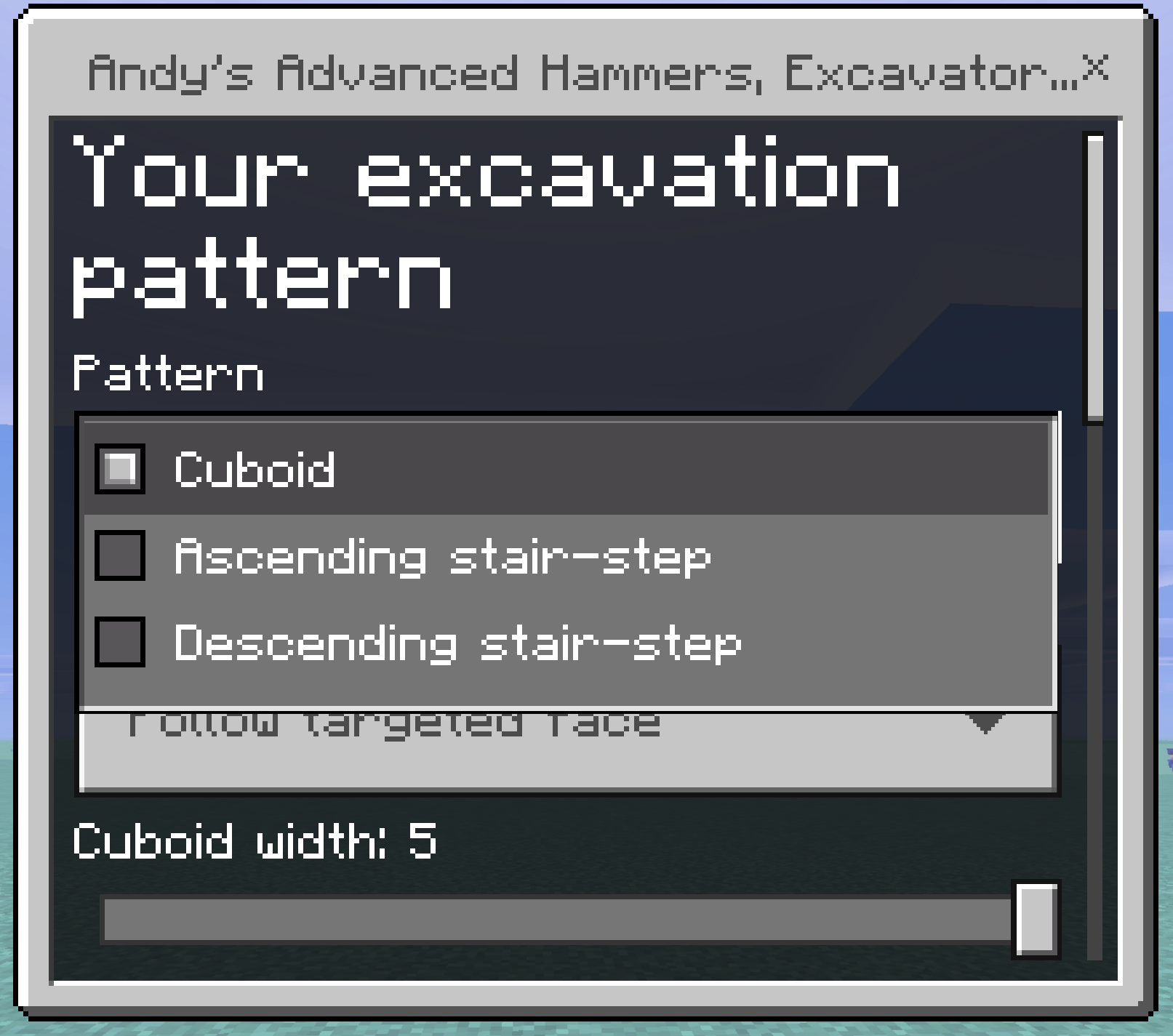
The shape menu sets the desired shape that the hammer or excavator uses.
Selection previews
Every one of the five tools draws a wireframe preview of what it is about to affect, updated as you look around. The outline is emissive and PBR-aware, so it reads clearly in dark caves and under Vibrant Visuals.
Three shades carry meaning:
- White — blocks that will be broken, or ground that will be tilled to farmland.
- Blue — water: the Tiller's centre irrigation hole, and every dug channel in a sugar cane plot.
- Green — rows a plot layout deliberately leaves open for fruit or cane.
The preview lists only blocks the tool would really change. If nothing outlines, that swing would do nothing. In the two Tiller plot layouts the outline shows the whole plot, including ground that is already correct and will not be rewritten, so you can see the shape you are about to commit to.
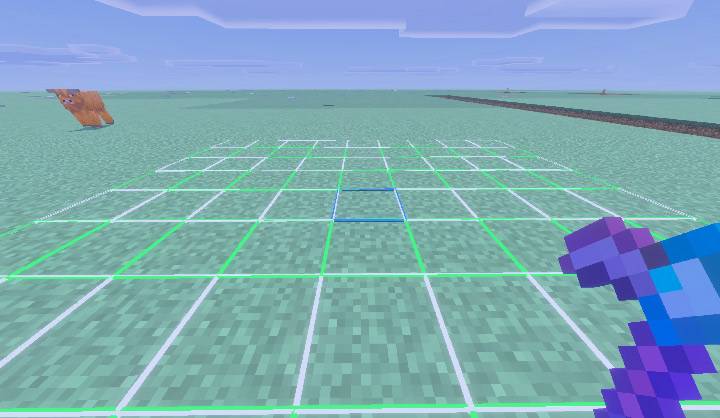
All three preview shades at once on a pumpkin and melon plot — white stem rows, green fruit rows, and the blue centre irrigation hole.
Tillers — a 9×9 farm in one interaction
Use a Tiller on dirt-like ground to prepare a centred 9×9 field. One interaction does the whole job:
- Eligible plants sitting directly on the soil are cleared first, so a grassy meadow becomes a clean field.
- Existing water blocks anywhere in the area are preserved, never overwritten.
- The centre block is removed as the irrigation location, and a centred water source hydrates the surrounding 9×9 under normal vanilla rules.
- Solid obstructions are left alone — the Tiller will not undercut a building.
Scythes and Tillers do not carry Bedrock's built-in hoe interaction, so a single click starts the full action instead of tilling one block first.
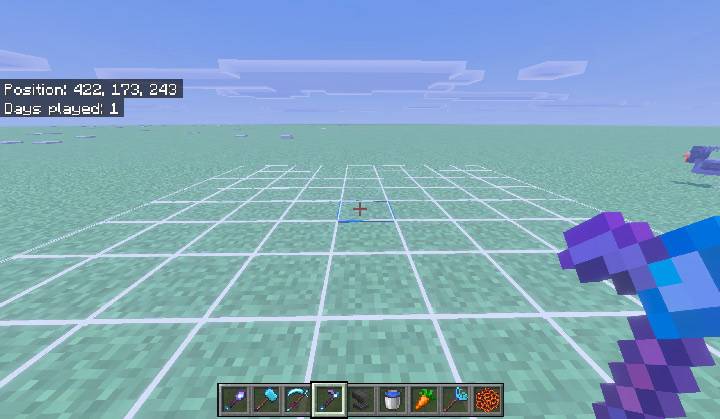
The standard 9x9 field preview. Eighty white cells become farmland; the blue centre becomes the irrigation hole.
The Tiller menu
Crouch and use a Tiller to open it. It chooses the plot layout the Tiller builds and controls the two optional irrigation features. Everything is saved per player, and the menu shows live whether the items each option needs are actually in your inventory.
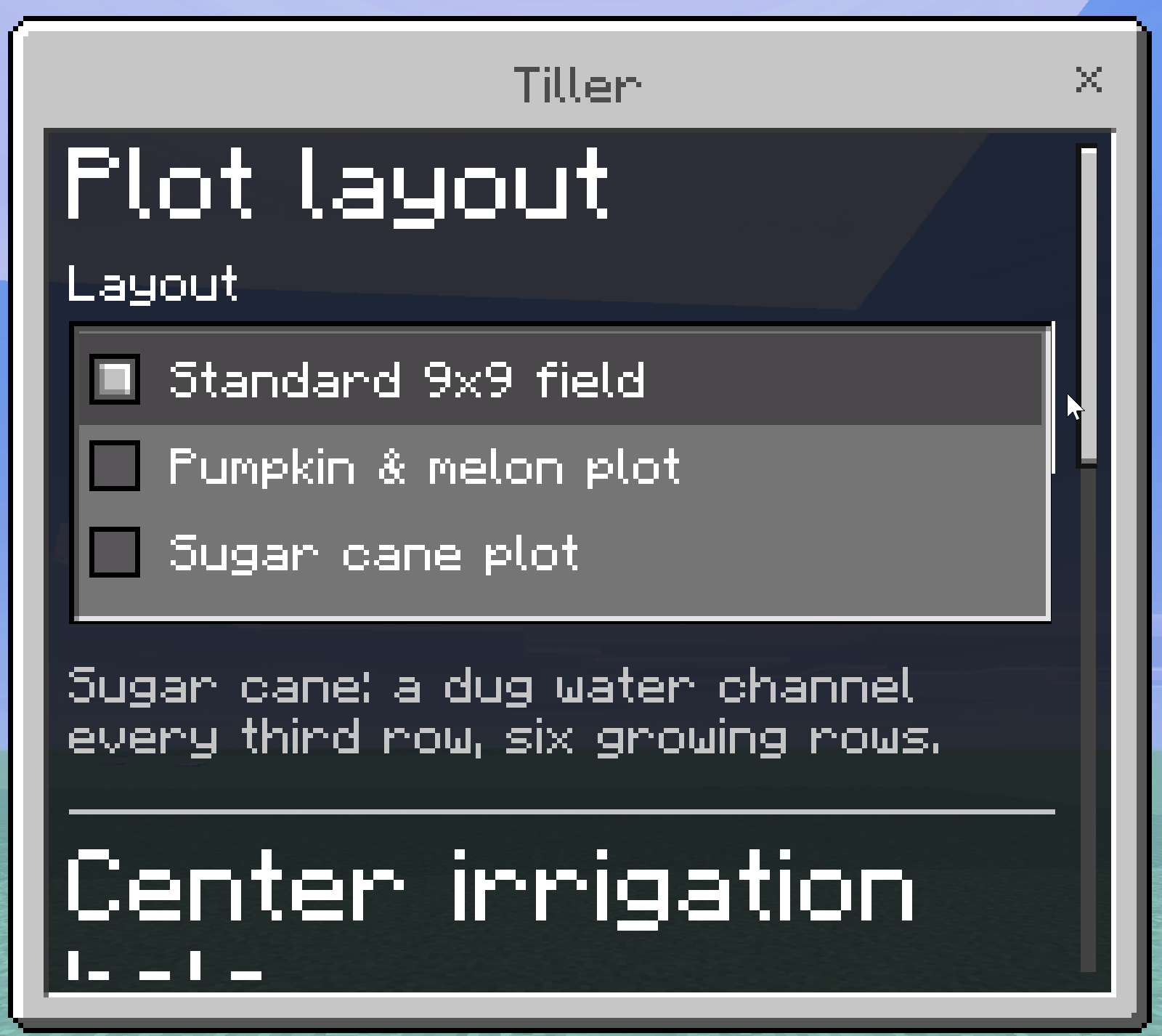
The three layouts are the standard 9×9 field, an optimal pumpkin & melon plot of alternating stem and fruit rows, and an optimal sugar cane plot with a dug water channel every third row. Auto water fill seals the centre hole with a waterloggable block from your inventory, and Lamppost & light raises a lit post over it.
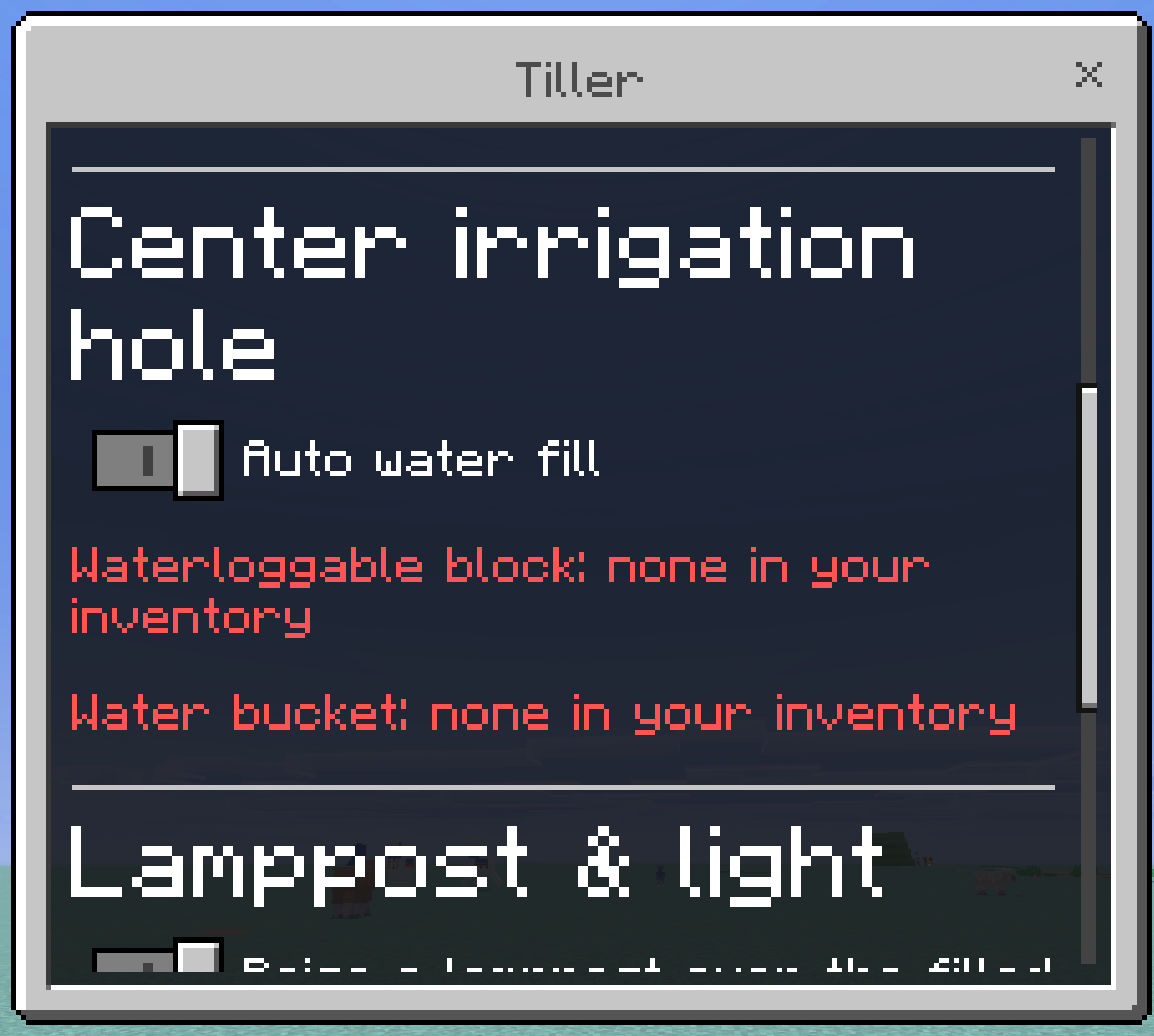
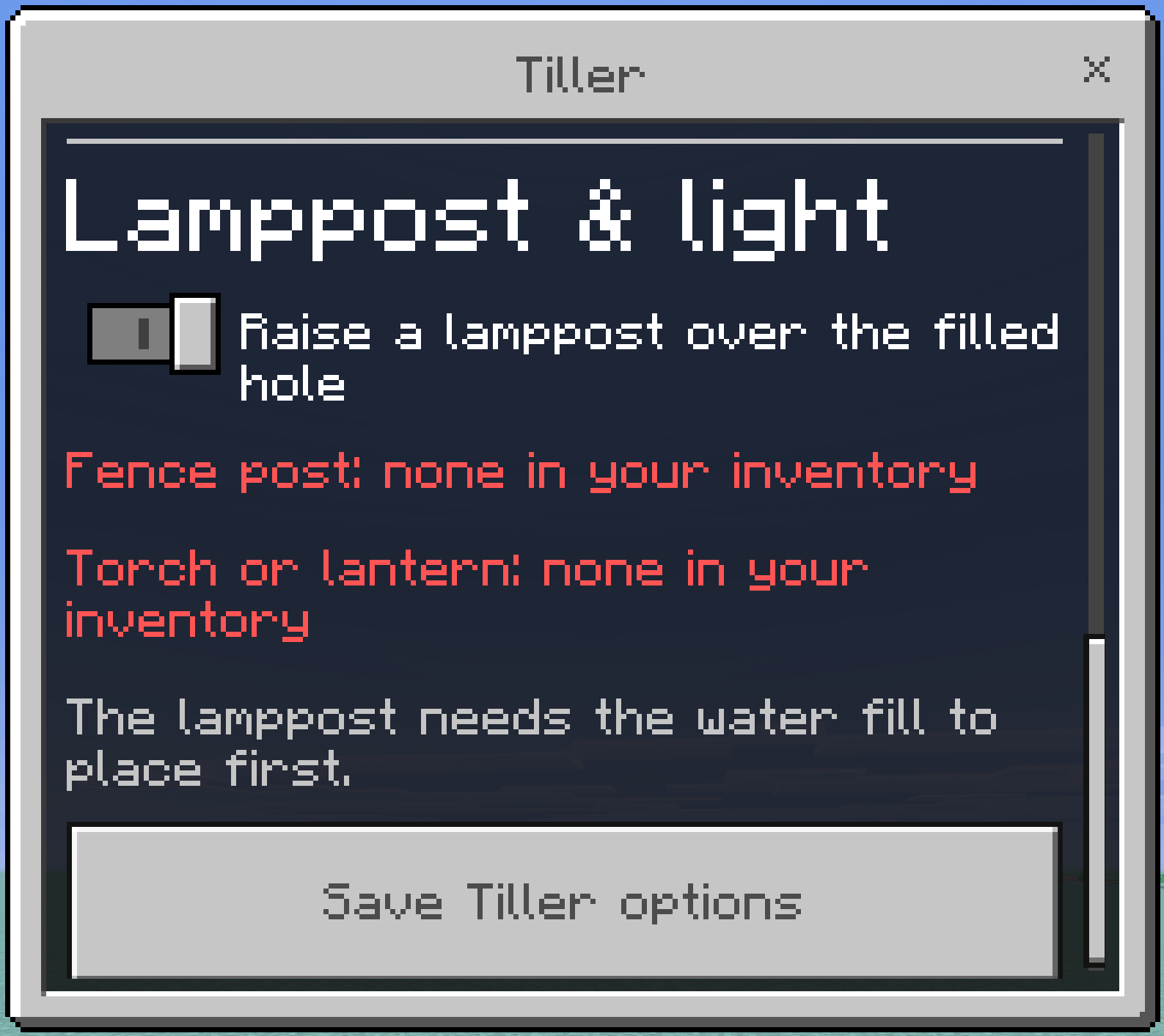
Every option, requirement, and failure message is documented in Menu 2 of the user guide below.
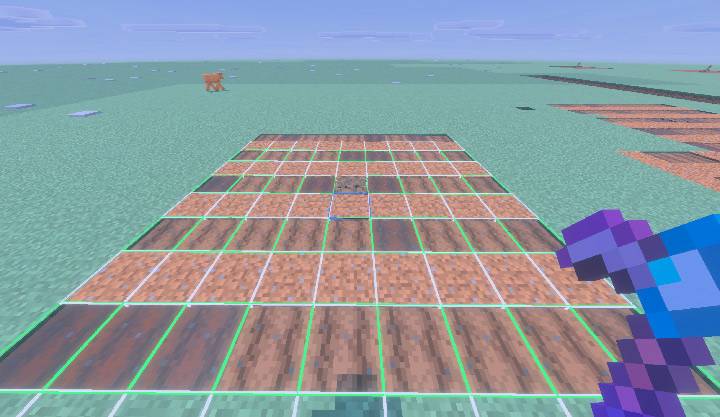
The finished pumpkin and melon plot: five farmland stem rows alternating with four open dirt rows for fruit.
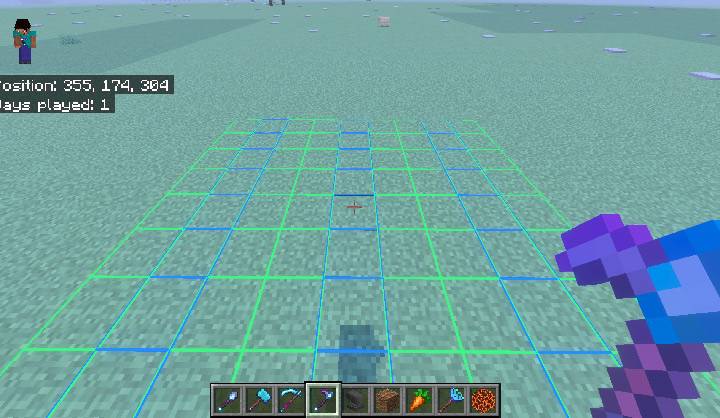
The sugar cane plot preview: three blue channel rows to be dug, six green growing rows between them.
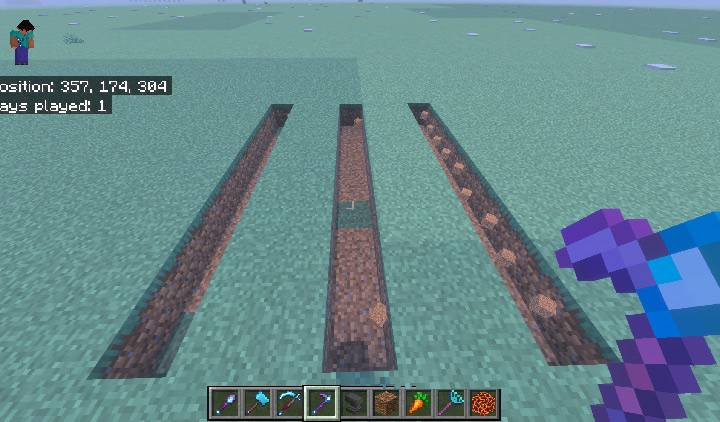
The same plot after the swing: three nine-long channels dug and ready for two buckets each.
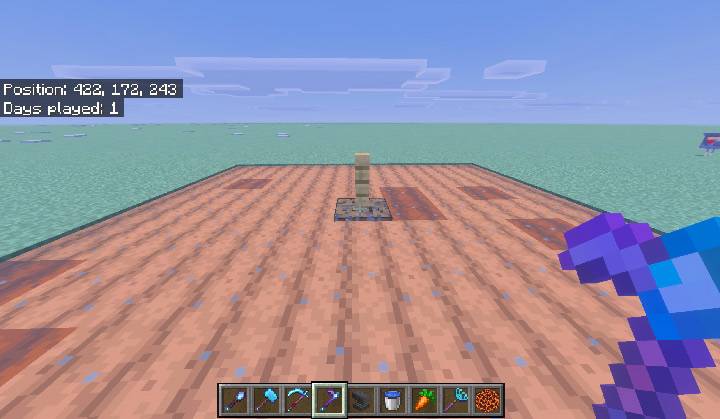
A finished field with Auto water fill on — the centre hole sealed with a waterlogged block, carrying the lamppost.
Scythes — sweeping vegetation
Use a Scythe on ground or vegetation to clear eligible plants in a centred 9×9 area. Breaking an eligible plant triggers the same sweep. The sweep checks the base plant layer plus one block above it, so tall grass, large ferns, sunflowers, lilacs, rose bushes, and peonies come out whole rather than leaving floating tops.
Supported categories include short and tall grass, ferns, every vanilla short and tall flower, wildflowers, pink petals, leaf litter, bushes, dead bushes, saplings, mushrooms, fungi, roots, leaves, coral, and coral fans. Waterlogged coral and fans leave their water behind when removed.
With Silk Touch, the Scythe produces a placeable version of eligible vegetation wherever Bedrock exposes one, so you can relocate grass and ferns. Without it, normal vanilla loot applies.
Scythes — harvesting crops
Use or break a mature crop with a Scythe to harvest every mature crop in the centered 3×3 area at the same height. Supported crops are Wheat, Carrots, Potatoes, Beetroot, Nether Wart, Cocoa, Sweet Berry Bushes, and Torchflowers.
- Immature crops are left completely untouched.
- Harvested crops stay harvested. The Scythe never resets them to a young state, consumes seed, or replants — replanting is deliberately left to you, and the Seeder Rake exists for exactly that.
- The farmland underneath is preserved. Scythes cannot till dirt, cannot create farmland, and cannot break farmland, so a held swing that carries past an instantly-harvested crop leaves your field intact.
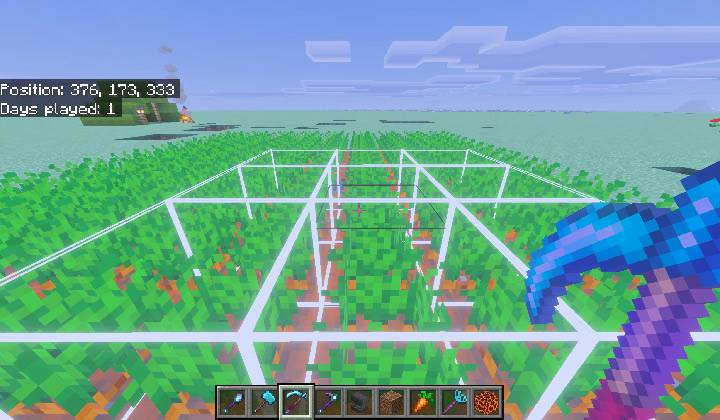
The Scythe 3x3 harvest preview over a carrot field. Only the mature crops inside it are taken, and the farmland is left intact.
Seeder Rakes — planting a 4×4 plot
Use a Seeder Rake on the ground to plant your selected crop across a 4×4 plot. Every seed comes out of your inventory, one per block planted, and planting stops when you run out. In Creative, nothing is consumed.
Each cell is checked against real vanilla placement rules before anything is planted, so the Rake never creates an invalid plant:
- Farmland crops need farmland.
- Nether Wart needs Soul Sand.
- Sweet Berries, Bamboo, and Sugar Cane each need their own supported ground.
- Sugar Cane additionally needs adjacent water.
- Cactus additionally needs all four sides clear.
Using the Rake on an existing crop plants around it rather than through it — the plot is anchored to the ground beneath, not the plant.
The Seeder Rake menu
Crouch and use a Seeder Rake to choose what it plants. The dropdown lists all thirteen supported seeds and plantable items, each showing how many you currently have, so you can see at a glance what you can actually plant. The choice is saved per player.
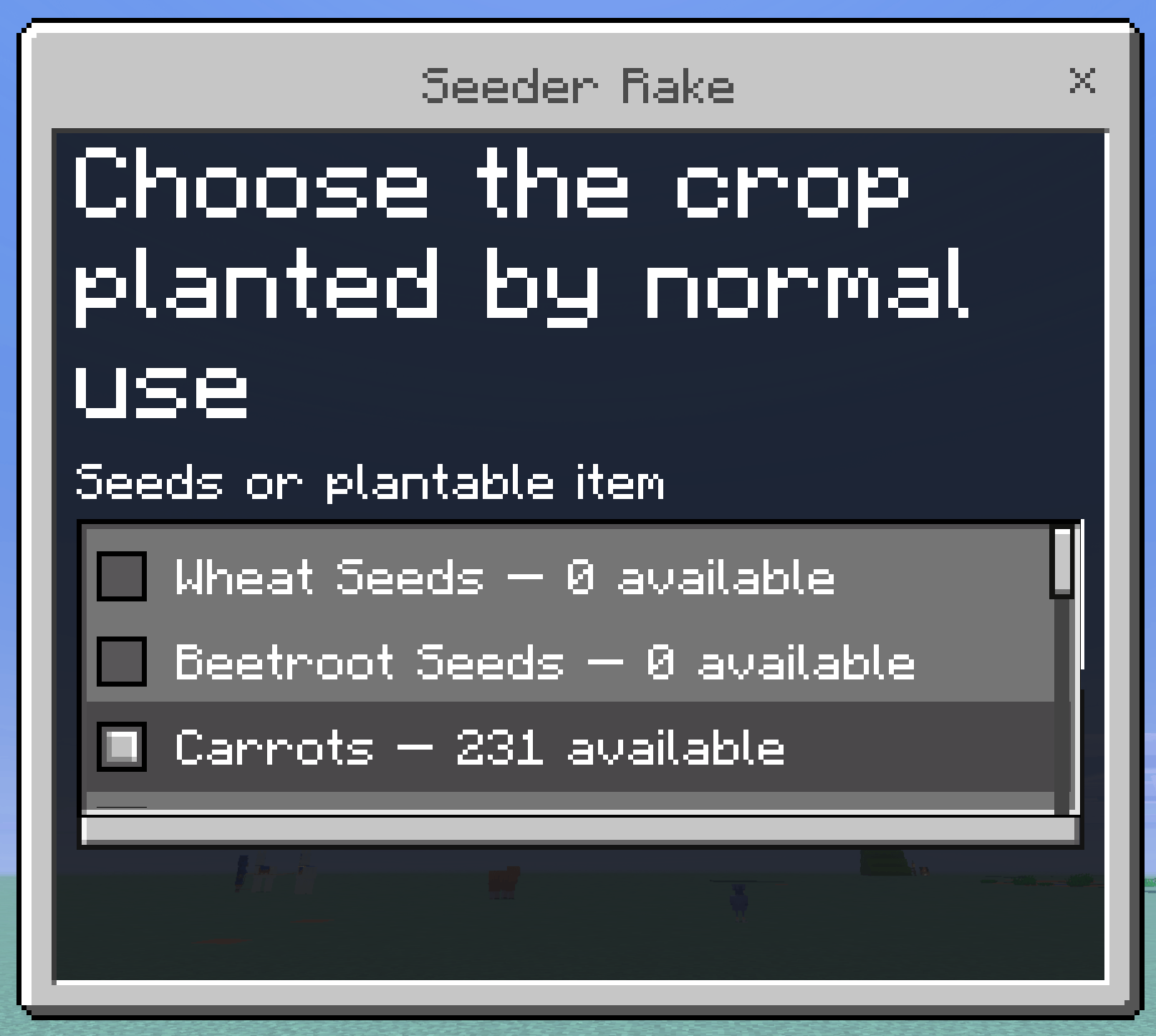
The full crop table, with the ground each one needs, is in Menu 3 of the user guide below.
Drops and item lifetime
Blocks broken by an area tool drop exactly what they would drop to a hand-held tool of the same tier and enchantment, spawned at the block that produced them. Those drops are ordinary item entities with the standard five-minute vanilla despawn timer. The add-on does not tag, collect, teleport, re-time, or delete drops, and a regression test blocks any custom cleanup from being added later.
If you clear a very large area, pick the drops up as you go, the same as you would after any big vanilla dig.
Durability and wear
Every block an area tool changes costs one durability use, and every one of those uses is rolled independently against Unbreaking. A tool that breaks mid-swing stops immediately, plays the normal break sound, and leaves the remaining blocks untouched — it never overdraws past zero. Swapping the tool out of your hand mid-action also stops it cleanly.
The Tiller's irrigation placements are the one exception: the water fill and lamppost blocks cost no extra durability, because you already pay for them with the blocks themselves.
What the tools will not break
Area tools are conservative on purpose. Nothing in the following list is ever taken, in any pattern or area:
- Bedrock, Barriers, Border Blocks, Light Blocks, Structure Blocks, Structure Void, Jigsaw, Allow, Deny, and Moving Blocks
- Every command block variant
- End Portals, End Portal Frames, End Gateways, and Nether Portals
- Anything holding items — Chests, Barrels, Shulker Boxes, Furnaces, Smokers, Blast Furnaces, Hoppers, Dispensers, Droppers, Brewing Stands, Crafters, Decorated Pots, Beehives, Bee Nests, Jukeboxes, Lecterns, Vaults, and Trial Spawners
- Liquids and waterlogged construction blocks
Complete user guide
Everything below is the full reference: every control, every menu, every option, and what each one does.
Controls at a glance
| Action | Hammer | Excavator | Tiller | Scythe | Seeder Rake |
|---|---|---|---|---|---|
| Break a block | Area mine | Area dig | — | Sweep or harvest | — |
| Use on a block | — | — | Prepare the plot | Sweep or harvest | Plant the 4×4 |
| Crouch + use | Shape menu | Shape menu | Tiller menu | — | Crop selector |
"Use" is right-click on desktop, the use button on a controller, or tap on touch. Crouching also hides the preview outline, so a menu always opens with a clear view.
Menu 1 — the shape menu
Opened by crouch-using a Hammer or Excavator. It sets the region both tools break, and it is saved per player.
| Control | Type | Range | What it does |
|---|---|---|---|
| Pattern | Dropdown | Cuboid · Ascending stair-step · Descending stair-step | Cuboid is a plain box. The two stair patterns cut a staircase, which is what you want for a mine ramp instead of a flat tunnel. |
| Orientation | Dropdown | Follow targeted face · World-horizontal plane · World-vertical plane | Follow targeted face aims the region at whatever face you hit, and is the default. Looking steeply up or down automatically resolves to horizontal, so a floor swing never becomes an accidental shaft. The two forced modes ignore the face and always cut a flat floor slice or an upright wall slice. |
| Cuboid width | Slider | 1–5 | Region size left-to-right, relative to the face you hit. |
| Cuboid height | Slider | 1–5 | Region size up-and-down. |
| Cuboid depth | Slider | 1–5 | How far the region reaches into the wall. Depth is what turns a flat 3×3 face into a 3×3×2 bite. |
| Stair-step size | Slider | 2–5 | Width and rise of the staircase cut by the two stair patterns. Ignored by Cuboid. |
The largest region is 5 × 5 × 5, hard-capped at 125 blocks. Defaults are Cuboid, Follow targeted face, 3 × 3 × 2, stair size 3.
Operators see one extra section in this menu — see Menu 4.
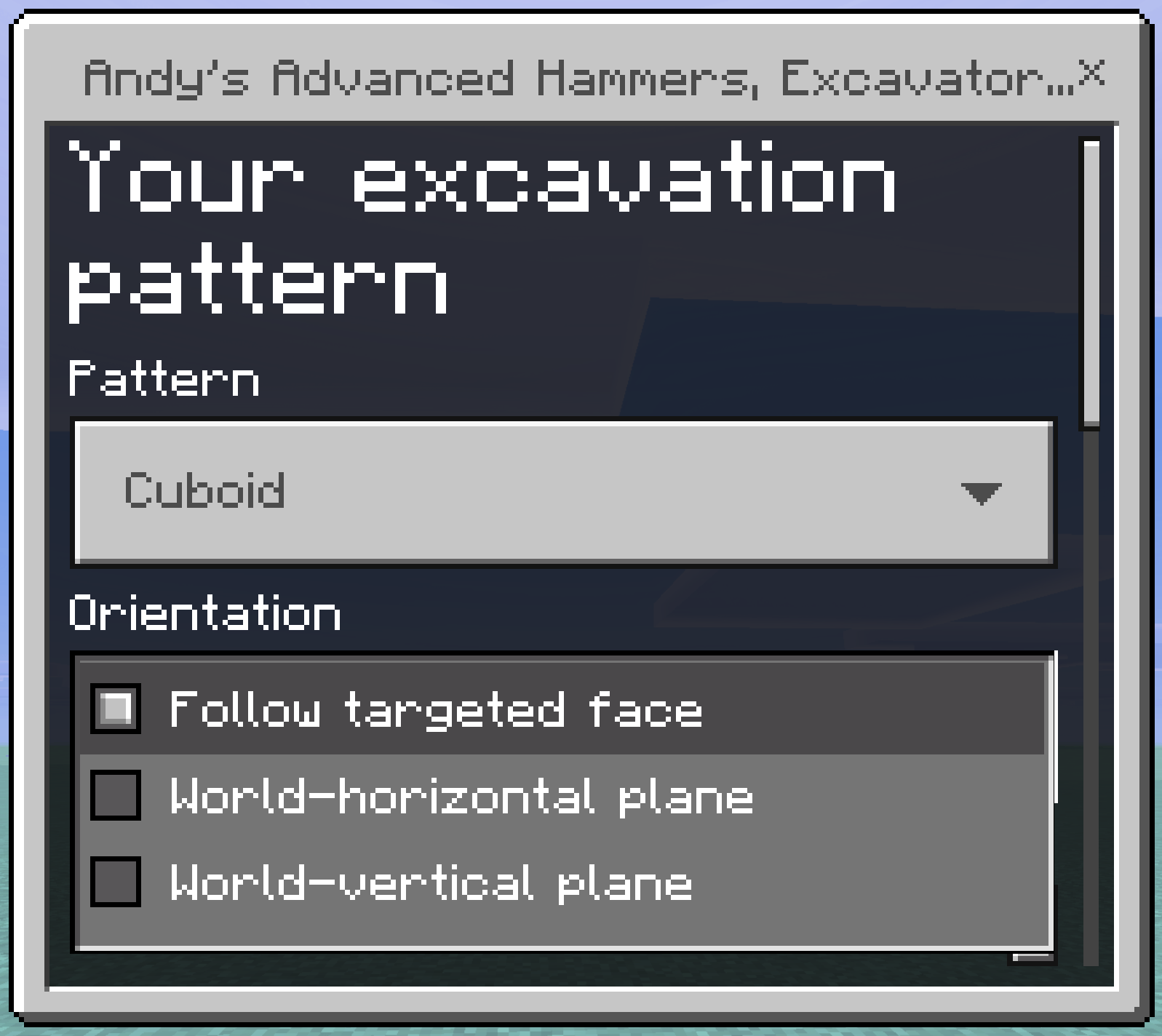
The shape menu: Pattern, Orientation, and the size sliders, saved per player.
The Pattern dropdown: a plain box, or a staircase cut up or down a slope.
The Orientation dropdown. Follow targeted face is the default and resolves to horizontal when you look steeply up or down.
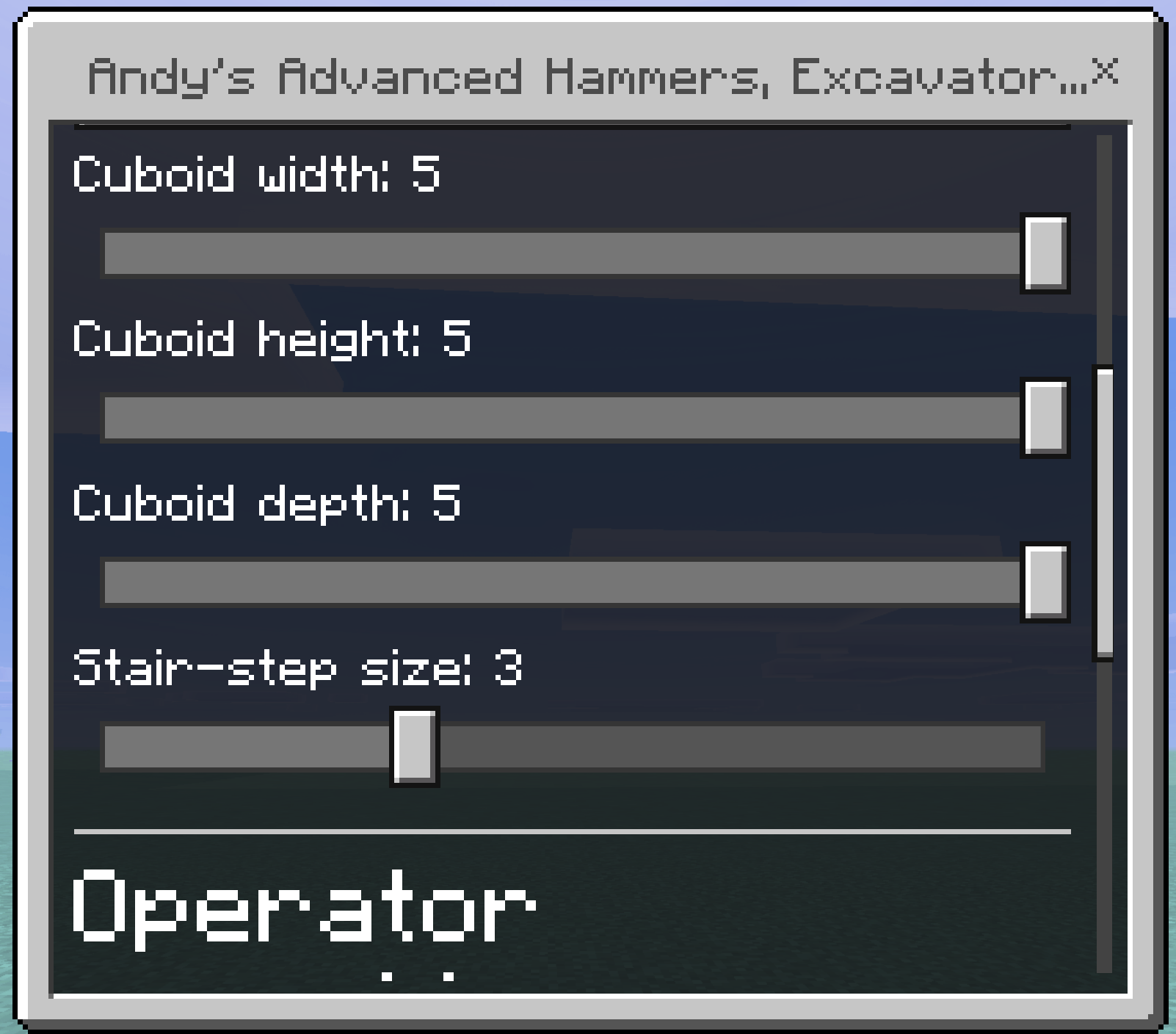
The four size sliders at their maximum 5x5x5 setting, capped at 125 blocks.
Menu 2 — the Tiller menu
Opened by crouch-using a Tiller. Everything in it is saved per player. Under each option the menu prints a live line telling you whether the required items are actually in your inventory — green when found, red when not — so you never have to guess why something did not place.
| Control | Type | Options | What it does |
|---|---|---|---|
| Layout | Dropdown | Standard 9×9 field · Pumpkin & melon plot · Sugar cane plot | Chooses the shape the Tiller builds. Detail below. |
| Auto water fill | Toggle | Off by default | Fills the centre irrigation hole with a waterloggable block from your inventory. |
| Raise a lamppost over the filled hole | Toggle | Off by default | Places a fence and a light on top of the filled block. |
Standard 9×9 field. The whole area becomes farmland around an open centre hole. This is the classic behaviour and the default.
Pumpkin & melon plot. Five farmland stem rows alternate with four open dirt rows. A mature stem grows its fruit onto a neighbouring block, so a solid field of stems has nowhere to put its fruit and stalls. This layout gives 36 fruit landing blocks across the 9×9 — the densest arrangement that fits the footprint — and it stops two stems fighting over one block. Plant your seeds in the white-outlined rows and leave the green-outlined rows empty.
Sugar cane plot. A dug water channel every third row, with six growing rows between them. Sugar cane cannot be planted on farmland or a dirt path at all, so the growing rows are set to plain dirt; ground that is already valid — dirt, grass, coarse dirt, sand, red sand — is left untouched and costs no durability. Every growing row ends up orthogonally beside a channel, which is the condition the plant actually checks. The Tiller digs the channels but does not create water. One source spreads seven blocks, so two buckets at opposite ends flood each nine-long channel.
Auto water fill needs two things from your inventory: a waterloggable block — mangrove roots if you have them, otherwise any stairs — and a filled water bucket. It places the block in the centre hole, waterlogs it, consumes the block, and hands your bucket back empty. The result is a hydrated plot with no pit to fall into. If either item is missing the hole is left open and you are told which one you need. The tool never creates water for free.
Raise a lamppost needs a fence post and a torch, soul torch, or any lantern, and it needs the water fill to have placed first, because the lamppost stands on the filled block. The fence goes directly on it and the light on top of the fence. Both are consumed. If the two blocks above the hole are obstructed the lamppost is skipped and says so. Lanterns are matched by name, so lanterns added by other add-ons work too - the menu names whichever one it found. Neither irrigation placement costs extra durability — you already pay with the blocks themselves.
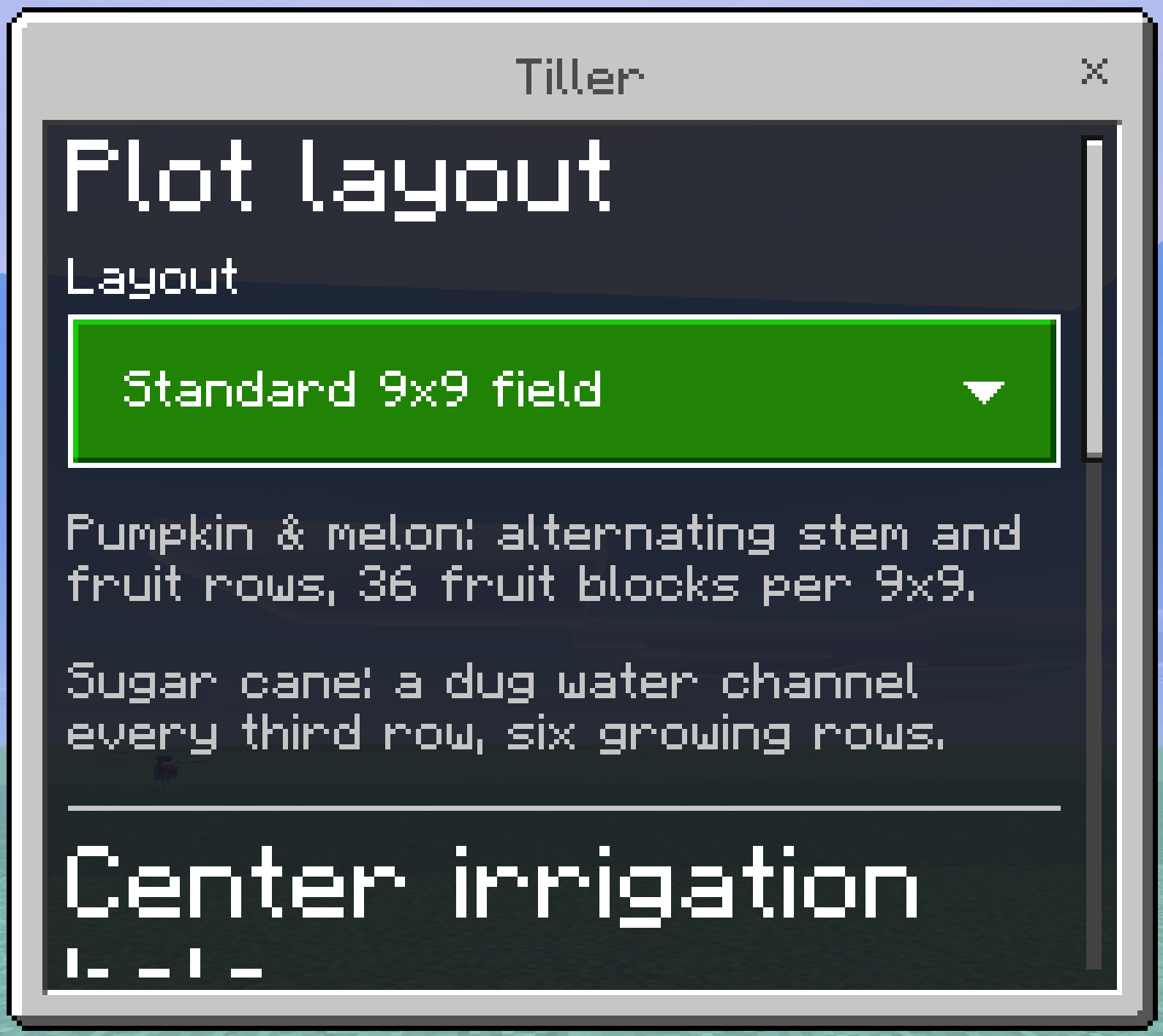
The Tiller menu opens on the plot layout, with a short reminder of what each layout does.
All three plot layouts in the Layout dropdown.
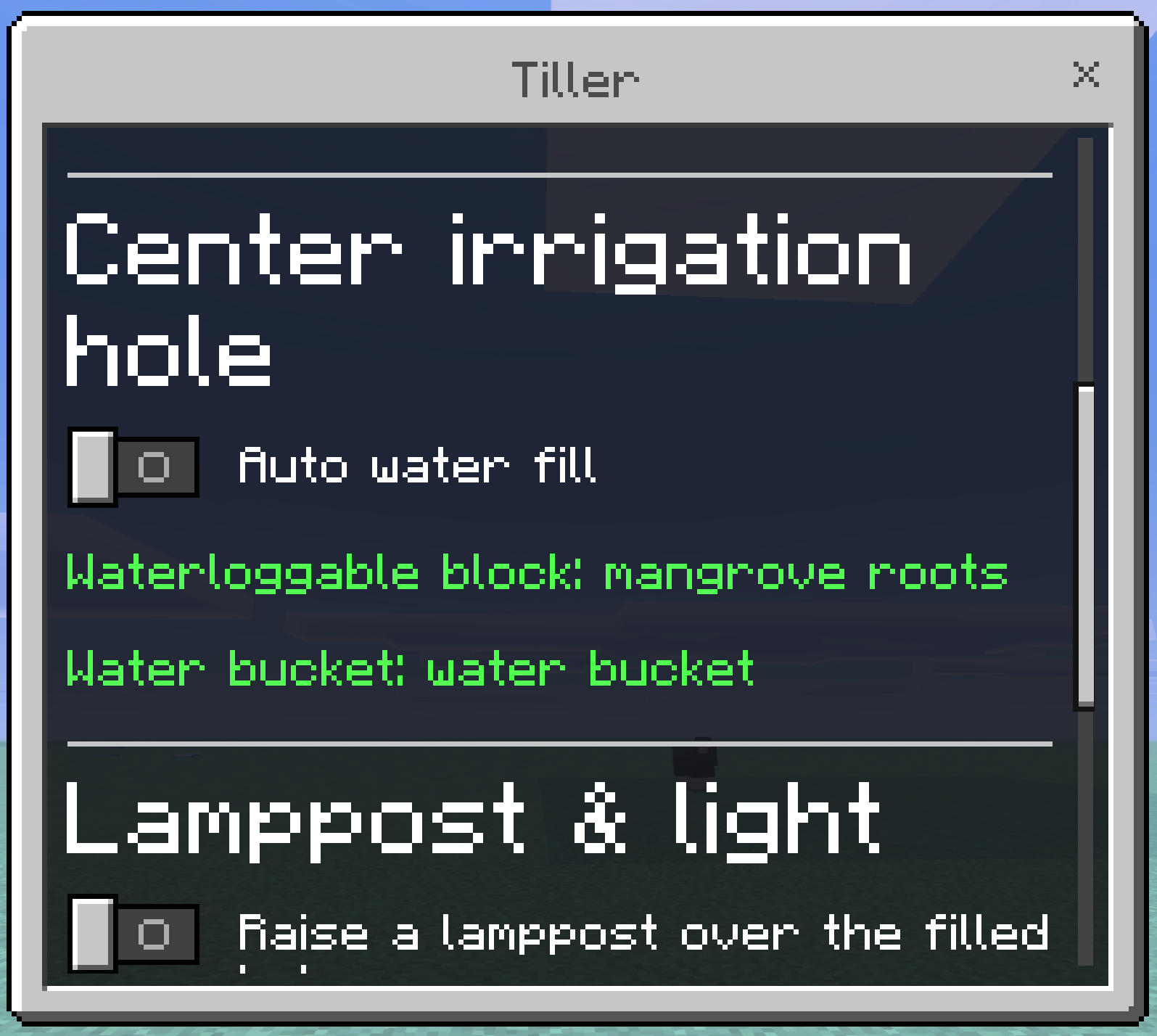
Auto water fill, with both requirements found in the inventory and named in green.
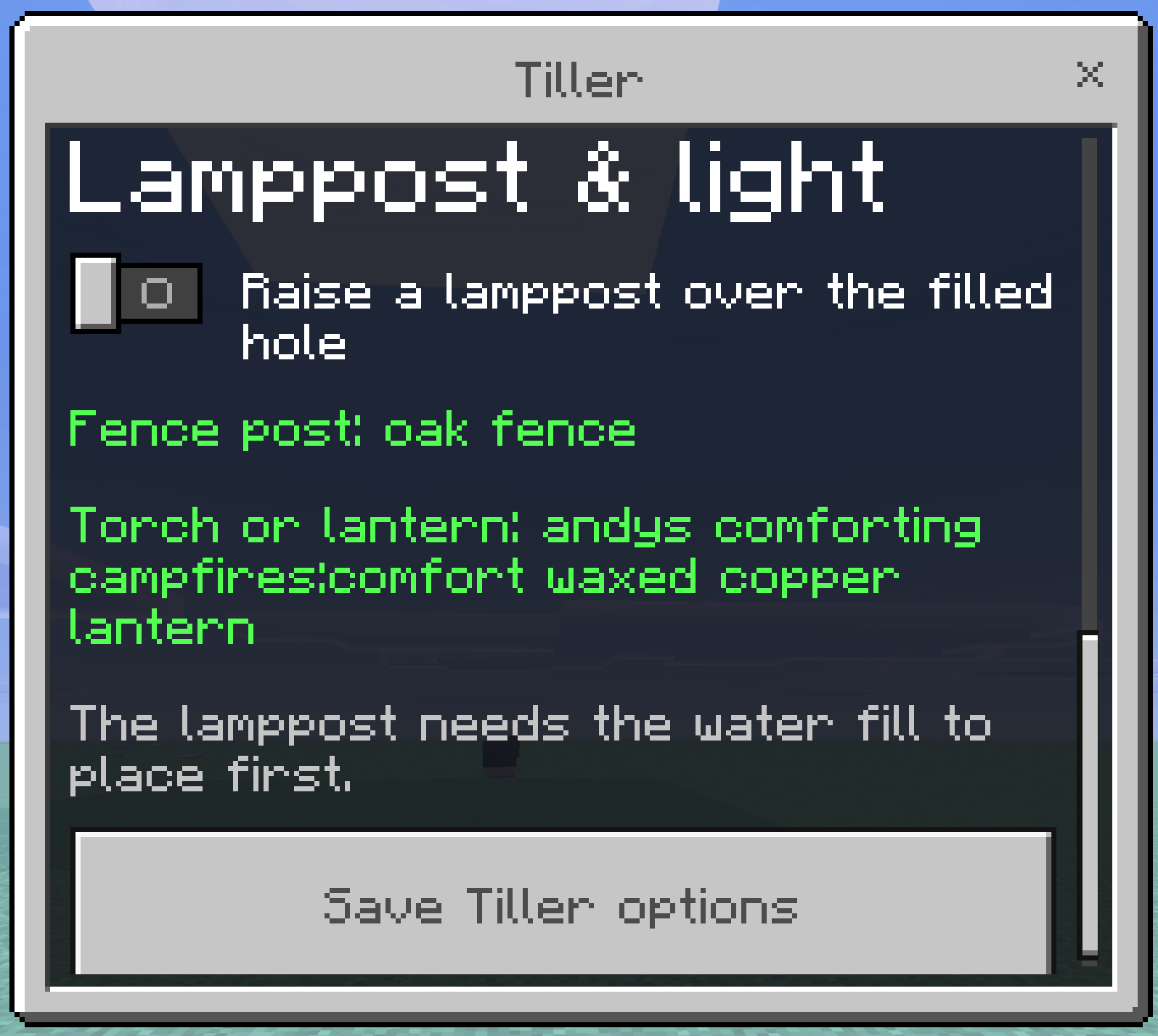
The lamppost section. Any fence and any lantern work, including lanterns added by other add-ons.
Auto water fill with nothing to work with. The hole is left open rather than half-filled.
When something is missing, the menu says so in red before you ever swing the tool.
Menu 3 — the Seeder Rake crop selector
Opened by crouch-using a Seeder Rake. One dropdown, saved per player.
| Crop | Plants on | Extra requirement |
|---|---|---|
| Wheat Seeds | Farmland | — |
| Beetroot Seeds | Farmland | — |
| Carrots | Farmland | — |
| Potatoes | Farmland | — |
| Melon Seeds | Farmland | — |
| Pumpkin Seeds | Farmland | — |
| Torchflower Seeds | Farmland | — |
| Pitcher Pods | Farmland | — |
| Nether Wart | Soul Sand | — |
| Sweet Berries | Grass, dirt, coarse dirt, podzol, mycelium, moss, mud, rooted dirt | — |
| Sugar Cane | Grass, dirt, coarse dirt, podzol, sand, red sand, moss, mud | Water orthogonally adjacent |
| Bamboo | Grass, dirt, coarse dirt, podzol, mycelium, sand, red sand, gravel, moss, mud | — |
| Cactus | Sand, red sand | All four sides clear |
Every entry shows how many you currently have, so the list doubles as a stock check. The Rake plants one item per block and stops when you run out.
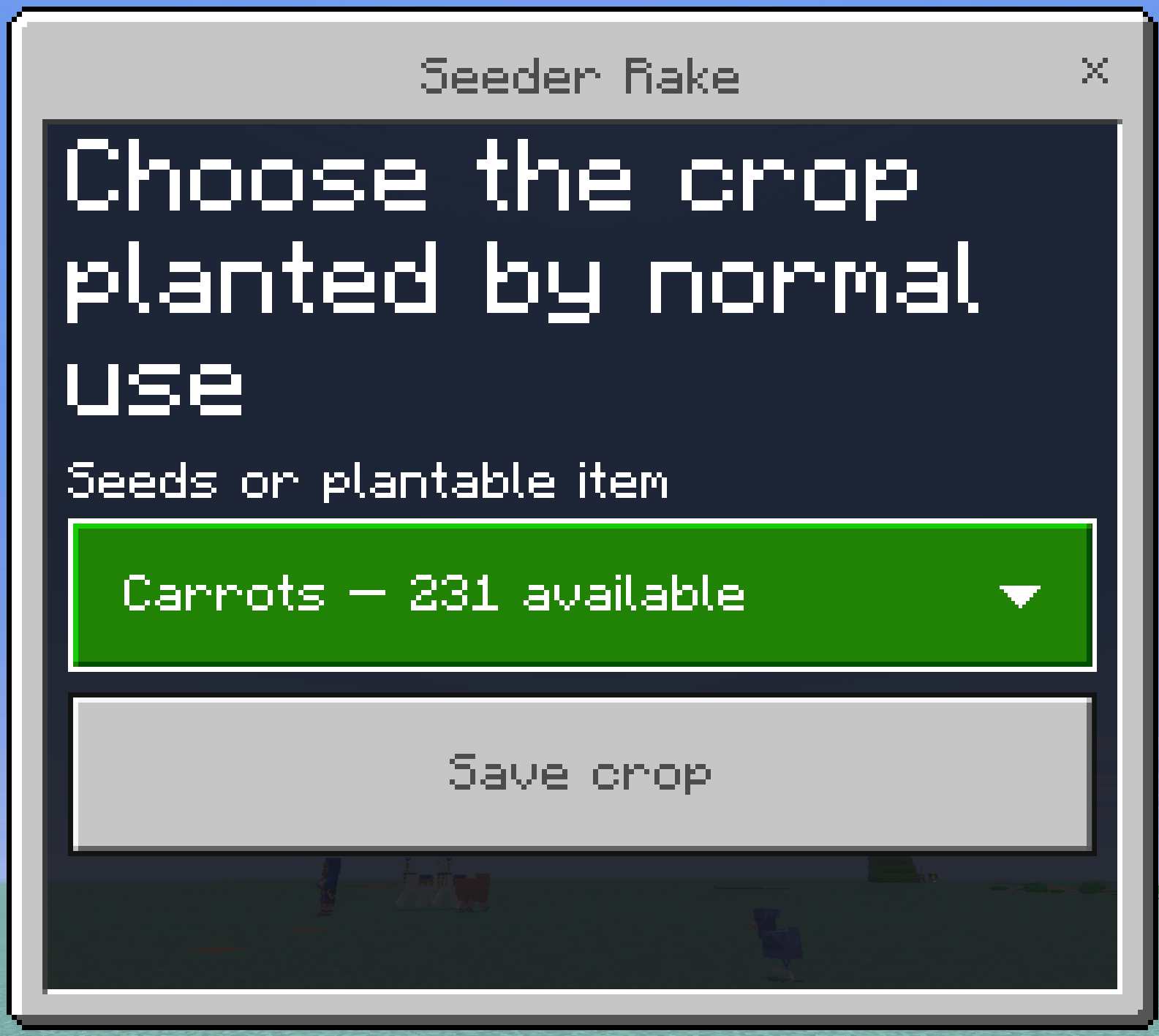
The Seeder Rake crop selector. Each entry shows how many you are carrying.
The dropdown doubles as a stock check: entries you cannot plant show a count of zero.
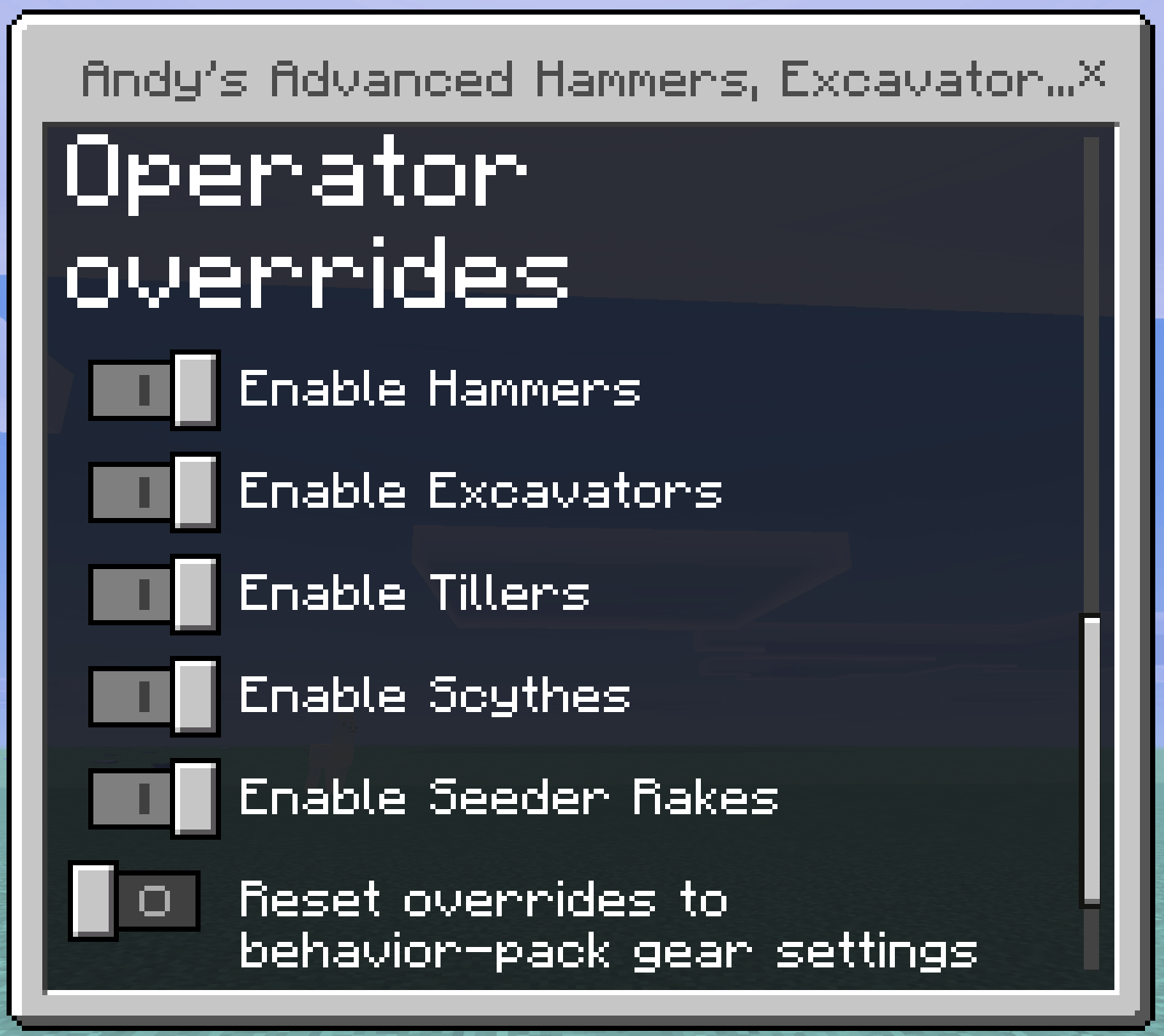
Menu 4 — operator overrides
Operators get an extra section at the bottom of the shape menu. Nobody else sees it.
| Control | Type | What it does |
|---|---|---|
| Enable Hammers | Toggle | Turns the whole Hammer family on or off for the world. |
| Enable Excavators | Toggle | The same, for Excavators. |
| Enable Tillers | Toggle | The same, for Tillers. |
| Enable Scythes | Toggle | The same, for Scythes. |
| Enable Seeder Rakes | Toggle | The same, for Seeder Rakes. |
| Reset overrides to behavior-pack gear settings | Toggle | Discards every override and returns to the world-settings values. |
These are world settings — every player is affected. Your shape, crop choice, and Tiller options stay personal to you.
The operator overrides section, visible only to operators, at the bottom of the shape menu.
Reading the outline colours
| Colour | Meaning |
|---|---|
| White | Will be broken, or tilled to farmland. |
| Blue | Water: the centre irrigation hole, and every dug sugar cane channel. |
| Green | Left open on purpose — the fruit rows of a pumpkin plot, the growing rows of a cane plot. |
If nothing outlines, that swing would change nothing. Crouching hides the outline.
Recommended workflows
Strip mine. Hammer, Cuboid, Follow targeted face, 3 × 3 × 2. Mine forward and the tunnel opens two blocks deep per swing. Switch to 5 × 5 × 1 for a wide gallery.
Staircase to bedrock. Hammer, Descending stair-step, stair size 3. Aim down the slope you want and keep swinging.
Wheat farm from scratch. Tiller on Standard → water the centre → Seeder Rake set to Wheat Seeds → plant → harvest later with the Scythe, which leaves the farmland intact so you can replant straight away.
Pumpkin farm. Tiller on Pumpkin & melon plot → water the centre → Seeder Rake set to Pumpkin Seeds, used on the white rows only → leave the green rows clear.
Sugar cane farm. Tiller on Sugar cane plot → two buckets per channel → Seeder Rake set to Sugar Cane on the green rows.
Clearing a meadow. Scythe on the ground. Each use sweeps a 9×9 of plants, including the tops of tall ones. Add Silk Touch to keep grass and ferns replantable.
Server and world settings
Each of the five tool families can be turned off independently. A disabled family stops working immediately, and players are told why rather than being left with a silent tool.
World creation and edit screens. The Behavior Pack exposes five toggles under Global tool availability: Enable Hammers, Enable Excavators, Enable Tillers, Enable Scythes, and Enable Seeder Rakes. All five default to on.
Operators in-game. Operators get an extra Operator overrides section at the bottom of the shape menu, with the same five toggles plus Reset overrides to behavior-pack gear settings. Non-operators never see this section.
Dedicated-server console and command blocks. Operators and the server console can drive the same settings directly:
scriptevent andys_excavators:set <hammer|excavator|tiller|scythe|seeder> <on|off>
scriptevent andys_excavators:get <tool>
scriptevent andys_excavators:list
scriptevent andys_excavators:status
scriptevent andys_excavators:reset
scriptevent andys_excavators:help
scriptevent andys_excavators:admin
set accepts on/off, true/false, yes/no, 1/0, and enable/disable. list shows every family and flags which ones differ from the pack defaults. Anyone who is not an operator or the server console is refused.
Compatibility
- Minecraft version — Bedrock 1.26.30 or newer. Both packs declare the same minimum engine version and depend on each other.
- Graphics — Standard graphics and Vibrant Visuals. The selection outline ships its own PBR texture set.
- Experiments — none required.
- Cheats — not required for any player-facing feature. Only the operator and console settings commands need operator permission.
- Multiplayer, Realms, and servers — supported. Settings are stored on the world, so every player sees the same tool availability, while shapes, crop choice, and Tiller options are stored per player.
- Dimensions — all three. Nether Wart planting, Nether ore experience, and Nether vegetation are handled.
- Other add-ons — the tools are eligible-block driven rather than hard-coded to a list, so modded blocks that carry the standard vanilla block tags are recognized automatically. Blocks with an inventory or a protected identifier are always skipped, whatever add-on added them.
Troubleshooting
The tool breaks only one block
The Resource Pack or Behavior Pack is probably not active, or that family has been turned off. Check that both Andy's Advanced Hammers, Excavators & More packs are active on the world, then run scriptevent andys_excavators:list as an operator to confirm the family is enabled.
No outline appears when I hold a tool
Outlines are hidden while you crouch, so the shape menu can be opened without the preview in the way. Otherwise, confirm the Resource Pack is active and accepted — on a server or Realm the outline needs the Resource Pack to have downloaded.
The Scythe will not break my farmland
That is deliberate. Scythes are plant tools and are blocked from breaking farmland so a fast harvest swing cannot chew through the field. Use a Shovel or an Excavator if you actually want the farmland gone.
The Tiller made a hole in the middle of my field
That is the irrigation location. Fill it with a water bucket to hydrate the whole 9×9, or turn on Auto water fill in the Tiller menu to have it filled with a waterloggable block automatically.
Auto water fill or the lamppost did nothing
Both are paid for out of your inventory. Crouch-use the Tiller and check the availability lines in the menu: the water fill needs mangrove roots or stairs and a filled water bucket, and the lamppost needs a fence post and a torch or lantern, and needs the water fill to have placed first.
My sugar cane will not grow
Check that the channels are actually flooded — the Tiller digs them but does not create water. Two buckets at opposite ends fill a nine-long channel. Sugar cane also cannot grow on farmland, so make sure the growing rows are dirt, grass, coarse dirt, or sand.
My pumpkins and melons are not producing
Stems grow their fruit onto a neighbouring block, so the open green rows have to stay clear. If you planted stems in every row, there is nowhere for fruit to land.
The Seeder Rake planted fewer blocks than expected
The Rake checks real vanilla placement rules per cell and skips anything invalid — wrong ground, an occupied block, no adjacent water for Sugar Cane, or a blocked side for Cactus. It also stops when you run out of the selected item. The chat message reports how many were planted.
Reporting problems
Please report issues on the official CurseForge project page. Include:
- your Minecraft Bedrock version and platform;
- the add-on version;
- which tool, tier, and menu settings were in use;
- whether it was single-player, a server, or a Realm;
- what you expected and what happened instead;
- a screenshot or clip where the problem is visual.
Keep Exploring with Andy
If the Excavators saved you an afternoon of clicking, come see what else Andy is building. Visit AndyTheMakerMC.xyz for more Minecraft Bedrock add-ons, .mcstructure downloads, HoloPrint files, world lore, tutorials, guides, videos, and other creations.
Join the AndyTheMakerMC Community
Follow @AndyTheMakerMC for new add-on releases, development updates, tutorials, showcases, streams, and more Minecraft adventures:
- YouTube
- Twitch
- <input type="checkbox" disabled style="margin: 0px 0.35em 0.25em -1.6em; vertical-align: middle;" checked>(https://x.com/AndyTheMakerMC)
- TikTok
Help Bring More Add-ons to Life
Enjoying the add-on? Ratings, favorites, recommendations, and kind comments all help more Bedrock players discover Andy's work. If you would also like to support future add-ons, guides, videos, and other AndyTheMakerMC projects, you can contribute through Ko-fi or make a direct Stripe contribution. Every bit of support is appreciated, but it is never required.
End-user permission
You may download the official, unmodified release of Andy's Advanced Hammers, Excavators & More from its official CurseForge or authorized GitHub project page and install, activate, and use it in personal single-player worlds, multiplayer worlds, Realms, and compatible Bedrock servers.
This permission includes Minecraft's normal automatic delivery of the official, unmodified add-on to players joining a world, Realm, or server where it is active. It does not permit offering the add-on file separately or distributing it as part of a world download, modpack, bundle, mirror, archive, or server download.
Content-creator permission
Content creators may use an official, unmodified release of Andy's Advanced Hammers, Excavators & More in original gameplay videos, livestreams, screenshots, tutorials, reviews, showcases, articles, guides, social posts, and other original content, including monetized content.
Credit to AndyTheMakerMC and a link to the official CurseForge project page are appreciated whenever practical. This permission covers display of normal gameplay and commentary; it does not grant permission to redistribute, modify, extract, or republish the add-on or its assets.
Tool texture attribution
This add-on uses selected tool textures from the following open-source Minecraft projects. Some textures were recolored or renamed to fit this add-on's supported material tiers.
Hammers Wooden, Golden, Iron, and Netherite Hammer textures from Vanilla Hammers by Draylar and contributors — GitHub — MIT License.
Copper and Diamond Hammer textures from More Hammers & Excavators by ianm1647 — GitHub — MIT License.
Excavators and Tillers Textures derived from Advanced Netherite – Bedrock Edition, reworked by Lilium Studio — GitHub — GPL-3.0. The project credits the original Java textures to LizterZapZap and the original Advanced Netherite project by Autovw — GitHub.
Scythes Textures from Server-Side Scythes by agmass — GitHub — LGPL-2.1.
Seeder Rakes Textures from Rake by Exline — GitHub — CC0-1.0.
All original assets remain subject to their respective licenses.
License — All Rights Reserved
All Rights Reserved. Copyright © 2026 Andy / AndyTheMakerMC.
You may not redistribute, reupload, rehost, mirror, resell, sublicense, bundle, repackage, modify and publish, translate, adapt, decompile, disassemble, reverse engineer, extract, or reuse the add-on, its source code, scripts, documentation, branding, pack icons, or promotional artwork without prior written permission from the copyright holder. The third-party tool textures listed above remain under their own licenses, which this reservation does not override.
You may not create derivative works or incorporate any portion of the project into another add-on, Behavior Pack, Resource Pack, application, product, modpack, download, or project without prior written permission. The end-user and content-creator permissions above are limited permissions; they do not transfer ownership or grant redistribution rights.
The promotional artwork is original AI-assisted concept artwork directed for this project. It is not an in-game screenshot.
Minecraft is a trademark of Microsoft Corporation. This project is not affiliated with, endorsed by, sponsored by, or associated with Microsoft or Mojang Studios.
Andy's Advanced Hammers, Excavators & More! Team