

![[Tblack's] StackWise logo](https://media.forgecdn.net/avatars/thumbnails/1893/179/64/64/639183898838593372.png)
[Tblack's] StackWise
- By
Take full control of item stack sizes with higher limits, smart per-item rules, a powerful in-game admin panel, safe compatibility, and easy Overstacked migration.

StackWise Cover.png
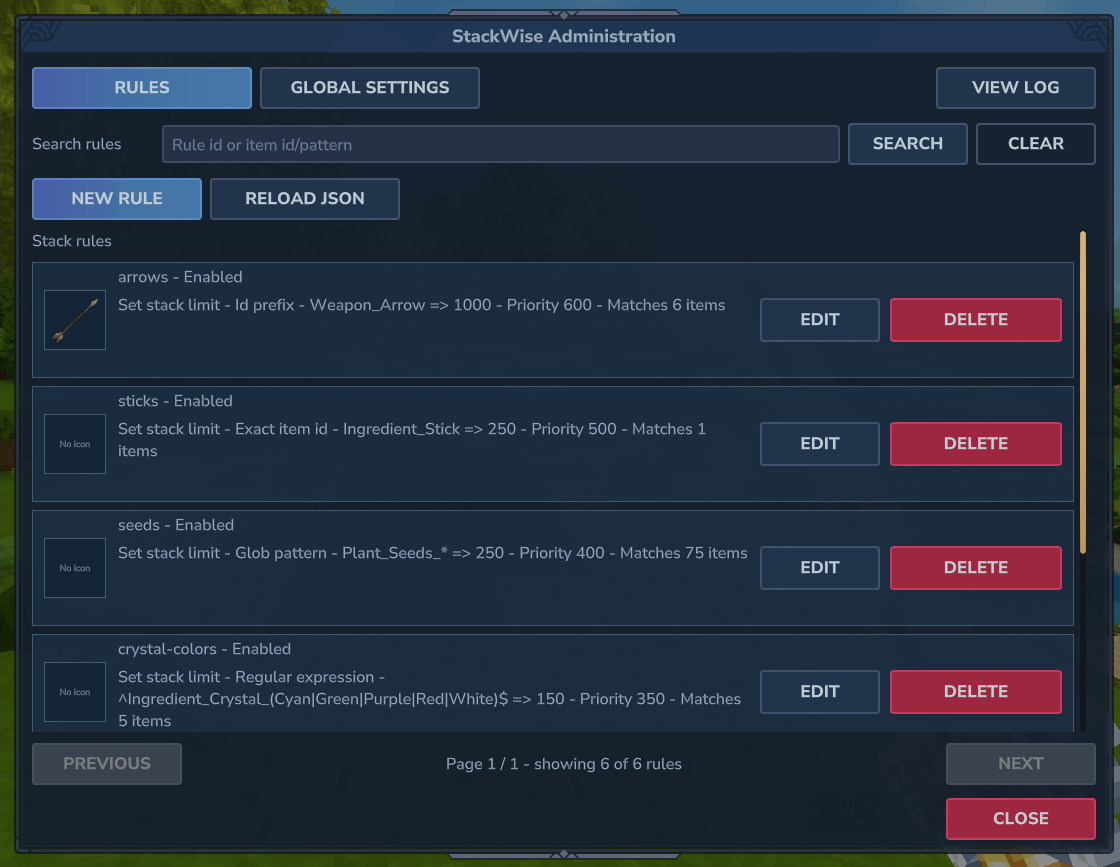
StackWise UI - Rules.png
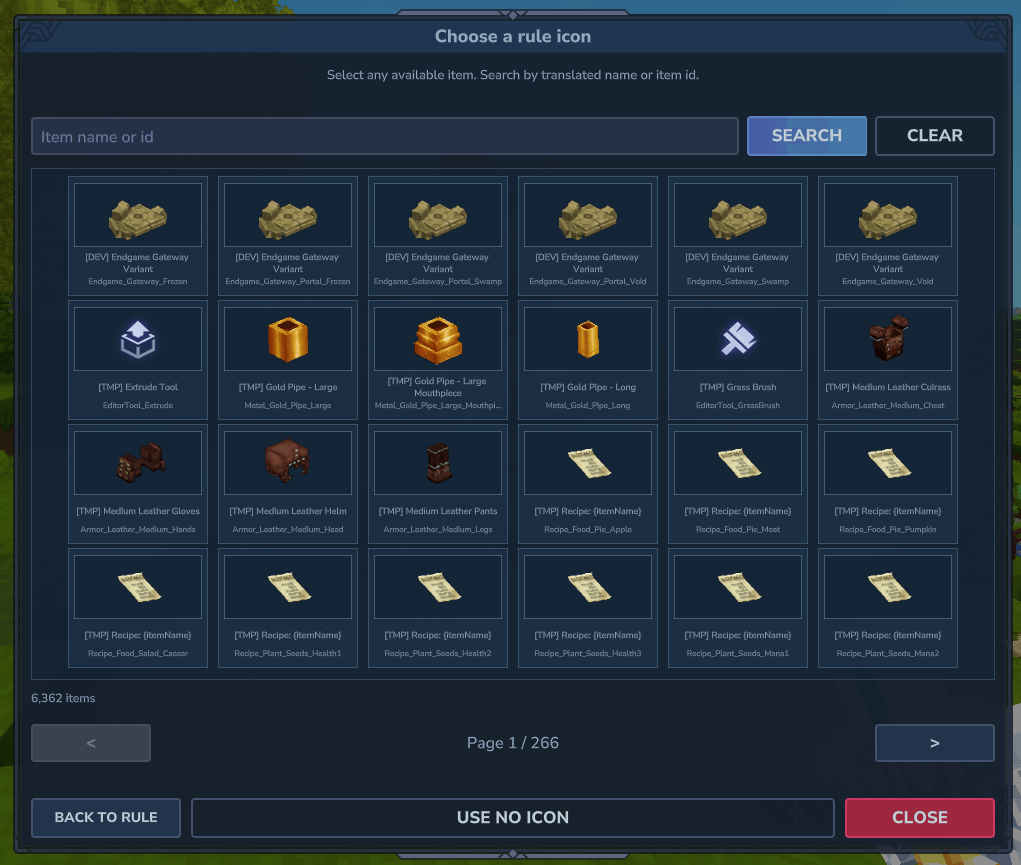
StackWise UI - Choose Icon.png
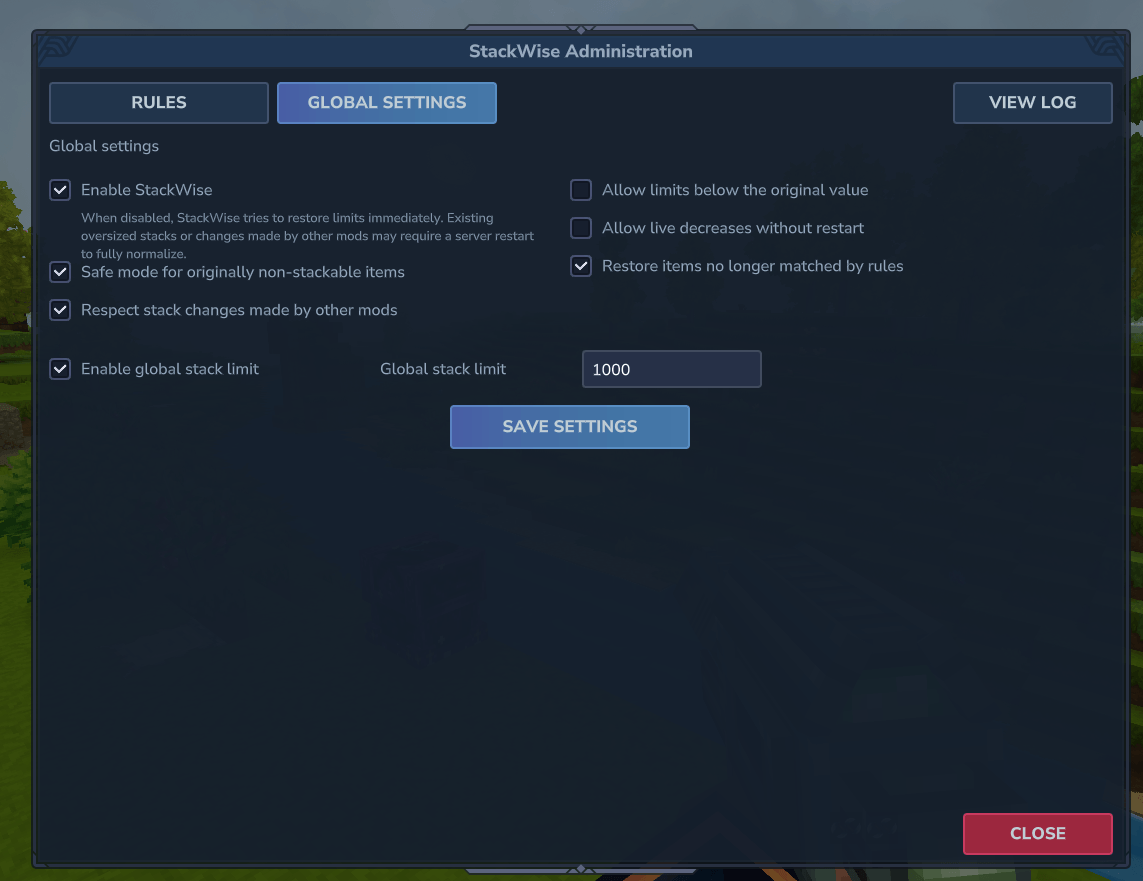
StackWise UI - Global Settings.png
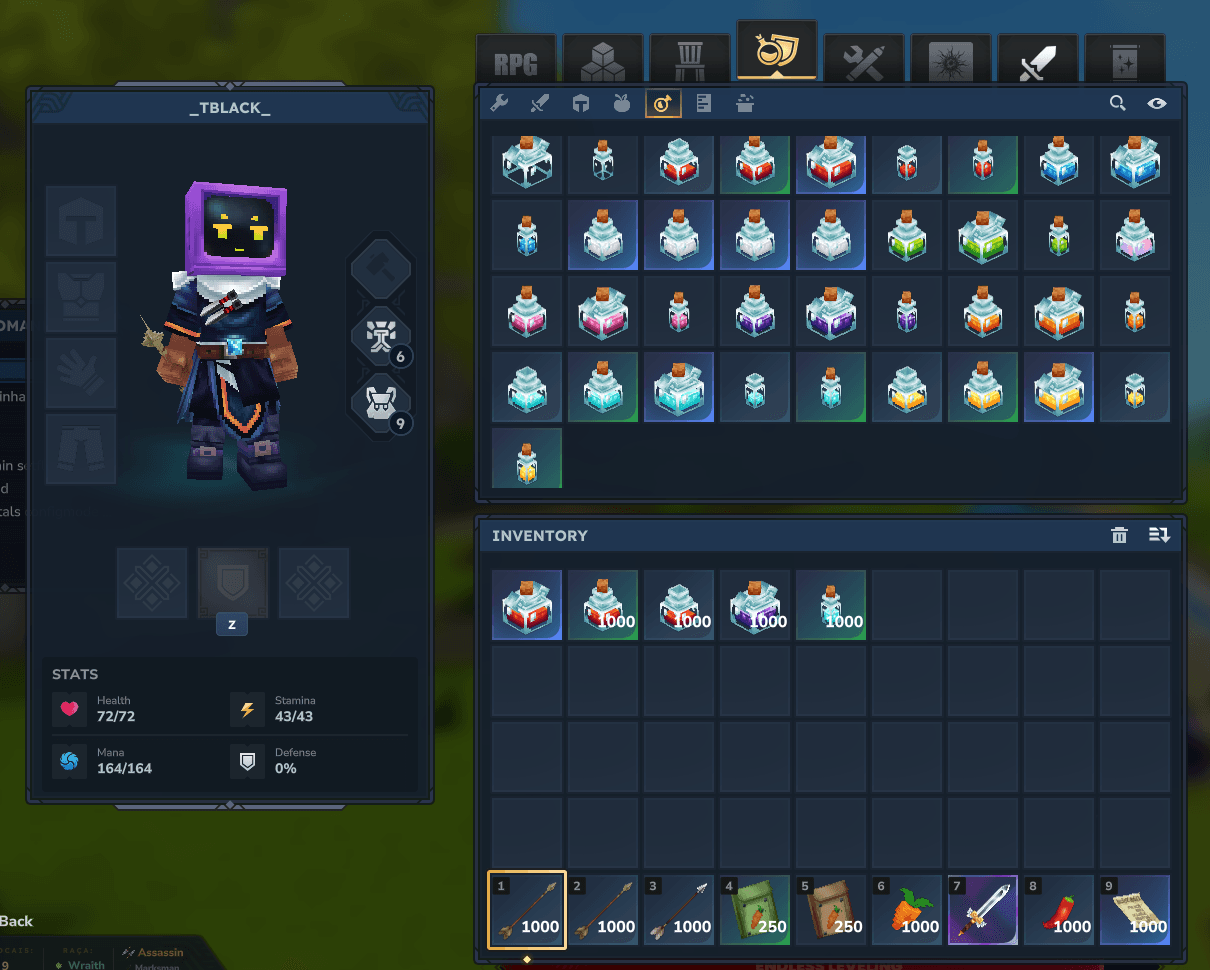
StackWise Items.png
Description
__If you like my work and want more mods: 
StackWise
Safe, intelligent and fully configurable item stack limits for Hytale servers
StackWise gives server owners complete control over item stack sizes through ordered rules, fixed or multiplier-based global limits and a clean in-game administration interface.
Increase common materials, protect sensitive items, exclude entire item families, migrate from Overstacked and manage everything without manually creating hundreds of individual entries.
🔥 StackWise Sponsors
Powered by HyTools

Free Hytale tools built by fans, for the community. Create shapes, format text, analyze server logs, configure servers, prepare announcements, simplify repetitive tasks, and more directly in your browser.
Powered by HyBrasa
Join HyBrasa, a Brazilian Hytale RPG server focused on adventure, progression, community, and an evolving gameplay experience.
Server IP: jogar.hybrasa.com.br:11276
Discord: Join the HyBrasa community →

✨ Features
- configurable stack limits from
1to999999; - two global stack modes:
FIXEDandMULTIPLIER; - editable fixed global stack limit, enabled by default at
1000; - baseline-relative global multiplier with a configurable cap;
- exact item ID matching;
- item ID prefix matching;
- item ID suffix matching;
- glob pattern matching;
- regular expression matching;
- ordered rule priorities;
- deterministic rule resolution;
SETrules for changing stack limits;EXCLUDErules for preserving or restoring original limits;- safe mode for originally non-stackable items;
- per-rule unsafe override when explicitly required;
- protection against unwanted stack decreases;
- protection against risky runtime decreases;
- live application of permitted stack increases without restarting the server;
- synchronization of runtime item updates with connected and future clients;
- restoration when StackWise is disabled;
- restoration when an item stops matching a rule;
- protection against changes made later by other mods;
- clean in-game administration UI;
- searchable and paginated rule list;
- optional item icons for visual rule identification;
- searchable and paginated item icon selector;
- icon search by localized item name or item ID;
- keyboard search confirmation with
Enter; - consistent fixed-size icon cards;
- clear no-icon state for rules without a selected icon;
- separate cards for easier rule identification;
- create, edit and delete rules in game;
- configurable global settings in game;
- actionable operation logs;
- full technical errors in the server log;
- manual Overstacked migration;
- intelligent conversion of repeated item families into prefix rules;
- timestamped configuration backups before migration;
- automatic and backward-compatible configuration migration from v1 to v2;
- atomic configuration writes;
- validation before replacing the active configuration;
- native Hytale permission support;
- optional LuckPerms permission checks;
- localized UI and command messages;
- no per-tick item processing.
🧠 How StackWise Works
StackWise reads the server item catalog, captures the current stack limit for each item and then resolves the desired result through its configured rules.
The general resolution order is:
- find the highest-priority matching rule;
- apply the most specific match when priorities are equal;
- use the selected fixed or multiplier global mode when no rule matches and the global fallback is enabled;
- preserve or restore the original value when an item is excluded;
- apply safety checks before changing the item;
- verify that the requested value was applied successfully.
StackWise does not continuously scan every item every tick. Changes are processed when assets are loaded or when the configuration is saved or reloaded. Permitted runtime changes are also synchronized with connected clients and with the item initialization data used by players who connect later.
🖥️ In-Game Administration UI
Administrators can open the StackWise panel with:
/stackwiseor:
/swThe interface includes:
- a searchable rule list;
- paginated results;
- visually separated rule cards;
- optional item icons displayed on rule cards;
- a searchable item icon catalog with pagination;
- icon search by localized name or item ID;
Entersupport for faster icon searches;- a clear no-icon option and status;
- match counts for every rule;
- rule creation and editing;
- safe rule deletion confirmation;
- global StackWise settings;
- a dedicated global mode selector with contextual explanations;
- mode-specific fixed-limit or multiplier controls;
- JSON reload support;
- the latest operation log;
- localized labels and messages.
The Rules tab is used to manage item-specific behavior. Each rule can optionally display an item icon, making large rule sets easier to scan without changing how the rule is evaluated.
When creating or editing a rule, use Choose Icon to browse the available item catalog. Search by localized item name or item ID, select an item, or choose Use No Icon to leave the rule without one.
The Global Settings tab is used to enable or disable StackWise, choose between a fixed limit and an original-value multiplier, configure the selected mode and control safety behavior. Only the settings relevant to the selected global mode are shown.
📚 Rule System
Every StackWise rule contains:
id
enabled
action
matchType
value
maxStack
priority
allowUnsafe
iconItemId (optional)
Example:
{
  "id": "arrows",
  "enabled": true,
  "action": "SET",
  "matchType": "PREFIX",
  "value": "Weapon_Arrow",
  "maxStack": 1000,
  "priority": 600,
  "allowUnsafe": false,
  "iconItemId": "Weapon_Arrow_Iron"
}
This rule changes every item whose ID starts with Weapon_Arrow to a maximum stack size of 1000.
iconItemId is optional and is used only to represent the rule visually in the administration interface. It does not participate in matching and can be removed without changing the rule's behavior.
🔎 Match Types
| Match type | Description | Example |
|---|---|---|
EXACT |
Matches one complete item ID. | Ingredient_Stick |
PREFIX |
Matches every item ID beginning with the configured value. | Weapon_Arrow |
SUFFIX |
Matches every item ID ending with the configured value. | _White |
GLOB |
Matches a simplified wildcard pattern. | Plant_Seeds_* |
REGEX |
Matches a Java regular expression. | ^Ingredient_Crystal_(Red|Green|Blue)$ |
Use EXACT whenever only one item should be changed.
Use PREFIX, SUFFIX or GLOB for related item families.
Use REGEX for advanced matching that cannot be represented cleanly by the simpler match types.
⚡ Rule Actions
SET
Changes the matching item's maximum stack size to the configured maxStack value.
Example:
{
  "id": "all-seeds",
  "enabled": true,
  "action": "SET",
  "matchType": "PREFIX",
  "value": "Plant_Seeds_",
  "maxStack": 500,
  "priority": 500,
  "allowUnsafe": false
}
EXCLUDE
Prevents the matching item from receiving a StackWise override and restores the baseline value when StackWise previously controlled it.
Example:
{
  "id": "exclude-swords",
  "enabled": true,
  "action": "EXCLUDE",
  "matchType": "PREFIX",
  "value": "Weapon_Sword_",
  "maxStack": 1,
  "priority": 1000,
  "allowUnsafe": false
}
EXCLUDE rules are especially useful when the global stack limit is enabled but certain item families must remain unchanged.
🏆 Priority and Specificity
When multiple rules match the same item, StackWise resolves them in this order:
- higher priority;
- more specific match type;
- earlier position in the configuration.
Match specificity order:
EXACT
PREFIX
SUFFIX
GLOB
REGEX
Example:
- a
PREFIXrule gives every crystal a stack size of500; - an
EXACTrule gives one specific crystal a stack size of1000; - when both rules have the same priority, the
EXACTrule wins.
Priorities can be configured from -10000 through 10000.
🌐 Global Stack Modes
StackWise includes an optional global fallback with two modes:
FIXED
Uses the same configured limit for every otherwise-unmatched item that was originally stackable:
"globalLimitEnabled": true,
"globalStackMode": "FIXED",
"globalStackLimit": 1000
This is the default mode and preserves the behavior of StackWise 1.1.
MULTIPLIER
Multiplies each item's captured original limit and applies a configurable cap:
"globalLimitEnabled": true,
"globalStackMode": "MULTIPLIER",
"globalStackMultiplier": 2.0,
"globalStackCap": 999
The calculation is:
min(globalStackCap, floor(original limit × globalStackMultiplier))For example, with a multiplier of 2.0:
- an original limit of
99becomes198; - an original limit of
10becomes20; - an original limit of
25with a multiplier of1.5becomes37; - any calculated result above a cap of
999becomes999.
This mode preserves the relative balance between item categories instead of forcing every item to use the same stack size.
The original limit used by the calculation is the effective baseline captured when the item asset loads. It may already include changes made earlier by asset packs or other mods.
Specific rules always take precedence over the global fallback. SET rules use their absolute configured value and may exceed the multiplier cap. EXCLUDE rules preserve or restore the captured baseline.
Originally non-stackable items are not changed by either global mode.
To change only explicitly configured items, disable the global fallback:
"globalLimitEnabled": falseFixed limits and multiplier caps can be configured from 1 to 999999. Multipliers can be configured from 1.0 to 999999.0.
🛡️ Safe Mode
Safe mode protects items whose original stack limit is 1.
These items can include weapons, tools, equipment, mounts, tokens or other items that may contain individual state and may not be safe to stack.
Default setting:
"safeMode": trueWhen safe mode is enabled, StackWise blocks an increase for an originally non-stackable item unless its matching rule explicitly enables:
"allowUnsafe": trueUse allowUnsafe only when you have confirmed that the item works correctly in stacks.
Safe mode warnings are shown in the StackWise operation log so the administrator can identify which items were protected.
↘️ Decrease Protection
Increasing a stack size is usually safer than reducing one on a live server.
StackWise includes two separate protections:
"allowDecreases": false,
"allowRuntimeDecreases": false
allowDecreases
Controls whether a configured value may be lower than the captured baseline value.
allowRuntimeDecreases
Controls whether StackWise may reduce an already active value while the server is running.
Permitted increases are applied immediately when the configuration is saved or reloaded, including changes from multiplier 4 to 5 or from multiplier mode to a higher fixed limit.
When a live reduction is blocked, StackWise keeps the current value, reports how many limits are pending and applies them after the next server restart. Enable allowRuntimeDecreases only when you intentionally want those reductions to happen immediately.
This prevents sudden normalization from interfering with existing oversized stacks, inventories or other runtime systems.
🔌 Enable, Disable and Vanilla Restoration
StackWise is enabled by default when installed for the first time:
"enabled": trueWhen StackWise is disabled, it immediately attempts to restore only the item limits that it currently owns.
"enabled": falseStackWise does not intentionally overwrite unrelated values while disabled.
A restart can still be necessary when:
- oversized stacks already exist in inventories or containers;
- another mod changes the same item after StackWise;
- the asset loading order changes;
- a runtime decrease cannot be normalized safely.
The in-game settings page displays this warning below the enable checkbox.
🤝 Compatibility with Other Stack Mods
StackWise tracks the last value it applied to every controlled item.
When respectExternalChanges is enabled and another mod changes that item afterward, StackWise releases the item to the external value instead of repeatedly forcing its own configuration.
Default setting:
"respectExternalChanges": trueThis behavior is designed to avoid destructive conflicts and unstable ownership loops between multiple mods.
For the most predictable setup, use only one primary stack-management mod after completing any migration.
🧹 Restore Unmatched Items
When a rule is disabled, deleted or changed, an item may stop matching it.
The following setting controls whether StackWise restores the item's captured baseline value:
"restoreUnmatchedItems": trueKeeping this enabled is recommended for most servers because it prevents old StackWise values from remaining active after rule changes.
⌨️ Commands
| Command | Description |
|---|---|
/stackwise |
Opens the StackWise administration interface. |
/stackwise ui |
Opens the StackWise administration interface. |
/stackwise reload |
Reloads, validates and applies config.json. |
/stackwise validate |
Validates the active StackWise configuration. |
/stackwise status |
Shows the latest stack application report. |
/stackwise import overstacked |
Imports rules from Overstacked's MaxStackSizes.json. |
/sw |
Default alias for /stackwise. |
The command name and aliases can be changed in config.json.
🔐 Permissions
Default administration permission:
stackwise.adminThis permission controls access to:
- the administration interface;
- rule creation and editing;
- global settings;
- configuration reload;
- configuration validation;
- status reports;
- Overstacked migration.
StackWise supports the native Hytale permission system and can also check LuckPerms when it is installed.
The permission node can be changed in:
"commands": {
  "adminPermission": "stackwise.admin"
}
🔁 Overstacked Migration
StackWise includes a manual migration command for server owners moving away from Overstacked.
Migration is never started automatically.
Keep the original file available and run:
/stackwise import overstackedStackWise looks for:
MaxStackSizes.jsonThe migration will:
- read
ItemIds; - read
Patterns; - validate every imported stack value;
- preserve valid Overstacked patterns as
REGEXrules; - convert compatible item families into
PREFIXrules; - keep items separate when their values differ;
- generate deterministic rule IDs;
- replace the current StackWise rule list;
- create a timestamped backup of the current configuration;
- disable the global fallback to preserve the imported behavior;
- save and apply the imported configuration;
- report the amount of prefix, exact and regex rules created.
Example input:
"Ingredient_Crystal_Blue": 1000,
"Ingredient_Crystal_Green": 1000,
"Ingredient_Crystal_Red": 1000
When all compatible entries share the same prefix and value, StackWise can create:
{
  "action": "SET",
  "matchType": "PREFIX",
  "value": "Ingredient_Crystal_",
  "maxStack": 1000
}
If one item in the family uses a different value, those entries remain separate EXACT rules.
Before migrating a production server, always create a full server backup.
After confirming the imported behavior, remove the old stack-management mod to keep ownership predictable.
⚙️ Configuration
StackWise creates its configuration at:
mods/Tblack_StackWise/config.jsonDefault configuration structure:
{
  "configVersion": 2,
  "enabled": true,
  "globalLimitEnabled": true,
  "globalStackMode": "FIXED",
  "globalStackLimit": 1000,
  "globalStackMultiplier": 2.0,
  "globalStackCap": 999,
  "safeMode": true,
  "allowDecreases": false,
  "allowRuntimeDecreases": false,
  "restoreUnmatchedItems": true,
  "respectExternalChanges": true,
  "commands": {
    "primary": "stackwise",
    "aliases": [
      "sw"
    ],
    "adminPermission": "stackwise.admin"
  },
  "rules": []
}
Supported stack limit range:
1 to 999999Maximum supported rule count:
5000 rulesAfter editing the file, run:
/stackwise reloadInvalid configurations are not allowed to replace the last valid active configuration.
When StackWise finds invalid JSON or invalid values, it preserves the active configuration and creates a timestamped copy of the invalid file for troubleshooting.
Upgrading from StackWise 1.1
StackWise automatically migrates valid configVersion: 1 files to version 2.
The migration:
- preserves every existing rule, command and safety option;
- keeps
FIXEDas the active global mode, so existing servers retain the same behavior; - preserves the previous
globalStackLimit; - adds a default multiplier of
2.0and cap of999; - creates
config.before-v2.<timestamp>.jsonbefore rewriting the configuration.
To downgrade to StackWise 1.1, restore the generated config.before-v2 backup before starting the older mod version. StackWise 1.1 does not understand the version 2 schema.
🧪 Configuration Examples
Increase arrows
{
  "id": "arrows",
  "enabled": true,
  "action": "SET",
  "matchType": "PREFIX",
  "value": "Weapon_Arrow",
  "maxStack": 1000,
  "priority": 600,
  "allowUnsafe": false
}
Increase all seeds
{
  "id": "seeds",
  "enabled": true,
  "action": "SET",
  "matchType": "GLOB",
  "value": "Plant_Seeds_*",
  "maxStack": 500,
  "priority": 500,
  "allowUnsafe": false
}
Increase selected crystal colors
{
  "id": "selected-crystals",
  "enabled": true,
  "action": "SET",
  "matchType": "REGEX",
  "value": "^Ingredient_Crystal_(Cyan|Green|Purple|Red|White)$",
  "maxStack": 250,
  "priority": 700,
  "allowUnsafe": false
}
Exclude weapons from the global limit
{
  "id": "exclude-weapons",
  "enabled": true,
  "action": "EXCLUDE",
  "matchType": "PREFIX",
  "value": "Weapon_",
  "maxStack": 1,
  "priority": 1000,
  "allowUnsafe": false
}
📋 Operation Log
The administration interface includes an operation log for the latest load, reload, save or migration action.
The player-facing log focuses on problems that an administrator can understand and act on, including:
- invalid configuration values;
- invalid regular expressions;
- items blocked by safe mode;
- decreases that require a restart;
- external mod conflicts;
- migration file problems;
- failed configuration writes;
- item update failures.
Technical exception details and Java stack traces remain in the server log instead of being exposed in the UI.
The status report includes:
scanned
matched
changed
blocked
failures
🌍 Localization
StackWise includes localized interface and command messages for:
English
Portuguese — Brazil
Spanish
French
German
Russian
Ukrainian
Simplified Chinese
Player-facing messages use the player's current language when available.
🚀 Performance
StackWise is designed for predictable server-side operation.
It does not run a continuous per-tick loop over the item catalog.
Rules are compiled and evaluated when configuration or asset state changes, including:
- server startup;
- asset loading;
- configuration reload;
- rule creation or editing;
- global setting changes;
- migration application.
Rule matching is deterministic, and the administration interface displays cached match counts for easier management.
📥 Installation
- Download the latest StackWise
.jar. - Place it in your server's
modsfolder. - Start the server.
- StackWise creates:
mods/Tblack_StackWise/config.json- Open the administration interface:
/stackwise- Review the global limit and example rules before opening a production server.
StackWise is enabled by default on the first start.
New installations start in FIXED mode with a default global stack limit of 1000.
Existing StackWise 1.1 configurations are migrated automatically without changing their active stacking behavior.
To manage only selected items, disable the global fallback and create explicit rules.
⭐ Recommended Setups
Simple global stack increase
Use:
"globalLimitEnabled": true,
"globalStackMode": "FIXED",
"globalStackLimit": 1000
Add EXCLUDE rules for weapons, equipment or special item families that should remain unchanged.
Balance-friendly proportional increase
Use:
"globalLimitEnabled": true,
"globalStackMode": "MULTIPLIER",
"globalStackMultiplier": 2.0,
"globalStackCap": 999
This doubles each originally stackable item's captured limit while keeping the relative differences between materials, food and other item categories. The cap prevents already-large stacks from growing beyond the configured ceiling.
Rules-only configuration
Use:
"globalLimitEnabled": falseCreate specific EXACT, PREFIX, SUFFIX, GLOB or REGEX rules only for the items you want to change.
Safer live server configuration
Recommended values:
"safeMode": true,
"allowDecreases": false,
"allowRuntimeDecreases": false,
"restoreUnmatchedItems": true,
"respectExternalChanges": true
This setup allows controlled increases while protecting originally non-stackable items, avoiding risky runtime reductions and respecting later changes from other mods.
⚠️ Important Notes
- Extremely large stack sizes can affect inventory balance and gameplay economy.
- Some individual items may contain unique state and should not be stacked.
- Keep safe mode enabled unless you understand the behavior of the affected item.
- Existing oversized stacks may not immediately split when a limit is reduced.
- A restart may be required after some decreases or compatibility changes.
- Stack increases are applied live, but reductions still respect
allowDecreasesandallowRuntimeDecreases. - Keep the generated
config.before-v2backup if you may need to downgrade to StackWise 1.1. - Always back up your server before large configuration changes or migrations.
- Test important rules in a development environment before applying them to a live economy.
📌 Version
Current version:
1.2.0💻 Source & Contributions
StackWise is source-available for non-commercial use.
Developers can read, modify, fork and contribute to the project for non-commercial purposes.
Contributions are welcome, especially around:
- additional migration sources;
- compatibility improvements;
- safer item classification;
- more rule tools;
- better diagnostics;
- UI improvements;
- additional translations;
- automated tests;
- Hytale API compatibility updates.
📜 License
StackWise is licensed under the PolyForm Noncommercial License 1.0.0.
You may read, use, copy, modify, fork and contribute to the project for non-commercial purposes.
You may not sell copies of this project, sell modified versions of this project, or use this project as the basis of a commercial product or paid service without explicit written permission from the project maintainers.
Commercial licensing exceptions may be granted by the maintainers on request.
StackWise
Stack more. Configure smarter. Keep control.
A modern and safety-focused stack management system for Hytale servers.
[Tblack's] StackWise Team

![[Tblack's] EasyCommands project image](https://media.forgecdn.net/avatars/thumbnails/1675/378/256/256/639065294440800586.png)
![[Tblack's] VoidVault project image](https://media.forgecdn.net/avatars/thumbnails/1847/337/256/256/639162430709288611.png)