

![[Tblack's] EasyCommands logo](https://media.forgecdn.net/avatars/thumbnails/1675/378/64/64/639065294440800586.png)
[Tblack's] EasyCommands
- By
Stop retyping commands—bind them to slots (1–9) and trigger instantly with Ctrl+F or O.
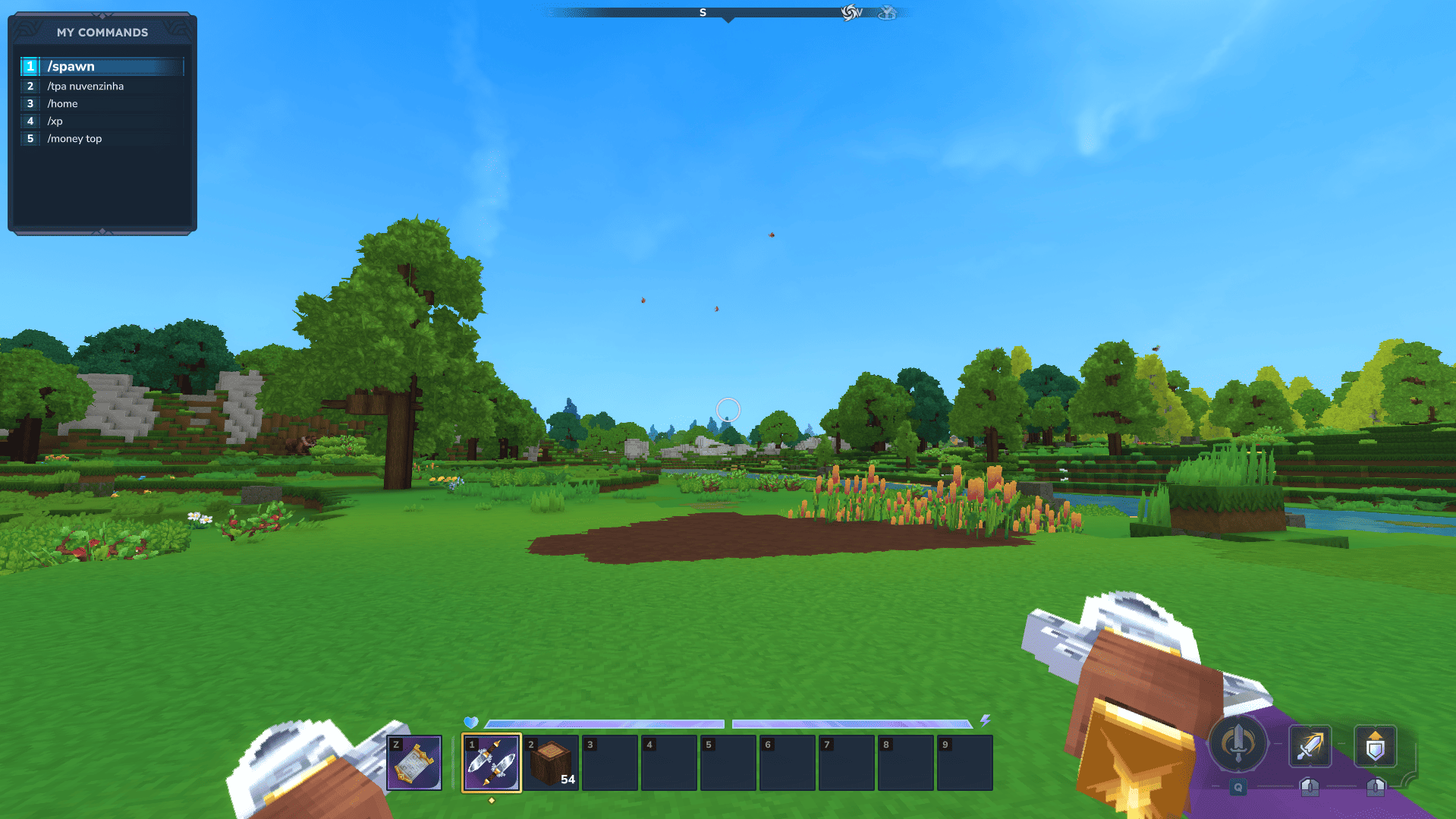
HUD - EasyCommands.png
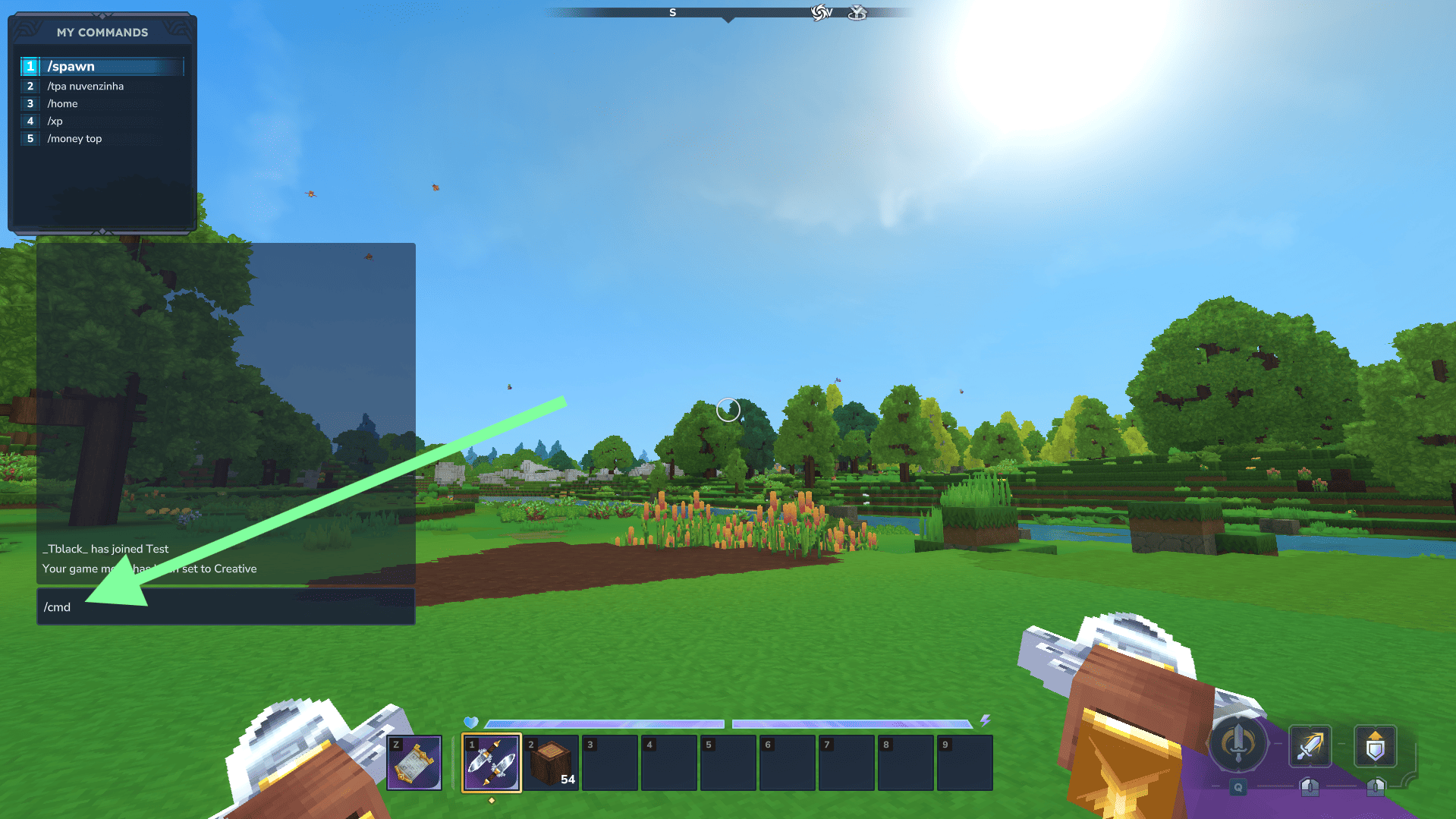
Mod Command Activation - EasyCommands.png
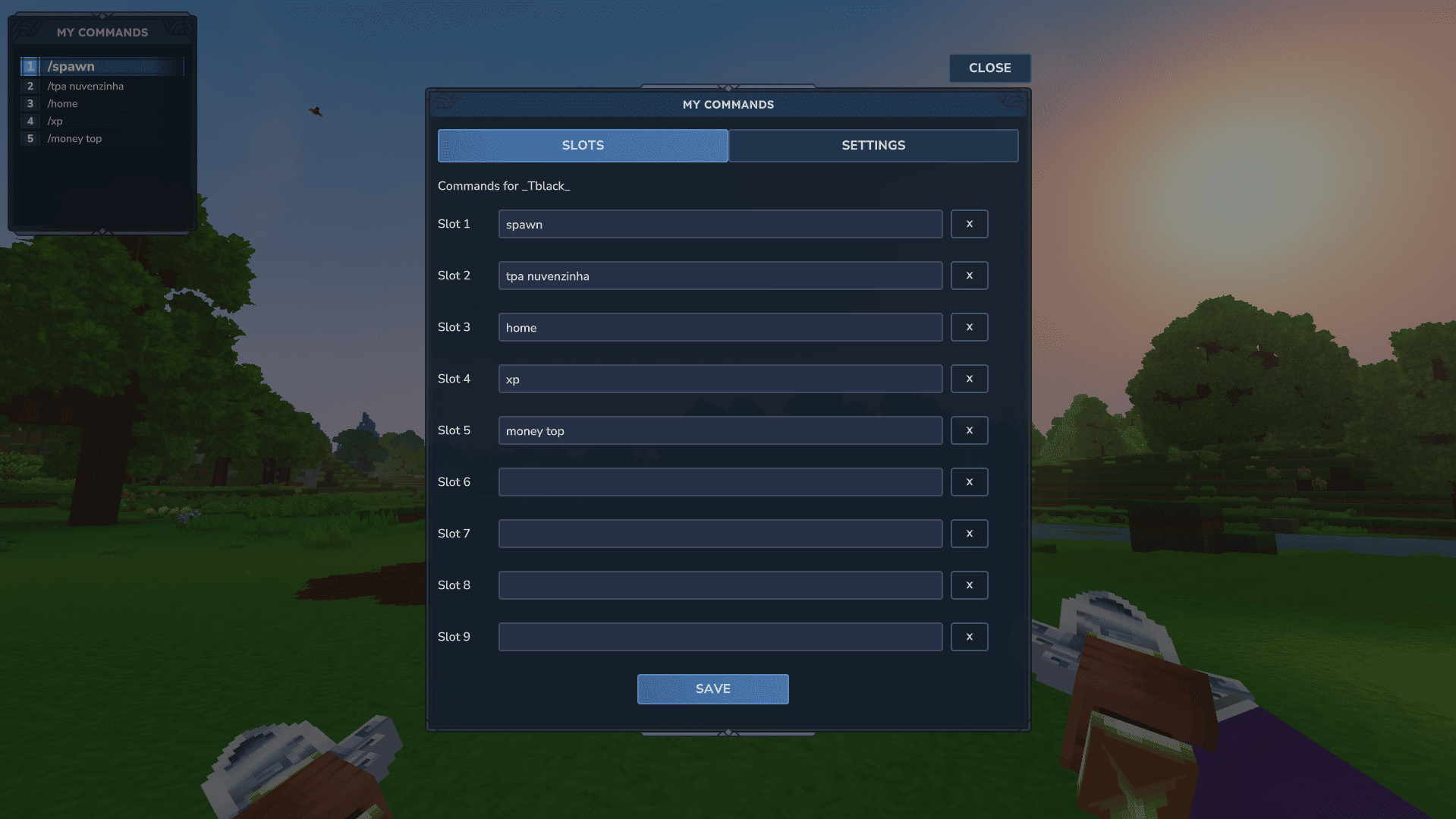
Slots Screen - EasyCommands.png
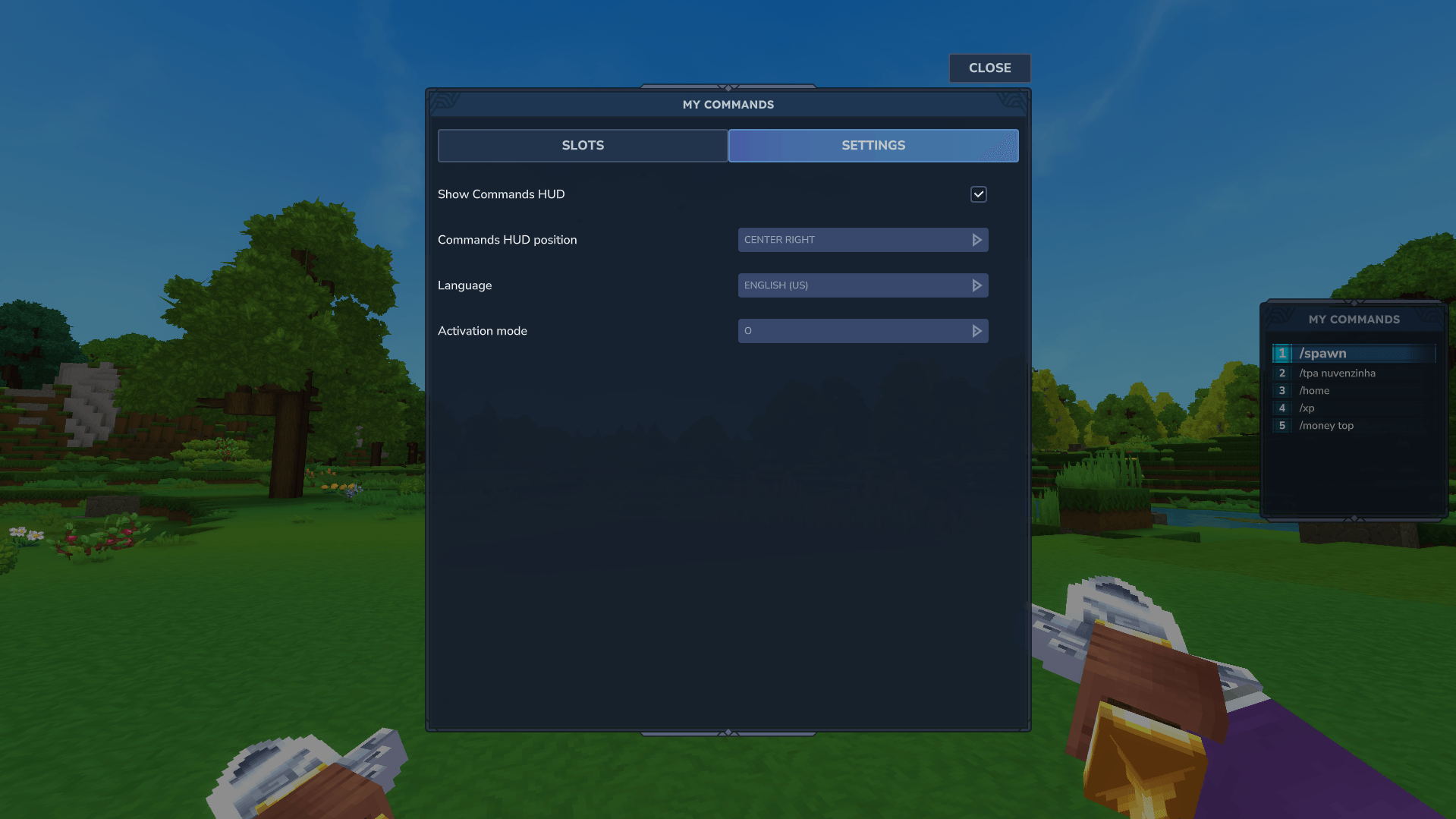
Settings Screen - EasyCommands.png
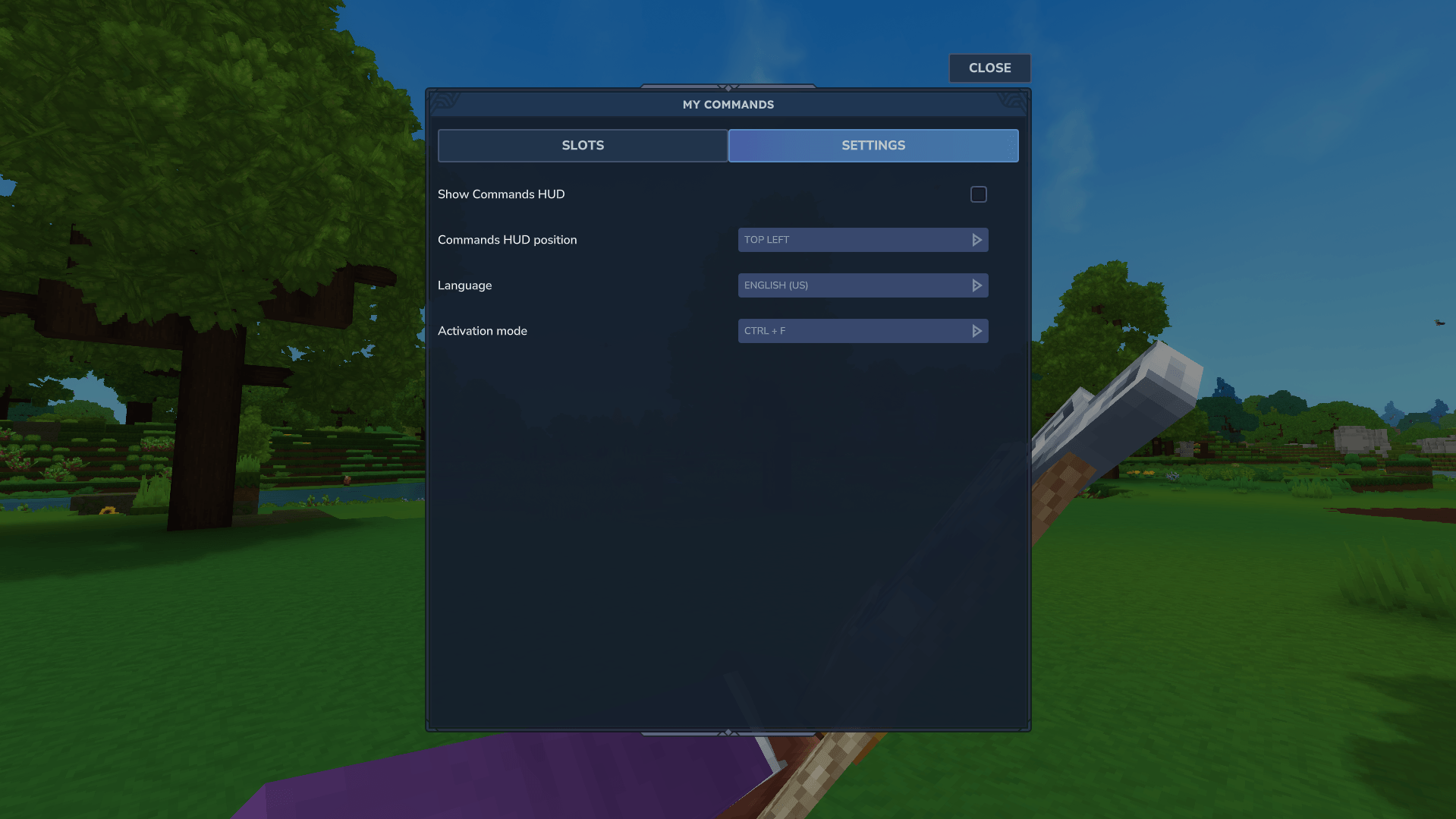
Hide HUD - EasyCommands.png
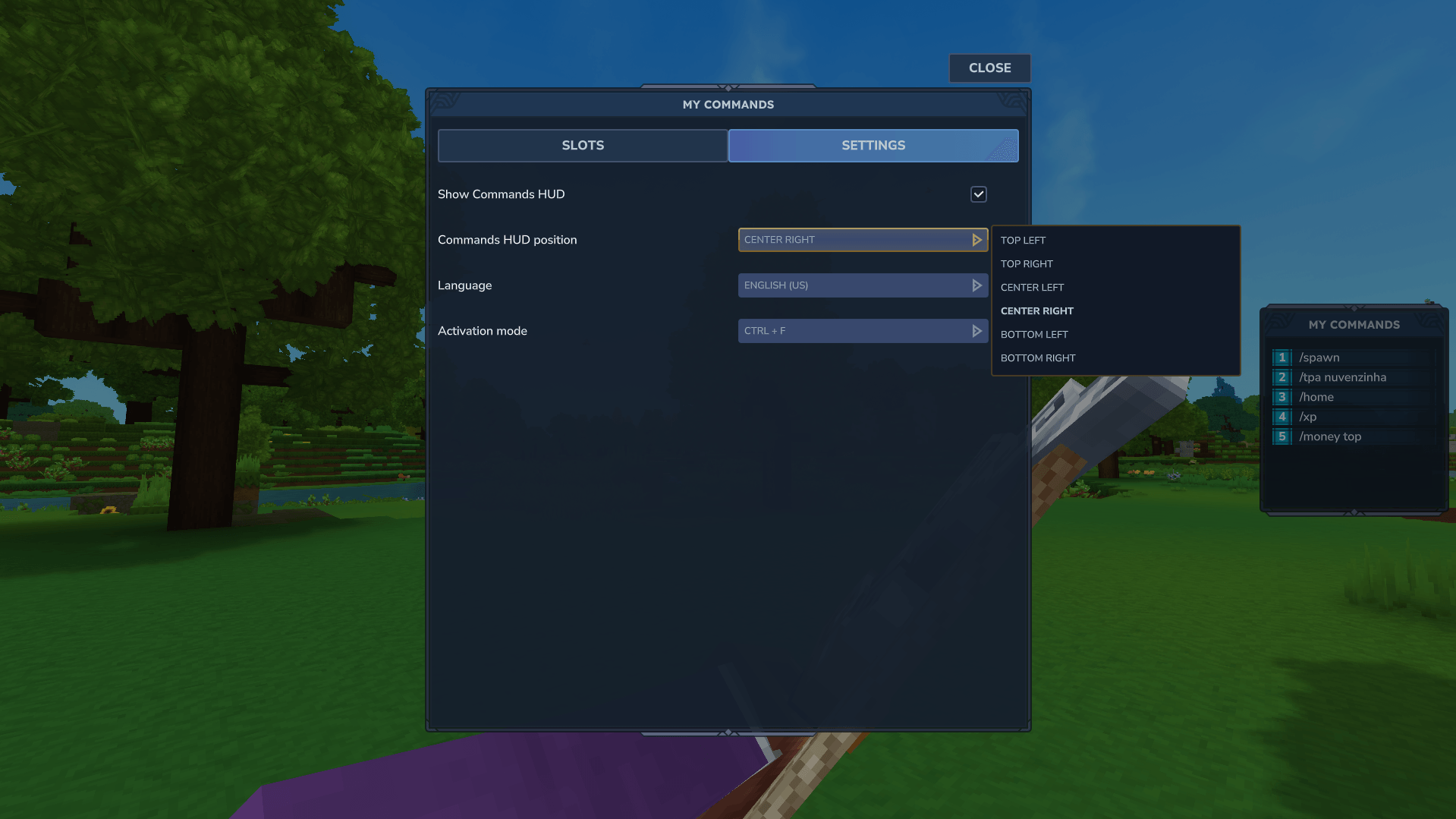
Change HUD Position - EasyCommands.png
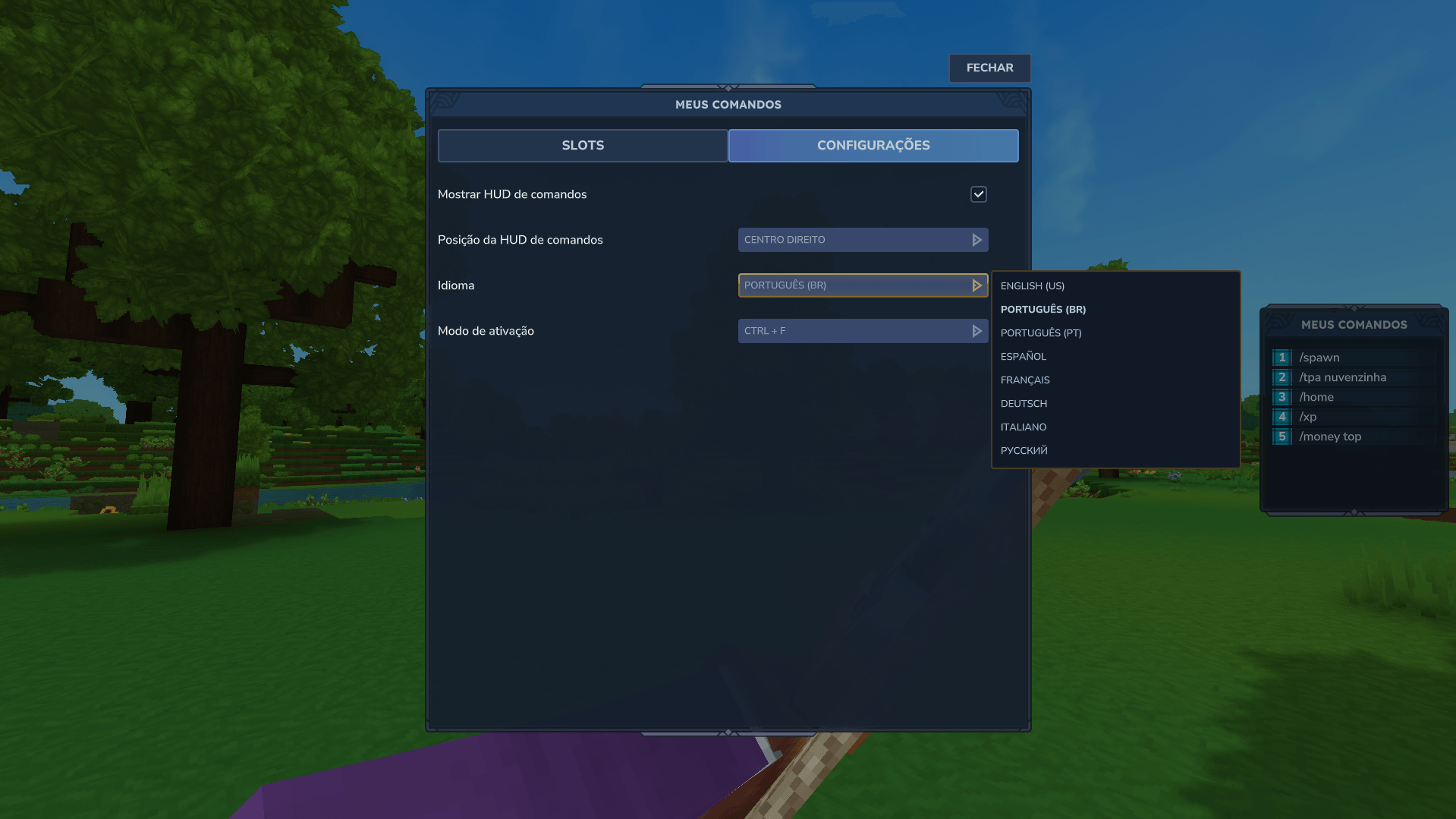
Change Language - EasyCommands.png
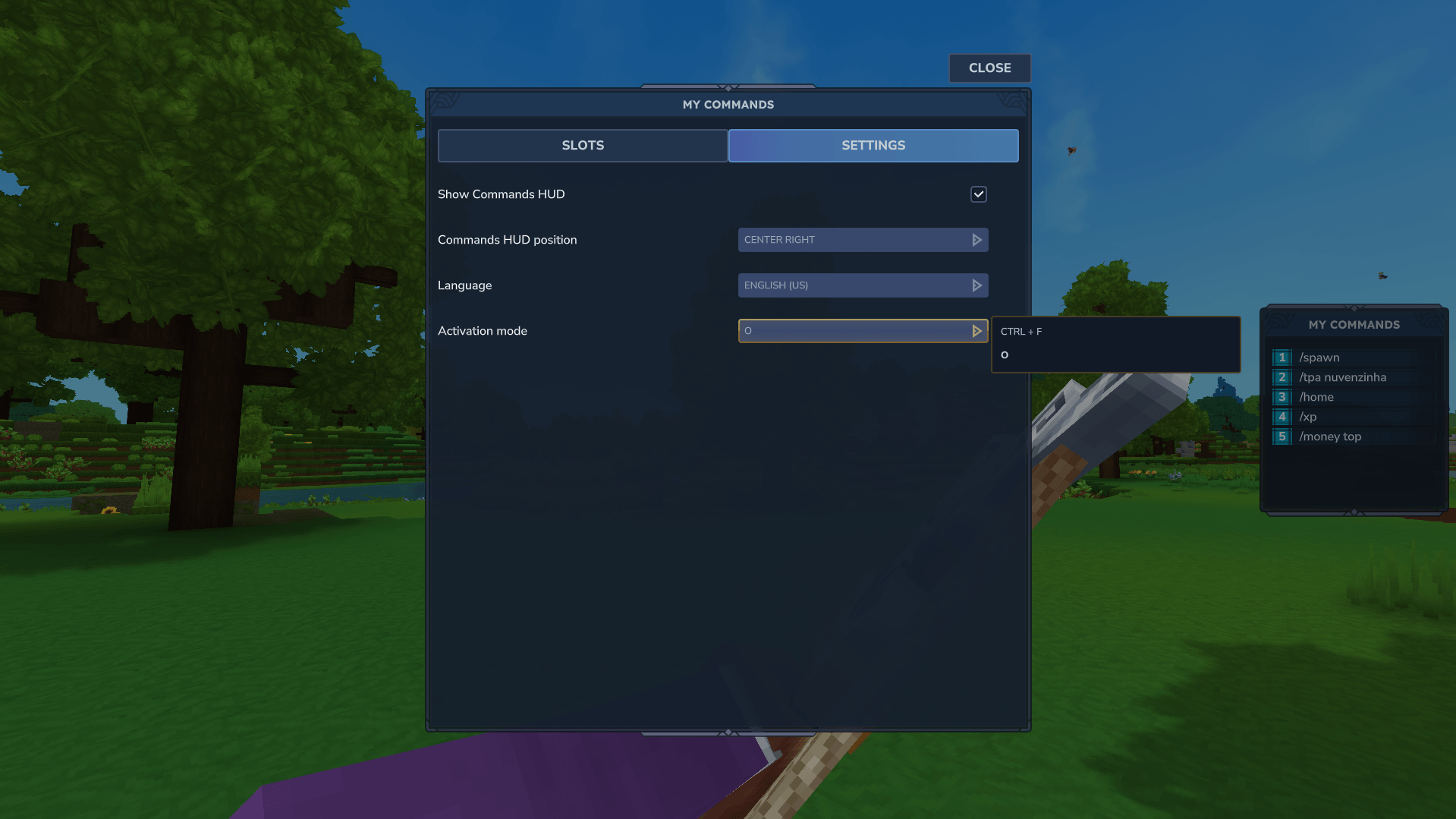
Change Activation Key - EasyCommands.png
Description
If you like my work and want more mods: 
EasyCommands
Instant command shortcuts with configurable slots and an optional in-game HUD
EasyCommands helps players execute their most frequently used commands without repeatedly typing them in chat.
Assign commands to nine configurable slots, choose how shortcuts are activated, customize the interface and keep your commands visible through a compact optional HUD.
🔥 EasyCommands Sponsors
Powered by HyTools

Free Hytale tools built by fans, for the community. Create shapes, format text, analyze server logs, configure servers, prepare announcements, simplify repetitive tasks, and more directly in your browser.
Powered by HyBrasa
Join HyBrasa, a Brazilian Hytale RPG server focused on adventure, progression, community, and an evolving gameplay experience.
Server IP: jogar.hybrasa.com.br:11276
Discord: Join the HyBrasa community →

✨ Features
- nine configurable command slots;
- clean in-game configuration interface;
- commands can be entered with or without
/; - configurable shortcut activation mode;
- optional compact command HUD;
- multiple HUD position presets;
- individual clearing of configured slots;
- protection against accidental activation while moving;
- cooldown protection against repeated triggers;
- persistent player configuration;
- language selector;
- localized interface and messages;
- normal command permission validation;
- support for commands provided by Hytale and other installed mods.
🕹️ Quick Start
1. Open EasyCommands
Run the following command in game:
/cmdThis opens the EasyCommands configuration interface.
2. Configure your shortcuts
Enter a command into any available slot from 1 through 9.
Examples:
spawn
home
kit starter
tpa PlayerName
Commands can be entered with or without the initial slash:
spawnand:
/spawnare both accepted.
After configuring your slots, select Save to store the changes.
Use Clear on an individual slot to remove only that shortcut.
3. Choose an activation mode
Open the Config tab and select the activation mode you want to use.
Available options may include combinations such as:
CTRL + For:
OWhen the selected activation input is detected, EasyCommands executes the command assigned to the corresponding slot.
4. Stop moving before activating
EasyCommands only activates shortcuts while your character is standing still.
This protection reduces unintended command execution during movement, exploration or combat.
⌨️ Command Slots
EasyCommands provides nine independent shortcut slots:
Slot 1
Slot 2
Slot 3
Slot 4
Slot 5
Slot 6
Slot 7
Slot 8
Slot 9
Each slot can contain a complete command, including its arguments.
Examples:
home
warp market
kit starter
msg PlayerName Hello!
tpa PlayerName
The commands are executed using the player who activated the shortcut.
All normal command restrictions and permission checks continue to apply.
🖥️ In-Game Interface
The EasyCommands interface can be opened with:
/cmdFrom the interface, players can:
- configure all nine command slots;
- edit previously saved commands;
- clear individual slots;
- save their configuration;
- choose an activation mode;
- enable or disable the HUD;
- change the HUD position;
- select their preferred language;
- close the configuration screen.
The interface is designed so that players can manage their shortcuts without manually editing configuration files.
📺 Optional Command HUD
EasyCommands includes an optional compact HUD that displays the commands currently assigned to the player's shortcut slots.
The HUD helps players remember their configured commands without reopening the configuration interface.
Players can:
- enable or disable the HUD;
- choose from the available screen positions;
- immediately see changes after updating their shortcuts;
- keep frequently used commands visible during gameplay.
The HUD is completely optional and can remain disabled for players who prefer a cleaner interface.
🎯 Activation Modes
The activation mode determines which input EasyCommands uses to recognize shortcut activation.
Players can configure this option from the Config tab.
EasyCommands also applies a cooldown between activations to prevent:
- accidental double execution;
- multiple commands being triggered too quickly;
- repeated activation caused by the same input;
- command spam.
For additional protection, shortcuts are only activated when the player is standing still.
✅ Useful For
EasyCommands can be used with almost any command the player is normally allowed to execute.
Common uses include:
Teleportation
spawn
home
warp market
tpa PlayerName
Kits and loadouts
kit starter
kit builder
kit daily
Communication
msg PlayerName Hello!
trade
party invite PlayerName
Server utilities
claim
shop
quests
rules
Administration
gamemode creative
teleport PlayerName
moderation command
Administrative commands still require the appropriate permissions.
🔐 Permissions and Command Security
EasyCommands does not bypass Hytale permissions or permission systems provided by other mods.
When a shortcut is activated, the configured command is processed as though the player had entered it normally.
This means:
- players cannot use commands they do not have permission to execute;
- administrative commands remain protected;
- command restrictions from other mods continue to apply;
- invalid commands still fail normally;
- EasyCommands does not grant additional privileges.
If a player cannot execute a command through chat, that player cannot execute it through EasyCommands.
🌍 Localization
EasyCommands includes localized interface elements and player-facing messages.
Players can choose their preferred language directly through the in-game configuration interface.
The selected language is used for supported:
- interface labels;
- buttons;
- configuration options;
- validation messages;
- shortcut feedback;
- status messages.
⚡ Performance and Safety
EasyCommands is designed to remain lightweight during normal gameplay.
Shortcut execution is event-driven and does not require continuous command processing.
The mod includes protections such as:
- movement checks before shortcut activation;
- cooldown handling;
- validation of configured commands;
- controlled slot execution;
- persistent player preferences;
- no permission bypassing.
These protections help make shortcuts responsive while reducing unintended command execution.
📥 Installation
- Download the latest EasyCommands
.jar. - Place the file inside your server's
modsfolder. - Start or restart the server.
- Join the server.
- Open EasyCommands with:
/cmd- Configure your command slots.
- Choose an activation mode.
- Enable and position the HUD when desired.
- Save your configuration.
No manual player configuration file editing is required.
⚠️ Activation Mode O
When the O activation mode is selected, manually entering certain shortened game mode commands may also activate EasyCommands shortcuts.
The affected commands include:
/gm c
/gm a
This happens because pressing O in vanilla Hytale internally uses game mode command behavior that EasyCommands observes to detect the input.
As a result, manually entering those shortened commands can be interpreted as an O activation.
To change game mode without activating the shortcut, use one of the complete alternatives:
/gamemode c
/gamemode a
or:
/gamemode creative
/gamemode adventure
This limitation only applies when the O activation mode is selected.
🛠️ Troubleshooting
The shortcut does not activate
Confirm that:
- your character is standing still;
- the command slot is not empty;
- your changes were saved;
- the correct activation mode is selected;
- the shortcut is not currently on cooldown;
- you have permission to execute the configured command.
The command returns an error
Try entering the same command normally in chat.
If it also fails in chat, the problem is related to the command itself, its arguments or your permissions rather than EasyCommands.
The HUD is not visible
Open:
/cmdThen check whether the HUD is enabled and select a different position preset if necessary.
The shortcut activates more than once
Wait for the configured cooldown before activating another shortcut.
EasyCommands includes cooldown protection, but repeatedly using the activation input can still produce unexpected behavior depending on latency and server performance.
📌 Important Notes
- EasyCommands does not grant access to restricted commands.
- Shortcuts only activate while the player is standing still.
- A cooldown prevents excessively fast command execution.
- Commands may be entered with or without
/. - Commands provided by other mods can be used when they are available and the player has permission.
- The HUD is optional and can be disabled.
- The
Oactivation mode has a known interaction with shortened game mode commands. - Invalid or unavailable commands are not automatically corrected by EasyCommands.
EasyCommands
Less typing. Faster commands. More time playing.
A simple and convenient shortcut system for frequently used Hytale commands.
[Tblack's] EasyCommands Team

![[Tblack's] StackWise project image](https://media.forgecdn.net/avatars/thumbnails/1893/179/256/256/639183898838593372.png)
![[Tblack's] VoidVault project image](https://media.forgecdn.net/avatars/thumbnails/1847/337/256/256/639162430709288611.png)