[MGG] Quick Pickup
- By
Automatically sends supported block, mob, and item drops to your inventory. Use /pickup to manage ON, OFF, or SNEAK mode, pickup categories, and collection speed. Inventory overflow drops safely at your feet.
Description
Features
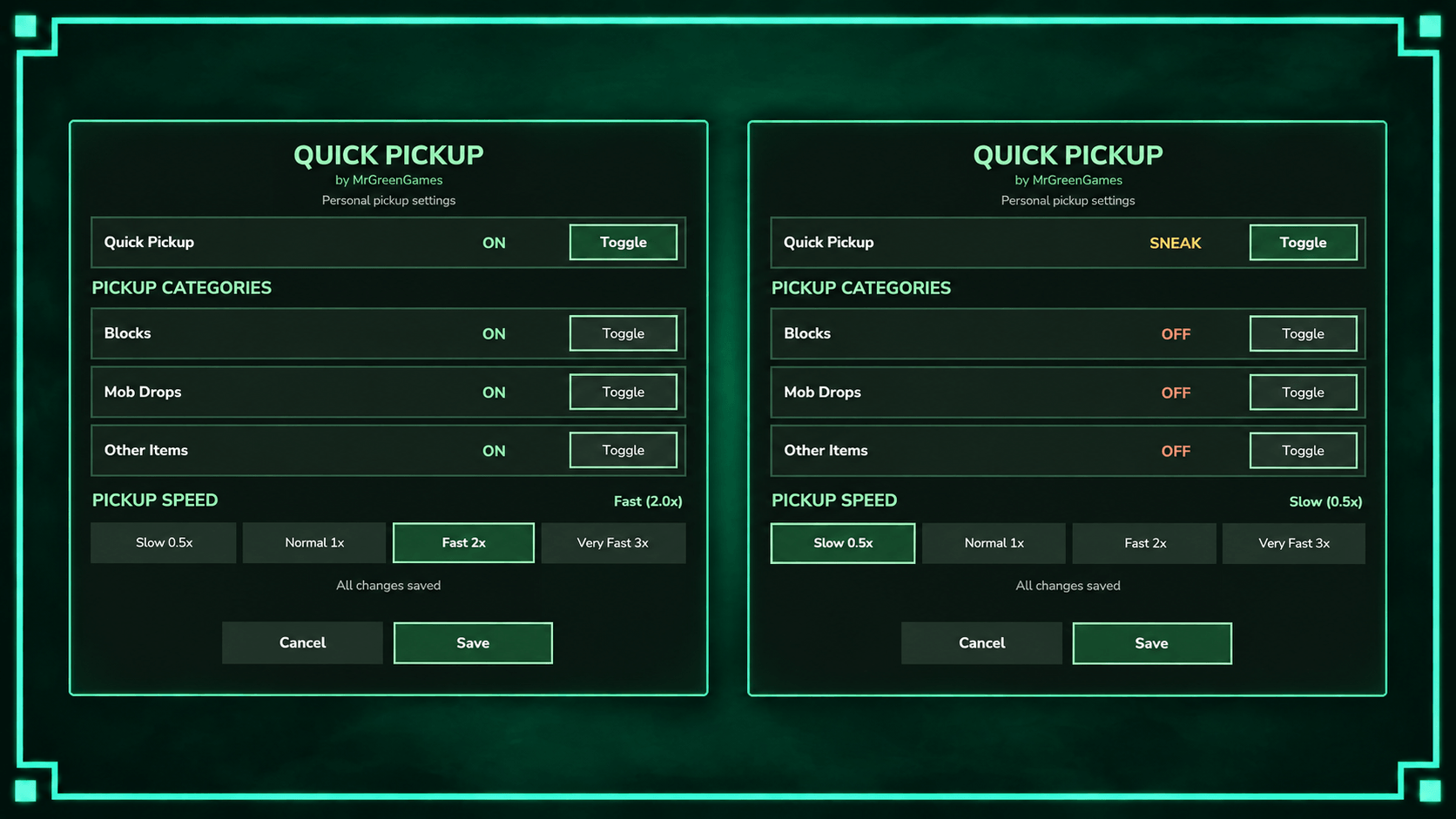
- In-Game Settings GUI — Manage your personal Quick Pickup settings through /pickup.
- Customizable Pickup Modes — Choose between ON, OFF, and SNEAK modes to control automatic item collection.
- Separate Pickup Categories — Independently enable or disable Blocks, Mob Drops, and Other Items.
- Smart Drop Classification — Correctly separates block drops from materials such as sticks, sap, fiber, seeds, saplings, and fruit.
- Adjustable Pickup Speed — Choose between Slow, Normal, Fast, and Very Fast collection speeds.
- Connected Block Support — Collects connected and secondary drops from actions such as chopping trees, including drop sequences started while sneaking.
- Inventory Overflow Protection — Items that cannot fit into your inventory are safely dropped at your feet.
- Manual Drop Protection — Prevents intentionally dropped items from being immediately collected again.
- Persistent Player Settings — Saves individual pickup modes, category preferences, and collection speeds between sessions.
- Optional Permissions — Control access to the GUI and individual pickup categories through permissions.
How to Use
Open the Quick Pickup settings menu using /pickup.
Choose between ON, OFF, and SNEAK modes. SNEAK mode collects items only while crouching.
Enable or disable individual pickup categories and select your preferred collection speed.
Your settings are automatically saved between sessions.
Configuration
Quick Pickup is configured through its in-game GUI.
Command: /pickup
Permissions — Disabled by Default:
- mgg.quickpickup.gui — Access to the settings menu.
- mgg.quickpickup.blocks — Block drops.
- mgg.quickpickup.mobs — Mob drops.
- mgg.quickpickup.items — Other supported item drops.
Installation
Place the plugin .jar inside: AppData\Roaming\Hytale\UserData\Mods
Enable the mod inside of your world settings.
Start or restart the server/world.
Important Notes
- Drop sequences started while sneaking continue collecting even after you stop crouching.
- Items that exceed inventory capacity are dropped safely instead of being deleted.
- Manually dropped items are protected from immediate automatic collection.
Support & Usage
If you encounter an issue, please include your Hytale log and relevant config.yml settings when reporting it.
Consider following MrGreenGames if you enjoy this mod! 💚
🟢 Feel free to use this mod in your modpacks and videos!
If you feature the mod in a video or showcase, linking back to the original mod page in your description is greatly appreciated, but not required.
🔴 Please do not redistribute or repurpose the mod.
You may not reupload the mod to other websites, launchers, or platforms, nor reuse its models, textures, data, or other assets in separate projects.
Do not place the mod behind ad-based or redirect services such as AdFly, and do not sell the mod or include it in any paid modpack.
💚 This mod is intended to remain free and accessible to everyone.

[MGG] Quick Pickup Team