![[MGG] Infinite Teleport logo](https://media.forgecdn.net/avatars/thumbnails/2079/812/64/64/639263013466804444.png)
[MGG] Infinite Teleport
- By
A lightweight Quality of Life plugin that removes Hytale's default created-portal cap while giving world admins full control over how many player-made portals can exist in each world. /infiniteportals = opens the GUI, Admin protected.
Description
Features
- Unlimited Teleporters — Removes Hytale's default teleporter creation limit, allowing unlimited placement by default.
- Customizable Limits — Set independent limits for each world, shared between all players or applied individually to each player.
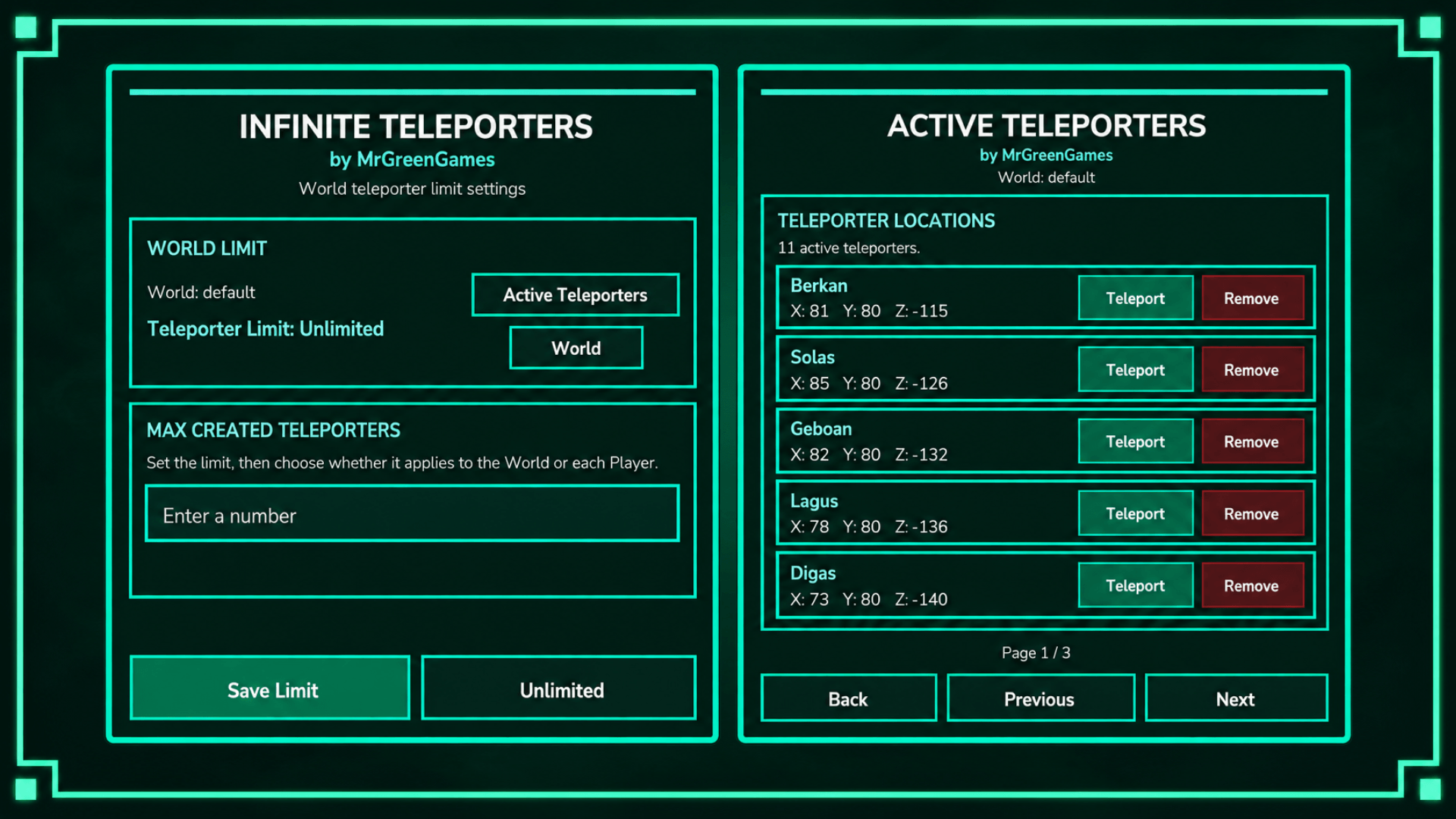
- Admin GUI — Manage teleporter limits, settings, and active teleporters through /infiniteteleport.
- Teleporter Management — View active teleporters, coordinates, and individual player teleporter lists.
- Placement Protection — Prevents new teleporters when limits are reached, with updated counts such as 3/4.
- Safe Limit Changes — Existing teleporters are never removed when a limit is lowered.
- Persistent Settings — Teleporter limits and modes are saved between sessions.
How to Use
Open the admin GUI using /infiniteteleport.
Choose between Unlimited, World, or Player limits for the current world.
In World Mode, the configured limit is shared by all players. For example, a limit of 4 allows a maximum of 4 active teleporters total in that world.
In Player Mode, each player receives their own allowance. For example, a limit of 4 allows each player to create up to 4 active teleporters in that world.
Use the GUI to view active teleporters, player lists, and teleporter coordinates.
Configuration
Infinite Teleporters is configured directly through its in-game admin GUI.
Command: /infiniteteleport
Permission: mgg.infiniteteleporters.admin
Admins can configure numeric limits, switch between World and Player modes, or restore unlimited teleporter creation.
Settings are saved between sessions, and each world can have its own limit and mode.
Installation
Place the plugin .jar inside: AppData\Roaming\Hytale\UserData\Mods
Enable the mod inside of your world settings
Start or restart the server/world.
Use /infiniteteleport to configure teleporter limits if desired.
Important Notes
- Teleporter creation is Unlimited by default.
- Limits are configured independently for each world.
- Lowering a limit never removes existing teleporters.
- New teleporter placement is blocked when the applicable finite limit is reached.
- Unlimited mode keeps normal teleporter placement silent.
Support & Usage
If you encounter an issue, please include your Hytale log and relevant config.yml settings when reporting it.
Consider following MrGreenGames if you enjoy this mod! 💚
🟢 Feel free to use this mod in your modpacks and videos!
If you feature the mod in a video or showcase, linking back to the original mod page in your description is greatly appreciated, but not required.
🔴 Please do not redistribute or repurpose the mod.
You may not reupload the mod to other websites, launchers, or platforms, nor reuse its models, textures, data, or other assets in separate projects.
Do not place the mod behind ad-based or redirect services such as AdFly, and do not sell the mod or include it in any paid modpack.
💚 This mod is intended to remain free and accessible to everyone.
[MGG] Infinite Teleport Team

![[MGG] Quick Pickup project image](https://media.forgecdn.net/avatars/thumbnails/2079/795/256/256/639263010060251538.png)
![[MGG] Feather Cape project image](https://media.forgecdn.net/avatars/thumbnails/2114/748/256/256/639274619731075927.png)
![[MGG] Biome Selector project image](https://media.forgecdn.net/avatars/thumbnails/2079/517/256/256/639262938704691636.png)
![[MGG] Block Outline project image](https://media.forgecdn.net/avatars/thumbnails/2079/779/256/256/639263004179665479.png)