[MGG] Biome Selector
- By
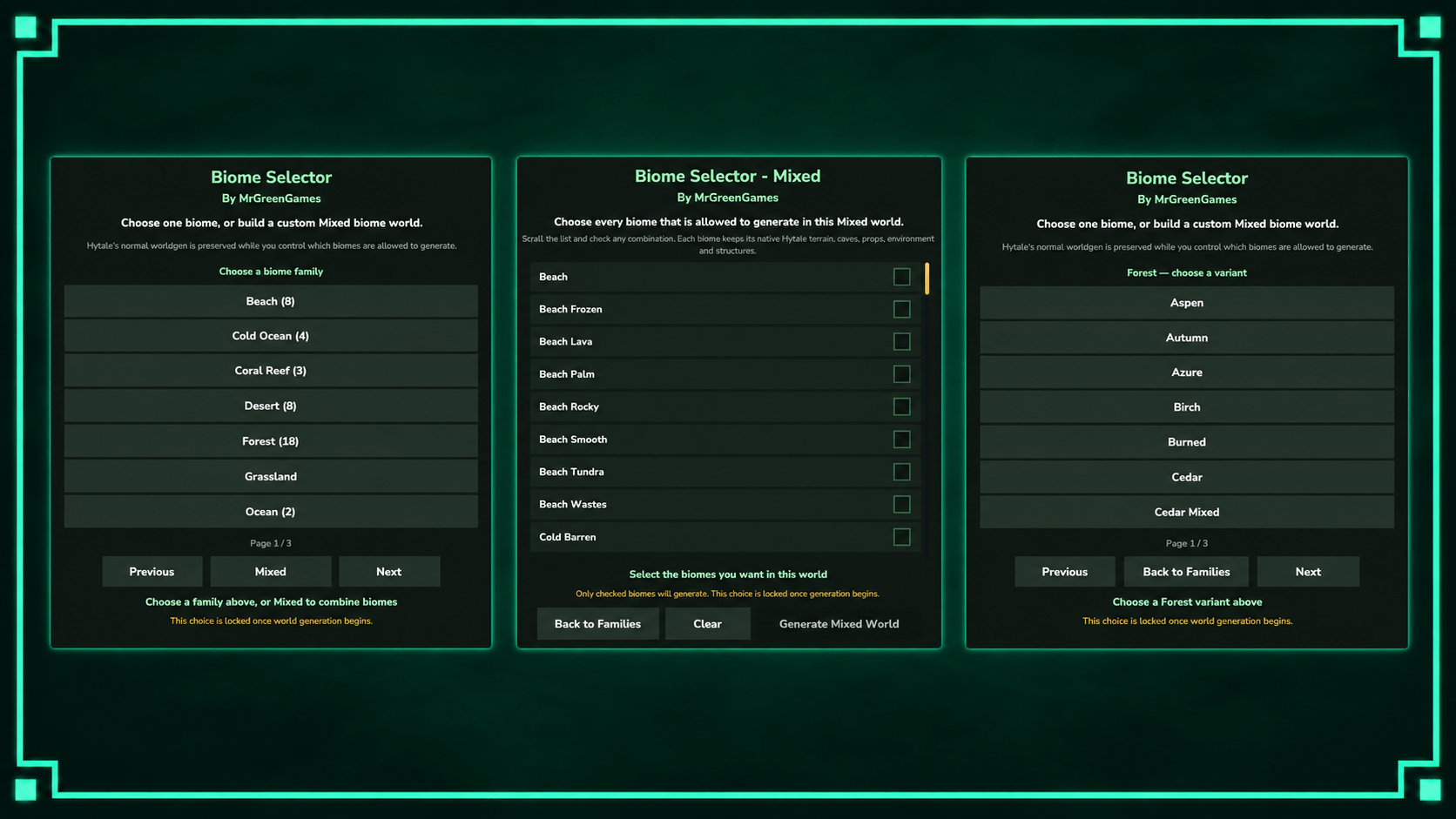
Choose one Hytale biome or combine multiple biomes into a custom mixed world while preserving native terrain, foliage, structures, and biome identity. Use /biomeselector to view your active biome setup anytime.
Description
Features
- Single & Mixed Biome Worlds — Generate worlds using one selected biome or combine multiple biomes into custom regions.
- Native Hytale Biomes — Browse Hytale's natural biomes and biome families through an organized selection menu.
- Multi-Biome Selection — Choose multiple biomes using simple checkboxes when creating mixed worlds.
- Improved Terrain Transitions — Uses seeded regions to create smoother transitions between selected biomes.
- Natural World Generation — Preserves native terrain, foliage, structures, oceans, shores, and supported rivers.
- Biome-Specific Caves — Generates underground terrain that matches the surrounding biome zones.
- Optional Spawn Building — Choose whether to generate Hytale's default spawn building when creating a world.
- Preferred Spawn Placement — Attempts to place the spawn building in a suitable selected biome, prioritizing Plains Spawn when available.
- Custom Dimensions — Allows administrators to create biome-specific dimensions with automatic teleportation.
- Saved World Settings — Displays selected biomes and generation settings through an active biome summary.
How to Use
Open the Biome Selector menu when creating a new world.
Choose a single biome for a themed world or select Mixed to combine multiple biomes using checkboxes.
After selecting Generate World, choose whether to include Hytale's default spawn building.
For dedicated servers, administrators can create custom dimensions using /biomeselector create <name>.
Your selected biomes and generation settings are displayed in the world summary.
Installation
- Place the mod .jar inside: AppData\Roaming\Hytale\UserData\Mods
- Enable the mod inside of your world settings.
- Start or restart the server/world.
For dedicated multiplayer servers, place the JAR inside the server's mods folder and restart the server.
Use /biomeselector create <name\> to create a custom dimension.
Important Notes
- Biome selections are locked once world generation begins.
- Supports newly generated worlds and dimensions. Existing terrain is not converted.
- Rivers depend on the selected biome's native generation support.
- Natural cliffs and elevation differences can still occur between regions.
- Plains Spawn receives priority for spawn building placement when selected.
- Spawn building placement does not disable mobs. If no suitable location is found, try another world seed.
Support & Usage
If you encounter an issue, please include your Hytale log and relevant config.yml settings when reporting it.
Consider following MrGreenGames if you enjoy this mod! 💚
🟢 Feel free to use this mod in your modpacks and videos!
If you feature the mod in a video or showcase, linking back to the original mod page in your description is greatly appreciated, but not required.
🔴 Please do not redistribute or repurpose the mod.
You may not reupload the mod to other websites, launchers, or platforms, nor reuse its models, textures, data, or other assets in separate projects.
Do not place the mod behind ad-based or redirect services such as AdFly, and do not sell the mod or include it in any paid modpack.
💚 This mod is intended to remain free and accessible to everyone.

[MGG] Biome Selector Team