[MGG] Block Outline
- By
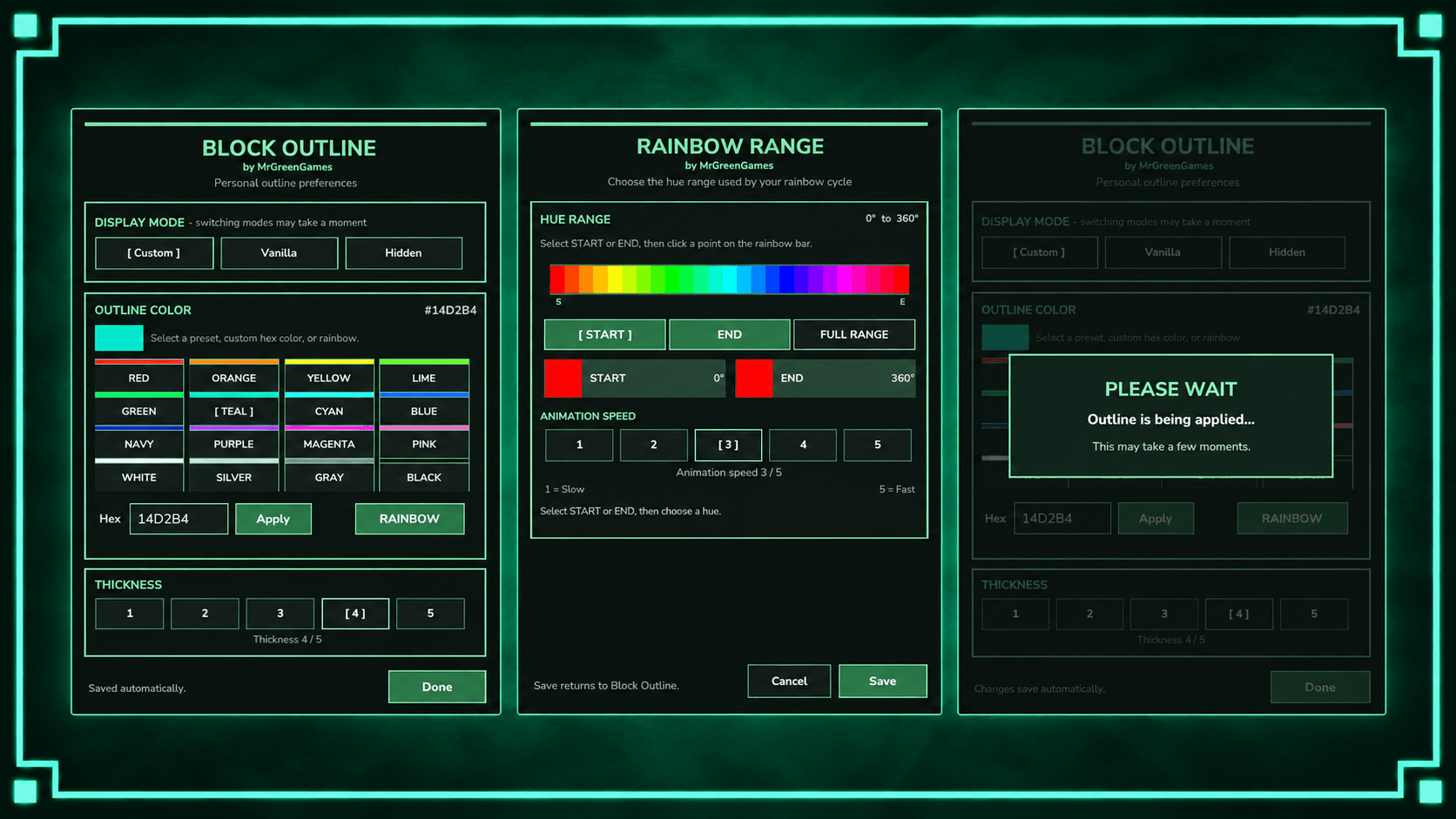
Block Outline is a simple accessibility and quality-of-life mod for Hytale that gives you control over the outline displayed around the block you're targeting. /Outline - will open the GUI to allow outline customization.
Description
Features
- Custom Block Outlines — Change Hytale's standard targeting outline to a color of your choice.
- Custom Hex Colors — Create personalized outline colors using custom hex values.
- Rainbow Outline Mode — Apply an animated rainbow effect that smoothly cycles through a customizable color range.
- Adjustable Rainbow Colors — Choose the starting and ending hues for your rainbow animation.
- Rainbow Animation Speed — Customize how quickly the outline transitions between colors.
- Adjustable Outline Size — Change the thickness of block outlines, with a default size of 3.
- Accurate Block Shapes — Outlines follow the shape of targeted blocks, including partial blocks.
- Per-Player Settings — Each player can customize their own outline independently.
- Accessibility Friendly — Improve block visibility while building, mining, and exploring.
- Singleplayer & Multiplayer Support — Designed for personal worlds and multiplayer servers.
How to Use
Use /outline to open the Block Outline settings menu.
Choose a preset color, enter a custom hex value, or enable Rainbow Mode for an animated outline.
Rainbow Mode includes additional controls for selecting the start and end hues and adjusting the animation speed.
Customize the outline size to suit your preferences, then save your settings.
Installation
- Place the plugin .jar inside: AppData\Roaming\Hytale\UserData\Mods
- Enable the mod inside of your world settings.
- Start or restart the server/world.
Use /outline to open the settings menu.
Important Notes
- Block Outline changes the visual targeting highlight without modifying normal block interactions or gameplay mechanics.
- Custom outlines follow supported block shapes, including partial blocks.
- Rainbow Mode cycles smoothly through the selected hue range.
- Each player can customize their own outline settings independently.
- Creative Mode: Hytale's original black outline may still appear alongside the custom outline in some situations.
Support & Usage
If you encounter an issue, please include your Hytale log and relevant config.yml settings when reporting it.
Consider following MrGreenGames if you enjoy this mod! 💚
🟢 Feel free to use this mod in your modpacks and videos!
If you feature the mod in a video or showcase, linking back to the original mod page in your description is greatly appreciated, but not required.
🔴 Please do not redistribute or repurpose the mod.
You may not reupload the mod to other websites, launchers, or platforms, nor reuse its models, textures, data, or other assets in separate projects.
Do not place the mod behind ad-based or redirect services such as AdFly, and do not sell the mod or include it in any paid modpack.
💚 This mod is intended to remain free and accessible to everyone.

[MGG] Block Outline Team