Hyshade
- By
HyShade intercepts Hytale's rendering pipeline at the shader level to replace the engine's lighting, tone mapping, sky, and water with cinematic-quality alternatives — no game files modified, one DLL, three presets, eight toggleable effects.
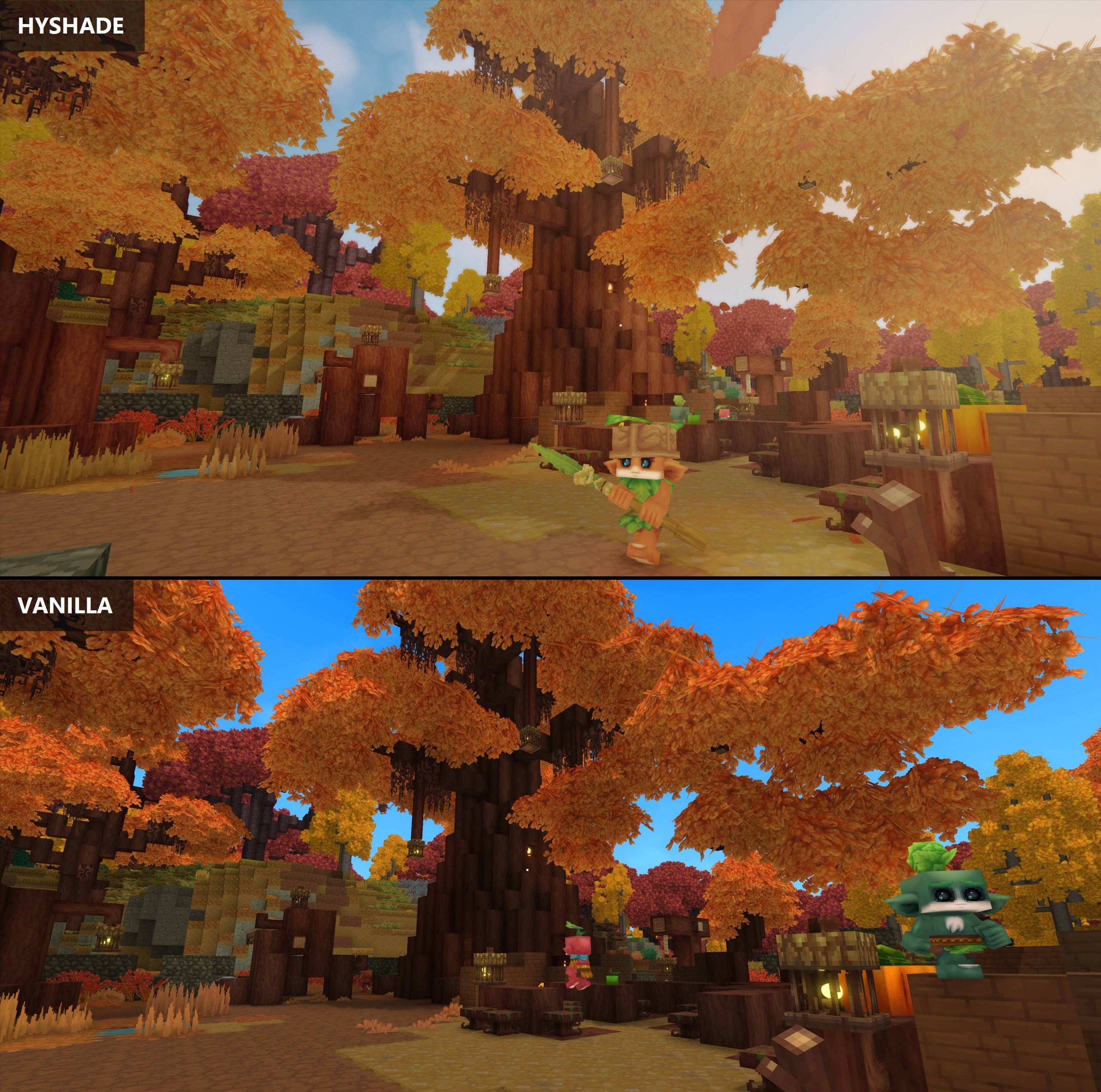
HyShade_vs_Vanilla.jpg
Hytale Hyshade_curseforge.jpg
Screenshot_2026-06-08_215649_best_quality_under_2MB.jpg
Description
HyShade — Real Shader Injection for Hytale
Not a filter. Not a preset. The actual rendering pipeline, rewritten.
Every "shader mod" for Hytale you've seen before is ReShade — a screen filter applied after the game has already finished drawing. It can tint, blur, and sharpen, but it can never change how light actually works, how water absorbs color, or how shadows fall. It's makeup on a finished painting.
HyShade is different. It intercepts Hytale's OpenGL shaders before they compile and rewrites them. The game's actual lighting math, sky rendering, water physics, and shadow calculations are modified at the source. This is the same approach that Minecraft's Iris/OptiFine shaders use — and HyShade is the first to bring it to Hytale.
New in v1.4.0 — Golden Hour
Sunsets you can feel. The world now warms to gold as the sun drops — with a subtle cool lift in the shadows — then returns to neutral at noon and midnight. This runs inside the engine's lighting pass with the actual sun direction, so it knows what time it is. A screen filter physically can't.
Sharpening without the halos. The engine's old-school sharpen filter is replaced with contrast-adaptive sharpening (the AMD-style approach modern games use): stone, bark, and foliage detail gets crisper, and the bright edge halos the old filter produced are gone.
Living water (experiment, Realistic preset) — HyShade's first geometry-level effect: taller waves that keep moving farther from your camera. Not your thing? WaterWaves=false and it's gone.
Every new constant ships as a knob in hyshade.ini — SunsetWarmth, SunsetCoolShadows, CasStrength, WaterWaveBoost, WaterWaveRange — and /hyshade toggle sunset | cas | waves works from chat.
(Coming from v1.2.0? You also get everything from v1.3.0, which was never published: a self-healing safety net that names and reverts any rule a game update breaks, live-tuning knobs for bloom and chromatic aberration, a /hyshade status health report, smoother soft-shadow edges, and a fuller night-sky star field. Full list in the release notes.)
We Found Hytale's Hidden Graphics Settings
Here's something nobody knew until v1.2.0: your copy of Hytale ships with high-quality graphics code that has never run on your screen. A soft-shadow system. A 12-pass anti-aliasing mode. A smoother bloom pipeline. All of it sitting inside the game's own shaders, compiled off — and one piece left broken mid-polish: the soft-shadow path has a math bug that would make shadows four times too bright if you simply flipped it on. Nobody could have enabled it. Until now, nobody knew it was there.
We mapped Hytale's entire rendering pipeline — every one of the 191 shaders the engine compiles, documented line by line — found these dormant paths, fixed their bugs, and switched them on.
Your GPU was always capable of this. The switch was just off.
What You'll Actually See
Here's what changes when you launch Hytale with HyShade installed:
Lighting that makes sense
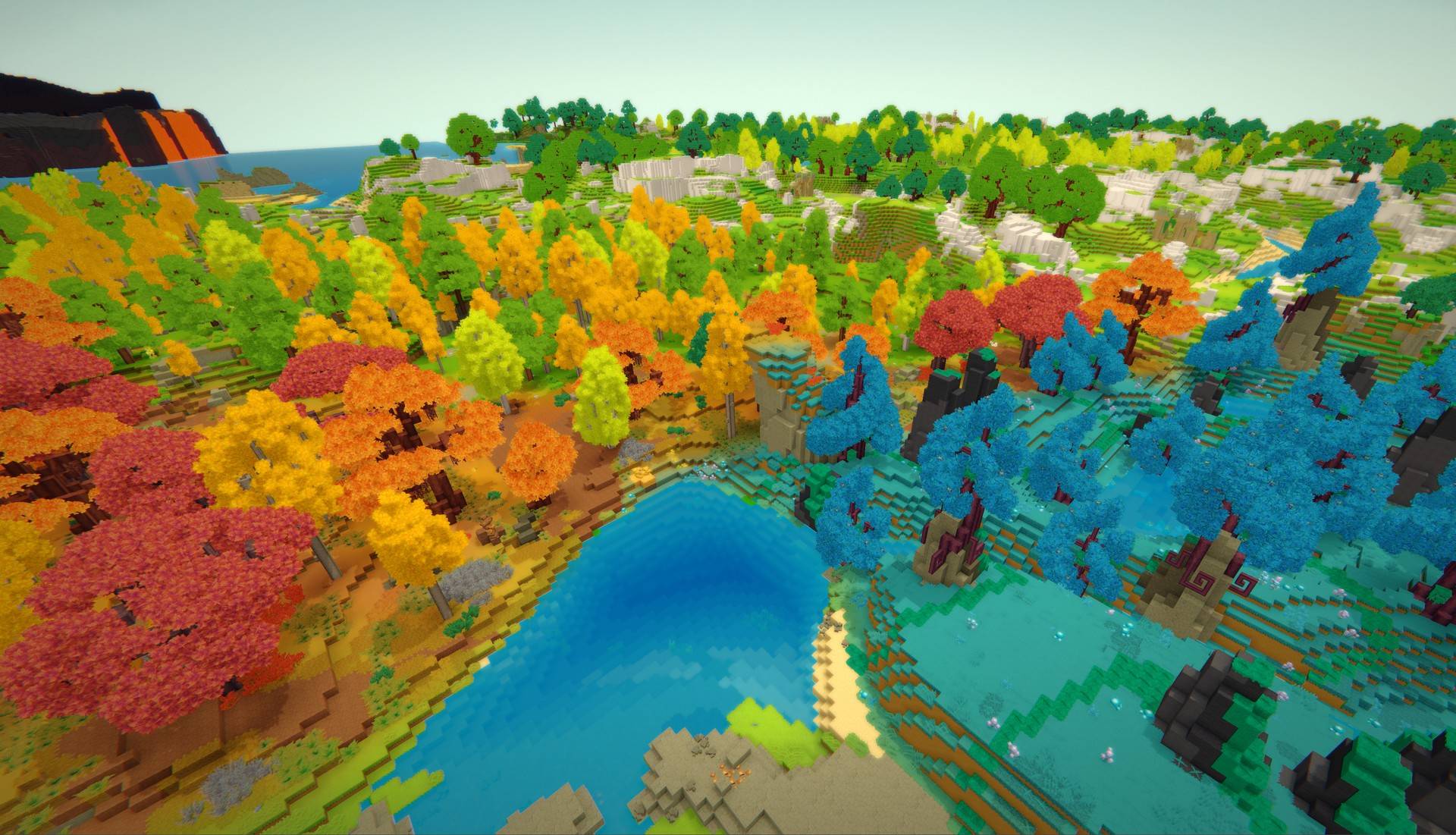
Torches cast warm orange light. Crystals glow their actual color. The sun creates a visible golden path on water. Shadows pick up a hint of sky blue instead of being flat black. Objects get subtle rim lighting when backlit. These aren't filters — the lighting math itself has been upgraded.
Skies that tell time
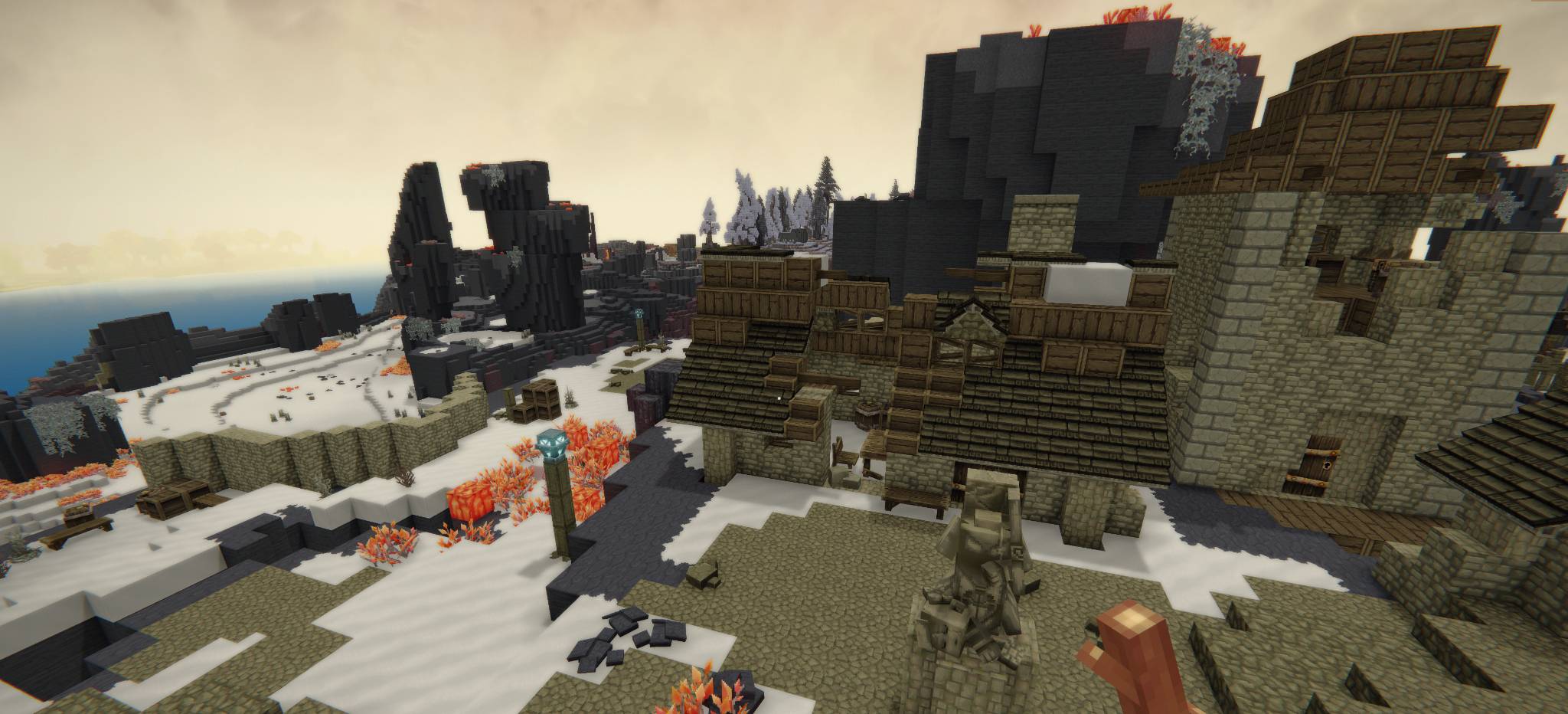
Sunsets now have three color bands: orange at the horizon, crimson above, and violet reaching into the upper sky. The zenith deepens to a richer cobalt during the day (real Rayleigh scattering). The sun gets a warm glow halo (Mie scattering). The moon gets a soft silver-blue aura at night.
Water that behaves like water
Real water absorbs red light first, then green, then blue last. HyShade adds this wavelength-dependent absorption — shallow water looks teal, deep water goes dark blue. The sun creates a shimmering specular reflection on the surface. Shore foam picks up the sun's color.
Distance that feels real
Far-away terrain fades into a subtle atmospheric haze — slightly desaturated, slightly blue-shifted. During golden hour, the haze picks up a warm tint. This is how real atmosphere works: air scatters light over distance.
Deeper shadows in crevices
The engine's ambient occlusion gets a power curve that makes contact shadows darker — the gaps between blocks, the underside of overhangs, and tight corners all have more depth without crushing the overall brightness.
Shadows with soft edges (new in 1.2)
Vanilla Hytale draws every shadow edge with a single sample — look closely and they're noisy and dithered. HyShade switches on the engine's own 16-sample soft-shadow mode and fixes the brightness bug that kept it broken, so shadow edges now fade out smoothly the way real shadows do. The single most visible upgrade in the pack.
Edges without jaggies (new in 1.2)
The engine ships two qualities of FXAA anti-aliasing and uses the cheap one. HyShade flips on the 12-pass version: foliage silhouettes, fences, and rooflines come out noticeably cleaner — and your HUD and text stay perfectly sharp, because the interface draws after the anti-aliasing pass.
Glow that holds steady (new in 1.2)
Bright lights used to shimmer slightly as the camera moved — a side effect of the engine's quick-and-dirty 4-tap bloom sampling. The 13-tap method (again: already in the shader, switched off) samples light more evenly, so torches, crystals, and the sun glow without the flicker.
A cinematic look without the blur (upgraded in 1.2)
ACES filmic tonemapping — the same curve used in film and AAA games — now runs at a smarter point in the pipeline: before the engine clips bright values to pure white, where highlight detail still exists. Sunsets and sun-on-water roll off like film instead of slamming into flat white. (Every screen-filter mod is stuck tonemapping after that clipping has already destroyed the detail — this is something only pipeline-level injection can do.)
Golden hour, everywhere (new in 1.4)
As the sun rises or sets, the whole world's lighting warms to gold while shadows pick up a gentle cool lift — then everything returns to neutral at midday and midnight. This is separate from the sky's sunset bands: it grades the light falling on terrain, water, and buildings, driven by the actual in-game sun position.
Texture detail without halos (new in 1.4)
Contrast-adaptive sharpening replaces the engine's basic sharpen filter. Stone grain, bark, and foliage come out crisper — and because the sharpening adapts to local contrast, the bright outlines the old filter drew around hard edges are gone.
Water that moves (new in 1.4, Realistic preset)
An experiment in HyShade's first vertex-stage injection: waves are taller and keep animating farther from your camera instead of flattening out a few blocks away. The water's surface level stays exactly where vanilla puts it. Toggle off with one ini line if it's not for you.
A fuller night sky (new in 1.3)
The engine's star-density falloff contains a mathematical no-op that thins stars out far too early toward the horizon. Fixed: more stars low in the sky at night, nearly unchanged overhead. Shadow edges also gained a per-pixel dither in 1.3, so the 16-sample soft shadows fade without visible banding stripes.
Three Presets — Pick Your Level
HyShade ships with three visual presets. Use the /hyshade command in-game to switch between them.
/hyshade realistic — The Full Experience
Everything listed above, all at once. ACES tonemapping (pre-clip as of 1.2), atmospheric haze, multi-band sunsets, Rayleigh/Mie scattering, energy-conserving specular highlights, subsurface scattering on foliage, wavelength-dependent water absorption, sun specular on water, hemisphere ambient bounce lighting, 16-sample volumetric god rays, deeper SSAO, hue-aware dynamic lighting, gentle color grading, optional vignette, optional film grain — plus all four 1.2 engine unlocks (soft shadows, 12-pass FXAA, high-quality bloom, filmic highlight roll-off), the 1.3 star-field and shadow-dither fixes, and all three 1.4 effects: golden-hour grading, CAS sharpening, and the living-water experiment (that last one is exclusive to this preset).
Best for: Screenshots, cinematic exploration, "I want Hytale to look like a movie." Performance: Moderate impact. Most effects are per-pixel math, not extra geometry. Soft shadows are the heaviest single item — toggle them off first if you need frames back.
/hyshade natural — Subtle but Better
ACES tonemapping, sky enhancement, and improved dynamic lighting — plus the four 1.2 engine unlocks (soft shadows, high-quality FXAA and bloom, filmic roll-off), because those aren't a "look," they're just the engine running its own best code. As of 1.4 it also gets golden-hour grading and CAS sharpening, tuned gentler than Realistic. Still no vignette, no grain, no water modifications, no SSAO changes, no god rays. The game looks like a better version of itself — you might not notice it's running until you turn it off.
Best for: Everyday play. Players who want improvement without the cinematic feel. Performance: Light. The soft shadows are the only meaningful cost — toggle off to make it nearly free.
/hyshade performance — Just the Tonemapping
Only the ACES filmic tone curve and gentle color grading. One shader injection, near-zero performance cost. The single biggest visual improvement per GPU cycle spent.
Best for: Low-end hardware, competitive play, "I want better colors but don't touch my framerate." Performance: Essentially free. One extra math operation per pixel.
/hyshade off — Disable Everything
Switches the proxy to passthrough mode. All shaders run unmodified. Useful for before/after comparison or troubleshooting.
Per-Effect Toggles — Fine-Tune What You Want
Don't want film grain but love everything else? Each effect can be toggled independently:
| Command | What it controls | What happens when OFF |
|---|---|---|
/hyshade toggle grain |
Film Grain — subtle animated noise that gives the image a film-like texture | Image is perfectly clean and digital |
/hyshade toggle vignette |
Vignette — gentle darkening at screen edges that draws your eye to the center | Even brightness edge to edge |
/hyshade toggle godrays |
God Rays — beams of sunlight streaming through gaps in terrain and trees | No volumetric light beams (saves performance) |
/hyshade toggle ssao |
Ambient Occlusion — deeper shadows in cracks, under objects, and in corners | Engine's default lighter AO |
/hyshade toggle sky |
Sky Enhancement — multi-band sunsets, Rayleigh scattering, moon glow | Engine's default sky rendering |
/hyshade toggle water |
Water Enhancement — depth-based color absorption, sun specular, foam tinting | Engine's default flat water |
/hyshade toggle lighting |
Dynamic Lighting — warm tint on torches/fire, color temperature, soft light edges | Engine's default uniform light color |
/hyshade toggle materials |
Material Enhancement — specular highlights, rim lighting, subsurface scattering on foliage | Engine's default flat material shading |
/hyshade toggle bloom |
Bloom Glow (applies live — no restart) — soft glow on bright areas (sun, torches, crystals) | No glow pass at all (saves performance) |
/hyshade toggle ca |
Chromatic Aberration (applies live — no restart) — subtle color-fringe toward the screen edges | Clean edges, no fringe |
/hyshade toggle bloomuisafe |
UI-Safe Bloom (opt-in, off by default) — runs the glow before the HUD and menus are drawn so the interface stays sharp | Bloom applies to the whole finished frame, HUD included |
/hyshade toggle softshadows |
Soft Shadows (new in 1.2) — the engine's 16-sample soft shadow edges, math bug fixed | Vanilla single-sample dithered edges (fastest) |
/hyshade toggle fxaa |
High-Quality FXAA (new in 1.2) — the engine's 12-pass edge smoothing | Engine's standard 3-pass FXAA |
/hyshade toggle bloomhq |
High-Quality Bloom (new in 1.2) — steadier, smoother glow sampling | Engine's standard 4-tap bloom |
/hyshade toggle tonemap |
Filmic Tonemap (new in 1.2) — ACES roll-off before highlights clip to white | Highlights hard-clip to white |
/hyshade toggle stardensity |
Star Density (new in 1.3) — fuller star field toward the horizon at night (fixes an engine math no-op) | Engine's too-early star fade |
/hyshade toggle sunset |
Sunset Grading (new in 1.4) — golden-hour warmth at sunrise/sunset, cool lift in the shadows, neutral at noon and night | Flat, time-blind lighting all day |
/hyshade toggle cas |
CAS Sharpening (new in 1.4) — contrast-adaptive texture sharpening with no edge halos | Engine's basic sharpen filter |
/hyshade toggle waves |
Water Waves (new in 1.4, Realistic preset, experiment) — taller waves that keep moving farther from the camera | Engine's default calmer water (Natural and Performance never have the waves either way) |
Most toggles need a restart; Bloom and Chromatic Aberration apply live within a second (v1.3.0's live-tuning system). Numbers are tunable too: BloomThreshold, BloomIntensity, and CAStrength apply live from hyshade.ini, while ShadowJitterStrength, SunsetWarmth, SunsetCoolShadows, CasStrength, WaterWaveBoost, and WaterWaveRange bake in at startup — every constant in the new effects is yours to retune, no shader editing needed. And /hyshade status reports the DLL version, active rules, and any effect a game update may have silently broken. Your choices are saved in hyshade.ini.
The Nerd Corner — For the ReShade Crowd
You want the real talk? Here's the real talk.
The pipeline you're actually playing on. Hytale's Windows client renders through OpenGL 4.1 core, every game shader authored at GLSL 330. It's a hybrid deferred/forward renderer: opaque geometry writes a 2-MRT G-buffer (RT0 packs checkerboard chroma-subsampled YCoCg albedo + spherical-coordinate normals; RT1 carries baked voxel light + an 8-bit per-pixel config bitmask in its alpha), lighting resolves through a clustered system (log-distributed 3D light grid, light data in a texture buffer, up to 1024 entries), transparency is Weighted Blended OIT (with a complete Moments OIT implementation compiled in but dormant — yes, really), shadows are 4-cascade CSM packed into a strip atlas, and almost the entire post stack is one 57 KB übershader running distortion → DoF → FXAA 3.11 → sharpen → saturation → bloom composite → brightness hard-clamp → contrast. There is no tonemapping operator in the shipped game, and no explicit gamma/sRGB handling anywhere in the post chain.
What HyShade actually is. Not a swapchain wrapper. The proxy DLL sits on opengl32, captures every glShaderSource, fingerprints the source with CRC32, and rewrites it before your driver ever compiles it — full-source hash replacement plus chainable signature-injection rules (plain-text anchor matching, which is why minor engine updates don't break it). The v1.2.0 unlocks are byte-verified anchor patches:
- Soft shadows — flips
USE_SINGLE_SAMPLEto activate the dormant 16-tap grid loop, with a pre-scale that corrects the engine'sN*N=4normalization bug into a true 16-tap average. Scoped to the fragment shaders that resolve shadows; the 6 vertex-stage shadow samplers (particles) deliberately keep their cheap path. - FXAA — preset 20 → preset 39 (3-pass → 12-pass search, edge threshold 0.15 → 0.05). The engine already compiles preset-39 variants for some configurations; HyShade just makes every FXAA-on variant use the good one.
- Bloom — downsample
METHOD 2→METHOD 3(the 13-fetch kernel sitting unused in the same source) plus 9-tap tent upsample on every quality variant. - ACES (Narkowicz fit), injected pre-clamp — between the additive bloom composite and the engine's
clamp(c + brightness, 0, 1). That gap is the only point in the entire pipeline where values above 1.0 still exist. Post-clamp tonemapping — what every final-frame filter does by definition — operates on highlights that are already gone.
The v1.4.0 additions, technically. Sunset grading injects into the deferred lighting combine — the only post-stage shader with the sun's world-space direction in its UBO (the gameplay PostEffect has neither sun nor time) — gated by a sunrise/sunset band computed from sun elevation, and it never touches alpha, because that channel carries the G-buffer config bitmask. CAS is a 5-tap contrast-adaptive kernel with a bounded per-tap weight (the denominator can't flip sign), delivered as a pure injection: the function is inserted above the engine's own sharpen() definition and a token-exact #define at the call site reroutes it — no hash replacement, every other rule intact, engine-update resilient. The water experiment is a vertex-stage injection (the rule engine turned out to be stage-agnostic) that scales the engine's own wave-offset and wave-range locals — with the displacement's DC component split out and preserved, so the boost amplifies motion without sinking the surface level.
And the v1.3.0 trust layer underneath it all: every injected shader passes through a compile-status net — if a rule ever breaks (say, after a game update), the log names the exact rule responsible and the proxy automatically resubmits the original engine shader, so you get stock visuals for that one shader instead of a black screen. An update-drift alarm flags any enabled rule that stopped matching, and /hyshade status reports it all in-game.
ReShade coexistence: ReShade hooks the swapchain and sees the finished LDR frame. HyShade edits the shaders that write the frame — G-buffer encode, light resolve, the bloom chain — levels a final-frame hook physically cannot reach. Run both; they don't fight.
The receipts: on the v1.4.0 verified run (2026-06-12) — 22 rules loaded in the Realistic preset, all 22 fired, 525 injections across the live shader set, zero GLSL compile errors, zero warnings, zero self-heals needed, clean unload.
How It Works (The Simple Version)
- You put HyShade's
opengl32.dllin Hytale's Client folder - When Hytale launches, Windows loads HyShade first (it's in the same folder as the game)
- HyShade loads the real OpenGL from your system and forwards every call through transparently
- When Hytale compiles its shaders, HyShade intercepts the source code and injects modifications
- The modified shaders compile normally and run on your GPU
- Everything else in the game is completely untouched
HyShade does not modify any game files. It does not patch the executable. It does not change any assets. It sits between the game and your graphics driver and modifies shader code in memory. Remove opengl32.dll and the game runs exactly as before.
Install — Step by Step
HyShade has two parts: the shader proxy (goes in the game's Client folder) and the companion plugin (goes in your Mods folder like any other mod). Here's exactly how to install both.
Part 1: The Shader Proxy
This is what actually changes how the game looks.
- Download the HyShade ZIP from this page and extract it somewhere (your Desktop is fine)
- Open the extracted folder — you should see files like
opengl32.dll,hyshade.ini, ashadersfolder, etc. - Now you need to open Hytale's Client folder. Here's how:
- Press Windows key + R on your keyboard (this opens the Run dialog)
- Paste this exact text:
%APPDATA%\Hytale\install\release\package\game\latest\Client - Press Enter
- A folder should open containing
HytaleClient.exe— that's the right place
- From the extracted HyShade folder, drag and drop these three things into that Client folder:
opengl32.dll(this is the shader proxy itself — about 120 KB)hyshade.ini(this is the settings file)shaders(this is the entire folder — drag the whole folder, not individual files inside it)
- That's it for the proxy. The Client folder should now contain
HytaleClient.exe,opengl32.dll,hyshade.ini, and ashadersfolder sitting side by side.
Part 2: The Companion Plugin (recommended)
This adds the /hyshade command so you can change presets and toggle effects in-game.
- In the extracted HyShade folder, find
HyShadeSettings.jar - Now open your Hytale Mods folder:
- Press Windows key + R again
- Paste:
%APPDATA%\Hytale\UserData\Mods - Press Enter
- Drag and drop
HyShadeSettings.jarinto that Mods folder - Launch Hytale, open your save, and go to mod settings — enable HyShadeSettings
- Now you can use
/hyshadein the chat to switch presets and toggle effects
If you skip Part 2, HyShade still works — you just change settings by editing hyshade.ini in a text editor instead of using the command.
How Do I Know It's Working?
Launch Hytale and load into a world. If HyShade is running, you'll notice:
- Colors look richer and more cinematic (ACES tonemapping)
- Distant terrain has a subtle atmospheric haze
- Torches and fire cast warmer light
- A file called
hyshade.logappears in the Client folder
If the game looks exactly the same as before, double-check that opengl32.dll is in the Client folder (not the Mods folder, not the Hytale root folder — specifically the Client folder where HytaleClient.exe lives).
Uninstall
- Open the Client folder again (Windows+R → paste
%APPDATA%\Hytale\install\release\package\game\latest\Client→ Enter) - Delete these three things:
opengl32.dll,hyshade.ini,shadersfolder - Optionally delete
hyshade.log(just a log file, harmless either way) - Open the Mods folder and delete
HyShadeSettings.jar
The game goes back to exactly how it was before. Nothing else was changed.
Frequently Asked Questions
Does it work on Linux?
Not officially — HyShade is Windows-only by design. It works by placing a stand-in opengl32.dll next to the game so Windows loads it first, and that loading mechanism only exists on Windows. If you run Hytale's Windows client under Wine/Proton, HyShade might work in theory (copy the files into the prefix manually and set WINEDLLOVERRIDES="opengl32=n,b"), but this is untested and unsupported — experiment at your own risk.
Does it work on macOS? No, and it can't be ported as-is: HyShade is a Windows DLL hooking the Windows graphics layer, and a Windows DLL can't load on a Mac at all. A macOS version would be a ground-up rewrite with a completely different technique, which isn't planned.
Will this get me banned? HyShade uses the same DLL proxy technique that Minecraft's Iris/OptiFine shaders have used for over a decade without issue. Hytale's current modding stance is permissive — ReShade already works freely. That said, if Hypixel ever adds DLL-level anti-cheat, all DLL-based mods (including ReShade) would be affected. We'll cross that bridge if it comes.
Does it work with ReShade? Yes. HyShade modifies the pipeline shaders; ReShade adds post-processing on top. They operate at different levels and don't conflict. You can run both simultaneously.
Does it work in multiplayer? Yes. HyShade is entirely client-side. The server never sees it. Other players don't need to have it installed.
What happens if Hytale updates and shaders change?
Shader modifications are matched by content signatures, not exact hashes. Minor engine updates that don't restructure the shader code will continue to work. Major rendering rewrites may require an HyShade update. And since v1.3.0 a breakage can't take your game down: if an injected shader fails to compile, HyShade automatically falls back to the original engine shader for that one effect, logs which rule broke, and /hyshade status tells you in-game — you lose one enhancement until we update, never the game.
Can I make my own shader pack?
Yes. Copy shaders/realistic/ as a template. Each pack is a folder of GLSL files plus a manifest. Set ShaderPack=yourpack in hyshade.ini. The README in the download has full documentation.
My screen is black / the game crashes.
Set Mode=passthrough in hyshade.ini (in the Client folder) to disable all modifications. Check hyshade.log in the same folder for error details. A shader compile error will be logged with the exact GLSL error message.
Compatibility
- Hytale Update 5 (0.5.x) — tested and verified (v1.4.0: in-game session 2026-06-12, all 22 Realistic rules fired, 525 live injections, zero shader errors)
- Windows only — the DLL proxy technique is Windows-specific
- Any GPU with OpenGL 4.1 — no vendor-specific extensions used
- Works with all Hytale mods — HyShade operates below the mod layer
- Works with ReShade — different pipeline levels, no conflicts
What's Inside the ZIP
HyShade-v1.4.0.zip
├── manifest.json             (mod metadata)
├── opengl32.dll              (the 120 KB proxy — this is HyShade)
├── hyshade.ini               (configuration file)
├── HyShadeSettings.jar       (companion plugin for /hyshade command)
├── shaders/
│   ├── realistic/            (full cinematic preset)
│   ├── natural/              (subtle preset)
│   └── performance/          (minimal preset)
├── README.md                 (documentation)
├── CHANGELOG.md              (version history)
├── CURSEFORGE_DESCRIPTION.md (this page)
└── CURSEFORGE_RELEASE_NOTES.md (release notes)
From the Author
I built HyShade because I wanted to see Hytale lit the way it deserves — with real light physics, not Instagram filters. For v1.2.0 I mapped every shader the engine compiles, found the high-quality code Hypixel wrote but never shipped switched-on, fixed what was broken, and gave it to you. v1.3.0 made the whole thing self-healing so a game update can never black-screen you. And v1.4.0 is the one you can see from across the server: golden sunsets, halo-free sharpening, living water. Every modification was hand-tuned with hot-reload, tested across day/night cycles, and iterated until it felt right without feeling fake.
If something looks wrong, tell me. If you want an effect I haven't added, tell me. And if you make your own shader pack, I want to see it.
— LordDionysus
120 KB. Zero game files modified. One DLL between you and the graphics your engine was hiding.
The Hyshade Team