Screenshot 2026-08-29 18-05-01.png
Screenshot 2026-08-31 15-57-47.png
Screenshot 2026-08-31 15-47-46.png
Schermafbeelding 2026-03-19 192807.png
Schermafbeelding 2026-03-19 192846.png
Schermafbeelding 2026-03-19 192807.png
Schermafbeelding 2026-03-19 192914.png
Screenshot 2026-08-20 13-44-27.png
Screenshot 2026-08-26 15-43-12.png
Description
🗝️ MythicMate
Formerly WhatLockout — same addon, new name, because it grew far beyond lockouts. Your settings carry over automatically.
MythicMate is your all-in-one Mythic+ companion. See at a glance which raids and Mythic dungeons are locked for you and your group, track your keys and per-dungeon score, teleport straight into any dungeon you've unlocked, and find or list groups from a built-in Group Finder — without ever opening Blizzard's Premade window.
📊 Mythic+
- 📊 M+ Stats tab: per-dungeon season overview — the highest key you completed (timed or depleted, tagged accordingly) and score for every dungeon, including ones you haven't run yet, sorted by score opportunity so you instantly see which key gives you the most rating
- 🎯 Score Goals window: set a target rating and see exactly where the points are — a per-dungeon breakdown of your headroom, with a "points per key level" estimate regressed from your own runs (no season-specific hardcoding). Open with
/mm goals - 🏅 Score badge: a Raider.IO-style badge of your current M+ score, coloured by rarity tier — docked in the top-right of the window or detached as a free-floating, draggable screen badge. When you've earned a Resilient Keystone floor, a matching badge appears right next to it showing the level your keys can't deplete below. A matching Durability badge sits alongside them, showing your equipped gear's average durability (green when healthy, amber when worn, red when nearly broken) so you never zone in with broken gear. Each of the three labels (Mythic+ score, Resilient floor, Durability) can be turned on or off individually in Settings > General.
- 🪙 Crest currency labels: two extra badges (icon + amount) for the season's upgrade crests, defaulting to Myth and Hero. The badge shows how many you currently have in your bags; hover it and the tooltip also shows Earned this season: X / 400 — since crests have a seasonal earn cap, that line counts what you've earned toward the cap (not your spendable balance). Pick which currency each shows (or turn it off) via dropdowns in Settings > General - the list is discovered live each season (Adventurer / Veteran / Champion / Hero / Myth …), and amounts update in real time.
- 🗝️ Group Keys tab: see which keystones your party members are holding — including members who don't run MythicMate but have Details!/WeakAuras (their key is read from the same data Details'
/keysshows) - 💬 Keystone on hover: party members' current keystone shows in the player-hover tooltip, with the same Details!/WeakAuras fallback
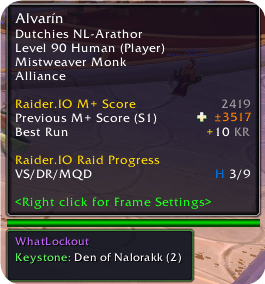
- 🛡️ Durability on hover: the player-hover tooltip also shows the member's equipment durability right under their keystone (green/amber/red by health) — your own gear read directly, teammates via Details/WeakAuras (LibOpenRaid). Toggle in Settings (default on)
- 🚀 Group Push tab: the best key for the whole party to run together — ranked by how much dungeon score each key gains the group — plus the best key for each player individually. Anyone can type
wlpushon its own line in party chat for an instant recommendation everyone sees. - 🌀 Teleports tab: one-click teleport to any Mythic+ dungeon you've earned the Hero's Path teleport for — no digging through spellbooks or flyouts
- 🖥️ In-run M+ tracker (HUD): a clean replacement for Blizzard's dungeon timer — key level, live timer with +2/+3 pace, enemy forces %, the boss checklist with per-boss kill times (this run, your best and the difference), and deaths with who died (class-coloured, full breakdown on hover)
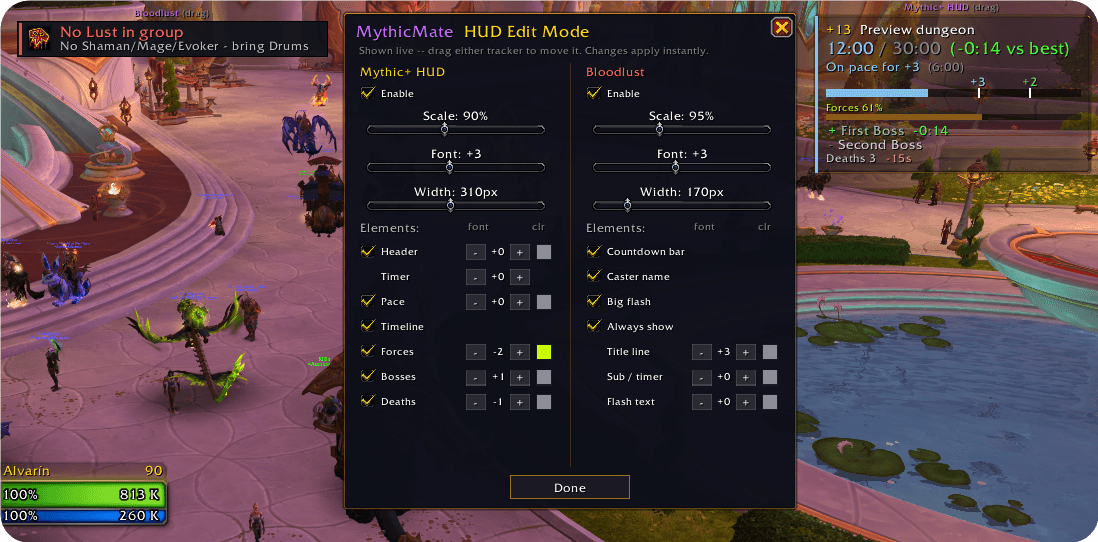
- 🎛️ HUD Edit Mode (
/mm editor the Edit HUD button in the main window): a floating panel to compose the M+ HUD, the Bloodlust tracker and the Combat Res tracker — enable, scale, font size, width, opacity, and per-element styling: each element has its own show/hide, font-size stepper and colour swatch. Toggle boss kill times, bold text, the M+ HUD inset (left indent) and row spacing, turn the left accent border on/off (or recolour it) per frame, and set the trackers to show only inside instances. The big flash banner previews live in edit mode so you can style it. All are shown live and draggable while you tweak; the HUD reflows so hidden rows leave no gap - 🗝️ Auto-slot keystone: at the dungeon start your keystone is dropped into the Font of Power for you — just press Activate (toggle in General)
- 🔁 Keyswap reminder: after a run finishes and your new keystone is granted, a quick on-screen nudge shows the new key so you don't forget to slot it before the next pull
- 🏁 End-of-run recap: result (timed +N / depleted), time vs the limit, your score gain, the next best dungeon to push, and an MVP block — top damage, most interrupts (with a portrait), and a healer shout-out (from Details!)
- 🏦 Great Vault button and My Alts overview built right into the window, with a compact weekly-readiness summary (vault slots, lockouts, keystone) for you and your synced alts
🔒 Lockouts
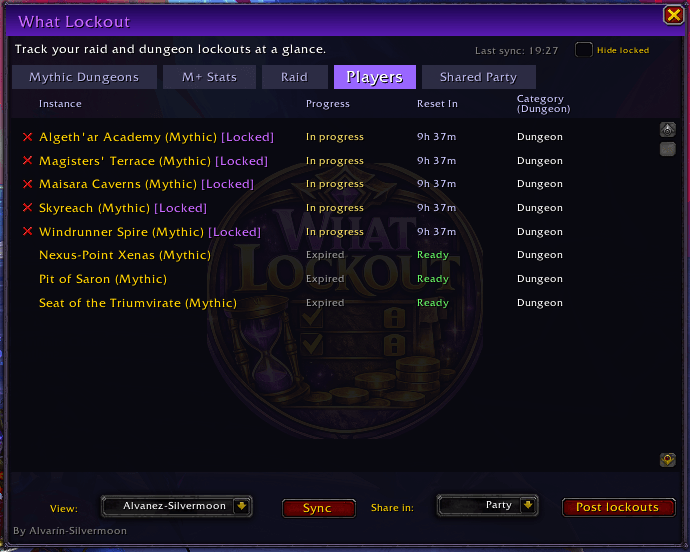
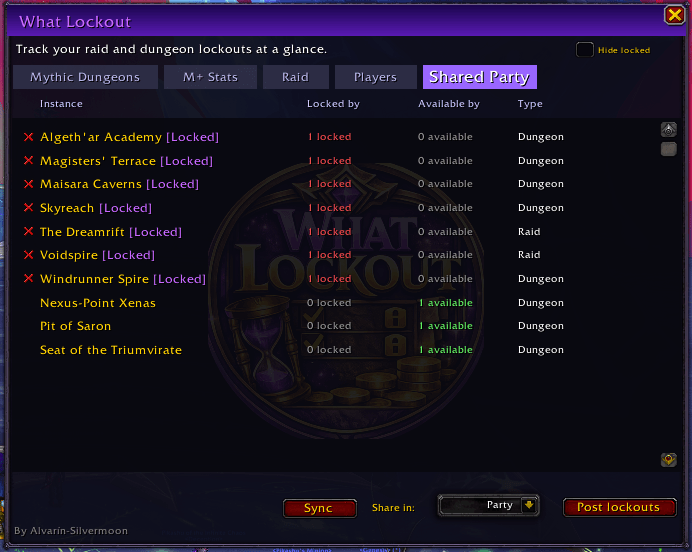
- 🔒 Clear raid + Mythic dungeon lockout status in one window
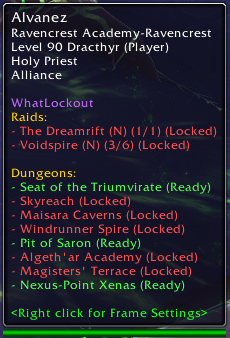
- 🖱️ Hover tooltips for party/raid members to inspect their lockouts instantly
- 🧹 Hide locked filter (per tab) to keep lists clean
- 🧩 Clickable header filters: Progress toggles Hide locked, Type cycles All / Raid / Dungeon / Mythic
- ⚠️ Warning when you apply to — or create — a group for a Mythic dungeon you're already locked to
- 🔄 Share lockout data directly with your party/raid; your own synced alts stay organized separately from temporary party members
🩸 Bloodlust tracker
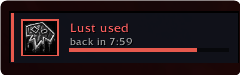
- 🩸 On-screen indicator: is Lust active now (with a live countdown), already used (Sated cooldown), or ready?
- 🚫 Red "No Lust in group" warning when nobody (Shaman / Mage / Evoker) can provide it
- 💥 Big fading banner the moment Bloodlust / Heroism goes out — including who cast it
- 🔊 Configurable cast sound (Raid Warning, Ready Check, and more — or off); the banner still shows
- 🧪 Only shows while you're in a party/raid; a Test button previews it solo. Toggle with
/mm lust.
🔟 Combat Res tracker
- 🔟 On-screen indicator: how many battle resurrections your group has, and the recharge to the next one (with a live bar)
- 💥 Big fading banner + optional sound the moment a battle rez is spent
- 🧟 Falls back to listing which classes can brez (Druid / Death Knight / Warlock / Paladin) when the shared pool can't be read
- 🎛️ Fully configurable in Settings and HUD Edit Mode, just like the Bloodlust tracker. Toggle with
/mm cr.
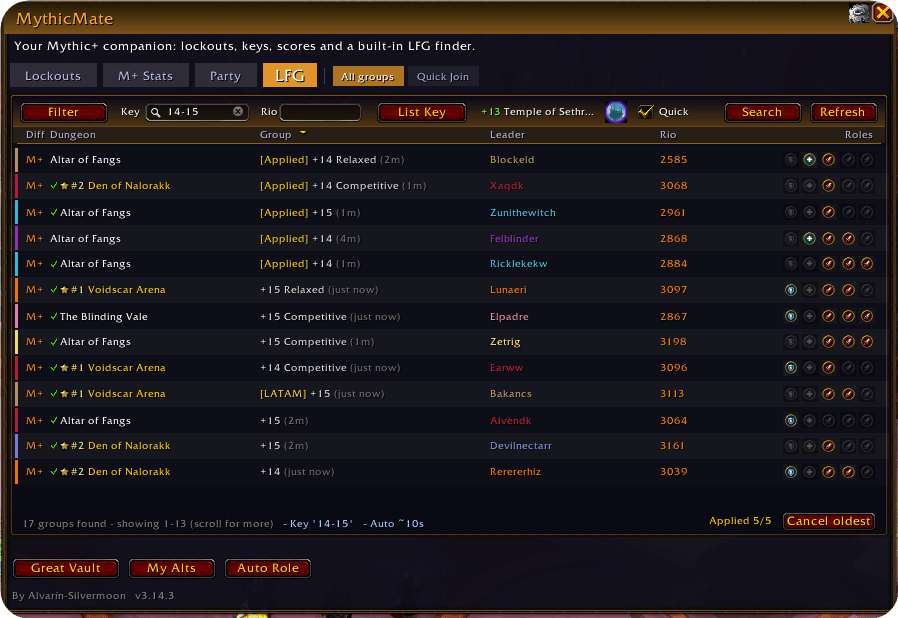
🔎 Built-in LFG finder (LFG tab)
- 🔎 Search Blizzard's Premade Groups from inside MythicMate — with quality-of-life Blizzard doesn't give you
- 🎚️ Key level filter: type
8-10,+9, or10-10for exactly +10 — the only key-level filtering Blizzard still allows - 🏅 Rio filter: show only groups whose leader is within your rating range
- 🟠 CarriedIO score: if you have the CarriedIO addon installed, a "CIO" column shows each leader's (and applicant's) carried.io score in the group list and the Applicants window — rarity-coloured. Completely hidden if you don't have CarriedIO
- 🎭 Playstyle filter: hide Competitive / Relaxed / Learning / Carry listings
- ⚠️ Deserter marker: leaders who recently abandoned a M+ group get a warning triangle next to their name
- 🌍 Region tags (OCE/BR/LATAM) with an option to hide high-ping regions
- 📌 Your active applications stay pinned on top — they never disappear behind a filter
- ✨ One-click sign-up popup with role pre-selection; double-click to cancel an application
- 🔔 Sound + flash when a group invites you; a popup shows the dungeon and key when you join
- 🚦 Locked-dungeon awareness: groups for dungeons you (or synced party members) are saved to are marked
- 🤝 Auto Role Check: opt-in auto-confirm of the LFG role-check popup so you don't have to click Accept every queue (default off; toggle on the LFG / Quick Join tab or
/mm autorole) - 📣 List Key / List Group: one click on the toolbar (or
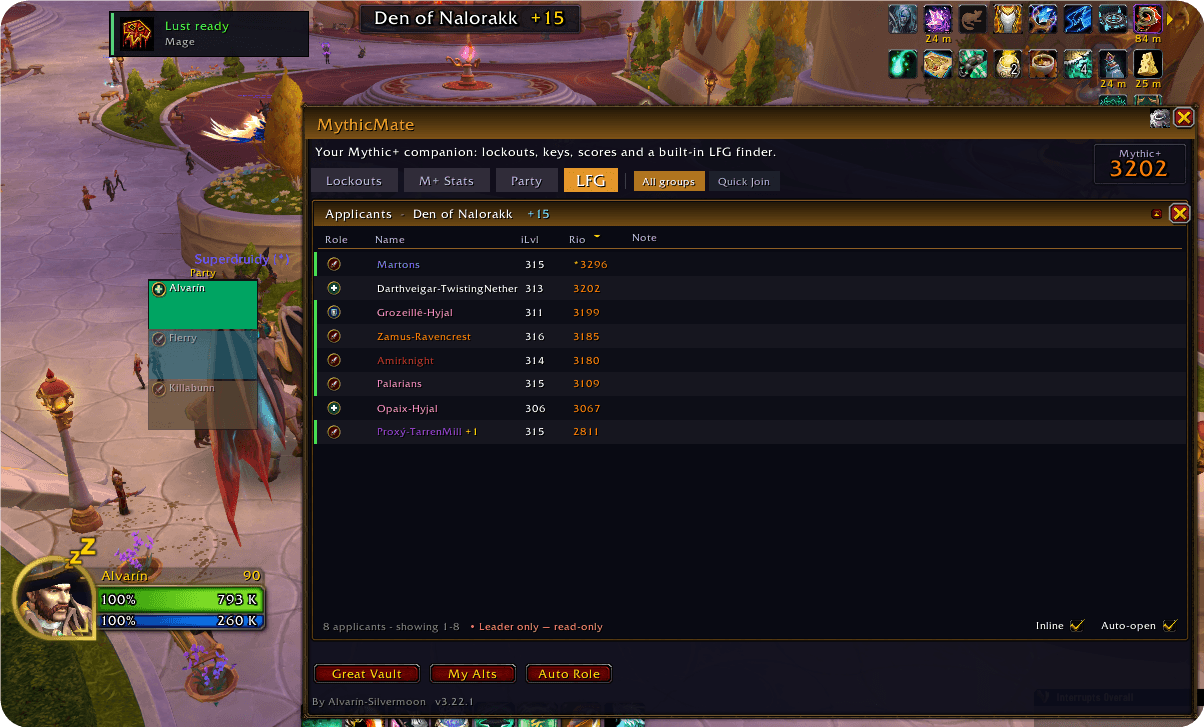
/wl key) instantly lists your own keystone — click again to delist. Shift-click opens the full List Group window (custom dungeon, requirements, playstyle) with an OAK-style applicant sorter for leaders — Battle.net friends, guildies and friends are highlighted (coloured name, row tint and side bar) just like the group list. Listing or delisting through MythicMate closes Blizzard's Premade Groups panel for you - 🧬 Applicant Spec column: the Applicants list shows the exact spec each applicant queued as (e.g. "Restoration"), class-coloured, alongside their role, item level and Rio score
- 🎯 Multi-role invite hint: when an applicant queued for several roles, the hover shows which of your group's open roles they'd fill (WoW auto-assigns the role your group needs on invite — an addon can't force it), so the outcome isn't a surprise
- 👥 Expanded group sign-ups: when a premade group applies together, the Applicants list shows the leader with each member on its own indented row beneath (Blizzard-style), each with their own role/ilvl/Rio/spec — so a group's lowest Rio is clearly visible. Groups rank by their highest member Rio; Invite/Decline act on the whole application
- 👁️ Minimap eye takeover: clicking Blizzard's queue "eye" opens MythicMate's LFG finder instead of Blizzard's popup — whether you've listed a key or you're just browsing/applying
- 🎯 Target banner: while you're forming up, an on-screen banner shows the dungeon + key level your group is about to run, and disappears the moment you zone in. Works for both Group Finder groups and manual guild/friends parties, mirroring the party leader's keystone. Fully stylable in HUD Edit Mode (scale, font, opacity, position) and previewable any time with the Test button in Settings or
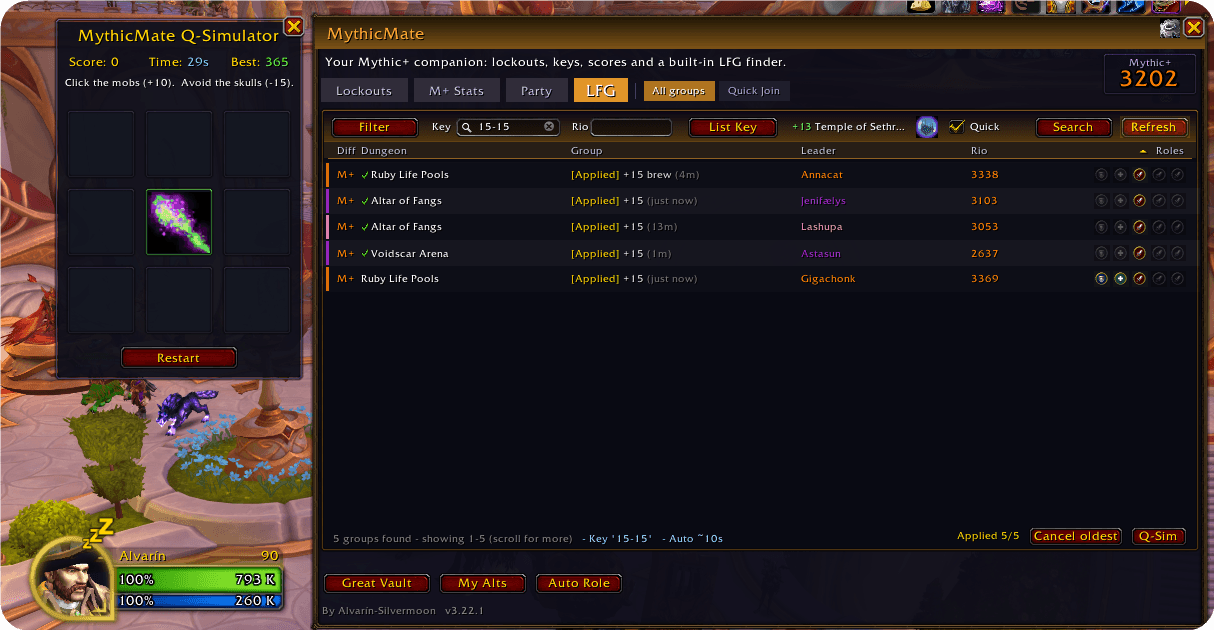
/mm banner test - 🕹️ Q-Simulator: a little whack-a-mole mini-game to kill time in the queue — a Q-Sim button sits in the LFG footer (or
/mm game)
👥 Quick Join
- 👥 Quick Join tab: every group your friends and guildmates are queued for (Social Queue), always visible regardless of filters, with on-screen alerts for new ones
🏰 Guild
- 🏰 Guild tab: your whole guild roster as a Mythic+ Rio leaderboard with a Hall-of-Fame rank number (#1, #2, … gold for the top 3). Shows each member's spec (cached and filled in over time as guildmates pass through your groups; updates on a real spec change), an optional CIO (CarriedIO) column, a best-effort current keystone column, and flags guildmates who are also a friend or Battle.net friend with an icon. Online only toggle, click a row to whisper (right-click to invite), and click the Name/Rio header to re-sort. Rio comes from the RaiderIO addon, with MythicMate's own sync and the
/keyslibrary (LibOpenRaid) as fallbacks
🎨 Misc
- 🎛️ Clean tabbed settings panel (Trackers · Tooltip · LFG · General), themed to your accent colour
- 🔍 Window transparency: a slider (General tab) to set how opaque the main window's background is (10-100%), so you can make it as see-through as you like
- 📐 Window size & scale: sliders (General tab) for the main window's width (880-1160px) and overall scale (70-115%), so it fits your screen and UI scale exactly
- 👥 Party sidebar: an optional slim panel down the left edge of the window listing your current 5-man party with role icons and class-coloured names (
/mm sidebar) - 🛡️ Low-durability warning: a fading on-screen popup (and a chat line) when your average equipment durability drops to/below a threshold, so you repair before your gear breaks — toggle + adjustable threshold (5-50%, default 25%) in the General tab; preview with
/mm durability - 🔧 Auto-repair: repair all your gear automatically whenever you open a repair merchant — guild-bank funds first when your guild allows it, otherwise your own gold — toggle in the General tab (default on)
- 💬 Answer key/score questions in group chat: when a groupmate asks "what key is this?" (English or Dutch), or types
!key/mmkey/io, MythicMate replies once with the group's target key (e.g. "MythicMate: Ruby Life Pools +12") or the leader's M+ score. Resolved via LibOpenRaid (Details/WeakAuras/BigWigs), so it works even when the leader has no MythicMate — and only one member's client answers, so there's no duplicate spam. Toggle in the General tab (default on); post it yourself with/mm key - 🛠️ Low-durability group announce: on entering a dungeon/raid, one client posts a single "please repair" line for any member at or below 30% gear durability — teammates are read via LibOpenRaid, so non-MythicMate members are covered too. Toggle in the General tab (default on)
- 🚫 Hide objective tracker: optionally keep Blizzard's whole quest/objective tracker hidden at all times (not just during a key) — toggle on the Trackers tab (default off)
- 🤫 Talking Head suppressor: hide Blizzard's boss/NPC "story tell" dialogue banners during dungeons and raids (General tab)
- 💬 Whisper command replies with configurable commands for locked / available dungeons
- ✂️ Optional abbreviations in player hover tooltips only (main UI keeps full names)
- 🎨 ElvUI / EllesmereUI aware skinning
📍 How to open
- 📍 Minimap button: click to show/hide the MythicMate window
- 💬 Slash commands:
/mythicmateor/mm— toggle the window (legacy/wl,/lockouts,/whatlockoutstill work)/mm options— open settings/mm lfg(or/mm search) — jump straight to the LFG tab/mm push— open the Group Push tab (best key for the party)/mm goals— open the Score Goals window (target rating + per-dungeon headroom)/mm keys— show party keystones/mm key— post the group's target key to chat/mm resilient— diagnostic for your Resilient Keystone floor/mm lust— toggle the Bloodlust tracker (/mm lust testto preview)/mm cr— toggle the Combat Res tracker (/mm cr testto preview)/mm durability— preview the low-durability warning popup/mm autorole— toggle auto-confirm of the LFG role check/mm sidebar— toggle the party sidebar/mm game— open the Q-Simulator mini-game (/mm game autotoggles auto-pop on queue)/mm lfgnote <text>— set your default application note
✅ Compatibility
Built for The War Within — patch 12.0 and 12.1.
MythicMate Team