Toxicify
- By
Toxicify helps you mark players as Toxic or Pumper. Once added, they will be clearly highlighted in Party/Raid frames and in the Group Finder.
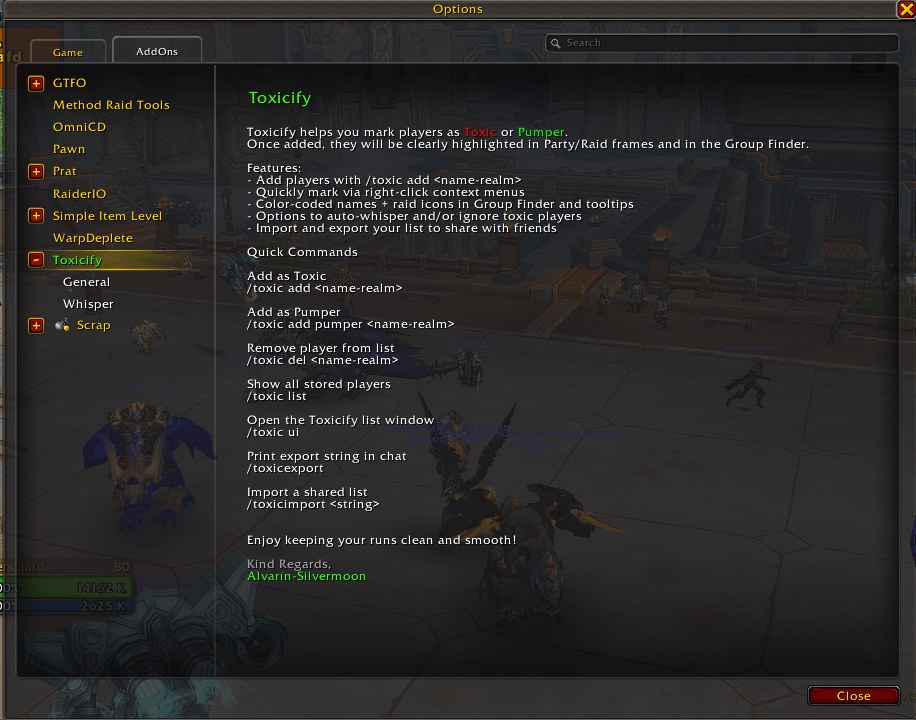
Settings-Front.png
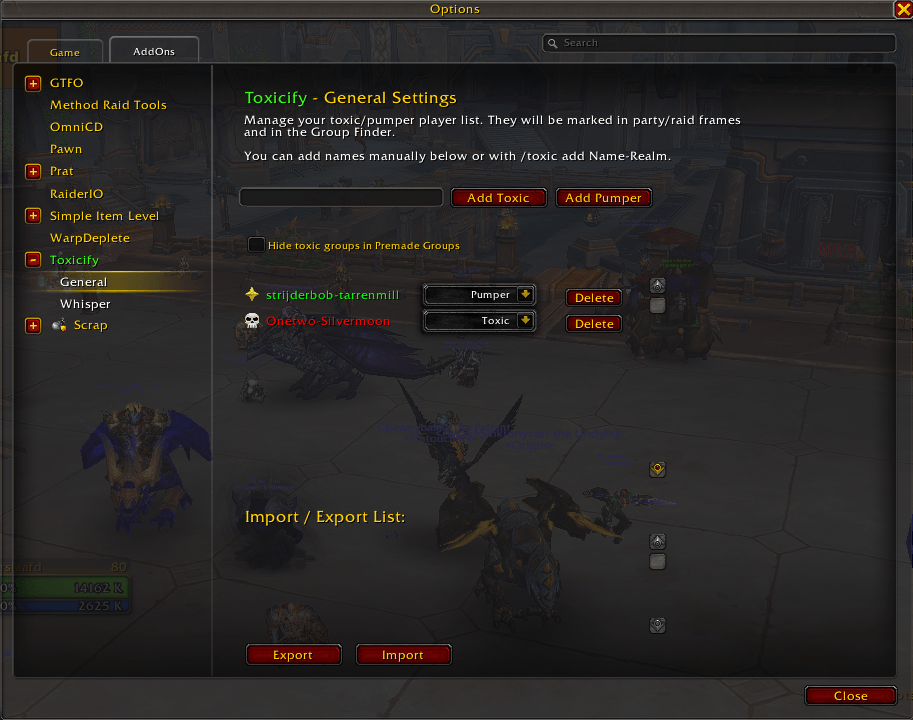
Settings-General.png
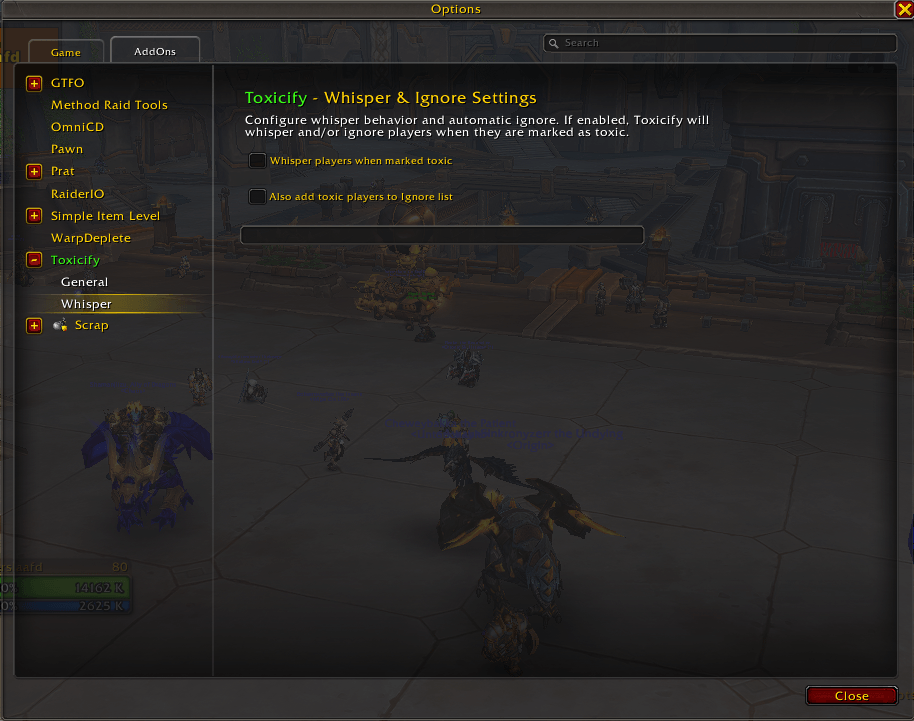
Settings-Whisper.png
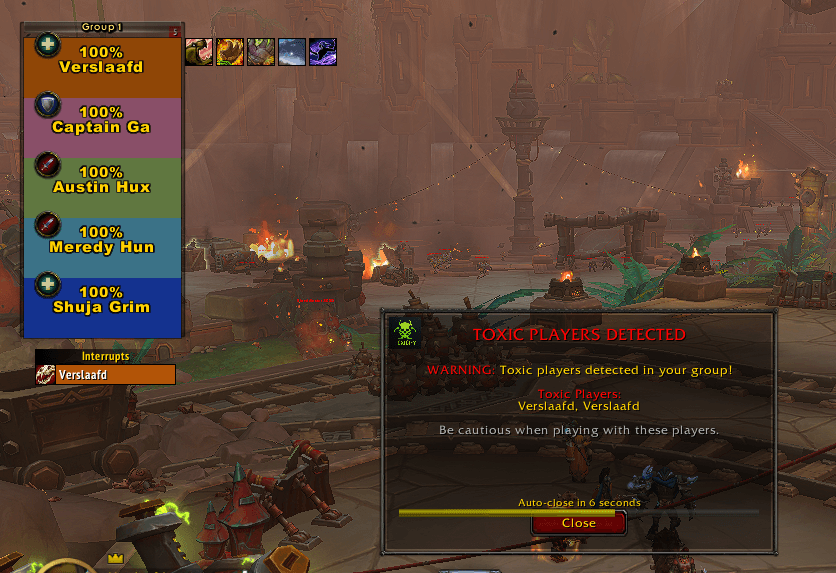
toxic-warning-dungeon.png
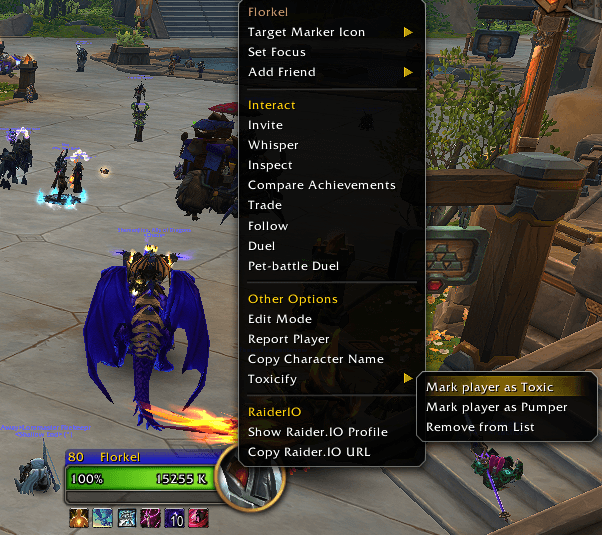
Right-Click-Player.png
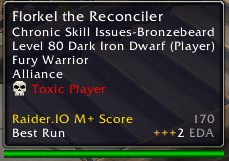
Toxic-Player.png
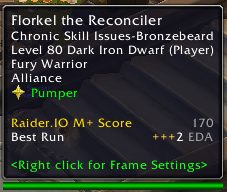
Pumper-Player.png
Description
Toxicify
Keep your runs clean and fun — mark toxic players and highlight the pumpers!
Toxicify helps you keep track of players you encounter in dungeons, raids, PvP, or the Group Finder. With one click or command, you can tag a player as Toxic (to avoid them in the future) or as a Pumper (great teammates you want to remember).
Once added, players are clearly highlighted in your party/raid frames, tooltips, and the Group Finder. You'll never forget who ruined your key — or who carried it!
✨ Features
📝 Toxic & Pumper Lists
- Mark players manually with
/toxic add Name-Realmor via right-click context menus. - Automatically highlight them with icons and color-coded names (red for Toxic, green for Pumper).
- Target frame indicator - See Toxic/Pumper status directly on the target frame.
🔎 Group Finder Integration
- Group leaders are flagged in the Premade Groups UI.
- Toxic leaders get a skull icon and red name.
- Pumper leaders get a star icon and green name.
- Optionally filter out Toxic groups entirely with one checkbox.
👥 Party & Raid Frame Highlighting
- Toxic players in your group show as "Toxic: Name" in red.
- Pumpers show as "Pumper: Name" in green.
🧾 Tooltip Enhancements
- Hovering over a player shows a Toxic/Pumper icon and label in their tooltip.
🎯 Target Frame Indicator
- Target frame overlay - Shows Toxic/Pumper status directly above the target frame.
- Real-time updates - Updates immediately when targeting a new player.
- Visual indicators - Red "TOXIC" with skull icon, green "PUMPER" with star icon.
- Clean design - Subtle overlay that doesn't interfere with the target frame.
💬 Whisper & Ignore Options
- Automatically whisper toxic players with a customizable message.
- Optionally add them directly to your Ignore List.
⚠️ Toxic Player Warnings
- Automatic popup warning when toxic players join your group.
- Shows a detailed list of toxic players with countdown timer.
- Option to leave group directly from the warning popup.
- Warning only appears when you're actually in a party with toxic players.
- Customizable Auto-Close timer - Set how long the warning stays open (1-300 seconds).
- Use
/toxic testwarningto manually test the warning popup. - Use
/toxic partywarningto toggle automatic warnings on/off.
🔄 Import & Export
- Secure data encoding - Export strings are Base64 encoded for security and compatibility
- Automatic clipboard handling - Export automatically copies to clipboard, import auto-detects clipboard data
- Legacy format support - Supports both new secure format and older export formats
- One-click sharing - Simply paste export strings with CTRL+V for instant import
- Checksum validation - Built-in data integrity checking prevents corruption
🖥️ Custom UI Window
- Enlarged interface - Bigger window (650px height) with much more list space for better overview
- Optimized layout - Wider input fields and better button alignment for improved usability
- Manage your Toxic & Pumper lists with a dedicated UI including:
- Enhanced search bar - Real-time filtering with larger, more visible text
- Smart auto-completion - Suggestions from your group, guild, and friends
- Status dropdown - Easy switching between Toxic and Pumper status
- Remove All button with confirmation
- ReloadUI button for quick addon resets
⚙️ Quality of Life
- LibDataBroker minimap icon for quick access.
- Slash commands for all major features.
- Clean design with tooltips and confirmations.
- Debug mode for troubleshooting.
🔧 Slash Commands
Basic Commands
/toxic add <name-realm>→ Add a Toxic/toxic addpumper <name-realm>→ Add a Pumper/toxic del <name-realm>→ Remove player from list/toxic list→ Show current list
Import/Export
/toxic export→ Export your list (automatically copies to clipboard)/toxic import→ Import from clipboard (auto-detects and imports)
UI & Settings
/toxic ui→ Open the Toxicify list window/toxic settings→ Open addon settings/toxic config→ Open addon settings (alias)
Warning System
/toxic testwarning→ Show test warning popup/toxic partywarning→ Toggle automatic warnings on/off
Debug & Advanced
/toxic debug→ Toggle debug mode (shows in main chat)/toxic luaerrors→ Toggle Lua errors (requires debug mode)
⚙️ Settings
Access settings via /toxic settings or the Interface Options. The settings panel includes an enlarged Toxic List (350px height) for better management:
General Settings
- Hide Toxic Groups - Filter out groups with toxic leaders in Premade Groups
- Party Warning - Show warning popup when joining parties with toxic players
- Target Frame Indicator - Show toxic/pumper status above the target frame when targeting players
- Auto-Close Timer - Set how long the warning popup stays open (1-300 seconds, default: 25)
- Whisper Message - Customize the message sent to toxic players
- Whisper on Mark - Automatically whisper when marking someone as toxic
- Ignore on Mark - Add toxic players to your ignore list
Debug Settings
- Debug Mode - Show detailed debug information in chat
- Lua Errors - Enable/disable Lua error reporting (requires debug mode)
Minimap
- Show/Hide Minimap Icon - Toggle the minimap button
💡 Example Use Cases
- Avoid that one player who always leaves keys - Mark them as Toxic and never group with them again
- Remember great teammates - Mark skilled players as Pumpers to invite them again
- Share lists with guildmates - Export your lists so your guild can avoid the same toxic players
- Auto-ignore toxic players - Set Toxicify to automatically add toxic players to your ignore list
- Get warned about toxic groups - Enable party warnings to know when toxic players join your group
- Quick target identification - See immediately if a targeted player is Toxic or Pumper without hovering
🚀 Getting Started
- Install from CurseForge - Download and install via CurseForge or your preferred addon manager
- Mark your first player - Use
/toxic add PlayerName-Realmor right-click on a player - Test the warning - Use
/toxic testwarningto see how the warning popup works - Customize settings - Use
/toxic settingsto configure the addon to your preferences - Share with friends - Use
/toxic exportto share your lists
🔧 Troubleshooting
Debug Mode
Enable debug mode with /toxic debug to see detailed information about:
- When players are detected as toxic/pumper
- When warnings are triggered
- Event handling and group updates
Common Issues
- Warning not showing - Check if party warnings are enabled with
/toxic partywarning - Players not highlighting - Make sure they're marked correctly with
/toxic list - Import not working - Use
/toxic testclipboardto test clipboard functionality - Clipboard not working - Some WoW versions don't support clipboard API, use manual copy/paste with CTRL+C/CTRL+V
- Changes not visible - Use
/reloadto reload the addon after updates
Support
- Use
/toxic debugto enable debug mode for troubleshooting - Check the chat for debug messages when issues occur
- Use
/toxic testwarningto test the warning system
📦 Distribution
Toxicify is distributed through CurseForge for easy installation and automatic updates.
For Users
- Download: Available on CurseForge
- Installation: Use CurseForge app or your preferred addon manager
- Updates: Automatic updates through CurseForge
For Developers
- Source Code: Available on GitHub
- Contributing: Pull requests and issues welcome
- License: Open source for community development
⚔️ Created by Alvarín-Silvermoon
Toxicify Team