WoW Forever Addon Weight
- By
Shows how heavy each of your addons is on WoW Forever: the frame time it takes, the hitches and stutters it causes, the memory it holds and how long it takes to load. One window names the heaviest, and the figures are kept across sessions.
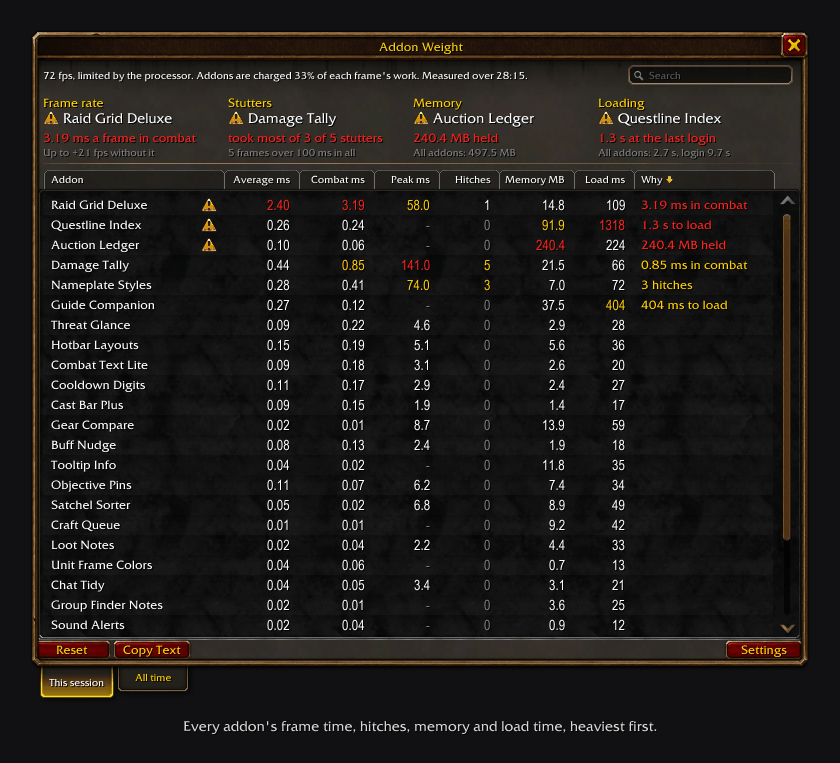
Four tiles name the heaviest addon on frame rate, stutters, memory and loading. The list gives every addon's figures, heaviest first. Drawn from the addon's own layout and figures with the game's art; the addon names are invented.
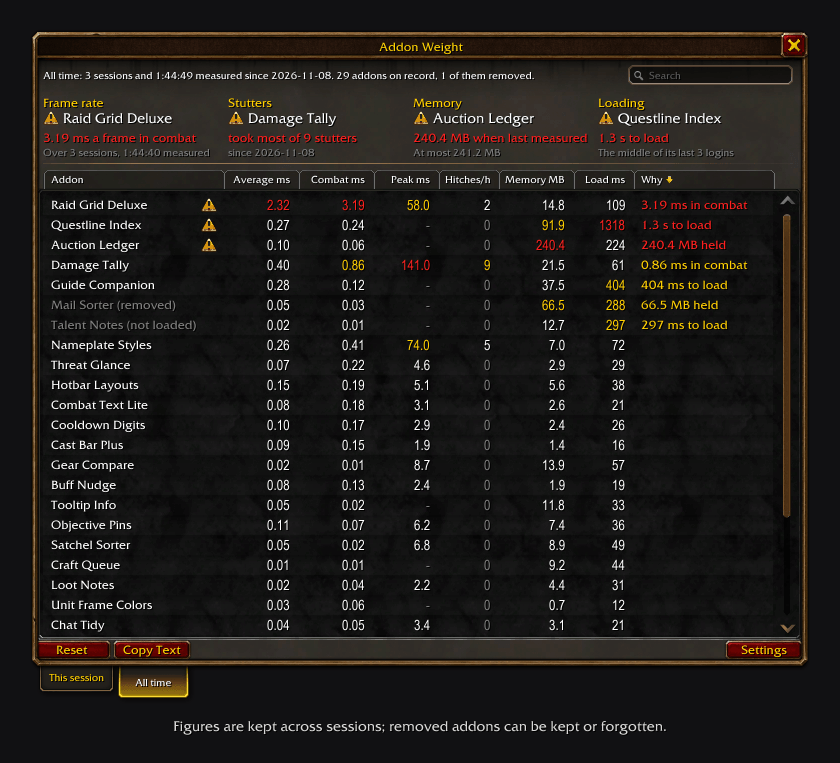
Figures are kept across sessions. Addons you removed or that are not loaded stay in the list, greyed. Drawn from the addon's own layout and figures with the game's art; the addon names are invented.
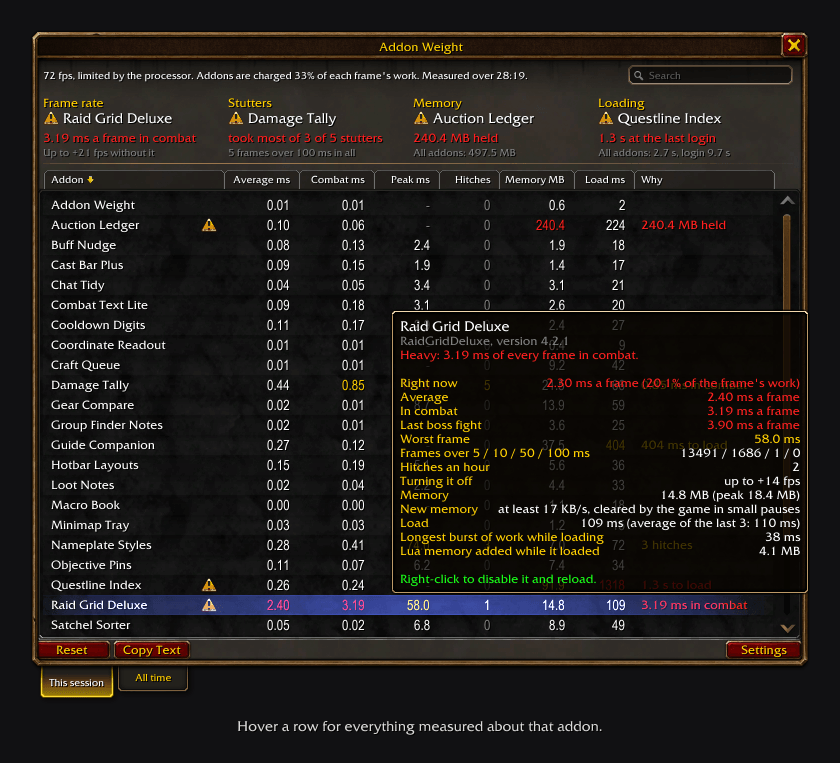
Hover a row for every figure measured about that addon. Drawn from the addon's own layout and figures with the game's art; the addon names are invented.
Description
Addon Weight shows how heavy each of your other addons is, so you can find the one that costs you frames, memory or loading time. It is for World of Warcraft: Forever. Type /weight to open it.
It reads the game's own addon profiler, which is always on, so there is nothing to switch on first and the profiling adds no slowdown of its own.
What the window shows
Four tiles across the top each name one addon and one number:
- Frame rate: the addon that takes the most processor time from every frame, and what turning it off could be worth in fps.
- Stutters: the addon that took most of the most long frames.
- Memory: the addon that holds the most memory, and the total for all of them.
- Loading: the addon that took longest to load, against the length of the whole login.
Below is one row per loaded addon:
| Column | What it is |
|---|---|
| Average ms | processor time it takes from each frame |
| Combat ms | the same, only while you are in combat |
| Peak ms | its worst single frame |
| Hitches | frames in which it alone ran over 50 ms |
| Memory MB | what it holds |
| Load ms | how long its files and saved settings took at the last login or reload |
| Why | in words, the measure furthest past its mark; blank when nothing stands out |
Heavy addons sort to the top, and those that cost frames come before those that cost memory or loading time. A heavy addon has an alert icon after its name. Click a column header to sort by it. Hover a row for everything measured about that addon.
This session and all time
Two tabs under the window switch between the session under way and everything on record. The all-time figures are saved, so a reload or a logout loses nothing: each addon's average frame time over every session, its hitches per hour, its worst frame, the stutters it took most of, its memory and the middle one of its last five load times.
When you delete an addon from your AddOns folder, its saved figures go at the next login. A setting keeps them instead, marked as removed, until you forget them with a right-click.
What you can do with it
- Right-click a row to disable that addon for this character and reload. It asks first.
- Reset starts the session's figures over, for measuring one fight or one place.
- Copy Text gives every table as text you can paste into a post or a bug report.
/weight topnames the addons that stand out, in chat.
What the numbers can and cannot tell you
- Frame time is what the game's profiler charges to an addon, and it charges whoever created the frame the work runs on. Addons built on the shared Ace3 library use one frame between them, so the first one to load Ace3 is charged with the event work of all of them. Addon Weight marks that addon and warns you before you disable it that the cost will move to the next one rather than go away.
- Work an addon does through Blizzard's own code, or after a mouse click, is charged to no addon. A stutter "not charged to any addon" can still be addon code.
- "Up to +N fps" is a ceiling. When your graphics card sets your frame rate, lighter addons will not raise it, and the window says so.
- Load time is the gap between one addon finishing and the next, so small figures are rough. Addons that load on demand are estimates, marked
~, and are not judged. - Everything that happens behind a loading screen is left out of hitches, peaks and stutters.
What the meter itself costs
It lists itself, so you can check. With the window closed it makes about one profiler call per frame with 60 addons. Measuring memory stops the game for as long as the scan takes, which large addon sets can feel, so the meter times every scan: a quick one repeats once a minute, and a slow one only runs while a loading screen is up or when you open the window.
Commands
/weightopens or closes the window;/weight allopens it on the All time tab./weight top,/weight report,/weight reset./weight forgetclears everything saved, after asking./weight configopens the settings: Esc > Options > AddOns > Addon Weight.
The folder is named !!AddonWeight on purpose. Addons load in name order, and the meter has to load first to time the others.
WoW Forever Addon Weight Team