Twitch Emotes WoW Forever
- By
Adds animated Twitch, 7TV, BetterTTV, and FrankerFaceZ emotes to WoW Forever chat, with search, autocomplete, favorites, and per-channel controls.
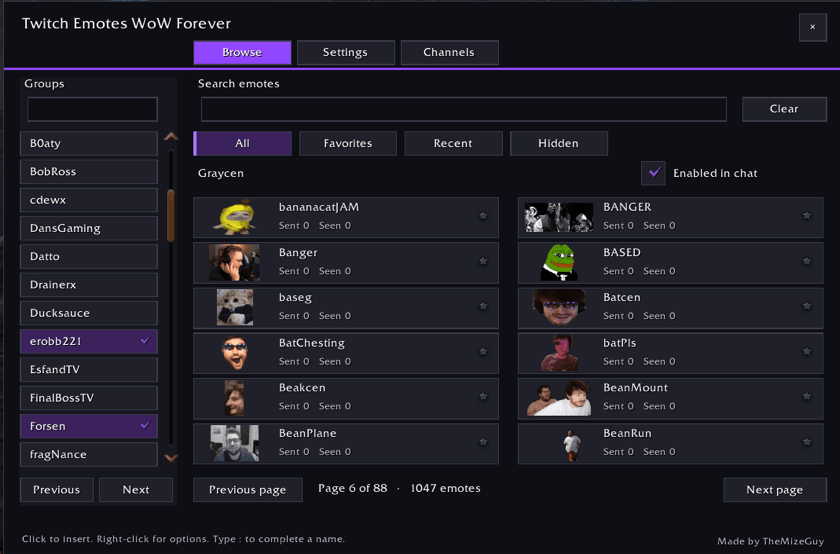
Search emote previews, manage favorites and hidden names, and enable a group directly from Browse.
Description
Twitch Emotes WoW Forever turns familiar emote names into images and animations in your chat. Find the expression you want in a purple visual browser, choose your channel groups, and autocomplete emotes as you type.
The full collection includes 8,000+ emote names across 66 groups, with artwork from Twitch, 7TV, BetterTTV (BTTV), and FrankerFaceZ (FFZ). Everything is bundled in one 198 MB download, with approximately 1.3 GB of disk space needed after extraction.
Start using emotes
- Install it for WoW Forever, Retail, Mists Classic, TBC Anniversary, or Classic Era, then fully exit and restart WoW.
/reloadalone can leave new textures as green boxes after this update. - Open
/te,/twitch, or the minimap button. General and five channel groups start enabled, with no setup popup. - With the chat box open, click an emote in Browse to insert its name, or type
:and part of a name for autocomplete with image previews. Up and Down move the highlight and Tab inserts the name; Enter always sends your message as typed.
For manual installation, place the TwitchEmotes folder inside your client's Interface/AddOns folder and keep its name unchanged. The same folder works in every client. No companion addon or Twitch login is required.
Browse and choose your collection
- Preview every group, including disabled ones. Search emote names, enable a group directly from Browse, and see enabled groups highlighted.
- One group per channel. Use the Channels tab to search and tick the groups you want; General holds provider-wide emotes.
- Keep favorites and recent emotes within reach. Hide individual names and restore them from Browse > Hidden.
- Control shared names. Choose which enabled group supplies the image when collections overlap.
- Use chat shortcuts. Click an emote in chat for its options, or Shift-click to insert its name into an open chat box.
Adjust how emotes appear
Set chat emote size from 12 to 40 pixels, with a live preview and a 28-pixel default. Choose which chat types show emotes, toggle animation, and set a 15, 30, or 60 FPS playback limit. Move the compact minimap button by dragging it, or hide it in Settings. Minimap button collectors such as MinimapButtonButton, Leatrix Plus, and EllesmereUI can gather it with your other addon buttons.
Static emotes use 64-pixel frames; animations keep every frame and their source timing, at the largest frame height the download budget allows for each emote (most at 64 pixels, long clips at 32 to 48). Palettes and deflate-aware layouts keep the download small without dropping content. Animation updates only visible chat lines and stops its timer when no visible emotes need animation.
Every Twitch global text face (:), :-P, :/, <3, O_o, B) and the rest), D:, and the chat words 1G, BOP, Retail, and Classic are disabled by default and can be restored individually. Messages still contain plain emote names, so friends without the addon can read them; players with matching emotes enabled see the images.
Found a bug? Report it on GitHub.
Made by TheMizeGuy. All Rights Reserved for the addon code and documentation. Emote artwork and provider trademarks remain with their respective rights holders. This project is not affiliated with or endorsed by the emote providers.
Twitch Emotes WoW Forever Team