WorldMarkerCycler
- By
when you in party or raid use keybind B to put world marker down and use CTRL-B to remove all markers
Description
# World Marker Cycler
**One key to mark everything.** World Marker Cycler lets raid leaders, tanks and anyone who marks pulls drop ground markers, mark targets and mark mouseover enemies with a single keybind, in the order *you* choose. Everything is set up in a clean in-game menu with live animated previews. No macros, no slash commands needed.
✅ Works on **Retail** and **WoW Classic / Forever**
💬 Questions, bugs or ideas? Join the Discord: **https://discord.gg/Y9BR7euG3R**
---
## ✨ Features
* 🔄 **Ground marker cycling**: press one key to drop the next world marker at your mouse cursor. Press again for the next one.
* 🎯 **Target marking**: one key puts the next raid icon on your current target.
* 🖱️ **Mouseover marking**: marks the enemy under your mouse without changing target. With nothing hovered, it marks your target instead.
* ❌ **Clear keys**: clear all ground markers, or the mark on your target/mouseover, with a separate key. After a clear, the cycle always restarts at your first marker.
* 📋 **Your own order**: pick the exact order markers are placed in. The same order is shared by ground, target and mouseover cycling.
* ⭐ **Custom Cycle Mode**: only want Skull → Cross → Diamond? Pick just the markers you use and cycle through those.
* 🧰 **Raid Marker Bar**: a small movable bar with all 8 ground markers, CLEAR, ready check, pull timer and cancel-timer buttons. One or two rows, lockable.
* ⌨️ **Any key or mouse button**: keyboard keys, mouse wheel, side/MMO mouse buttons, with CTRL / ALT / SHIFT combos.
* 🛡️ **Safe in combat**: uses Blizzard's secure buttons, and throttles itself to stay under Blizzard's limit of about 3 marker actions per second.
---
## 🖥️ The Options Menu
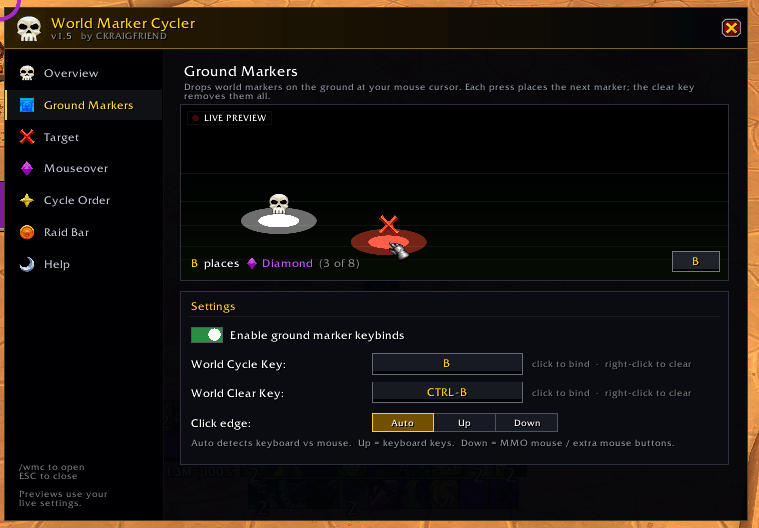
Type **`/wmc`** (or open *Settings → AddOns → World Marker Cycler* and click **Open World Marker Cycler**).
| Tab | What you do there |
|---|---|
| **Overview** | See which features are on and which keys they use. Click a tile to jump to it. |
| **Ground Markers** | Turn ground markers on/off, set the Cycle and Clear keys, choose the click edge (Auto / Up / Down). |
| **Target** | Set the target Cycle and Clear keys. |
| **Mouseover** | Set the mouseover Cycle and Clear keys. |
| **Cycle Order** | Click two marker slots to swap them, type an order, or reset to default. Set up Custom Cycle Mode. |
| **Raid Bar** | Set the key that opens the bar, show/hide, lock/unlock, one or two rows. |
| **Help** | Mouse button names, slash commands and tips. |
Every page has a **live preview animation** that shows exactly what the feature does, using *your* keys and *your* marker order. Click a preview to pause it.
---
## 🚀 Quick Start
1. Type **`/wmc`**.
2. Go to **Ground Markers**, click the **Cycle Key** box and press the key you want (for example `SHIFT-Q`). Do the same for the **Clear Key**.
3. Go to **Cycle Order** and click two slots to swap them until the order is how you like it.
4. Optional: set keys on the **Target** and **Mouseover** tabs.
5. Point at the ground and press your key. Done!
**Tip:** right-click any key box to unbind it. You need to be group leader or assistant (or solo) for markers to show up.
---
## ⌨️ Slash Commands (optional)
**You don't need any commands anymore.** Everything is in the `/wmc` menu. The old commands still work for anyone who likes them or uses them in macros:
| Command | What it does |
|---|---|
| `/wmc` or `/wmckey` | Open the options menu |
| `/wmcstatus` | Print your current keys and order in chat |
| `/wmcclear` | Clear the ground marker keybind overrides and reset the cycle |
| `/wmcbind place <key>` · `/wmcbind clear <key>` | Set the ground marker keys |
| `/wmcclickedge auto\|up\|down` | Change the click edge for the ground cycle key |
| `/wmctadd cycle <key>` · `/wmctadd clear <key>` | Set the **target** marker keys |
| `/wmctclear` | Remove both target marker keys |
| `/wmcmadd cycle <key>` · `/wmcmadd clear <key>` | Set the **mouseover** marker keys |
| `/wmcmclear` | Remove both mouseover marker keys |
| `/wmcrshow` · `/wmcrhide` · `/wmcrtoggle` | Show / hide the Raid Marker Bar |
| `/wmcrlock` | Lock or unlock the Raid Marker Bar |
| `/wmcrrows` | Switch the bar between one and two rows |
| `/wmcpull <1-60>` | Set how many seconds the pull-timer button counts down |
**Examples:**
```
/wmctadd cycle CTRL- NUMPAD1
/wmctadd clear CTRL- NUMPAD2
/wmcmadd cycle SHIFT-W
/wmcmadd clear SHIFT-E
```
*Type `cycle` / `clear` in lowercase. Modifiers are `CTRL-`, `ALT-`, `SHIFT-` (or none). Key names are WoW's names, e.g. `F1`, `NUMPAD1`, `BUTTON4`, `MOUSEWHEELUP`.*
---
Perfect for raid leaders, M+ tanks and anyone who wants fast, reliable marking without fumbling through menus. 💀❌💎
WorldMarkerCycler Team

Owner