WhoThreatAggro
- By
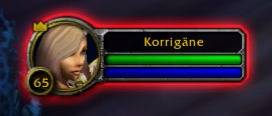
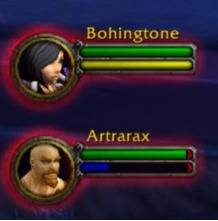
A colored glow on your unit frames to know at a glance who has aggro — lightweight, high-performance.
WTA Frame 1.JPG
WTA Frame 2.JPG
Description
WhoThreatAggro
Always know who has aggro.
WTA adds a colored glow around unit frames the moment threat gets dangerous — and can display the exact threat percentage in real time, directly on the frame.
How it works
The glow changes color as threat builds:
- 🟡 Yellow — getting close (80%)
- 🟠 Orange — watch out (95%)
- 🔴 Red — you have aggro (100%, glow pulses)
Works on player, party (5-man), and raid (40) frames out of the box.
Who's it for?
- Tanks — spot who's pulling off you before it becomes a wipe
- DPS — know your exact threat % before the boss turns around
- Healers — keep an eye on your squishiest raiders
Options
Type /wta options to customize:
- Toggle glows and percentage text independently for each frame type (player / party / raid)
- Choose text size and position (9 anchor points)
- Combat Only mode: the addon stays completely silent out of combat
/wta test to preview the visuals without being in combat.
Lightweight by design
Zero activity at rest. In raids of 25+, the addon automatically drops to 30 FPS to reduce CPU load.
----
WhoThreatAggro
Sachez toujours qui a l'aggro.
WTA ajoute une lueur colorée autour des cadres d'unité dès que la menace devient dangereuse — et peut afficher le pourcentage exact en temps réel, directement sur le cadre.
Comment ça marche
La lueur change de couleur au fil de la menace :
- 🟡 Jaune — ça monte (80%)
- 🟠 Orange — attention (95%)
- 🔴 Rouge — tu as l'aggro (100%, la lueur clignote)
Fonctionne sur les cadres du joueur, du groupe (5-man) et du raid (40) dès l'installation.
Pour qui ?
- Les tanks — repérez qui vous arrache l'aggro avant que ça vire au wipe
- Les DPS — sachez exactement à combien de % vous êtes avant que le boss se retourne
- Les healers — gardez un œil sur vos raiders les plus fragiles
Options
Tapez /wta options pour personnaliser :
- Activer/désactiver les lueurs et les pourcentages indépendamment pour chaque type de cadre (joueur / groupe / raid)
- Choisir la taille et la position du texte (9 points d'ancrage)
- Mode Combat uniquement : l'addon reste totalement silencieux hors combat
/wta test pour prévisualiser le rendu sans être en combat.
Léger par conception
Zéro activité au repos. En raid de 25+, l'addon passe automatiquement à 30 FPS pour réduire la charge CPU.
WhoThreatAggro Team