UIMover
- By
Reposition your frames and chat in two clicks — faster than Blizzard's edit mode.
UIMover 2.png
Description
UIMover — Reposition your TBC interface in two clicks
Move your frames and chat windows exactly where you want them, without going through Blizzard's edit mode.
What you can move
- Portrait frames — player, target, focus, pet
- Chat windows — move and resize each window (General, Combat, etc.) independently. All windows share the same size: resize one and they all follow.
How it works
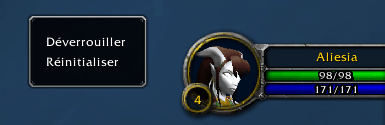
Right-click any frame or chat window → Unlock → move it → Right-click → Lock. The Reset option puts the element back to its default position.
Positions and sizes are saved automatically. Moving is disabled in combat (game limitation).
Compatibility
Works on TBC Classic Anniversary Edition 2.5.5. Interface available in 10 languages — auto-detected from your client (FR, EN, DE, ES, IT, PT, RU, ZH, KO).
----
[FR] UIMover — Repositionnez votre interface TBC en deux clics
Déplacez vos cadres et vos fenêtres de chat exactement où vous voulez, sans passer par le mode édition de Blizzard.
Ce que vous pouvez déplacer
- Cadres de portrait — joueur, cible, focus, familier
- Fenêtres de chat — déplacez et redimensionnez chaque fenêtre (Général, Combat, etc.) indépendamment. Toutes partagent la même taille : redimensionner l'une suffit pour toutes.
Comment ça marche
Clic droit sur n'importe quel cadre ou fenêtre de chat → Déverrouiller → déplacez → Clic droit → Verrouiller. L'option Réinitialiser remet l'élément à sa position par défaut.
Les positions et tailles sont sauvegardées automatiquement. En combat, le déplacement est désactivé (limitation du jeu).
Compatibilité
Fonctionne sur TBC Classic Anniversary Edition 2.5.5. Interface disponible en 10 langues — détection automatique selon votre client (FR, EN, DE, ES, IT, PT, RU, ZH, KO).
UIMover Team