OmniFade
- By
Fades your whole interface away when you're idle and brings it back the instant you act, so you can simply enjoy Azeroth.
Description
OmniFade
The next OmniFade update arrives with novelty and comfort.
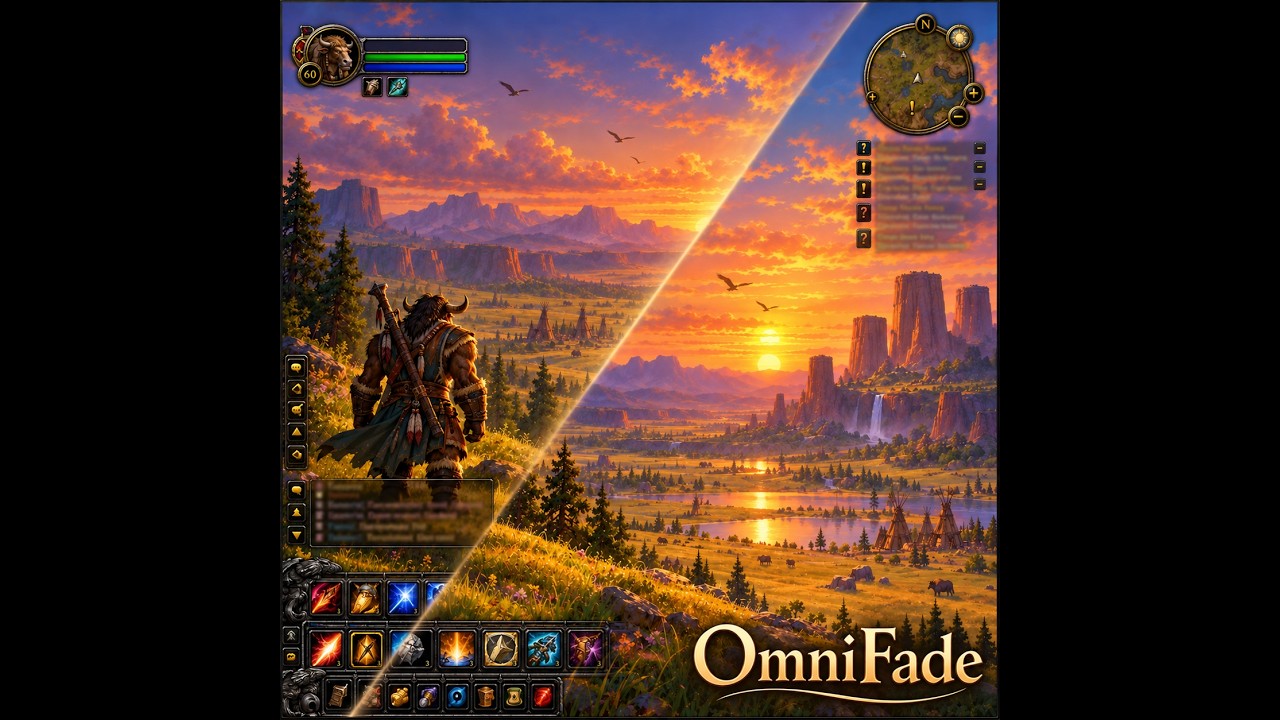
Your interface fades away when you do nothing, and comes back the moment you act.
Action bars, unit frames, minimap, chat, quest tracker: everything stays on screen all the time, even while you just watch the sunset over Mulgore or wait for a friend. OmniFade fades your interface out after a few calm seconds. Move, target, cast or open a window, and everything is back instantly.
It just works
Stop for a few seconds: the interface fades. Act again: it's back, instantly.
It stays out of your way when it matters:
- in combat , everything is always visible;
- in a group, dungeon or raid , the interface never fades (each one can be turned off);
- with an open window (vendor, bags, quests...), only that window stays visible;
- in settings menus and Edit Mode , nothing fades.
Made for immersion
- Deep rest : after a longer delay, everything drops to zero, even the minimap. Instantly with `/afk`.
- Cinema bars : two black bars slide in at the top and bottom during deep rest. They never block your clicks.
- Hidden names : names above units fade out while you rest, and your settings come back as soon as you wake up.
- Fishing and crafting : the interface fades at once, only the cast bar (and the profession window) remain.
- Taxi flights : sit back and watch the world go by.
Smart exceptions
- Chat shows up for a few seconds when you get a whisper, a group or raid message.
- Player and pet frames stay visible while hurt.
- Mouse at the bottom brings back the action bars, mouse on the right the side bars, mouse near a frame brings it back gently.
- An enemy appears nearby: your action bars come back for 5 seconds.
Your settings
Everything is in the panel (`/ofade`), in four tabs: General, Immersion, Exceptions, Opacity. Every option has a tooltip.
Each module gets its own resting opacity: action bars, player and pet frames, buffs, minimap, quest tracker, chat, XP bar, everything else. 0 = gone, 100 = always visible.
Good to know
- Settings are saved per character.
- Reset in the panel restores the defaults, after confirmation.
- English and French , following your game language.
Commands
| Command | Effect |
|---|---|
| `/fade` | Turn OmniFade on or off |
| `/ofade` or `/omnifade` | Open or close the settings panel |
| `/fade reset` | Restore default settings (with confirmation) |
Minimap button : left-click for the panel, right-click to turn on or off, drag to move it.
Key binding : Options > Key Bindings > AddOns > OmniFade.
---
OmniFade
Une interface qui s'efface quand vous ne faites rien, et qui revient dès que vous agissez.
Barres d'action, cadres, mini-carte, chat, suivi de quêtes : tout reste affiché en permanence, même quand vous regardez simplement le coucher de soleil sur Mulgore ou attendez un ami. OmniFade estompe l'interface après quelques secondes de calme. Bougez, ciblez, lancez un sort ou ouvrez une fenêtre : tout revient instantanément.
Ça marche tout seul
Arrêtez-vous quelques secondes : l'interface s'estompe. Agissez : elle revient aussitôt.
Elle ne vous gêne jamais quand ça compte :
- en combat , tout reste toujours visible ;
- en groupe, en donjon ou en raid , l'interface ne s'efface jamais (chaque cas peut être désactivé) ;
- avec une fenêtre ouverte (marchand, sacs, quêtes...), seule cette fenêtre reste visible ;
- dans les menus d'options et le Mode Édition , rien ne s'efface.
Pensé pour l'immersion
- Repos profond : après un délai plus long, tout tombe à zéro, même la mini-carte. Immédiat en `/afk`.
- Bandes cinéma : deux bandes noires apparaissent en haut et en bas pendant le repos profond. Elles ne bloquent jamais vos clics.
- Noms masqués : les noms au-dessus des unités s'effacent pendant le repos, et vos réglages reviennent dès le réveil.
- Pêche et fabrication : l'interface s'efface aussitôt, seules la barre d'incantation (et la fenêtre du métier) restent.
- Vols de taxi : installez-vous et regardez le monde défiler.
Des exceptions malignes
- Le chat apparaît quelques secondes à chaque chuchotement, message de groupe ou de raid.
- Les cadres joueur et familier restent visibles tant qu'ils sont blessés.
- Souris en bas : les barres d'action reviennent. Souris à droite : les barres latérales. Souris près d'un cadre : il revient en douceur.
- Un ennemi apparaît près de vous : vos barres d'action reviennent pendant 5 secondes.
Vos réglages
Tout se règle dans le panneau (`/ofade`), en quatre onglets : Général, Immersion, Exceptions, Opacités. Chaque option a une infobulle.
Chaque module a sa propre opacité au repos : barres d'action, cadres joueur et familier, buffs, mini-carte, suivi de quêtes, chat, barre d'XP, tout le reste. 0 = disparaît, 100 = toujours visible.
Bon à savoir
- Les réglages sont enregistrés par personnage.
- Réinitialiser dans le panneau remet tout par défaut, après confirmation.
- Anglais et français , selon la langue de votre jeu.
Commandes
| Commande | Effet |
|---|---|
| `/fade` | Active ou coupe OmniFade |
| `/ofade` ou `/omnifade` | Ouvre ou ferme le panneau de réglages |
| `/fade reset` | Remet les réglages par défaut (avec confirmation) |
Bouton de mini-carte : clic gauche pour le panneau, clic droit pour activer ou couper, glisser pour le déplacer.
Raccourci clavier : Options > Raccourcis > AddOns > OmniFade.
OmniFade Team