WhoScout
- By
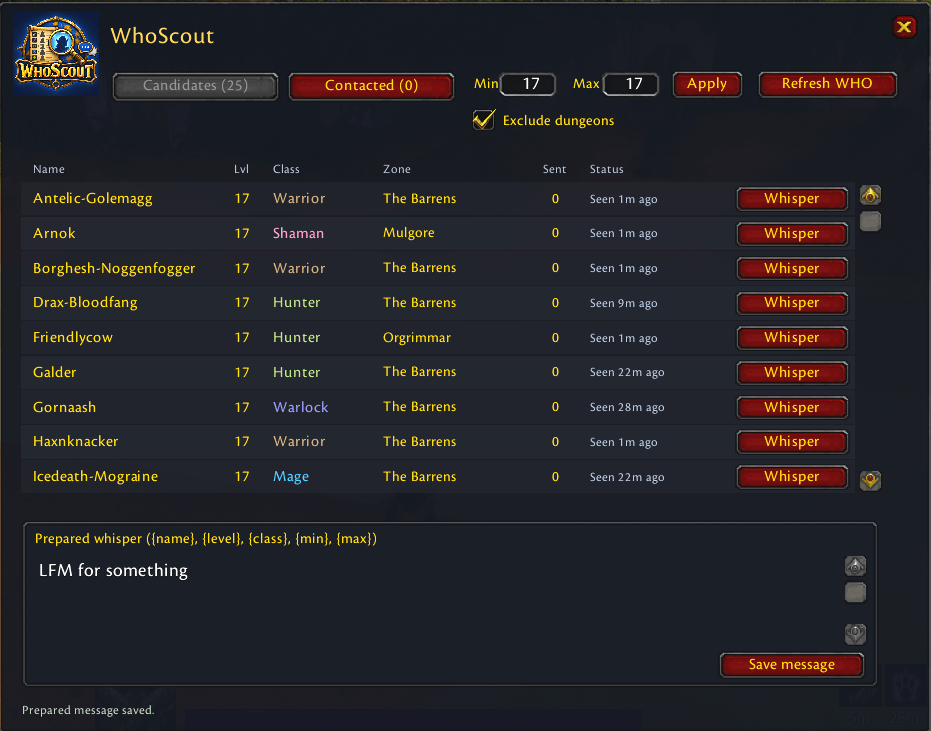
A lightweight Classic Era addon for finding players through WHO, sending prepared whispers, tracking contacts, replies, and group invitations.
screenshot.png
Description
WhoScout
WhoScout helps you find and contact players without losing track of who you have already messaged.
Use configurable WHO searches to discover players, filter the results, send a prepared whisper with one click, and keep contacted players separate from new candidates. Incoming replies are highlighted and
stored together with your outgoing messages.
#### Features
- Configurable minimum and maximum player level
- Optional dungeon-location filter
- Player name, level, class, zone, guild, and last-seen information
- Separate Candidates and Contacted tabs
- Custom prepared whisper message
- Message tokens: {name}, {level}, {class}, {min}, and {max}
- One deliberate click sends one whisper
- Sent-message counter for every player
- Persistent conversation history
- Incoming and outgoing whispers shown together
- Highlighted rows for unread replies
- Click a contacted player to view the conversation
- Native right-click menu with Invite to Group
- Clear all contacted action for starting a new outreach session
- Draggable minimap button
- Persistent settings and contact state
- No external libraries required
#### How to use
1. Open WhoScout with /whoscout, /ws, or the minimap button.
2. Choose the desired level range.
3. Enable or disable Exclude dungeons.
4. Click Refresh WHO.
5. Review the discovered players in Candidates.
6. Customize and save your prepared message.
7. Click Whisper to contact one player.
8. Contacted players move to the Contacted tab.
9. Select a player to view the conversation or right-click for group actions.
#### Important
WHO searches are initiated manually because World of Warcraft restricts automated WHO requests. WhoScout does not send bulk or automatic whispers—every message requires a deliberate player click.
WhoScout records whispers received while the addon is loaded. A sent message confirms that it was sent by the client, not that the recipient has read it.
#### Compatibility
Designed for World of Warcraft Classic Era and the Classic Era client family.
WhoScout Team