Better Loot Rolls
- By
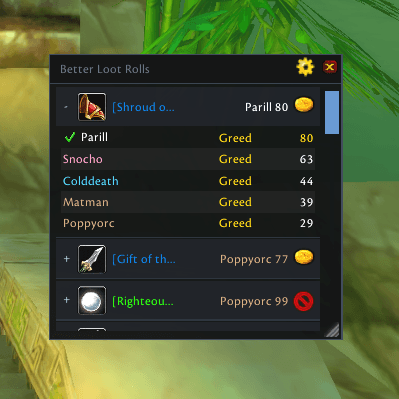
A configurable, resizable history of recent Need, Greed, Disenchant and Pass rolls with roll values and winners for WoW Classic Era and TBC Classic.
screenshot.png
Description
# Better Loot Rolls
Better Loot Rolls is a lightweight and configurable replacement view for the
information shown by World of Warcraft Classic's built-in `/loot` history
window.
It keeps recent group loot rolls readable without turning them into a
long-term archive. Active rolls stay at the top, while only a configurable
number of completed rolls are retained.
## Features
- Shows the item icon and full item link.
- Shows every participating player with their class colour.
- Clearly distinguishes Need, Greed, Disenchant, Pass, and waiting states.
- Shows each completed roll value and highlights the winner.
- Keeps active rolls above completed history.
- Retains 20 completed rolls by default, configurable from 5 to 100.
- Provides a movable window that can be resized in both directions.
- Saves window position, size, scale, options, and bounded recent history.
- Can open automatically when a new group loot roll begins.
- Uses no external addon libraries.
Better Loot Rolls only observes Blizzard's `C_LootHistory` data. It does not
hide or modify the standard `/loot` window, automate loot decisions, or
interfere with Need, Greed, Disenchant, Pass, Bind-on-Pickup confirmation, or
Master Loot actions.
## Commands
- `/blr` toggles the recent-roll window.
- `/blr options` opens Better Loot Rolls settings.
- `/blr history 20` changes the completed-history limit (5-100).
- `/blr clear` clears completed history.
- `/blr reset` resets window position, size, and scale.
- `/blr api` prints a compact compatibility report for bug reports.
## Client coverage
This alpha targets:
- World of Warcraft Classic Era, including Hardcore realms (`1.15.9`);
- World of Warcraft: Burning Crusade Classic Anniversary (`2.5.6`).
This is an early alpha intended for practical in-game validation. Please report
the exact client build, locale, reproduction steps, and `/blr api` output with
any problem.
## Installation
Extract the `BetterLootRolls` folder into:
`World of Warcraft/_classic_era_/Interface/AddOns/`
Restart the game or run `/reload`, then use `/blr`.
## Support and source
Source code and issue tracking:
The Better Loot Rolls Team