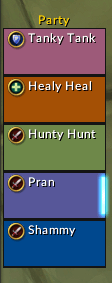
Raid-style party frames with nicknames in a follower dungeon
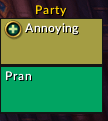
Raid-style party frames in a Delve
Description
WhoDat
Replace character names with nicknames on your raid frames
Feedback on this AddOn or any others that I develop/maintain is always welcome. If you enjoy using any of my AddOns and would like to support future development, it is greatly appreciated.




Summary
WhoDat allows you to define a nickname for a character that will appear on their unit frame when they are in your party or raid. Multiple characters can be associated to a single nickname, so you can always tell which altoholic friend you're grouped up with regardless of what character they are playing on!
This AddOn is built to work with default Blizzard raid frames, so it may cause unexpected interactions if you are running any other AddOns that modify names on unit frames. When in a party, nicknames will only appear when you have the Raid-Style Party Frames option enabled.
Usage
You can use the options window to modify all available options. To open the options window from the Chat window, type the slash command /wd config.
Options Window
- Debug: Display debugging messages in the default chat window (You should never need to enable this)
Add New Entry
- Nickname: A new nickname that you want to see in your raid frames
- Character Name: A character to assign the nickname to
Current Nicknames
Options defined below are available for each existing nickname. The Delete Nickname button deletes the chosen nickname along with all associated characters. Characters associated with a nickname are listed in this section, with a Delete button allowing you to disassociate a character name with the chosen nickname.
- Add to Nickname: Adds a new character to associate with the chosen nickname
Slash Commands
/wd config: Opens the Options window/wd debug: Toggles debug messages in the default chat window- This is the same as clicking the Debug checkbox in the Options window
Public API (WDUtils)
WhoDat exposes a WDUtils object containing utility functions that allow for using some of the AddOn's capabilities in other places. As an example, users who also have the Shadowed Unit Frames AddOn can create a custom tag to display WhoDat nicknames on their SUF frames using the function WDUtils.GetNickname.
Get Nickname
WDUtils.GetNickname(character) accepts a character name as an argument and returns the WhoDat nickname for that character. If one doesn't exist, the character name provided is returned instead.
Check Group Status
WDUtils.IsGroupedUp() returns true when your character is in either a party or a raid, and false otherwise.
The WhoDat (Raid Frame Nicknames) Team