Warlock Library Forever
- By
All your warlock demon grimoires on one page, by demon: see at a glance what is known, in your bags or available to buy.
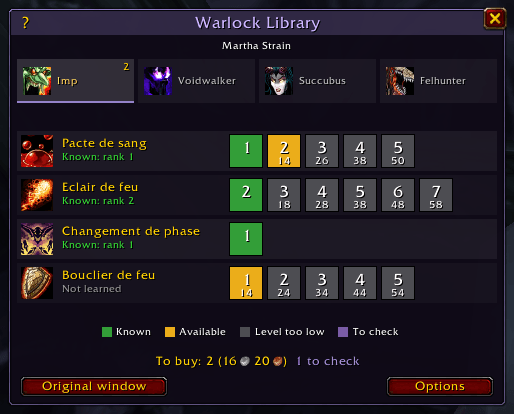
One page per demon: known ranks in green, grimoires to buy in gold, locked ranks in grey with their required level.
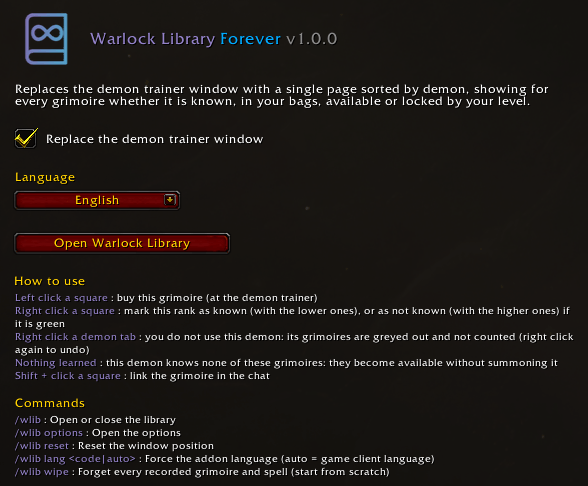
Replace the trainer window or not, choose the language, and find every mouse action and command.
Description
Warlock Library Forever
All your warlock demon grimoires on one page, by demon: see at a glance what is known, in your bags or available to buy.
Made for the WoW Forever server (modern client, Classic data).
Why?
The demon trainer sells about sixty grimoires spread over six merchant pages, all with the same icon, and the game never tells you which ones your demons already know. You end up flipping pages, hovering every book and sometimes buying a grimoire twice.
Warlock Library replaces that window with a single, clear page.
Features
- One tab per demon: Imp, Voidwalker, Succubus, Felhunter. Each tab shows how many grimoires you can buy right now.
- One line per spell, one square per rank, with the real spell icon and the rank your demon already knows.
- Colour-coded status for every rank:
| Colour | Status | Meaning |
|---|---|---|
| 🟩 Green | Known | Your demon already knows this rank |
| 🟩 Dark green | Higher rank known | Useless now, a higher rank is known |
| 🟦 Blue | In bags | Already bought: use it with the demon summoned |
| 🟨 Gold | Available | You can buy it now: just click |
| ⬛ Grey | Level too low | The required level is written in the square |
| 🟪 Purple | To check | This demon has not been checked yet |
- Click to buy a grimoire directly from the page.
- Total to buy with its cost at the bottom of the window.
- Library anywhere: type
/wlibto check your grimoires away from the trainer (from your last visit). - The legend only shows the colours actually used, and the ? button recalls every mouse action.
How does it know what my demons have learned?
The game only exposes the spells of the demon currently summoned. Warlock Library reads them whenever a demon is out (at login, after a summon, when you talk to the trainer) and remembers them for each character.
- Detection uses spell and item IDs, so it works in every client language.
- Using a grimoire, or seeing "Already known" at the trainer, is recorded too.
- Summon each demon once and everything is up to date for good.
Don't want to summon a demon? Set it by hand:
| Action | Effect |
|---|---|
| Right click a square | Mark this rank as known (with the lower ones), or as not known (with the higher ones) if it is green |
| Right click a demon tab | You do not use this demon: its grimoires are greyed out and not counted (right click again to undo) |
| "Nothing learned" button | This demon knows none of these grimoires: they become available without summoning it |
| Shift + click a square | Link the grimoire in the chat |
Manual marks are replaced automatically as soon as the game reports the real information.
Commands
| Command | Description |
|---|---|
/wlib |
Open or close the library |
/wlib options |
Open the options |
/wlib reset |
Reset the window position |
/wlib lang <code|auto> |
Force the addon language (auto = game client language) |
/wlib wipe |
Forget every recorded grimoire and spell (start from scratch) |
Options are also available in Esc > Options > AddOns > Warlock Library.
Languages
English, Français, Deutsch, Español, Italiano. The language can be switched in game without changing your client language. Spell names always come from your game client.
Good to know
- The original merchant window is never moved or closed, only made transparent under Warlock Library. The Original window button brings it back at any time, and the replacement can be turned off in the options.
- No library dependency, lightweight, no combat log usage.
Feedback
Found a bug or a grimoire that is not recognised? Please leave a comment with a screenshot and your client language. Custom Forever grimoires are supported by reading their tooltip, but feedback helps a lot.
Changelog
1.0.0
- First release.
Warlock Library Forever Team