DoTimer Forever
- By
Lightweight multi-target DoT tracker for WoW Forever with class editions (Warlock, Shadow Priest in beta): timers, health bars, damage forecast and expiry warnings.
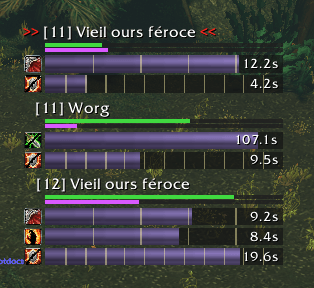
DoTs, Curses and Drains on three enemies, with health bars, damage forecast and tick markers. The current target is marked with >> <<.
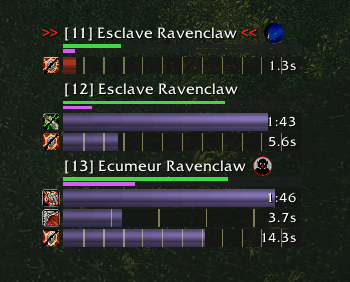
New in 0.5.0: your pet's portrait shows which enemy it is attacking, and the focus icon marks your focus target. Can be turned off in the options.
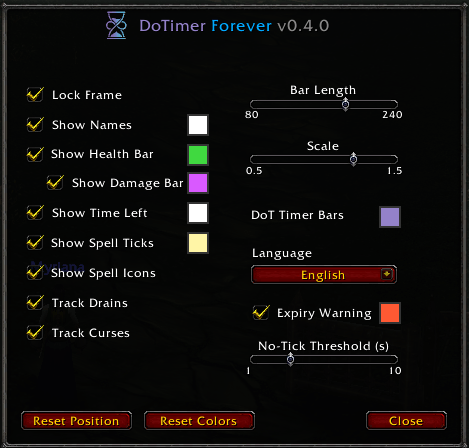
All settings in one window: colors, displayed elements, bar length, scale, expiry warning and language.
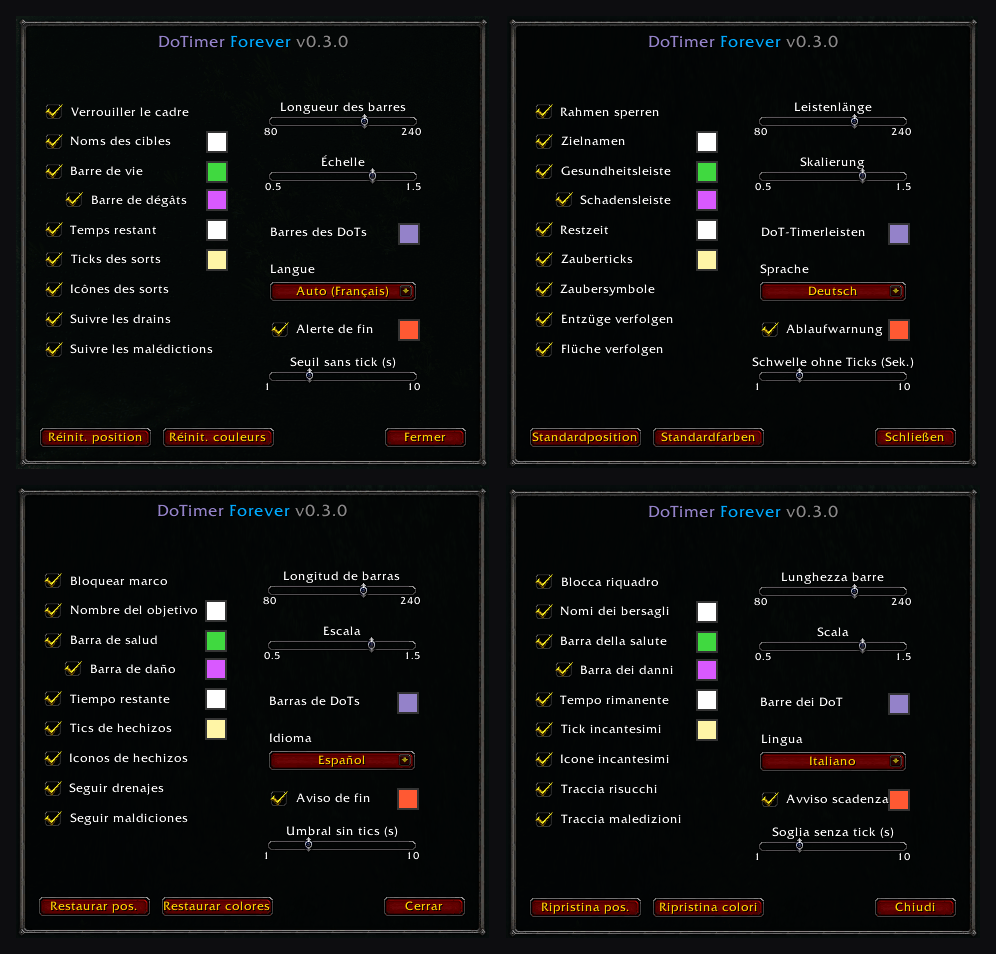
English, French, German, Spanish and Italian. The addon follows your game client language, or you can pick one in the options.
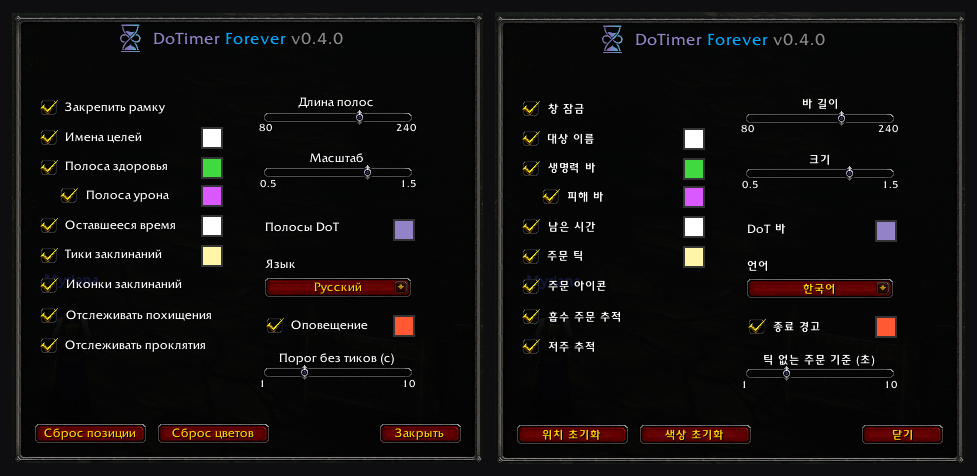
New in 0.4.0: DoTimer Forever is now available in Russian and Korean, on every game client. Choose the language in the options or with /dt lang ruRU / koKR.
Description
DoTimer Forever is a simple, lightweight multi-target DoT and Channel tracker built for the WoW Forever server. It helps you monitor your DoTs, utility debuffs and channels across multiple enemies in a Classic-style environment without UI clutter.
🧩 Editions
DoTimer Forever is made of a core and class editions, installed together and grouped under DoTimer Forever in your addon list. The edition matching your character is used automatically; you can disable the ones you don't need.
- Warlock Edition: Corruption, Bane of Agony, Immolate, Siphon Life, every Curse, Drain Life, Drain Soul, Drain Mana and the Forever talent channel Wrack. Respects the Warlock rules: one Curse and one Bane per target. The damage forecast follows the growing ticks of Bane of Agony.
- Priest Edition (beta): Shadow Word: Pain, Devouring Plague, Vampiric Touch and Void Plague (runes), Mind Flay and Mind Sear (channels), Hex of Weakness and Vampiric Embrace. Available in the beta files (see the Files tab) while it is being tested. Feedback from Shadow Priests is very welcome!
On a class without an edition, DoTimer stays asleep: no window, no CPU use.
✨ Key Features
- Target Health Bar: Displays an integrated visual health bar beneath enemy names whenever unit data is available (requires the target to be selected, focused, moused over, or to have an active nameplate visible on your screen).
- Estimated Damage Forecast: Displays a graphic bar showing the estimated remaining periodic damage from your active DoTs. When this bar nears or passes the enemy's remaining health, it serves as a helpful visual cue that your DoTs can finish off the creature without extra casts.
- Expiry Warning: A bar changes color and pulses when a DoT enters its last tick, or during the last seconds of a utility debuff such as a Curse (adjustable), so you know exactly when to recast.
- Real Durations: Durations are read from your own spell tooltips when you cast, so talents that lengthen a DoT (e.g. Improved Shadow Word: Pain) are taken into account, tick marks included.
- Structured Spell Ordering: Timers are organized in a fixed hierarchy (utility debuffs at the top, damage DoTs in the center, channels at the bottom), so bars do not jump around unpredictably.
- Calculated Tick Markers: Displays subtle tick divider marks across your timer bars.
- WoW Forever Calibrated: Durations, ticks and damage checked against the Forever server, including custom spells and spell IDs.
- Stable Multi-Target Tracking: Tracks DoTs on multiple enemies simultaneously in chronological order. Your active target is clearly highlighted with >> << indicators, and enemies with no DoT left fade out smoothly.
- Pet & Focus Markers: Your pet's live portrait appears next to the enemy your pet is attacking, and a focus icon next to your focus target, so you always know who is on what.
- Instant Channel Stops: Channel bars (Drains, Wrack, Mind Flay…) are removed the moment your cast finishes, fails, or is interrupted.
- Multilingual: Available in English, French, German, Spanish, Italian, Russian, and Korean. The addon follows your game client language automatically, or you can pick one in the options. Spell names always come straight from your game client.
- Lightweight: No libraries, and next to no CPU cost when nothing is being tracked.
⚠️ Technical Notes & Limitations (WoW Forever Engine)
- Visual Bars Only (No Raw Numbers): Because combat health values are protected as "secret values" by the engine, addon scripts cannot calculate or display numerical HP or percentages without triggering script errors. Tracking relies entirely on native graphic status bars.
- Rough Estimates (Not a Combat Calculator): The damage forecast is a visual aid based on the periodic damage read from your spell tooltips (values measured on the Forever server as a fallback). It does not speculate on critical strikes, nor does it factor in target magic resistances, partial resists, or external healing.
- Nameplate Visibility Required: Target health updates rely on active nameplates or direct targeting. If an enemy is behind your camera or out of nameplate render range, its health bar will not refresh until you target or face it again.
- Resisted or Immune Spells: The engine hides enemy auras and the combat log from addons during combat, so the tracker cannot know when a spell was resisted or the target was immune. A resisted DoT will still show its timer until it would have expired.
- Spells Cast on Another Unit: The engine does not tell addons who a spell was cast on, so DoTimer always assumes your current target. Spells cast without targeting the enemy (e.g.
/cast [@focus]or[@mouseover]macros) will show their timer on your current target instead.
⚙️ Commands & Configuration
Type /dt or /dotimer in the game chat to manage the addon:
/dt: Opens the in-game options menu./dt lock: Locks the anchor in place and hides the background frame./dt reset: Resets the anchor position to the center of your screen./dt lang <code>: Forces the addon language (enUS,frFR,deDE,esES,itIT,ruRU,koKR), orautoto follow your game client.
🎨 Options Menu (/dt)
The options panel is also available from Esc > Options > AddOns > DoTimer Forever. It adapts to your class. You can customize:
- Full Color Palette: Built-in color pickers for Target Names, Health Bar, Damage Forecast Bar, DoT Bars, Time Left text, Tick Markers, and the Expiry Warning.
- Dedicated Toggles: Show or hide Target Names, Health Bar, Damage Forecast Bar, Time Left text, Tick Markers, Spell Icons, and the Pet & Focus Icons (Focus Icon for classes without a pet).
- Class Options: Track or hide your class's channels and utility debuffs (Warlock: Drains and Curses; Priest: Channels and Hexes), saved per class. Hidden spells keep being tracked and come back with their real time left when you tick the option again.
- Expiry Warning: Turn it on or off, and set the warning threshold for spells without ticks (DoTs always warn on their last tick).
- Sliders: Adjust Bar Length and global UI Scale.
- Language: Auto (follows your game client) or any available language.
- One-Click Resets: Revert anchor position to center (
Reset Position) or restore default theme colors (Reset Colors).
🚀 Coming Next
- Priest Edition: out of beta once tested at higher levels.
- Layout Options: keep the current target at the top, choose whether bars grow up or down, and limit the number of enemies displayed.
Got an idea? Share it in the comments!
👨💻 About the Author
Created by Xunga (aka Myriana, Warlock in the Phénix guild on EU-Dalaran, in another life, back in 2004!).
Don't hesitate to say hi if we cross paths in-game!
I also welcome all your feedback, suggestions, and bug reports regarding the addon in the comments to help improve it.
DoTimer Forever Team