Warlock HUD
- By
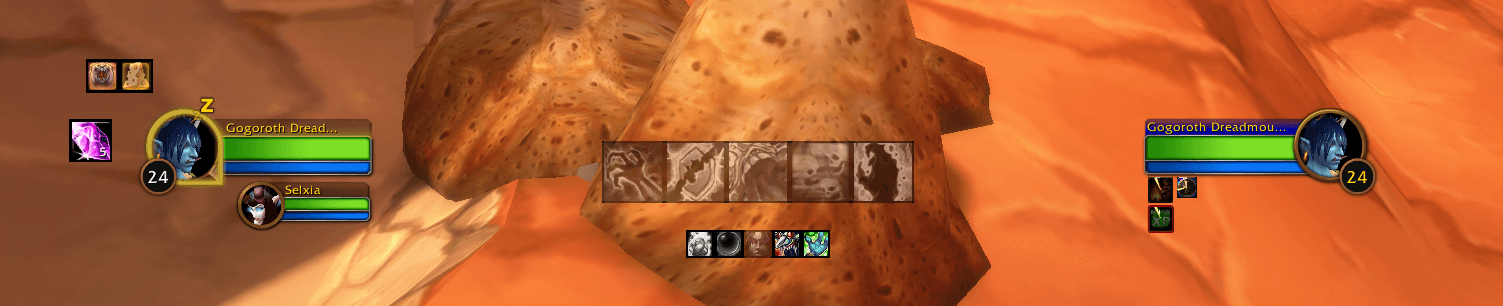
The live HUD shows only slots that are enabled and relevant to your character. Target DoTs and buffs use their normal in-game colors and countdowns.
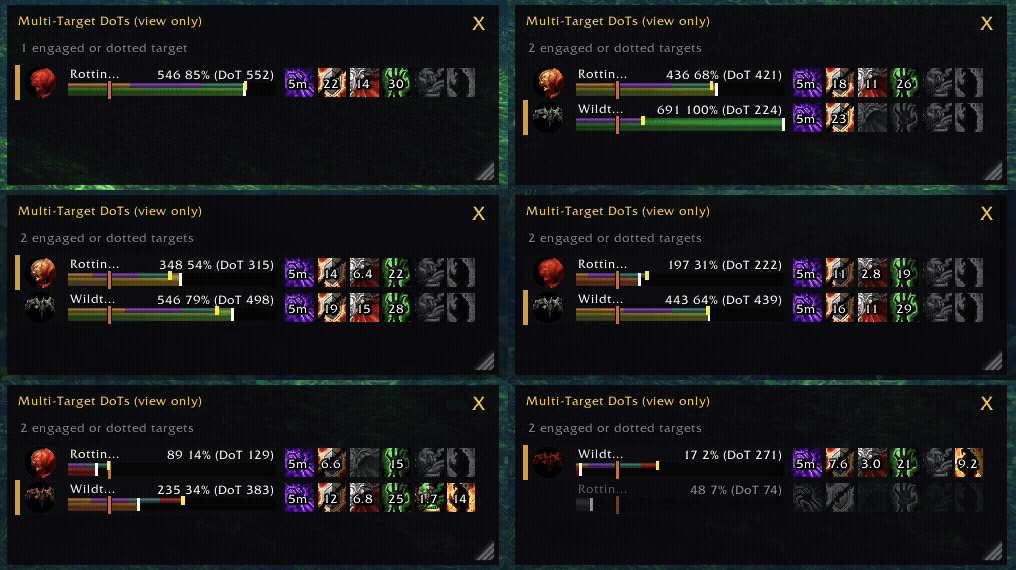
Multi-Target DoTs in action.
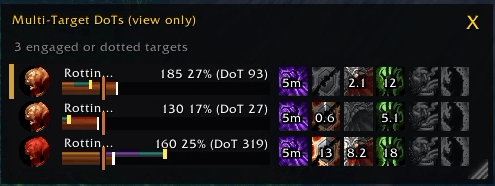
Track your DoTs over multiple targets, with estimated DoT damage, and kill.
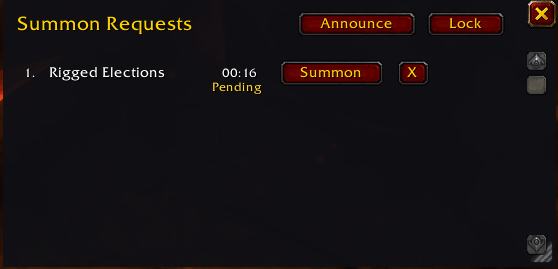
Single button summoning from party, raid, instance or whispers.

The demo labels Buffs, Procs, Target DoTs, Utility, and Soul Shards at their on-screen positions. It shows inactive and disabled icon slots so you can see the full layout before choosing what to track.
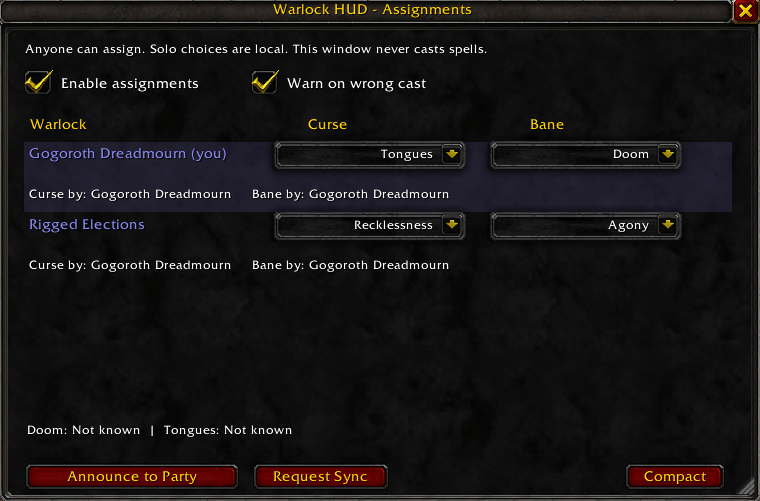
Assign curses and banes to members of your party, raid, or instance.
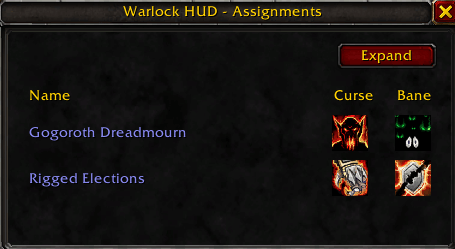
Mini window of assign curses and banes to members of your party, raid, or instance.
Description
Warlock HUD
Your Warlock. Your HUD. Your raid, organized.
Warlock HUD is a customizable combat HUD and Warlock utility toolkit built specifically for World of Warcraft: Forever.
Keep your important DoTs, buffs, procs, cooldowns, and Soul Shards visible without cluttering your screen. Coordinate raid assignments, organize summons, distribute Healthstones, and manage your demons — all in one addon.
Built with Forever's modern addon restrictions in mind, Warlock HUD uses Blizzard-native aura rendering to display supported effects and countdowns during combat.
Whether you're leveling, running dungeons, or coordinating a raid, Warlock HUD helps you spend less time managing your UI and more time playing your Warlock.
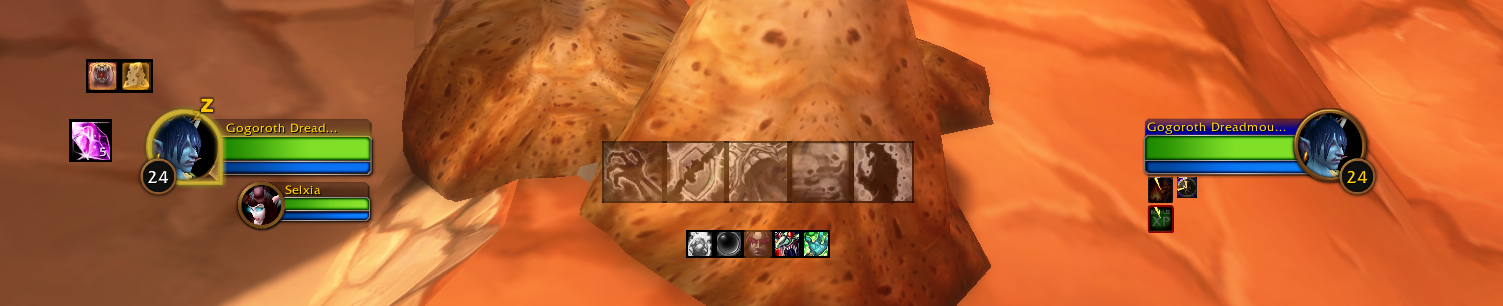
Combat HUD
A compact, fully customizable HUD that displays the information Warlocks need during combat.
Target DoTs & Effects
Track your important target effects:
- Corruption, Immolate, and Siphon Life
- Demonic Brand when talented, with a native countdown and application count
- Banes: Agony, Doom, and Havoc
- Curses
- Drain spells
Active effects display Blizzard-native aura countdowns, including decimal timing where supported.
Shared icon slots keep related abilities together instead of filling your screen with unnecessary icons. Customize their default appearances, ordering, sizes, and visibility.
Icons react to target availability and range, with configurable coloring for active and inactive effects.
Multi-Target DoTs (optional)
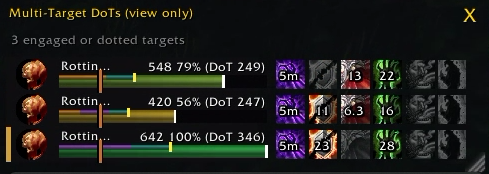
Track your DoTs on up to 16 enemies in a compact, scrollable window. Live rows show a portrait, name, health bar, raid marker where available, a 20% health mark, and Blizzard-native DoT icons with countdowns. The tracker can find enemies through visible nameplates and player, party, or raid target tokens when it can confirm combat involvement or one of your DoTs.
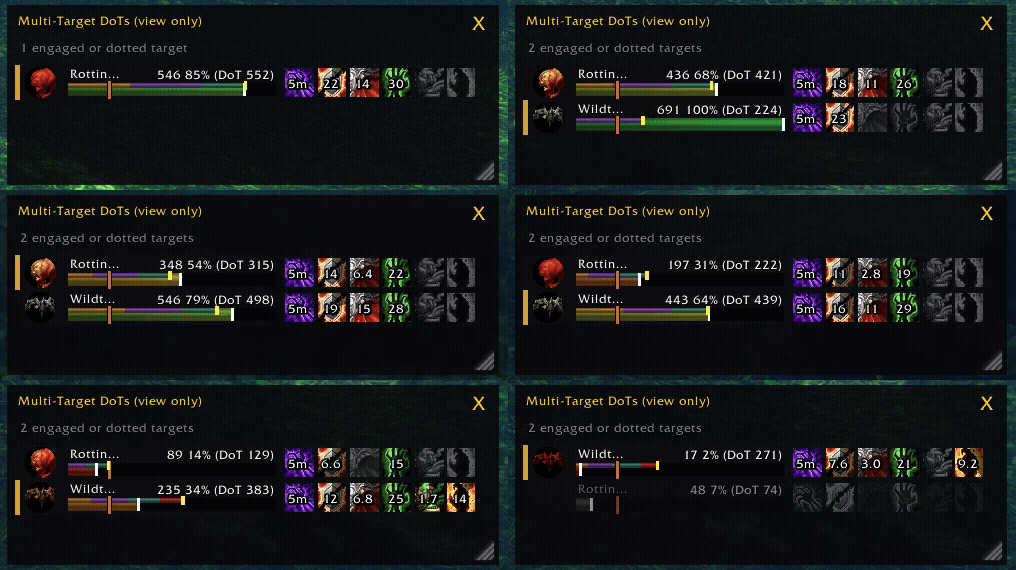
When talented and enabled in Target DoTs settings, Demonic Brand can also appear on each tracked enemy with its own native countdown and application count.
A colored line above each health bar estimates the remaining damage from your Corruption, Bane of Agony, Siphon Life, and Immolate. Each live row also shows current HP, health percent, and the estimated DoT damage left. The portrait pulses red when that estimate exceeds current health. Spell descriptions provide the starting estimate when available; observed noncritical ticks can help when a description total is unavailable. The result is approximate.
An optional dot and label show your personal threat on each live enemy: green LOW, yellow MED, or red HIGH. A grey dash means the client did not provide a readable status; it does not mean low threat. This is categorical awareness, not a threat percentage. Turn it on or off per profile with Multi-Target DoTs → Show Threat Indicator. Forever returned readable target and nameplate statuses in solo combat; other token types may show the grey dash until the client provides a safe status.
If a tracked mob loses its live unit token, a grey last-seen row can retain its last available HP, health-bar fill, portrait, and estimated active DoT icons. Its DoT estimate decreases as expected ticks pass. The row returns to live tracking if the mob becomes available again and clears when combat ends, the estimate expires, or the client confirms the mob died. Last-seen rows always show unknown threat.
Multi-Target limitations: A grey row is a snapshot: its HP and portrait are no longer live, and it has no native aura countdowns, raid marker, or lethal portrait pulse. If the client does not provide a readable HP or portrait snapshot, the row shows the DoT estimate and a generic portrait. The mob must have had a readable GUID before it disappeared; client restrictions can prevent this, so some mobs may still drop from the list. The 16-row limit includes grey rows. Damage estimates can differ from actual damage because of critical hits, resists, modifiers, early aura removal, and Immolate's separate direct hit. An evade clears the estimate only when the client reports it for a tracked unit; otherwise the row clears when combat ends or the estimate expires.
The window is on by default for new profiles. Existing profiles that turned it off stay off. Outside combat, type /whud mtd to open or close it. You can move and resize it, set its transparency, or choose to hide it outside combat. Toggling and adjustments are available only outside combat. The list is view-only; select enemies with world nameplates or Tab. New mobs need a live unit token before the tracker can identify them.
Consumes, Buffs & Procs
Keep track of your personal buffs, group buffs, and important procs:
- Demon Armor / Demon Skin
- Well Fed in its own movable Consumes row, with optional flask, spell-damage, shadow, fire, Mageblood, and Wizard Oil trackers
- Power Word: Fortitude, Mark/Gift of the Wild, and other group buffs
- Thorns and Unending Breath
- Nightfall / Shadow Trance
- Power Infusion
- Soul Link and Demonic Sacrifice
Missing-buff reminders flash when the addon can confirm a buff is absent. Active procs appear with countdowns and a flashing glow.
The HUD avoids treating protected or unreadable combat information as proof that a buff is missing. Each Consumes category can be selected independently, with optional missing reminders. Aura effects use native countdowns. Wizard Oil reads temporary weapon-enchant state without showing an estimated timer.
Share selected profile settings with a copyable code. Preview and choose which sections to import before confirming. A separate reset button restores addon defaults after confirmation.
Utility & Combat Awareness
- Healthstone, Soulstone, and Fear tracking
- Conflagrate cooldown when learned; its icon pulses while your Immolate is active on the current target
- Available racial abilities
- Drain Life, Drain Soul, and Drain Mana channel tick markers
- Optional 20% execute markers on enemy nameplates
- Demon presence and missing-buff reminders
- Spell-rank warnings when casting outdated ranks
- Shift+Right-click wand attack on a living enemy when a wand is equipped

Raid Assignments — PallyPower for Warlocks!
Coordinate responsibilities across your Warlocks with a shared assignment system.
Assign each Warlock:
- Curse: Which curse they're responsible for.
- Bane: Which Bane they should use.
- Control: A raid-marked Fear or Banish target.
- Soulstone: Who they are responsible for Soulstoning.
Assignments can be synchronized between group members running Warlock HUD, including after a UI reload.
Other Warlocks don't need the addon to appear in the assignment roster, and assignments can be announced directly to party, raid, or instance chat.
Assignment-Aware HUD
Your assigned Curse and Bane become the default icons on your HUD.
If you successfully cast a different Curse or Bane, Warlock HUD highlights the mismatch so you can correct it.
Your Soulstone icon can also flash when your assigned recipient is confirmed missing Soulstone and yours is ready.
The assignment window includes a compact view for keeping raid responsibilities visible without occupying much screen space.
Summon Request Queue
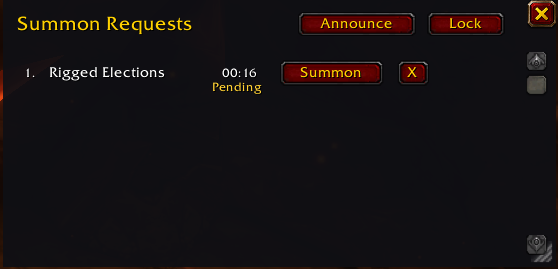
No more scrolling through raid chat looking for "123"!
Group members can request a summon by typing 123, sum, or summ in:
- Party chat
- Raid chat
- Instance chat
- Whisper
Warlock HUD automatically adds valid requests to a dedicated, movable queue.
Features include:
- Oldest requests first
- Live waiting timers
- A Summon button beside each player
- Pending summon indicators
- Automatic removal when a player arrives nearby
- Manual request removal
- Configurable request keywords and chat channels
- Raid/party announcements, including Soul Shard availability where supported
The queue can be resized, and settings include a 15-request preview for testing the layout.
Summons still require your interaction — the addon does not automatically cast protected spells.
Soul Shards, Healthstones & Soulstones
Soul Shard Management
A separate movable Soul Shard icon displays your current shard count.
Configure resource warnings:
- Red flashing: Soul Shards are running low.
- Yellow flashing: Soul Shards exceed your configured upper threshold.
- Soul Bag overflow: Optionally warn when shards occupy normal bags while a Soul Bag is equipped.
You can also click the shard icon to destroy one shard from a regular bag, subject to your configured minimum reserve.
Safety: Shard destruction is unavailable in combat, and your configured minimum is respected.
Healthstone Distribution
Warlock HUD can:
- Track confirmed Healthstone trades to group members
- Automatically place one Healthstone into an eligible trade with a group member
- Announce accepted Healthstone trades
- Help you keep track of who you've supplied
Trade acceptance must still be performed manually.
Distribution history records successful trades; it does not claim to know whether another player has since consumed their Healthstone.
Soulstone Tracking
Track your active Soulstone recipient, coordinate Soulstone assignments, and receive reminders when your assigned target is confirmed missing the buff.
Demon Management & Leveling Utilities
Warlock HUD includes useful features for managing your demons while leveling and preparing for combat.
Demon Status
- Missing-demon warnings when neither a living demon nor an active Demonic Sacrifice is confirmed
- Demonic Sacrifice buff tracking with native countdowns
- Soul Link reminders when talented and a demon is present
- Support for the possibility of an active sacrifice effect alongside a summoned demon
Pet Grimoire Tracking
Stop wasting gold buying grimoires your demons already know.
Warlock HUD remembers the spell ranks of demons you've summoned and highlights grimoire status at demon trainers:
- Red: Already known
- Green: Unlearned and available
- Yellow: A higher usable rank is available for sale
- Grey: The pet hasn't been scanned yet
Summon each demon at least once so the addon can record its known abilities.
Spell-Rank Warnings
Receive warnings when using lower spell ranks than the highest you know, including casts from macros and your spellbook.
Particularly useful while leveling and updating your action bars.
Make It Yours
Warlock HUD is designed to fit your UI, not force you into someone else's layout.
Open settings with /whud or /whub.
Customize:
- Icon sizes, positions, and ordering
- Which spells, buffs, and procs appear
- Separate visibility rules for HUD rows
- Active/inactive icon colors
- Missing-buff reminders
- Soul Shard warning and reserve thresholds
- Summon queue behavior
- Raid assignments and notifications
- Individual layout profiles
- Automatic profile switching with your talent specialization
Use Edit Mode to reposition HUD elements, or enable Demo All HUD Bars to preview your entire setup before entering combat.
Settings save immediately, although changes to protected UI elements may need to wait until combat ends.
Built for WoW Forever
Warlock HUD is developed specifically for World of Warcraft: Forever beta and its modern addon API restrictions.
It prioritizes Blizzard-native aura and cooldown rendering wherever supported.
Because Forever protects some combat information, certain effects may be displayed without the addon being allowed to inspect their underlying values. Warlock HUD avoids unreliable guesses where possible.
Compatibility: World of Warcraft: Forever beta — interface 16001 / game version 1.60.1.
Feedback & Development
Warlock HUD is actively developed, and player feedback helps shape what comes next.
Found a bug? Have a suggestion? Want to see a new feature? Leave a CurseForge comment or open an issue on GitHub!
Source code, releases, and documentation:
Future Ideas
- Gear and trinket cooldowns / procs
- Expanded raid consumable tracking
- Additional Demonology utilities
- Further customization and quality-of-life improvements
Thank You!
A huge thank you to my guildmates in Tabula Rasa [EU] for helping test and improve Warlock HUD.
Special thanks to:
- Tiny — for testing just about everything I've built.
- Wheat — for feedback and testing around the summon window and pending summon behavior.
- stevegeoffmcgeofforington — for recommending Demonic Brand tracking.
- GamaKatsu — for recommending a DoT kill tracker on the Multi-Target DoTs window.
- Drugnanov — for recommending a toggle for milliseconds or seconds.
And thanks to everyone downloading, testing, and sharing feedback. It means a lot to see other Warlocks getting use out of something I originally built for myself!
Acknowledgement — DoesItDie
The lethal DoT indicator was inspired by DoesItDie, which demonstrated a clever way to work with WoW Forever's protected health values using native StatusBar rendering.
Warlock HUD uses the same underlying technique but implements it differently, using an inverted health threshold and a pulsing portrait indicator.
Thanks to the DoesItDie developer for sharing their work and helping make these kinds of solutions possible for the addon community.
Warlock HUD Team