


Does It Die
- By
Screenshot 2026-09-24 092416.png
Screenshot 2026-09-24 092713.png
Description
DoesItDie
Stop wasting casts on targets that are already dead. DoesItDie tracks your DoTs on your current target and shows you, right on the target frame, whether they'll finish it off. Track each DoT individually or as a group.
Built for World of Warcraft: Forever.
What it does
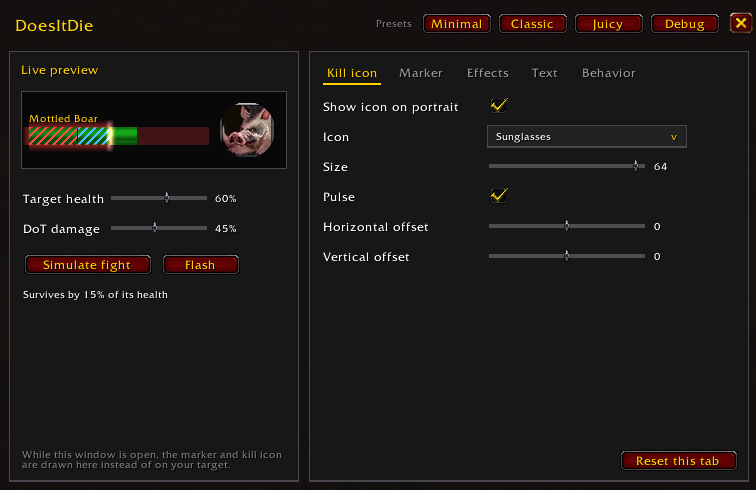
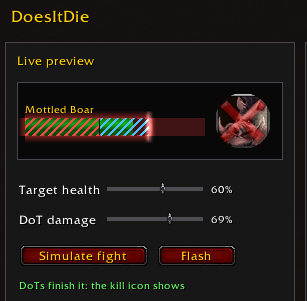
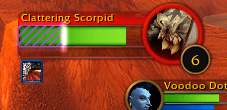
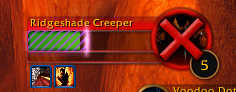
- Damage marker: a highlighted section on your target's health bar covers the damage your DoTs still have to deal. If the green health ends inside the marker, the target is going to die. Move on to the next one.
- Kill skull: when your DoTs are enough to kill the target, a skull appears on its portrait. No math, no guessing.
- Damage text (optional): shows the remaining DoT damage as a number next to the health bar.
Perfect for multi-dotting, leveling, and knowing when to stop casting and start moving.
Fully customizable
Type /did to open the options panel (it's also under the game's AddOns settings). You can change:
- Skull: icon (raid skull, boss skull or red X), size, position, optional pulse
- Marker fill: flat, health bar texture, raid bar texture, diagonal stripes (optionally scrolling) or a fade-in gradient, with 9 color presets and adjustable opacity
- Marker outline: dashed or solid, dash length, thickness, color and opacity
- Animation and effects: smooth motion, flash when a new DoT lands, pulsing outline, spark, glow and shine sweep
- Damage text: position, size and color
- Preview mode, so you can style everything out of combat
Supported DoTs
- Druid: Moonfire, Insect Swarm, Entangling Roots, Rake, Rip, Pounce, Lacerate
- Hunter: Serpent Sting, Lacerate
- Mage: Fireball, Pyroblast, Frostfire Bolt (their damage-over-time parts)
- Priest: Shadow Word: Pain, Devouring Plague, Holy Fire
- Rogue: Rupture, Garrote
- Shaman: Flame Shock
- Warlock: Corruption, Immolate, Bane of Agony, Siphon Life, Wrack
- Warrior: Rend
Finishers (Rip, Rupture) account for the combo points you spent.
How it works
Forever's client hides a lot of combat information from addons: target health, auras and your spell power can't be read directly. DoesItDie works within those rules:
- When you cast a DoT, it reads the spell's damage, school and duration from the tooltip.
- As ticks land, it matches them to your DoTs and learns your real tick sizes, including your spell power, attack power and talents. It remembers them between sessions, so estimates get more accurate the more you play.
- Dodges, misses, parries, resists and immunities on the cast are detected and taken off.
Nothing is sent anywhere. The addon only looks at your own casts and the damage done to your target.
Known limitations
- Only your own DoTs are tracked, not those of party members.
- Proc-based DoTs with no cast (Deep Wounds, Ignite, poisons) currently cannot be tracked.
- Healing on the target isn't accounted for.
- Bane of Agony is slightly underestimated. Lacerate stacks are approximated.
- Bonus combo points from crits (Primal Fury, Seal Fate) aren't counted, so finisher estimates err on the low side.
Commands
- /did: open the options panel
- /did skull: show the skull for 5 seconds (to check placement)
- /did debug: echo the tracking log to chat
- /did reset: forget learned tick sizes
Feedback and bugs
Found a DoT that's tracked wrong, or one that's missing? Please open an issue on GitHub: https://github.com/swirllyman/DoesItDie/issues
Include your class and level, the spell, and, if you can, the output of /did debug from the fight.
Open source under the MIT license.
The Does It Die Team
