Wardglow - Absorb Shield Tracker
Absorb shield tracker for you and your party, your way: arcs, ring, bar, emblem, dots, auras and the number. Works in combat.
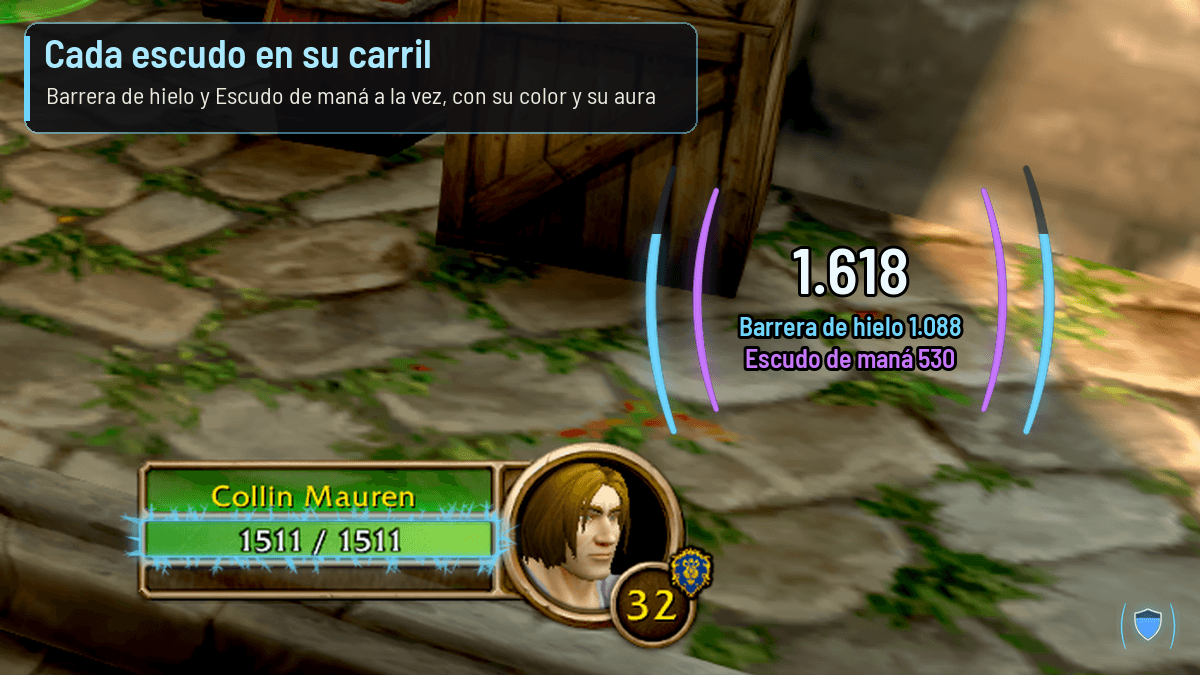
muestra-1-juego.png
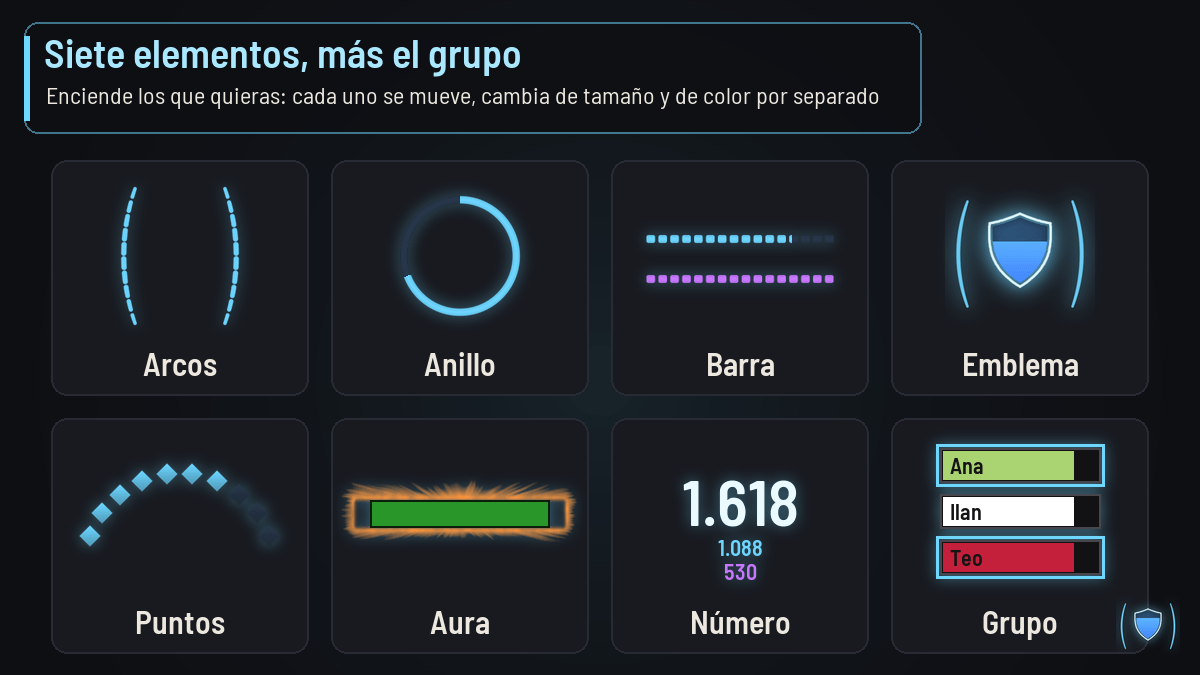
muestra-2-elementos.png
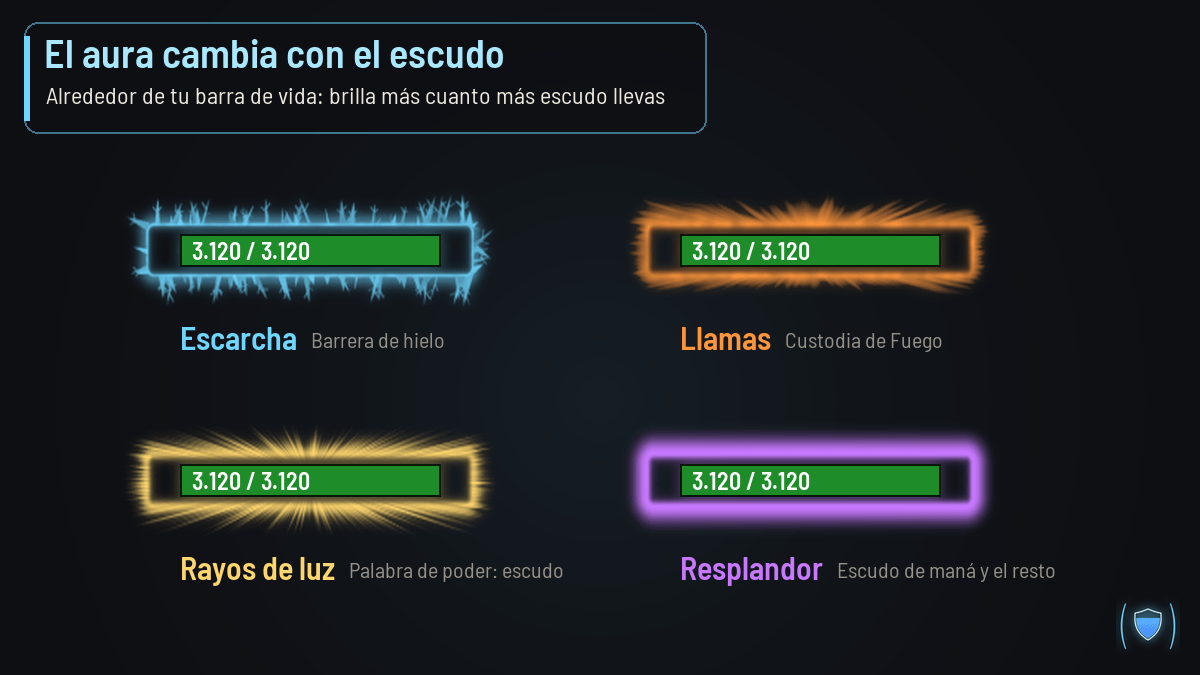
muestra-3-auras.png
banner.png
banner-en.png
muestra-1-juego-en.png
muestra-2-elementos-en.png
muestra-3-auras-en.png
Description
Follow me live and support the project:




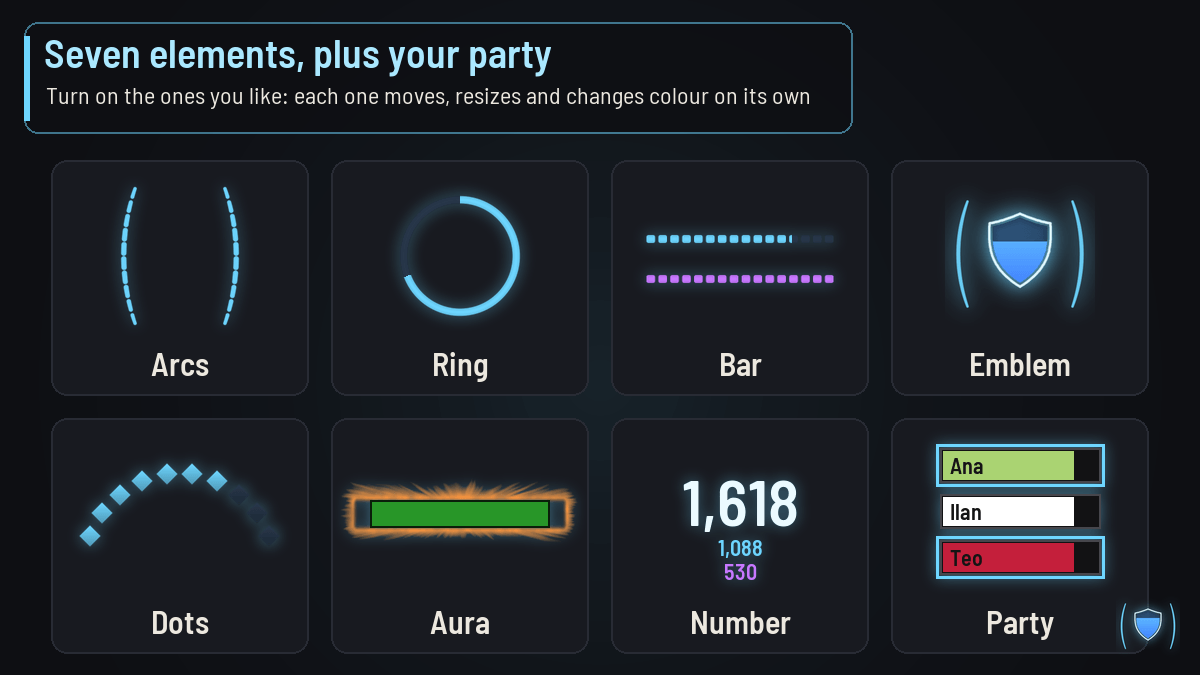
Wardglow shows how much absorb shield you have and how much each party member has: Ice Barrier, Mana Shield, Power Word: Shield, wards and any other. You choose how to see it: arcs, ring, bar, emblem, dots, an aura around your health bar and the number, alone or combined.

- Arcs on the sides of your character (both, or just one).
- A ring that fills as it turns and a horizontal bar, smooth or segmented.
- A shield emblem that fills from bottom to top.
- Dots: 3 to 20, in a row, column, arc or circle, shaped as orbs, diamonds or shields.
- An aura around your health bar, your frame or a free box: the more shield, the brighter it glows.
- The number with the exact amount.
- Each element is turned on, moved, resized, coloured and faded on its own.

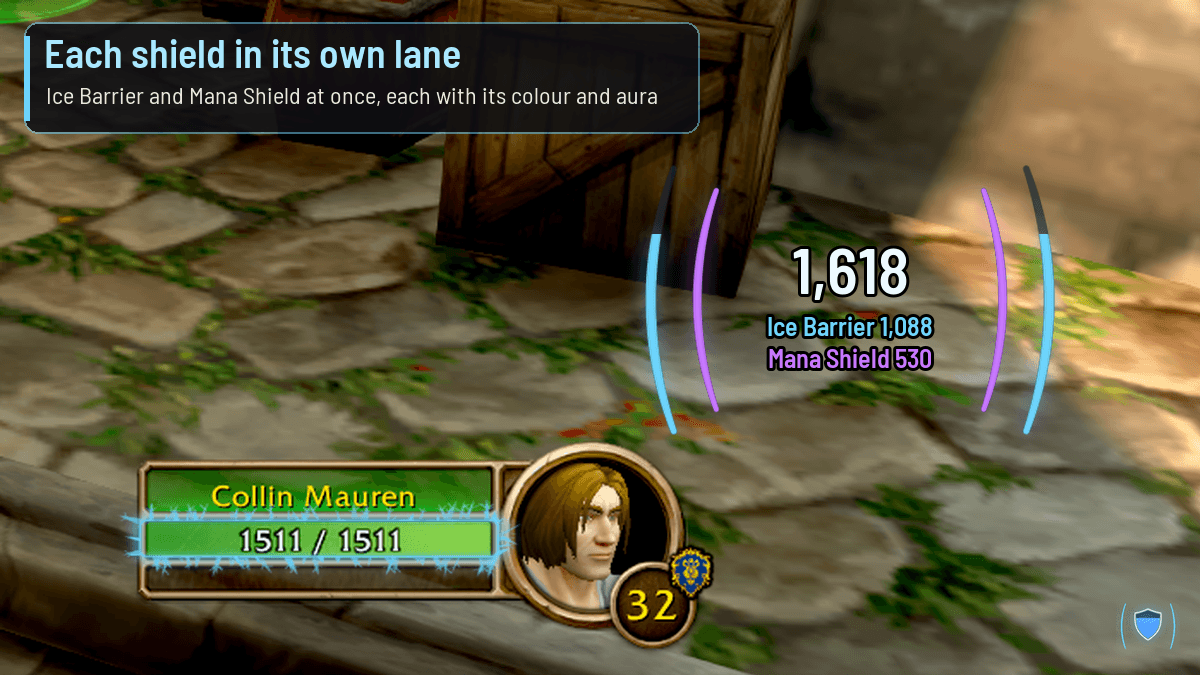
- If you have several shields at once (for example Frost Ward and Mana Shield), each one gets its own lane with its colour and aura.
- Parallel arcs, rings inside each other, bars and numbers stacked, emblems in a row. Up to four shields.
- Can be turned off to see everything together as a single total.

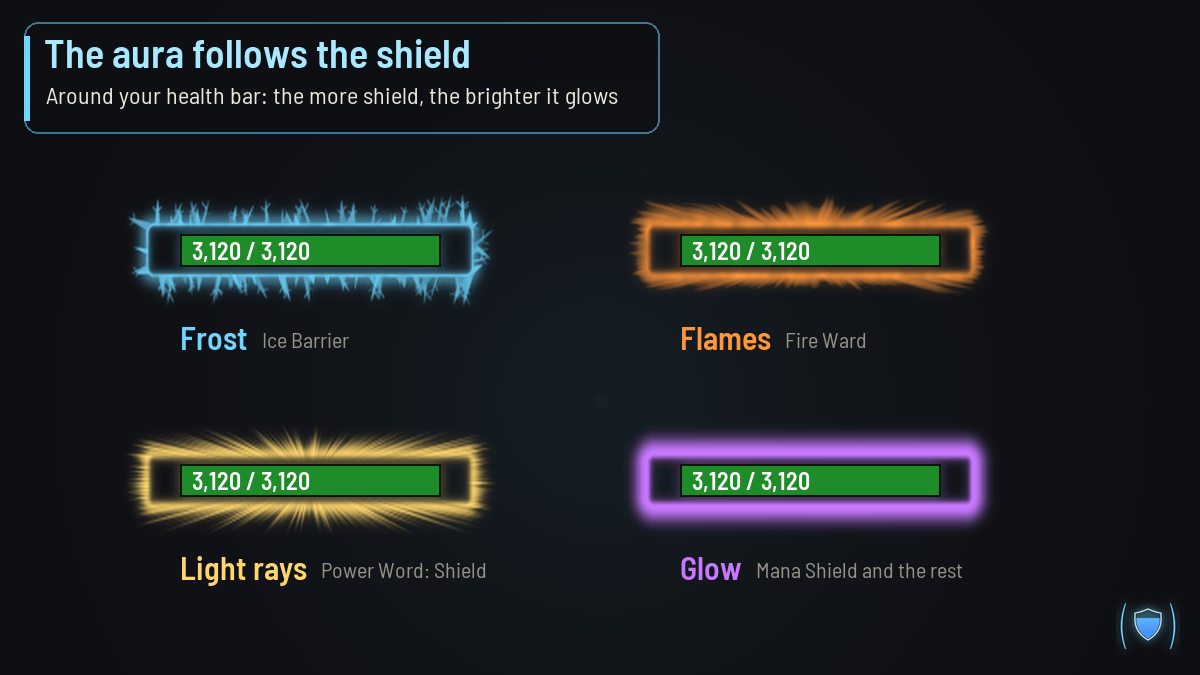
- The aura follows the shield: frost for Ice Barrier, flames for fire shields, light rays for holy ones and a soft glow for the rest. You can also keep one fixed style.
- Automatic colours by shield, your class colour, five fixed colours or one you pick; one overall and another for each element if you like.
- A flash when a new shield lands on you.

- Next to each party member's frame: an edge, dots, emblem or ring, with aura and number if you like.
- Works with the game's party frames; if it can't find them, it opens its own movable panel.

In combat the game hides the figures from addons. Wardglow keeps drawing correctly because it lets the game itself fill the bars. With the test view you see fake shields so you can set everything up without being in combat or in a group.

/wardglow: opens the menu (also in the minimap addon button and in Options > AddOns)./wardglow test: test view./wardglow moveand/wardglow lock: drag the elements and lock them again./wardglow reset: everything back in place./wardglow diag: diagnostics.

- Install it with the CurseForge app or unzip it into
World of Warcraft\_forever_\Interface\AddOns\(you get theWardglowfolder). - In game:
/wardglow.
Free, in English, Spanish, German, French, Russian, Brazilian Portuguese, Italian, Korean and Chinese (the non-English/Spanish texts are machine translations: tell us if something reads wrong and we'll fix it). MIT licence. Not affiliated with Blizzard Entertainment.
Español
Wardglow te enseña cuánto escudo de absorción llevas tú y cuánto lleva cada compañero de grupo: Barrera de hielo, Escudo de maná, Palabra de poder: escudo, custodias y cualquier otro. Tú eliges cómo verlo: arcos, anillo, barra, emblema, puntos, un aura alrededor de la barra de vida y el número, solos o combinados.

- Arcos a los lados del personaje (los dos, o solo uno).
- Anillo que se llena girando y barra horizontal, lisa o por tramos.
- Emblema de escudo que se llena de abajo arriba.
- Puntos: de 3 a 20, en fila, columna, arco o círculo, con forma de orbe, rombo o escudo.
- Aura alrededor de tu barra de vida, de tu marco o de una caja libre: brilla más cuanto más escudo llevas.
- Número con la cantidad exacta.
- Cada elemento se enciende, se mueve, cambia de tamaño, de color y de transparencia por separado.

- Si llevas varios escudos a la vez (por ejemplo Custodia de Escarcha y Escudo de maná), cada uno va en su propio carril con su color y su aura.
- Arcos paralelos, anillos uno dentro de otro, barras y números uno debajo de otro, emblemas en fila. Hasta cuatro escudos.
- Se puede apagar para verlo todo junto en un solo total.

- El aura cambia con el escudo: escarcha para la Barrera de hielo, llamas para los escudos de fuego, rayos de luz para los sagrados y resplandor para el resto. También puedes dejar un estilo fijo.
- Colores automáticos según el escudo, el de tu clase, cinco colores fijos o el que tú elijas; uno general y otro para cada elemento si quieres.
- Destello cuando te cae un escudo nuevo.

- Junto al marco de cada compañero: un borde, puntos, emblema o anillo, con aura y número si quieres.
- Funciona con los marcos de grupo del juego; si no los encuentra, abre un panel propio que puedes mover.

En combate el juego esconde las cifras a los addons. Wardglow sigue dibujando bien porque deja que sea el propio juego quien rellene las barras. Con la vista de prueba ves escudos de mentira para ajustarlo todo sin estar en combate ni en grupo.

/wardglowo/escudos: abre el menú (también está en el botón de addons del minimapa y en Opciones > Accesorios)./wardglow prueba: vista de prueba./wardglow movery/wardglow bloquear: arrastrar los elementos y volver a fijarlos./wardglow restablecer: todo a su sitio./wardglow diag: diagnóstico.

- Instálalo con la app de CurseForge o descomprime el zip en
World of Warcraft\_forever_\Interface\AddOns\(queda la carpetaWardglow). - En el juego:
/wardglow.
Gratis, en español, inglés, alemán, francés, ruso, portugués de Brasil, italiano, coreano y chino (los textos que no son español ni inglés son traducciones automáticas: si algo suena raro, dínoslo y lo corregimos). Licencia MIT. No está afiliado a Blizzard Entertainment.
Wardglow - Absorb Shield Tracker Team