Sherpa - Leveling Guide, Quest Arrow & Map
All-in-one 1-60 companion for WoW Forever: 3D arrow leveling guide, Questie-style map, gear for your talent build, professions, fishing, gold and quest voice-over. Spanish & English.
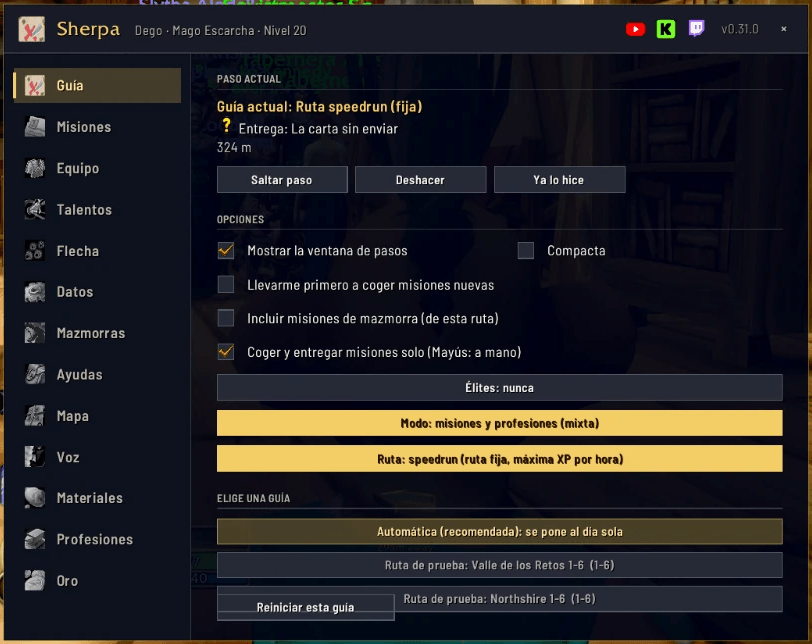
sherpa-1-guia.png
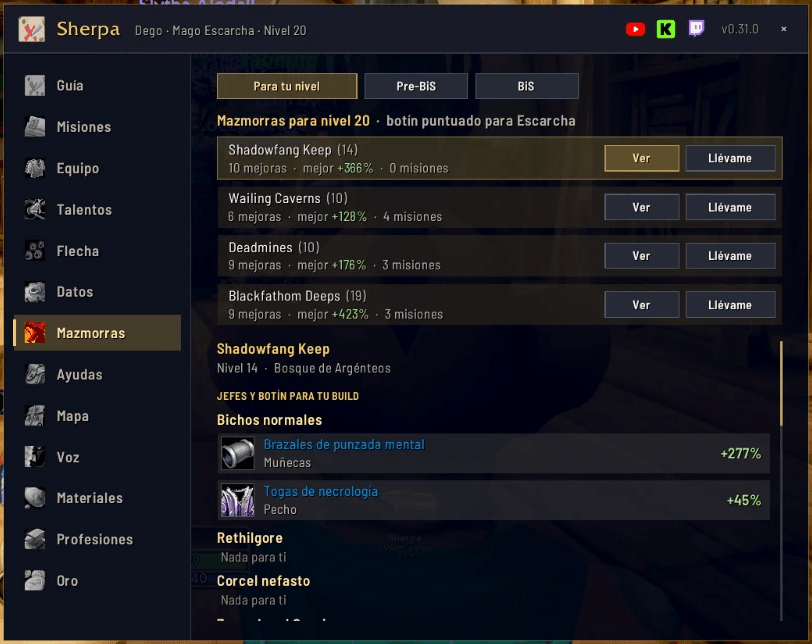
sherpa-2-mazmorras.png
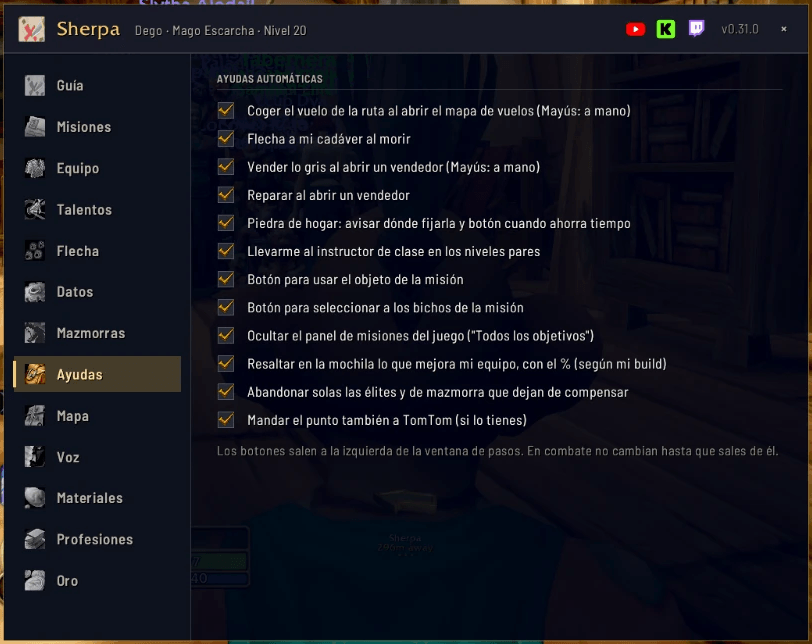
sherpa-3-ayudas.png
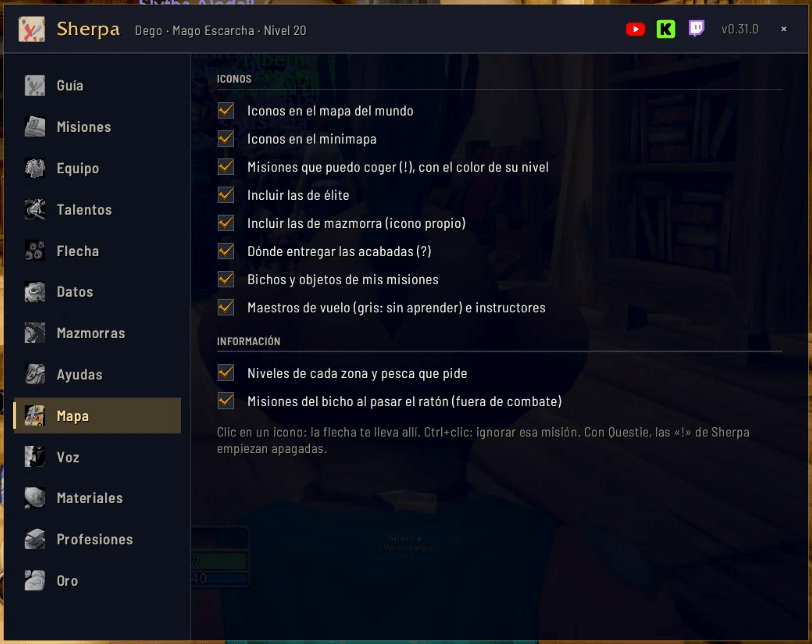
sherpa-4-mapa.png
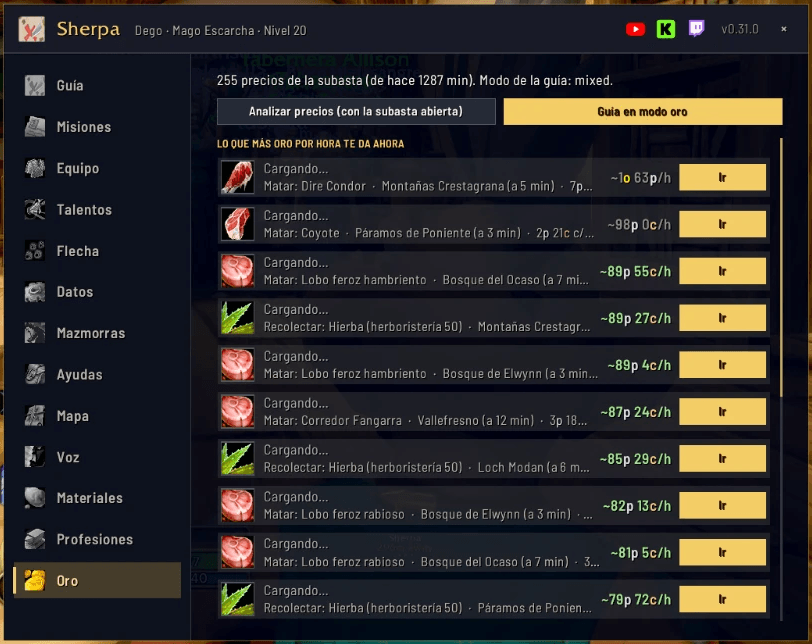
sherpa-5-oro.png
Description
Follow me live and support the project:




Sherpa takes you from 1 to 60 in WoW Forever without opening a guide in your browser. It plans a linear route from wherever you are, counting how long it takes to reach each place, and leads you there with a 3D arrow. It also improves your gear for your talent build, advises you on every loot roll, levels your professions, helps you make gold, warns you about enemies in PvP and reads quests aloud.
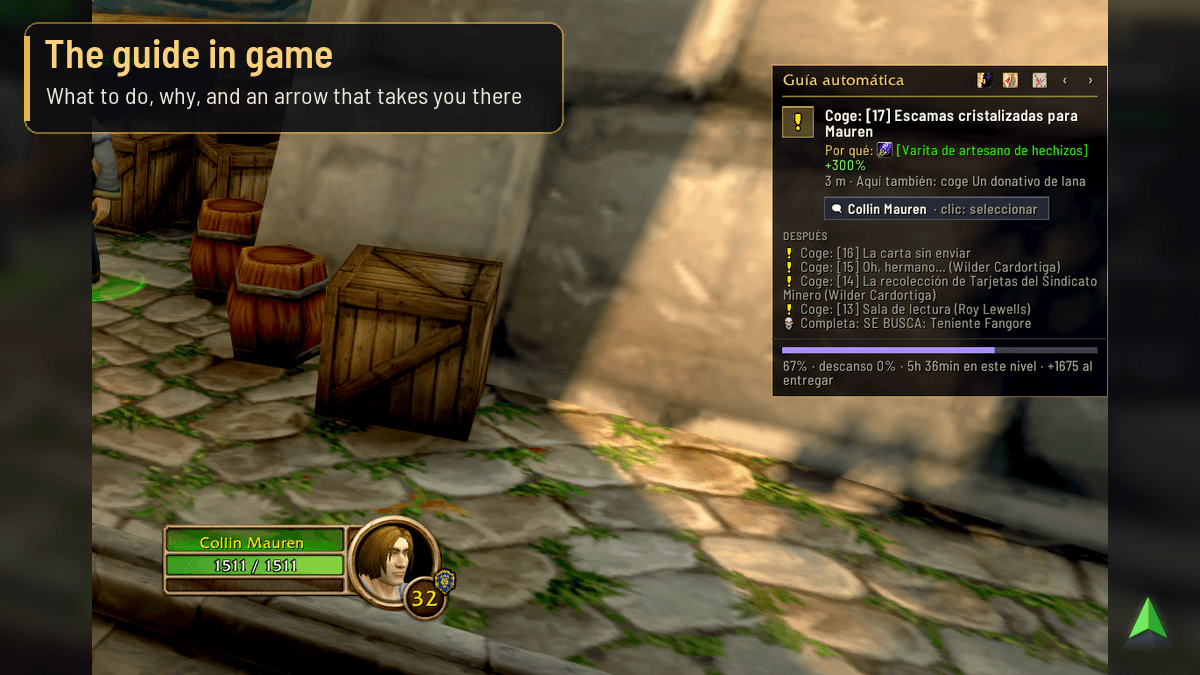

- Automatic linear guide: plans a route of a few hours from where you are and follows it in order (pick up, complete, turn in), using roads, flight paths, boats and zeppelins. It rebuilds itself if you leave the route, level faster than expected or change continent.
- Six route styles: automatic, speedrun (the fastest 1-60 order), hardcore (nothing above your level +1, no dangerous zones), completionist (every quest in each zone), group (with elites and dungeons) and one continent (no boats while possible). Routes for all 8 starting zones, Skyborne included.
- It plans like written guides do: groups what is done in the same place, avoids going back and forth between zones and leaves low-XP detours for last.
- Every step tells you why: the reward and how much it improves you, the XP, the chain or whether it is a class quest.
- Resizable step window, with a translucent background if you like.
/way 45 60points the arrow at some coordinates, like Wowhead links.

- "!" for quests you can pick up, coloured by level, and "?" where to turn them in.
- Areas where your quest mobs and objects are, with your progress on mouse-over.
- Dungeon and raid entrances with their level, boats and zeppelins with their destination and route, and cave entrances.
- Rare mobs, flight masters, trainers, zone levels and the fishing skill each zone needs.
- Diablo-style minimap overlay: large and translucent in the middle of the screen, without catching the mouse.
- Click an icon: the arrow takes you there. Ctrl+click: ignore that quest. With Questie installed it doesn't repeat its "!".

- Interior maps of 25 dungeons and raids and 44 caves, next to the minimap.
- Bosses as numbered skulls in the order they are usually killed; the ones you have killed turn grey.
- Opens on its own at the floor of the next boss. In caves your arrow moves on the map.

- Upgrades in your bags and at vendors, using the weights of your build, not your class in general.
- Pre-BiS and BiS by dungeon.
- Leveling talent builds for all 9 classes.

- NeedOrGreed is built in: on every roll it tells you Need, Greed or Disenchant, and why, based on your class, your role and whether it is really an upgrade.
- It looks at your party: if someone else benefits more, it tells you their name. Next to the party frames, what everyone rolled and who wins.
- If you also have standalone NeedOrGreed, only one of the two runs (nothing is shown twice).

- Recommends the professions that suit your class best and builds a leveling plan with Forever's real recipes and a shopping list.
- Where to get each material (nodes, mobs, skinning, vendors) with a farming route.
- Fishing: the skill each zone needs, cast with a right double-click, lure and pole swap with one button.

- What to farm for the most gold per hour for your level, your professions and the travel time.
- Auction prices that take into account what actually sells.
- Assisted selling: "Prepare" fills in the auction and you post it.

- Sound alert when a player from the other faction shows up, with their class, level and guild.
- "Nearby enemies" window: click to target, right-click to add to your blacklist.
- On the map, where you saw them in the last 10 minutes. Off in dungeons, battlegrounds and sanctuary cities.

- Each NPC reads their quest with a voice that matches their race and sex, using the Windows voices you have installed.
- Mutes the game's own greetings so they don't talk over the reading. Buttons to listen again or stop.
- Optional: the separate addon Sherpa Voices (about 570 MB) brings some 5,800 quests already recorded in Spanish with synthetic voices by race. Sherpa only uses it if you have it installed.

Sherpa does not move, attack or play for you. What it does on its own (picking up and turning in quests, flying, selling grey items, repairing) are things the game allows addons to do, and each one can be turned off or done by hand with Shift. The Features section lists everything the addon includes, with a switch for each one. It is free and always will be. Sherpa shares what it learns about Forever with other Sherpa players through a hidden channel.

- Install it with the CurseForge app or unzip it into
World of Warcraft\_forever_\Interface\AddOns\. - The zip has two folders:
SherpaandSherpa_Data(farming, professions and fishing data). It works without the second one, but without those parts. - In game: minimap button or
/sherpa.
Works with English, Spanish, German, French, Russian, Brazilian Portuguese, Italian, Korean and Chinese game clients (the non-English/Spanish texts are machine translations: tell us if something reads wrong and we'll fix it).
Credits and licences: data from All The Things, DonData, wowforever-helper, WCLBox and AzerothCore (details in NOTICES.md). Sherpa is MIT; Sherpa_Data is GPL v2 because it contains AzerothCore data. Not affiliated with Blizzard Entertainment.
Español
Sherpa te lleva del 1 al 60 en WoW Forever sin abrir una guía en el navegador. Planea una ruta lineal desde donde estás, contando lo que tardas en llegar a cada sitio, y te lleva con una flecha 3D. Además mejora tu equipo según tu build de talentos, te aconseja en cada tirada de botín, sube tus profesiones, te ayuda a ganar oro, te avisa de los enemigos en PvP y lee las misiones en voz alta.
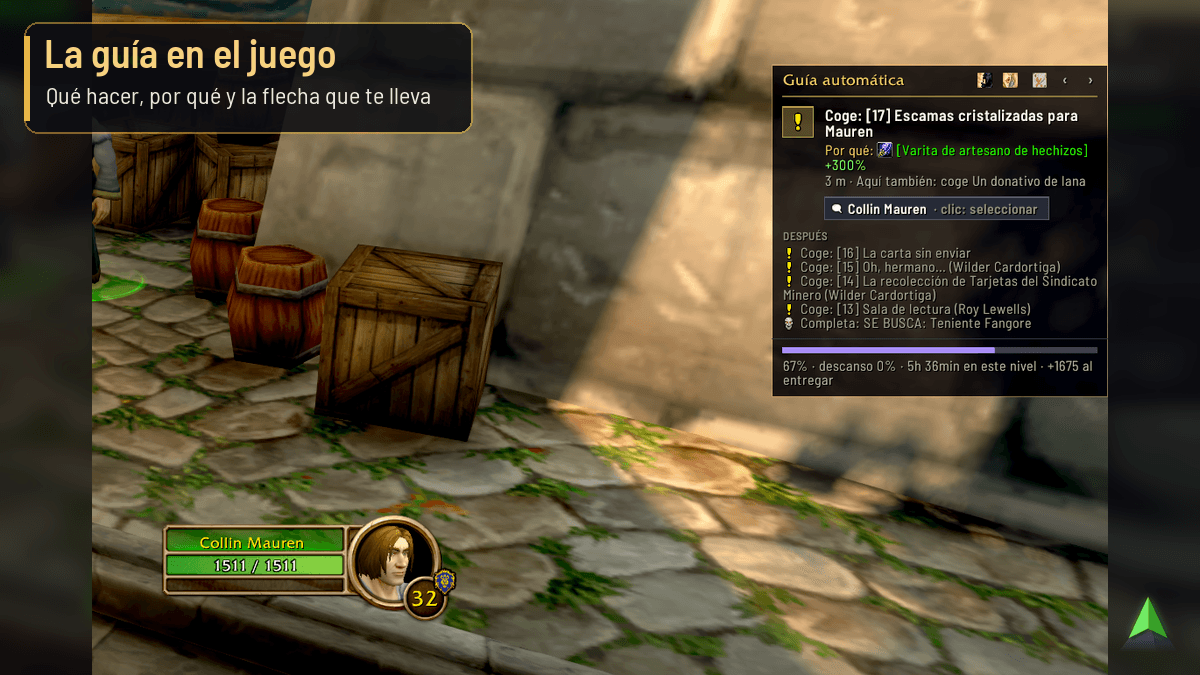

- Guía automática lineal: planea desde donde estás una ruta de unas horas y la sigue en orden (coger, completar, entregar), por caminos, vuelos, barcos y zepelines. Se rehace sola si te sales de ella, si subes más rápido de lo previsto o si cambias de continente.
- Seis rutas a elegir: automática, speedrun (el orden más rápido del 1 al 60), hardcore (nada por encima de tu nivel +1, sin zonas peligrosas), completa (todas las misiones de cada zona), en grupo (con élites y mazmorras) y un continente (sin barcos mientras se pueda). Rutas para las 8 zonas de inicio, Skyborne incluidos.
- Planifica como las guías escritas: agrupa lo que se hace en el mismo sitio, evita ir y venir entre zonas y deja para el final los desvíos que dan poca XP.
- Cada paso te dice por qué: la recompensa y cuánto te mejora, la XP, la cadena o si es de clase.
- Ventana de pasos con tamaño ajustable y fondo translúcido si quieres.
/way 45 60pone la flecha en unas coordenadas, como los enlaces de Wowhead.

- «!» de las misiones que puedes coger, con el color de su nivel, y «?» donde entregar.
- Zonas donde están los bichos y objetos de tus misiones, con el progreso al pasar el ratón.
- Entradas de mazmorras y bandas con su nivel, barcos y zepelines con su destino y su ruta, y entradas de cuevas.
- Bichos raros, maestros de vuelo, instructores, niveles de cada zona y la pesca que pide.
- Minimapa superpuesto estilo Diablo: grande y translúcido en el centro de la pantalla, sin coger el ratón.
- Clic en un icono: la flecha te lleva. Ctrl+clic: ignorar esa misión. Con Questie instalado no repite sus «!».

- Mapa por dentro de 25 mazmorras y bandas y 44 cuevas, junto al minimapa.
- Jefes como calaveras numeradas en el orden en que se suelen matar; los que ya has matado salen en gris.
- Se abre solo en la planta del siguiente jefe. En las cuevas tu flecha se mueve por el mapa.

- Mejoras en la mochila y en los vendedores, con los pesos de tu build, no de tu clase en general.
- Pre-BiS y BiS por mazmorra.
- Builds de talentos de subida para las 9 clases.

- Lleva dentro NeedOrGreed: en cada tirada te dice necesidad, codicia o desencantar, y por qué, pensando en tu clase, tu rol y si de verdad te mejora.
- Mira al grupo: si a otro le va mejor, te lo dice con su nombre. Junto a los marcos de grupo, qué ha tirado cada uno y quién gana.
- Si también tienes NeedOrGreed suelto, solo funciona uno de los dos (no se repite nada).

- Recomienda las profesiones que mejor van con tu clase y hace un plan de subida con las recetas reales de Forever y la lista de compra.
- Dónde conseguir cada material (nodos, bichos, desuello, vendedores) con ruta de farmeo.
- Pesca: qué habilidad pide cada zona, lanzar con doble clic derecho, cebo y cambio de caña con un botón.

- Qué farmear para ganar más oro por hora según tu nivel, tus profesiones y el viaje.
- Precios de la subasta teniendo en cuenta lo que de verdad se vende.
- Venta asistida: «Preparar» rellena la subasta y tú la publicas.

- Aviso con sonido cuando aparece un jugador del otro bando, con su clase, nivel y hermandad.
- Ventana «Enemigos cerca»: clic para seleccionarlo, clic derecho para tu lista negra.
- En el mapa, dónde los viste en los últimos 10 minutos. Apagado en mazmorras, campos de batalla y ciudades santuario.

- Cada PNJ lee su misión con una voz según su raza y sexo, usando las voces de Windows que tengas instaladas.
- Silencia los saludos del propio juego para que no se pisen con la lectura. Botones para volver a escuchar o parar.
- Opcional: el addon aparte Sherpa Voices (unos 570 MB) trae unas 5.800 misiones ya grabadas en español con voces sintéticas por raza. Sherpa lo usa solo si lo tienes instalado.

Sherpa no mueve, no ataca ni juega por ti. Lo que hace solo (coger y entregar misiones, volar, vender lo gris, reparar) son funciones que el juego permite a los addons, y cada una se puede apagar o hacer a mano con Mayús. En la sección Funciones está todo lo que incluye el addon, con un interruptor para cada cosa. Es gratis y lo será siempre. Sherpa comparte con otros jugadores de Sherpa lo que aprende de Forever, por un canal oculto.

- Instálalo con la app de CurseForge o descomprime el zip en
World of Warcraft\_forever_\Interface\AddOns\. - El zip trae dos carpetas:
SherpaySherpa_Data(datos de farmeo, profesiones y pesca). Sin la segunda funciona, pero sin esas partes. - En el juego: botón del minimapa o
/sherpa.
Créditos y licencias: datos de All The Things, DonData, wowforever-helper, WCLBox y AzerothCore (detalles en NOTICES.md). Sherpa es MIT; Sherpa_Data es GPL v2 porque lleva datos de AzerothCore. No está afiliado a Blizzard Entertainment.
Sherpa - Leveling Guide, Quest Arrow & Map Team