Travelcraft
- By
Plan any trip across Azeroth in WoW Forever: pick a start and a destination on the world map, see the route and how long it takes, and track it next to your quests.
travelcraft-1-plan.jpg
travelcraft-2-follow.jpg
travelcraft-3-discover.jpg
travelcraft-5-fly.jpg
travelcraft-4-dungeons.jpg
Description
Travelcraft plans your trips across Azeroth in World of Warcraft: Forever, right inside the game's own world map. It looks and feels like part of the game.
How to use
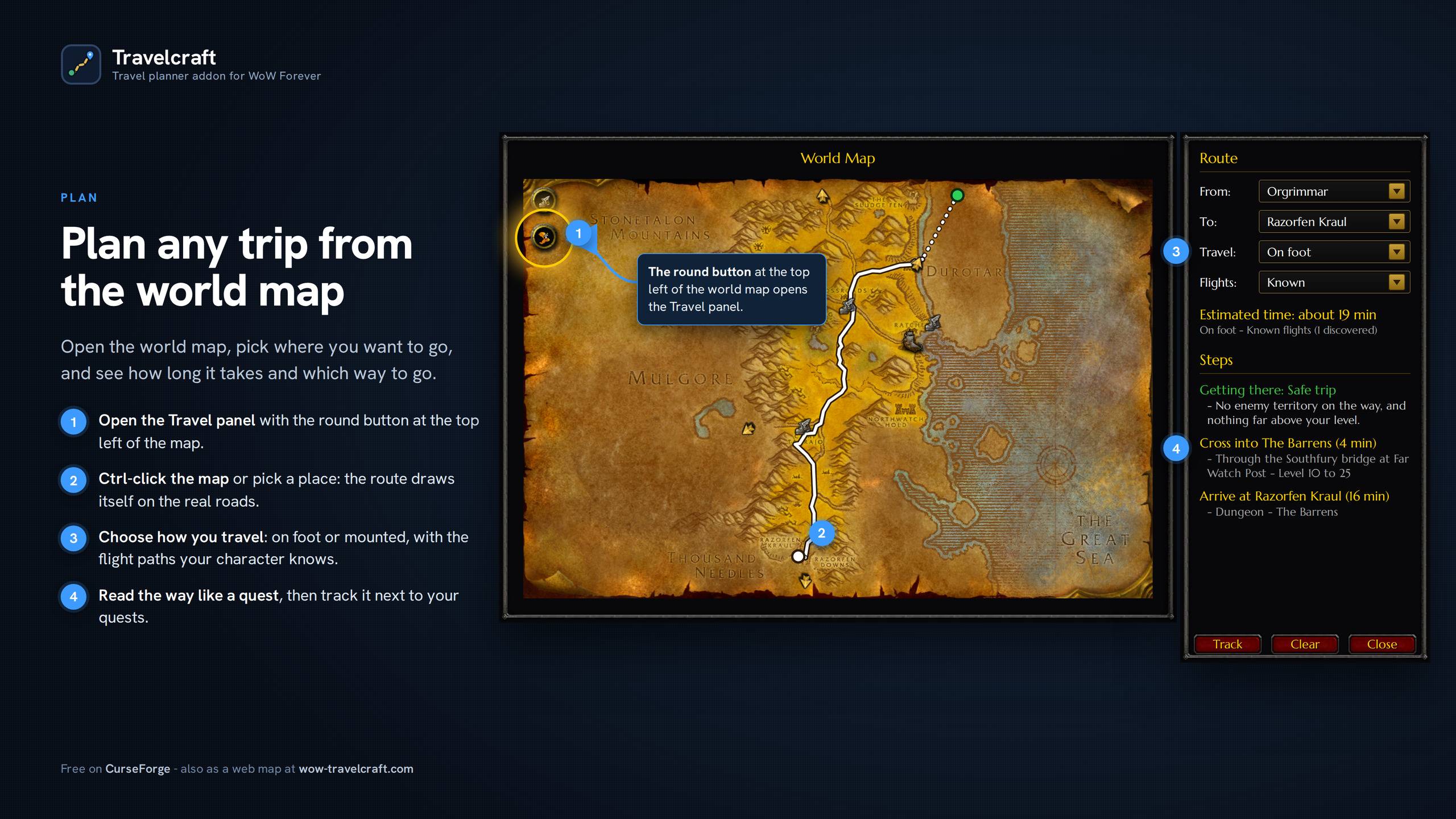
- Open the world map and click the round button under the map legend, top left of the map. The Travel panel opens beside the map.
- Pick a start and a destination. Leave "Your position" or choose a place in the menus, type a name (zones, cities, ports, flight masters, dungeons), click an icon on the map, hold Ctrl and click anywhere, or Ctrl+click a quest.
- Choose how you travel and read the steps, then click "Track" to follow the route next to your quests.
Tip: hold Ctrl over the map to see how long it takes to get anywhere.
Features
Routes drawn on the map
Every step comes with its time and is drawn on the map: roads, off-road stretches, sea lanes and flight paths, with a key to read them. Roads were traced by hand on all 40 Classic zones, so routes follow them instead of cutting across cliffs and forests.
Routes that fit your character
Travelcraft knows your level and your faction. It avoids zones far above you when there is a detour, keeps you out of enemy territory when it can, and tells you when the quickest way goes through it.
Your shortcuts in your routes
Your Hearthstone, Astral Recall, mage teleports, the druid's Teleport: Moonglade and the engineering transporters to Gadgetzan and Everlook are added to a route when they save time. Only when you have them and they are ready; nothing is ever cast for you. Horde players with the Goblin Transponder also get the Booty Bay teleporter to Gnomeregan.
Follow it next to your quests
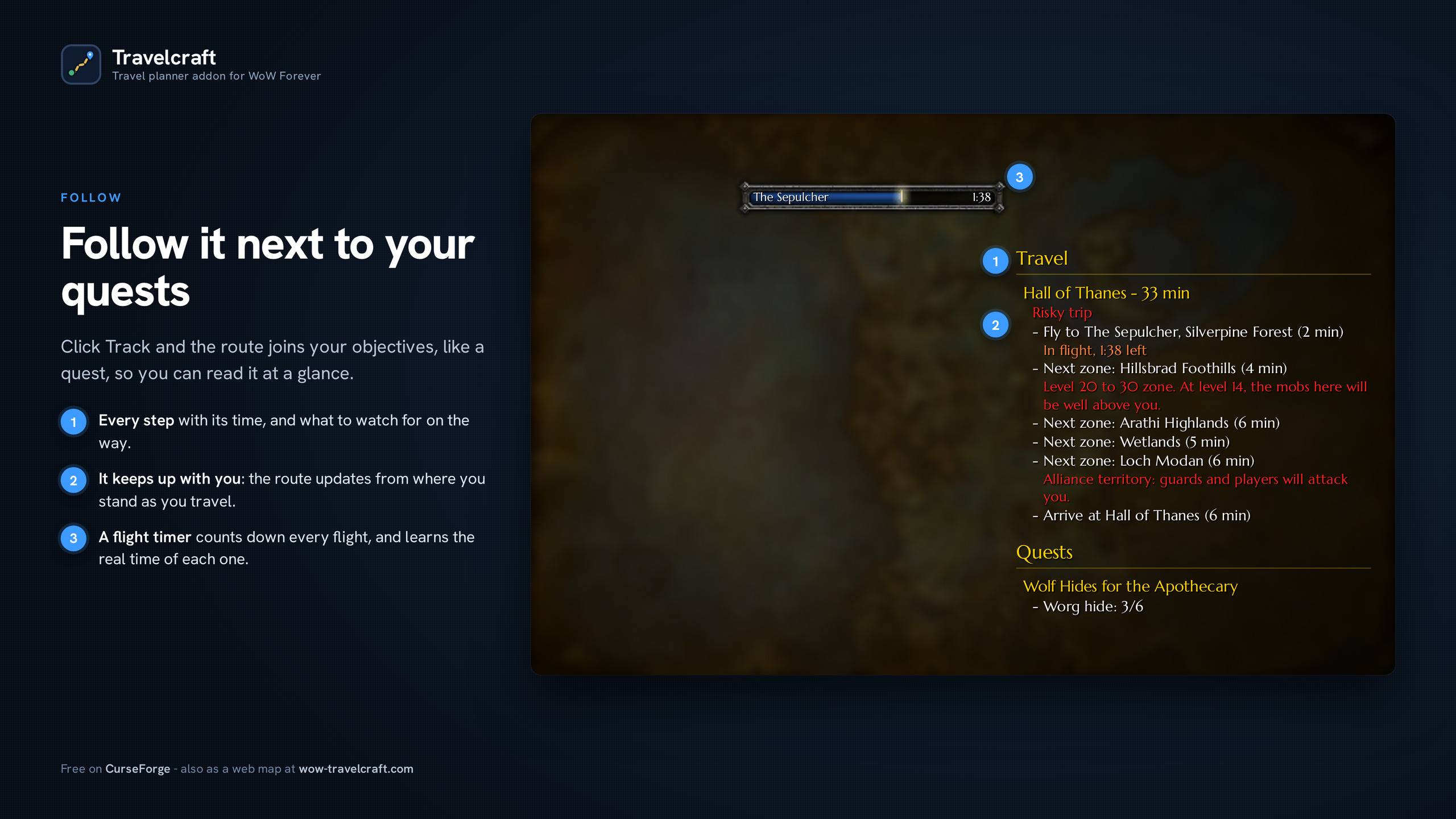
Click Track and the route appears in your objective tracker, just like a quest. Steps tick off as you move, you see the time left while you fly, and you can fold it to one line. Works with Questie: the route sits right under Questie's tracker.
Ctrl+click a quest
Ctrl+click a quest on the world map, on its icon or its area: the route there opens in the Travel panel, under the quest's name. Hold Ctrl over a quest to see how long it takes to get there.
Your flight masters
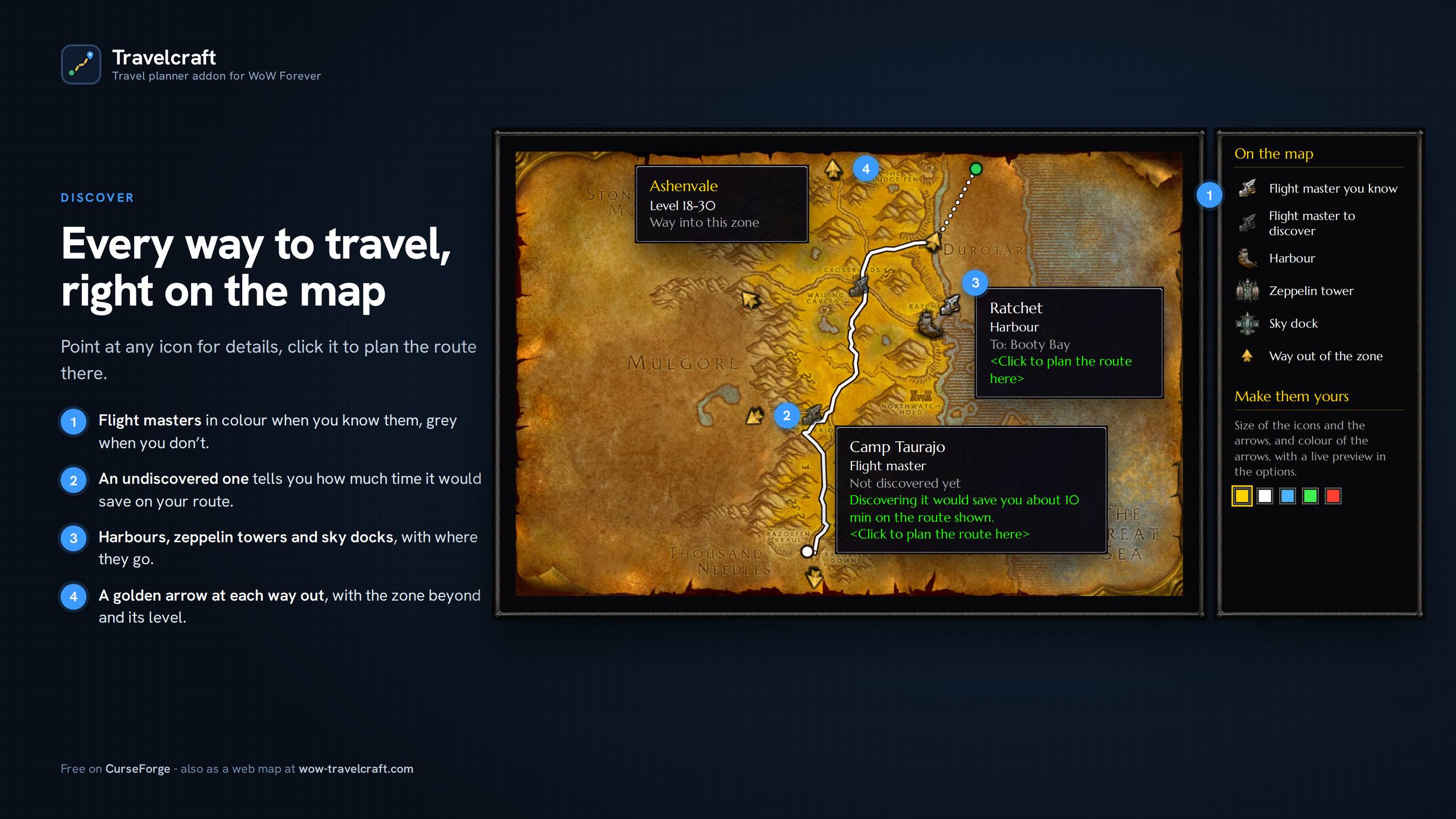
Routes only use the flight masters your character has discovered. Point at an undiscovered one on a route to see how much time it would save you.
Flight timer
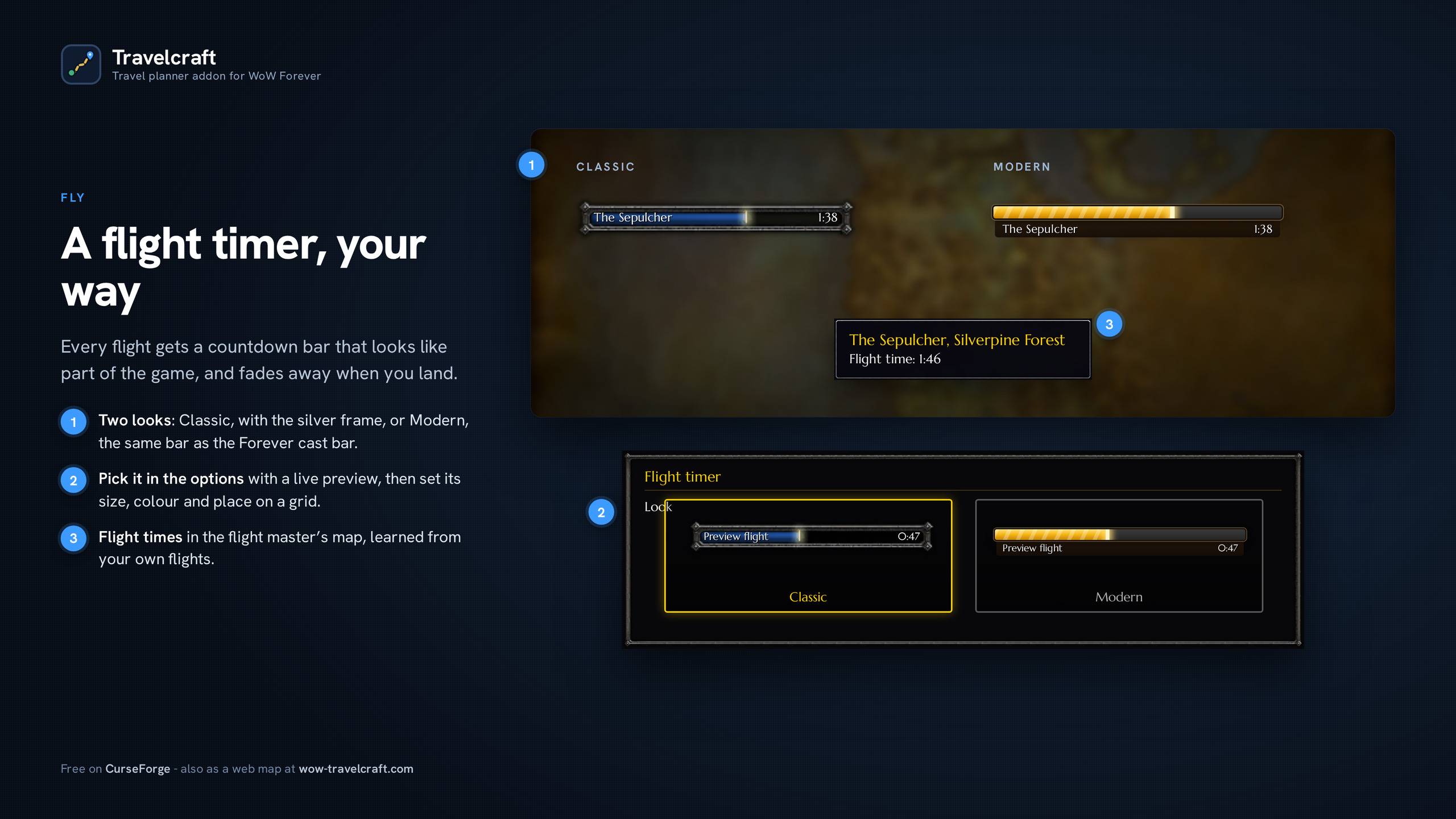
A bar counts down each flight, in the style of the game's cast bar. Size, colour and position are yours to set, or turn it off. Flight times show on the flight master's map, and Travelcraft learns the real time of every flight you take.
Every way to travel, right on the map
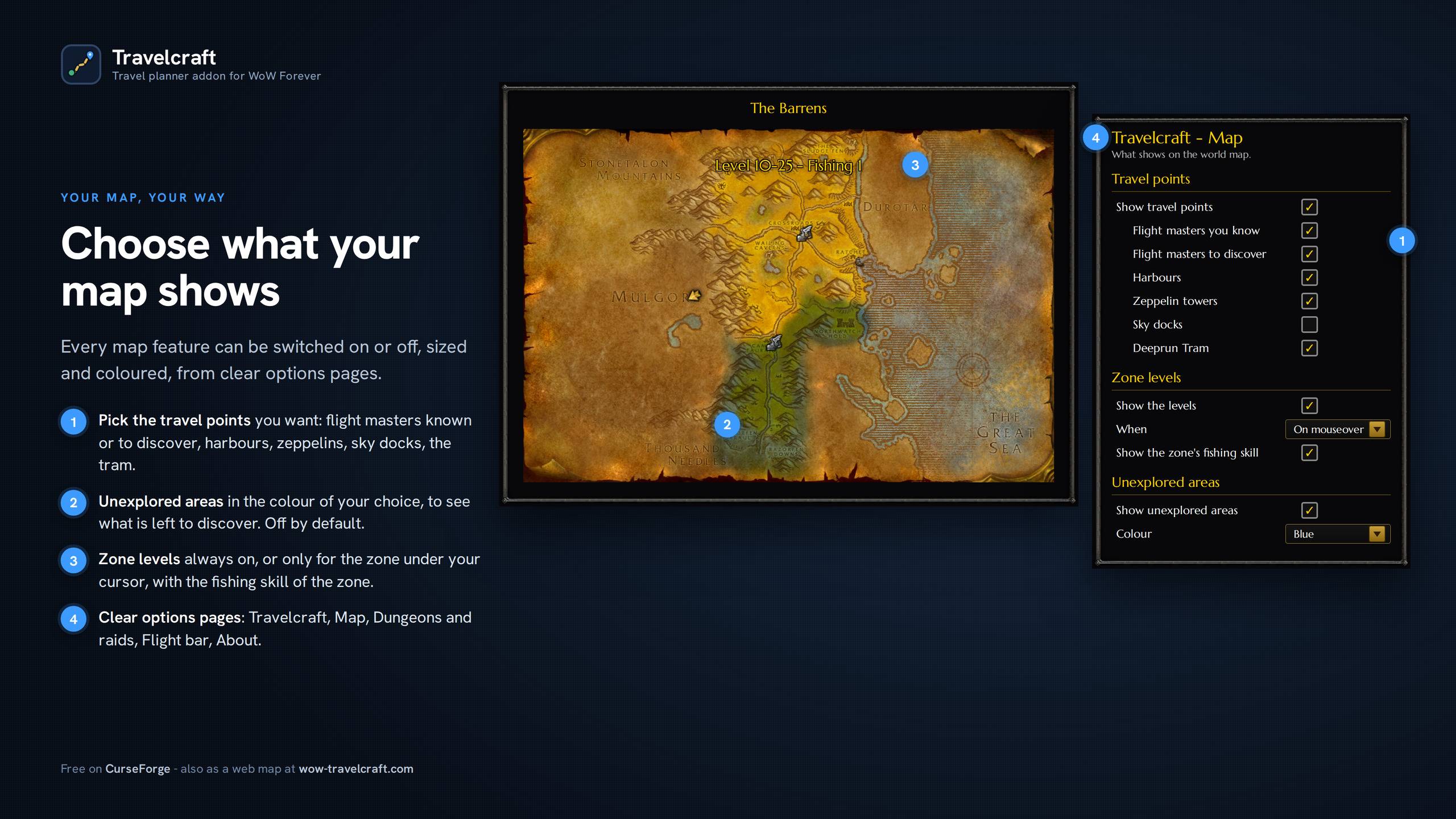
Flight masters (in colour when you know them, grey when you don't), harbours, zeppelin towers, sky docks and the Deeprun Tram, with where each one goes. A golden arrow marks each way out of a zone, with the zone beyond and its level. Click any of them to plan the route there, and pick in the options which ones you want to see.
Zone levels
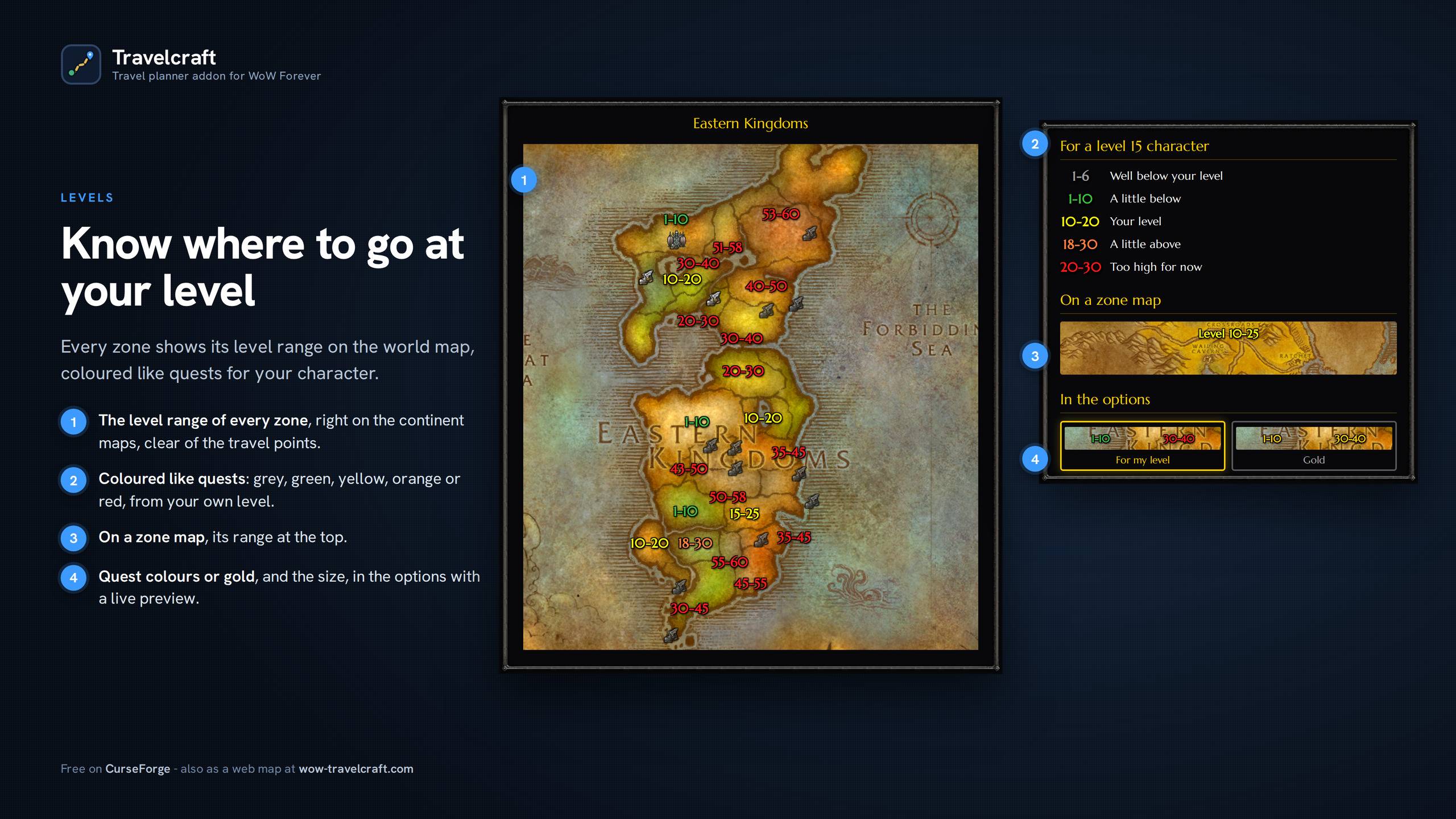
Every zone shows its level range on the continent maps, coloured like quests for your character: grey, green, yellow, orange or red. Show them all the time or only for the zone under your cursor. A zone map also shows the fishing skill the zone needs.
Unexplored areas
Optional: the parts of a zone you have not explored yet, drawn in the colour of your choice, so you see what is left to discover.
Dungeons for your level
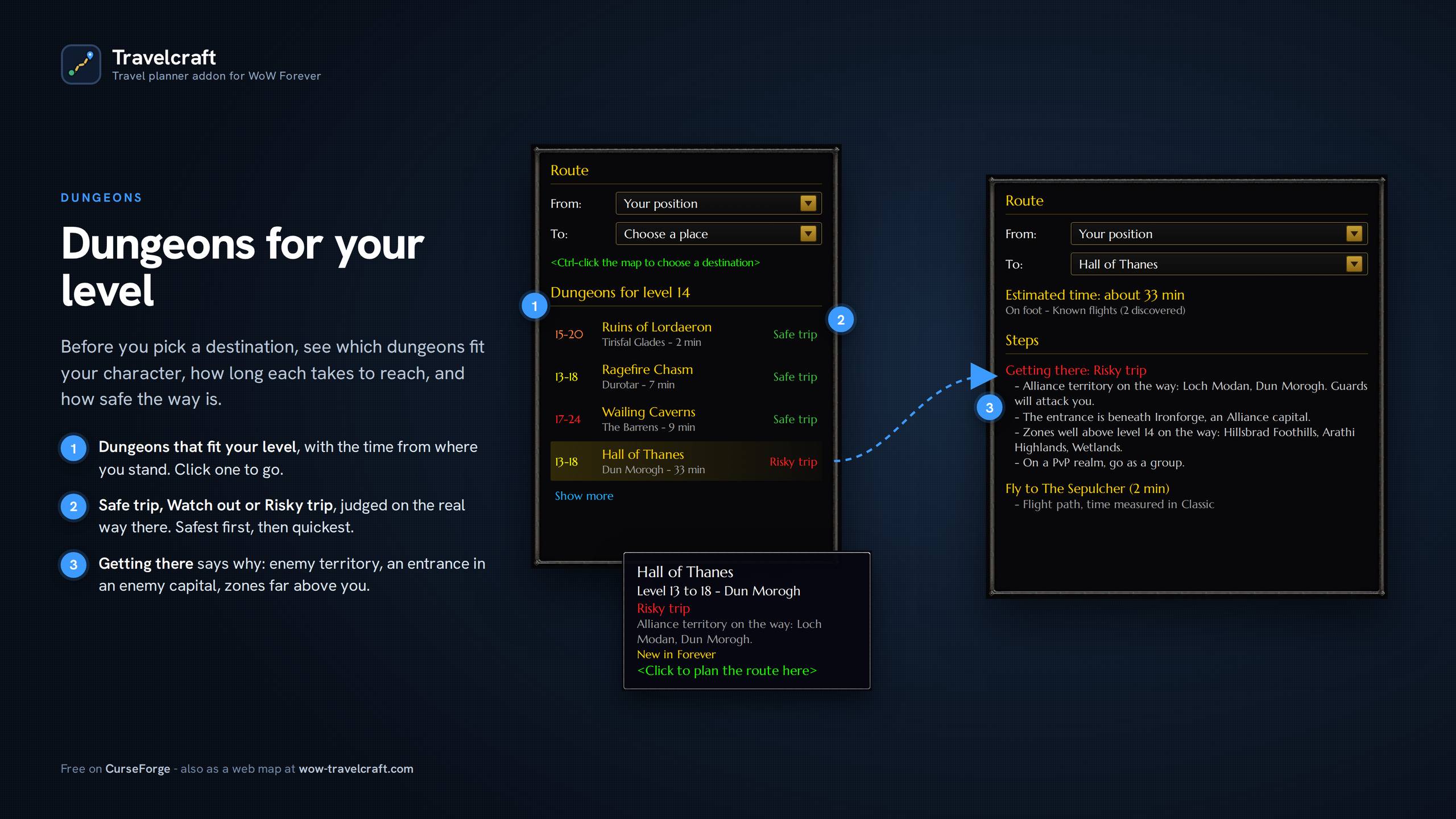
Before you pick a destination, see which dungeons fit your character, how long each takes to reach, and how safe the way is (Safe trip, Watch out, Risky trip). On a route to a dungeon or raid, "Getting there" tells you why: enemy territory, an entrance in an enemy capital, zones far above you.
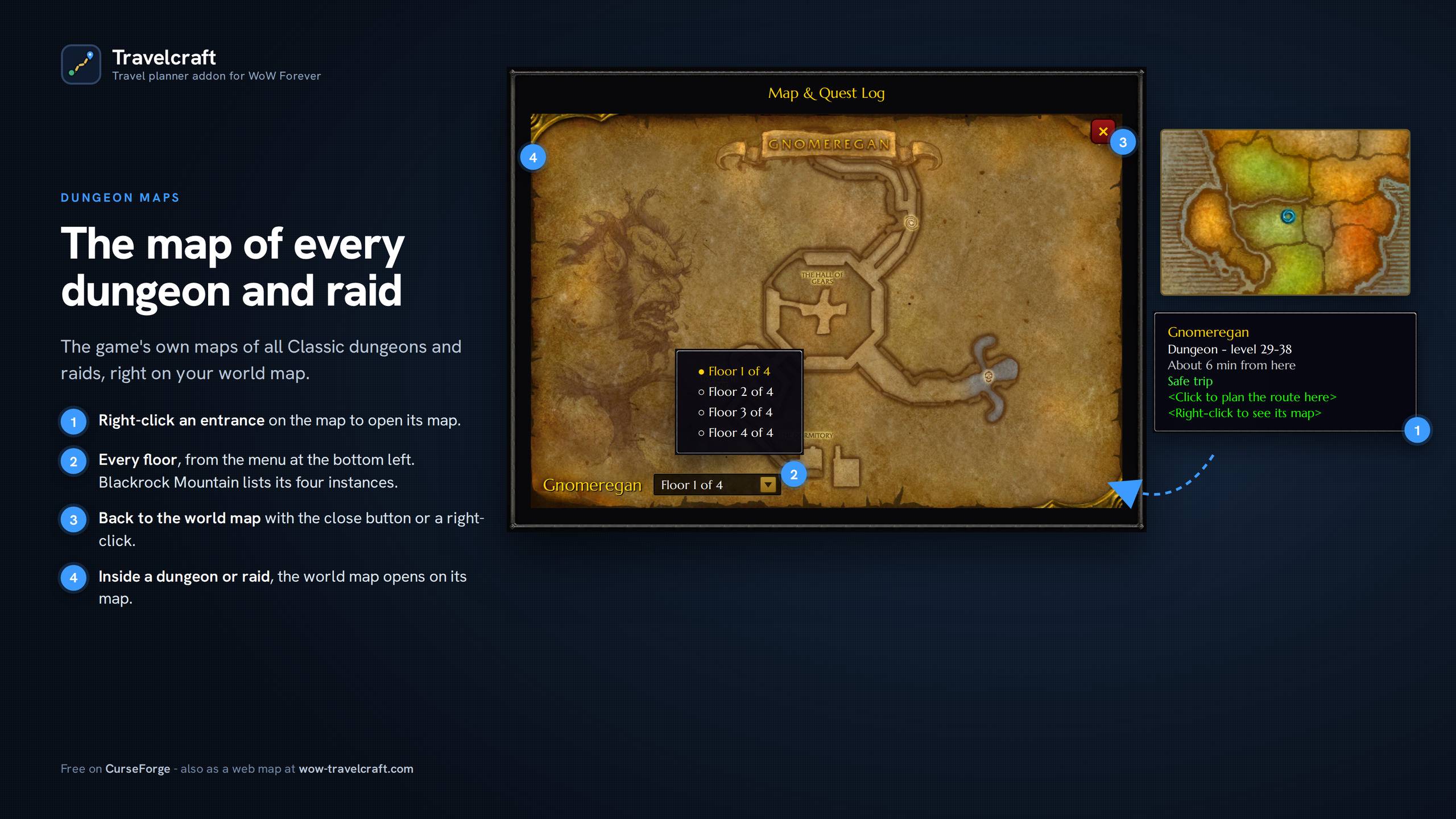
Dungeon and raid entrances on the map
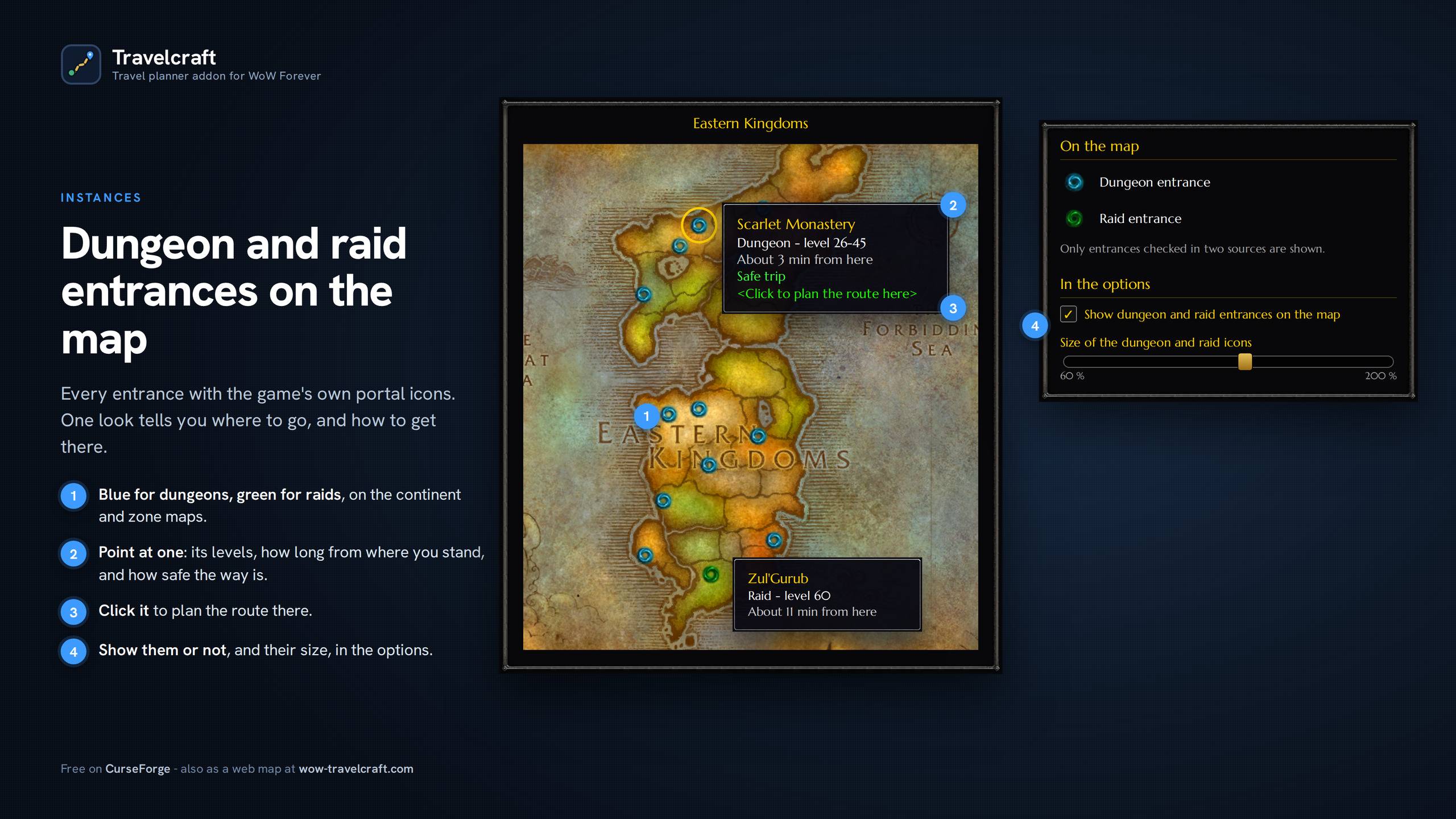
Every entrance checked in two sources, with the game's own portal icons: blue for dungeons, green for raids. Point at one for its levels, the time from where you stand and how safe the way is; click it to go.
Dungeon and raid maps, with their bosses
Right-click an entrance to open the map of the dungeon or raid, floor by floor; inside, the world map opens on it. The entrance is marked with the game's portal icon, and each way to another floor with an arrow: click it to see that floor. Each boss is marked where it stands, with its name, numbered in the usual order of the run, and coloured for your level. Point at one for its level, the last boss, rare spawns, optional bosses and the quests of your faction that send you there.
The game has no map of the new Forever dungeons: Hall of Thanes, Ruins of Lordaeron, Excavation Site: Wetlands and the City of Dalaran are drawn by Santiago Reyes (Atlas de Azeroth: Forever) and used with his permission. Thank you, Santiago! See his work: asguevara433.wixsite.com/srmaps
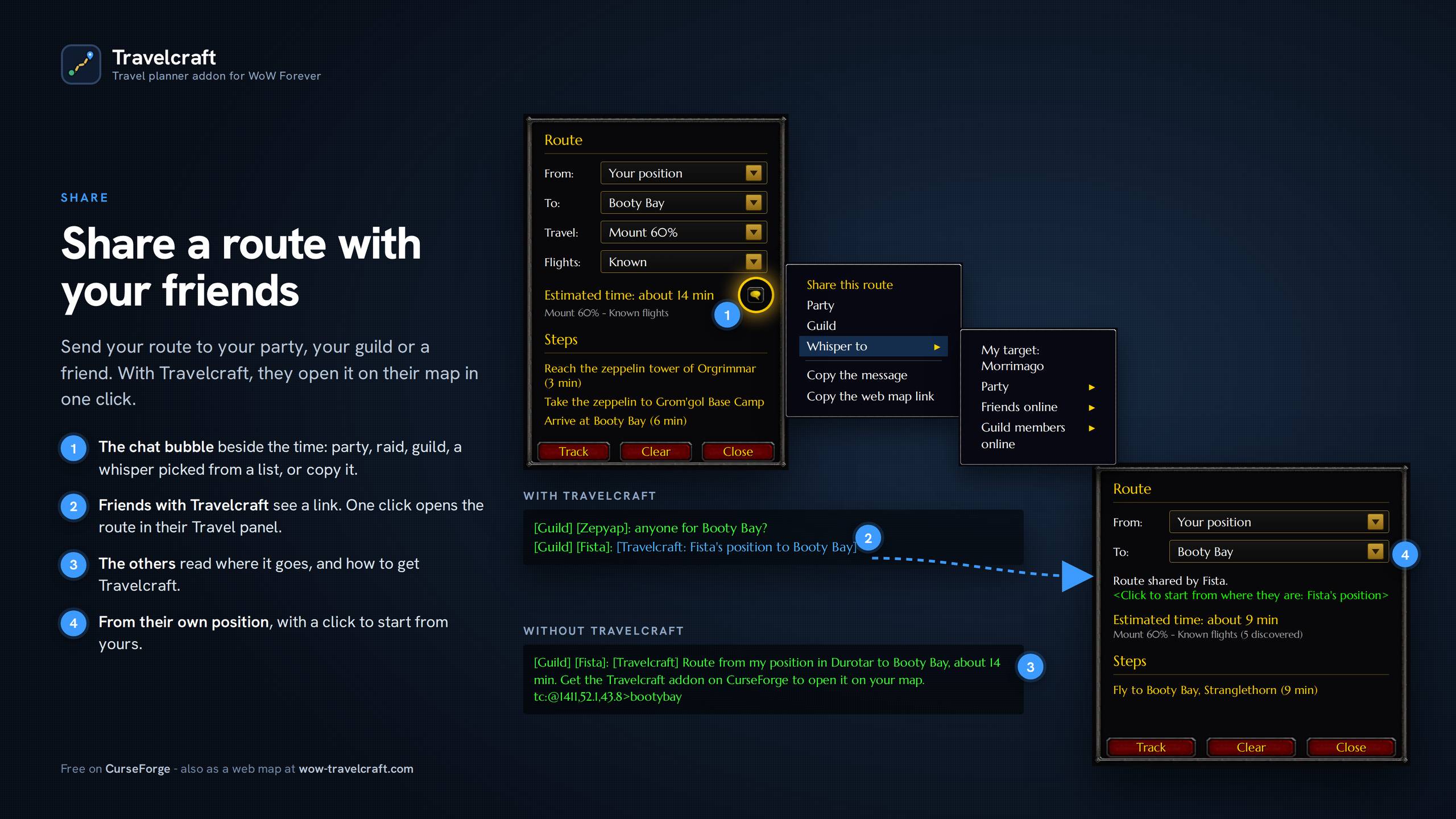
Share your route
Send your route to your party, raid, guild or a friend in one click. If they have Travelcraft, it opens right on their map, from their own position. If they don't, they read where it goes and how to get the addon.
Made to fit in
Clear options pages in the game's own settings (Travelcraft, Map, Dungeons and raids, Flight bar, About), with live previews. Keyboard shortcut, hearthstone as a starting point. Light on memory. English, French and Spanish, with place names in your game's language.
Good to know
Flight times come from real Classic flight durations. Walking times are measured along the route, on the real ground. Built on the WoW Forever beta: positions of places that are new in Forever are only shown once checked.
Bugs and ideas are welcome in the comments, in game with /tc feedback, or here: tally.so/r/RGp5WQ. I read every message.
Also on the web: the free Travelcraft map, with the same planner, in English, French, Spanish and German.
If it saves you time, you can support it here: Ko-fi.com/fistao
Travelcraft Team