TransmogEJ - Transmog in the Journal
See which transmog, mounts, housing decor and achievements you are missing in every dungeon and raid, inside the Adventure Guide. Includes lockouts, a farm planner, and full mount and housing decor catalogs.
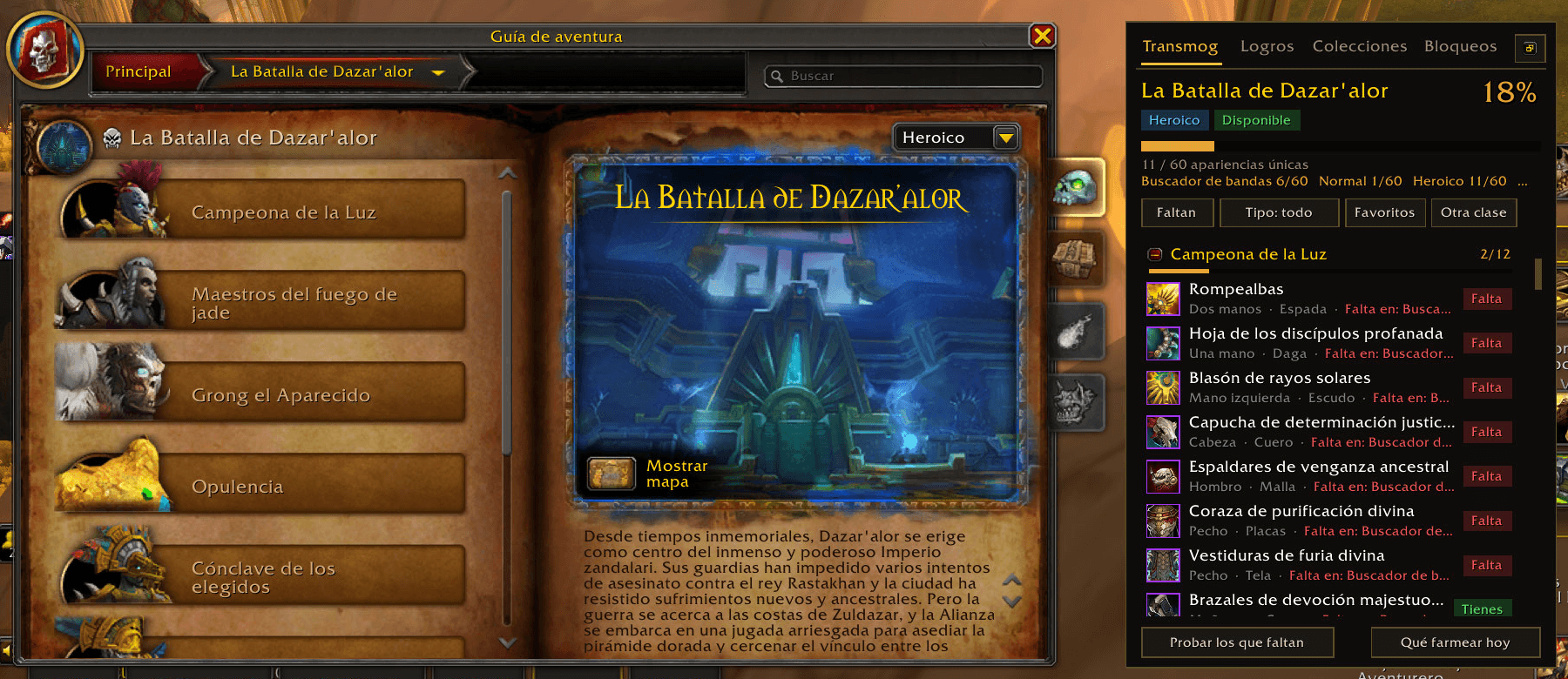
01-transmog.png
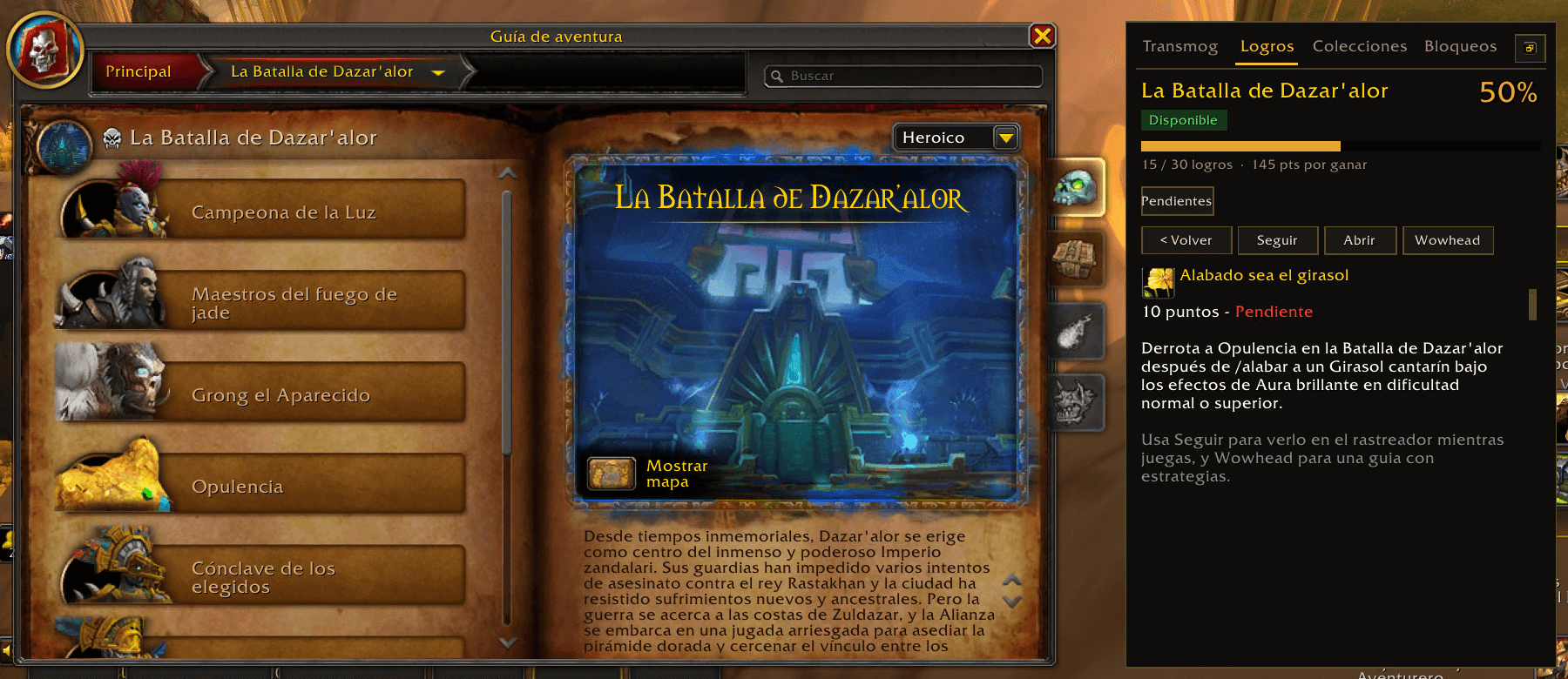
02-achievements.png
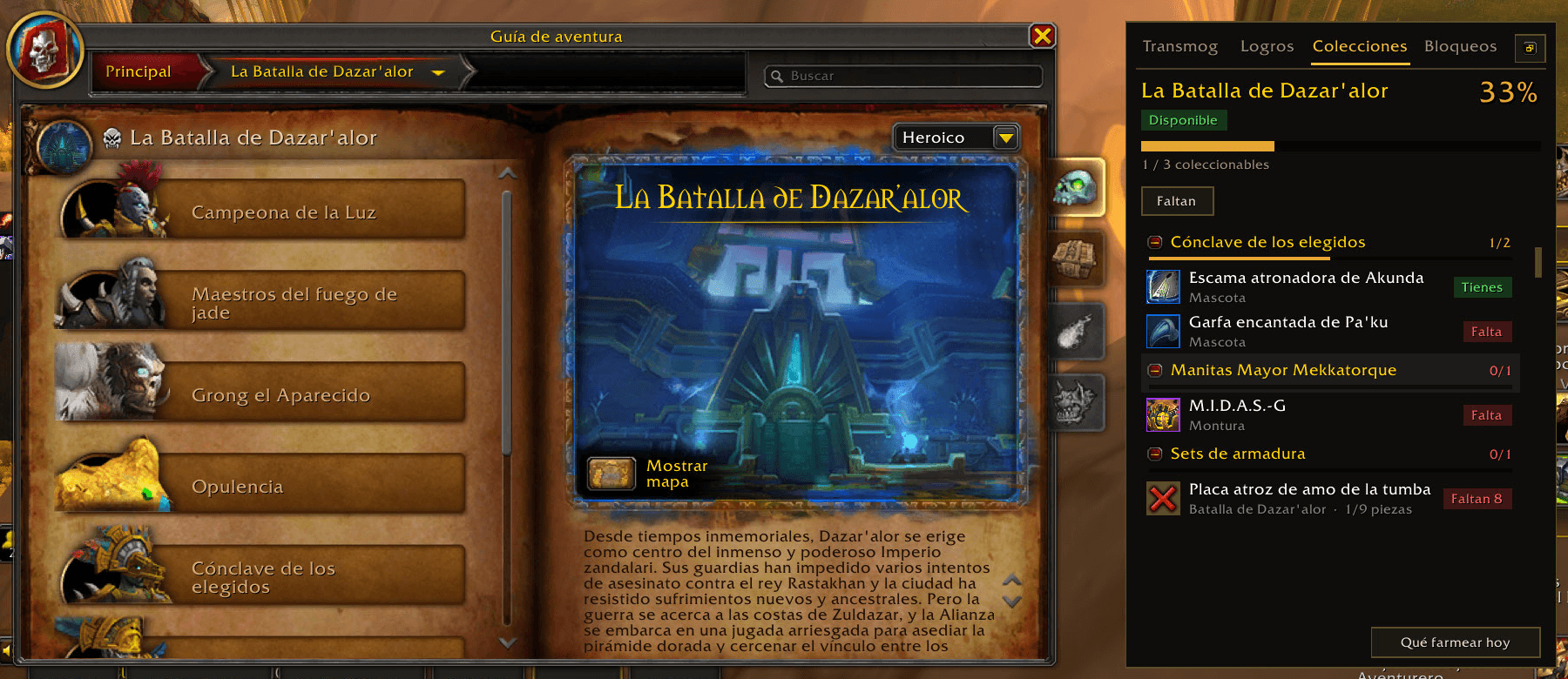
03-collections.png
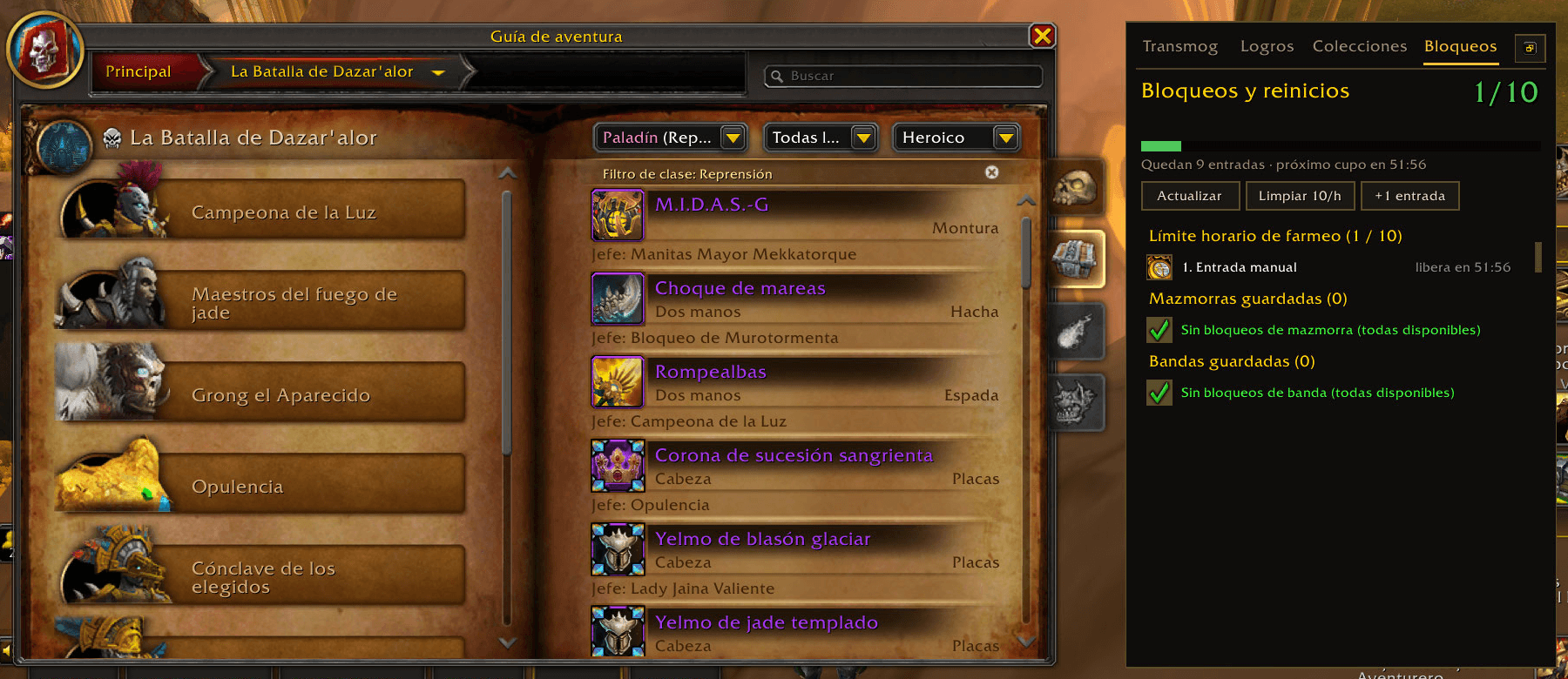
04-lockouts.png
Description
# TransmogEJ — Transmog in the Journal
Open any dungeon or raid in the **Adventure Guide** and a side panel tells you what you are still missing there: transmog appearances, mounts, pets, toys, housing decor and achievements, plus your lockouts. No more alt-tabbing to a website to decide what to farm tonight.
Built for **Retail 12.1 (Midnight)**. Free, lightweight, and it works on its own — it does **not** require any other addon.
## What you get
**Transmog**
- Every item is marked *owned*, *missing*, *owned through another item* or *your class can't learn it*.
- Unique appearances: an appearance that drops from several bosses is counted once.
- See which **difficulties** an appearance drops on and which one you are missing.
- Armor **sets** with progress, **favorites** (right-click an item), and a **Try on missing** button for the dressing room.
- ✔ / ✖ marks directly on the loot list of the Adventure Guide.
- **New appearance alert**: when you unlock an appearance, chat prints it with a **[Try on]** link that shows the piece in your dressing room with one click.
**Achievements**
- Per-instance achievement list with filters (almost done, with reward, timed), criteria detail, tracking, links and your own notes.
- Written guides for **over 2,000 dungeon and raid achievements** across every expansion (see *Known limitations* about the language).
**Mounts**
- A **complete mount catalog** (1,700+ mounts) opened with `/tej mounts`, with a progress bar and filters by **source** (dungeons & raids, reputation, PvP, purchase, achievements, quests & treasures, professions, events, Trading Post, shop, world drops), by **expansion**, *missing only* and *available today*.
- A *Mounts* tab in the Adventure Guide for the instance you are looking at.
- Mounts of the other faction or hidden for your character are not counted; new mounts from future patches show up automatically.
**Housing**
- A *Housing* tab lists the **housing decor** that drops in the instance you are looking at, boss by boss, marked owned or missing according to your decor catalog.
- A full **housing decor catalog** (`/tej housing`) with search by name or source (boss, vendor, achievement…), category and *missing only* filters.
**What to farm today**
- `/tej farm` ranks every instance by what you are missing (favorites and collectibles weigh more) and hides the ones you are locked to. Results are saved between sessions, so reopening it is instant, and a **Refresh** button rescans everything on demand.
**Lockouts**
- All your lockouts and resets, the **10 entries per hour** limit with warnings, and the lockouts of **all your characters** in one place.
**Everywhere else**
- `X/Y` badges on dungeon and raid entrances on the world map.
- A transmog / collection line on any item tooltip.
- An optional chat message when you enter an instance telling you what you are missing there.
- Minimap button and Addon Compartment entry. Options in *Settings → AddOns → TransmogEJ*.
## Light on resources
TransmogEJ was written to be easy on slow computers and slow connections:
- Background scans run in tiny slices (about 5 ms each), only out of combat and with the Journal closed, and they pause by themselves if you start fighting.
- Item data requests are throttled, so it never floods the server on a bad connection.
- Results are cached between sessions and only the changed appearances are re-checked when you learn something new.
- The written guides live in a separate **load-on-demand** module (`TransmogEJ_Guides`) that the game only loads the first time you open a guide.
- Very frequent game events are only listened to while they are needed.
Use `/tej debug` to see the addon's memory use and scan times.
## Commands
| Command | What it does |
|---|---|
| `/tej` | Show / hide the panel |
| `/tej farm` | "What to farm today" window |
| `/tej mounts` | Mount catalog |
| `/tej lockouts` | Floating lockouts window |
| `/tej housing` | Housing decor catalog |
| `/tej new` | Try on the last new appearance you unlocked |
| `/tej try` | Try on what you are missing in the dressing room |
| `/tej note` | Note for the current instance |
| `/tej options` | Open the options |
| `/tej map` · `/tej minimap` | Toggle map badges / minimap button |
| `/tej debug` · `/tej log` · `/tej scan` | Diagnostics |
(Spanish aliases such as `/tej monturas`, `/tej hogar`, `/tej nueva`, `/tej farmear` and `/tej bloqueos` also work.)
## Installation
Install it like any addon (CurseForge app, Wago, or unzip into `World of Warcraft/_retail_/Interface/AddOns/`). The download contains **two folders** and both must be in `AddOns`:
- `TransmogEJ` — the addon.
- `TransmogEJ_Guides` — the written achievement guides (loads on demand; it does not need to be enabled by hand).
## Known limitations
- The addon's text is **Spanish by default and fully translated to English** (other languages use the English text). The **written achievement guides are currently in Spanish only**; the official condition of each achievement is always shown by the game itself.
- Guides summarize public strategy guides; boss mechanics change with patches, so when in doubt trust what the achievement says in game.
- The **expansion** shown for mounts that do not come from a dungeon or raid is an approximation.
- The first time you open "What to farm today" with *All* instances selected it needs a few minutes to scan in the background; after that it is cached.
- The addon reads the Encounter Journal in the background (for the map badges, the farm window or when you enter an instance); it never does so during combat or while you are browsing the Journal.
## Feedback
Found a wrong guide, a mount in the wrong category or an error? Please open an issue on the project page and include the output of `/tej debug` and `/tej log`.
## License
© 2026 Leonardo. **All Rights Reserved.** Free to use; the source is readable as required by Blizzard's add-on policy, but it may not be redistributed, re-uploaded, forked or reused in other projects without permission. See `LICENSE.txt`. World of Warcraft® is a trademark of Blizzard Entertainment, Inc.; this addon is not affiliated with Blizzard.
TransmogEJ - Transmog in the Journal Team