Transmog Hunter
- By
Transmog Hunter passively scans players and mobs around you for appearances you want, alerting you to wishlist matches, tracked looks, and missing pieces — so you never miss a transmog opportunity.
UI-with-char.jpg
Description
Transmog Hunter
Hunt smarter, not harder.
Transmog Hunter watches the world around you and lets you know when something you want walks by — so you can actually enjoy the game instead of manually inspecting everyone in Stormwind.
What It Does
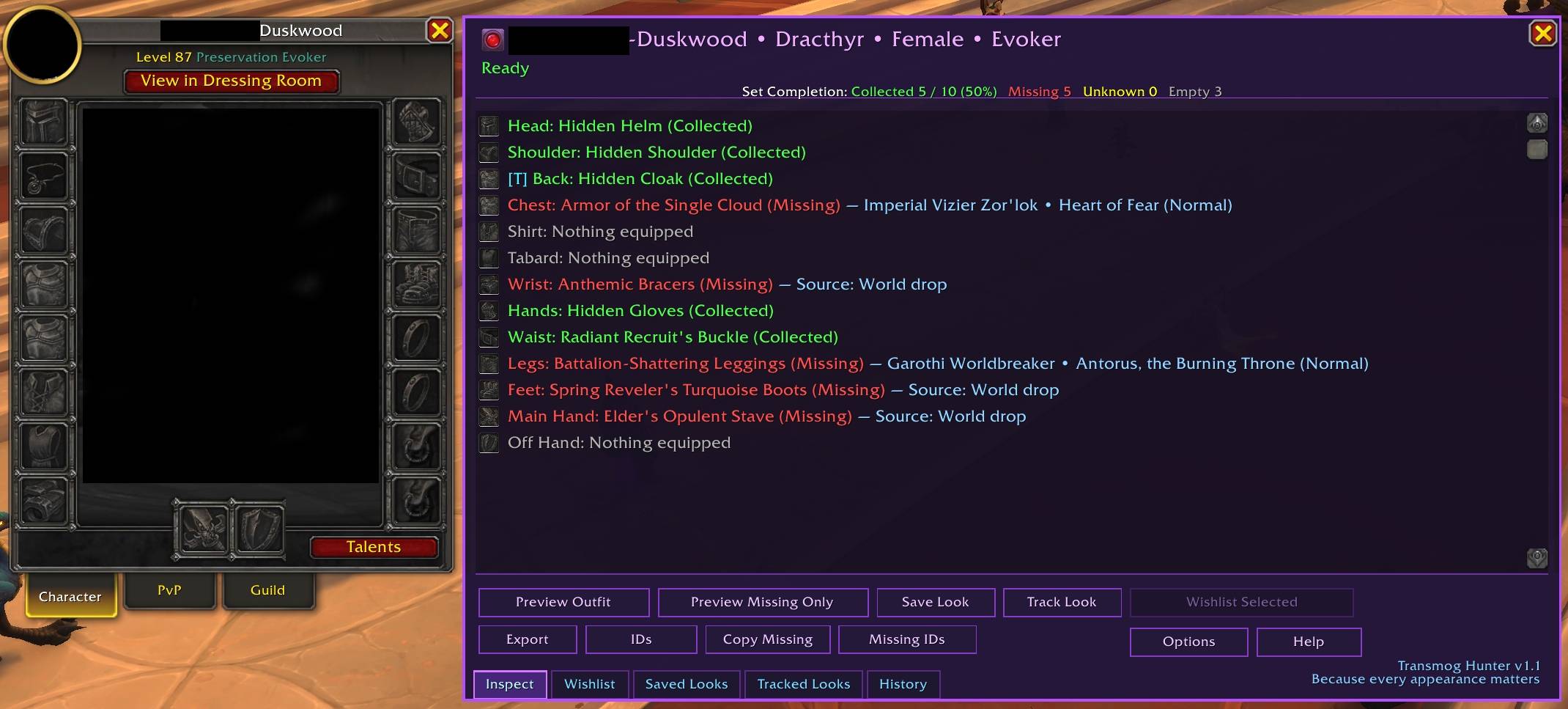
Type /tmh while targeting a player to see their full transmog set, slot by slot, with collected and missing states clearly marked. Missing pieces show where they drop right in the UI — no alt-tabbing to Wowhead required.
The real magic is passive detection. Enable Mouseover Inspect and TMH quietly checks players as you hover over them. Turn on Radar Mode and it scans nearby nameplates on its own. When something matches your wishlist or a tracked look, you get an alert. When that alert fires, target the player and open /tmh — matching rows are tagged [W] for Wishlist and [T] for Tracked so you know exactly what triggered it.
Key Features
Inspection & Display
- Slot-by-slot appearance breakdown with Collected / Missing state
- Drop source info right in the UI — boss, instance, and difficulty
- Wowhead links and export tools
- Dressing Room preview (overlay or solo)
Wishlist System
- Build a list of appearances you're after
- Select specific missing pieces or add them all at once
- Get alerted when players or mobs have something on your list
- Full management: delete single items, bulk delete, or clear all
Tracked Looks
- Track full outfits you want to collect
- Live progress tracking (X / Y pieces collected)
- Alerts when players are wearing pieces from your tracked sets
Passive Detection
- Mouseover Inspect — checks players as you hover over them
- Radar Mode — scans nearby nameplates automatically
- Mob Loot Detection — alerts when a rare or boss drops a wishlist item
- Missing Appearance Detection — flags mob drops you haven't collected
- Radar Pulse Notification — repositionable on-screen panel for radar hits
Alerts
- Screen flash, banner, chat output, and sound — all individually toggleable
- Color-coded chat: gold for Wishlist hits, cyan for Tracked hits
- Compact or detailed chat output modes
- Nameplate highlights for matched players
UI
- Tab-based interface: Inspect, Wishlist, Saved Looks, Tracked Looks, History
- Auto reinspects when you switch targets while TMH is open
- [W] / [T] row tags show which pieces triggered a detection
- Minimap button: Left = open UI, Ctrl+Left = toggle Mouseover, Right = toggle Radar, Ctrl+Right = toggle pulse anchor
- Window remembers its last position
Configuration
Everything is individually toggleable from Settings → AddOns → Transmog Hunter or via slash commands.
/tmh           — Open the main UI
/tmh help      — Open the in-game help window
/tmh options   — Open the options panel
/tmh mouseover / radar / banner / sound / mobloot / tooltip
Notes
- Some slots may show fallback data due to Blizzard API limitations
- Radar requires player nameplates to be enabled
- Mouseover scanning pauses during combat
Some screenshots are pictured with ClemmerGear — a complementary addon that adds gear comparison data to tooltips. Not required.
By WoWRamen — Because every appearance matters.
Transmog Hunter Team