Dead O'Clock
- By
Waiting for a mob to respawn or want to know if you're safe hanging around a dead one? Mouse-over it and you'll see when it died. Simple.
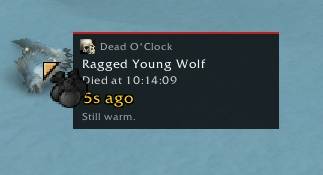
Still Warm
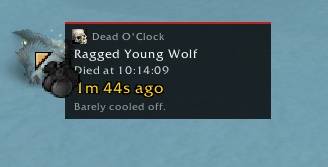
Barely Cooled Off
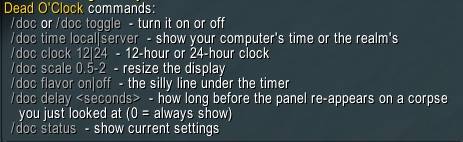
Commands

Status
Description
# Dead O'Clock
When did that mob die? Who knows? Well, now YOU do.
---
## What it does
Hover any dead NPC and a little panel follows your cursor showing:
- The mob's name
- A **[RARE]** tag (purple) for rares and rare elites, or a **[BOSS]** tag (red) for bosses, in the top-right corner
- The time it died (your computer's time or the realm's, 12 or 24 hour, your call)
- How long ago that was, in minutes and seconds, ticking up while you look at it
- A little flavor line under the timer that changes as the corpse gets older (can be turned off)
It keeps track of **every** NPC that dies near you while the addon is loaded, no matter who killed it. Your kills, your party's kills, some random stranger's kills. If it died where Dead O'Clock could see it, it's in the log.
---
## Commands
Use `/doc` or `/deadoclock`.
| Command | What it does |
|---|---|
| `/doc` or `/doc toggle` | Turn Dead O'Clock on or off |
| `/doc time local` | Show your computer's clock time (default) |
| `/doc time server` | Show realm (server) time |
| `/doc clock 12` | 12-hour clock with AM/PM (default) |
| `/doc clock 24` | 24-hour clock |
| `/doc scale 0.5-2` | Resize the panel |
| `/doc flavor on` / `/doc flavor off` | Turn the flavor line on or off (default on) |
| `/doc delay <seconds>` | How long before the panel re-appears on a corpse you just looked at (default 10, `0` = always show) |
| `/doc status` | Show your current settings |
| `/doc help` | Show the command list |
Your settings are saved between sessions.
---
## The re-show delay
Hover a corpse, move your mouse away, and hover the same corpse again right away? Dead O'Clock stays quiet so the panel doesn't pop up over and over on the same mob while you're looting or fighting around it. By default it waits **10 seconds** after you look away before it'll show for that same corpse again.
- While your mouse stays on the corpse, the panel stays up the whole time. The delay only kicks in after you look away.
- Moving off and back in a flash (under half a second) counts as one look, so the panel won't flicker.
- Hover a *different* corpse and the panel shows right away. The delay is per mob.
- Want it longer? `/doc delay 60` makes it wait a full minute. Want it every time? `/doc delay 0`.
- If you're holding your mouse on a corpse while the delay runs out, the panel will pop up on its own once time's up.
---
## The flavor line
A small grey line under the timer, because staring at a dead boar for 3 minutes should be at least a little entertaining.
| Time since death | Line |
|---|---|
| Under 30 seconds | Still warm. |
| 30 seconds to 2 minutes | Barely cooled off. |
| 2 to 5 minutes | Dead as a doornail. |
| 5 to 10 minutes | Cold as ice. |
| 10 to 20 minutes | Pushing up daisies. |
| 20 minutes and up | Ancient history. |
If you'd rather not see that, `/doc flavor off` makes the panel a bit smaller and plain.
---
## "Time of death unknown"
If you hover a corpse and the panel says **Time of death unknown**, it just means Dead O'Clock never saw that mob die, so it has nothing to report. It's not broken. This happens when:
- The mob died before you logged in or before you zoned in
- The mob died while you were out of range or somewhere the game didn't tell you about it
- You did a `/reload` since it died (the death log lives in memory, so a reload starts it fresh)
- It's been more than 30 minutes since it died (old entries get cleaned up)
The panel still shows the name and the [RARE]/[BOSS] tag in that case, so you can at least tell what you're looking at.
---
## Good to know
- **It only knows about deaths it saw.** See "Time of death unknown" above.
- **It forgets after 30 minutes.** Old entries get cleaned up so it doesn't pile up memory. Corpses despawn long before that anyway.
- **NPCs only.** Players, pets, and everything else are ignored.
- **Server time is a little approximate on the seconds.** The realm clock only gives hour and minute, so Dead O'Clock figures out the offset from your computer's clock and uses your computer's seconds. Local time is exact.
- WoW Forever uses Midnight's addon rules, and the game can hide some info from addons during boss fights and similar restricted content. If that happens, you may just see "Time of death unknown."
---
## Compatibility
Built for WoW Forever beta client (interface 16001 / 160001), and the retail interface numbers are listed too.
The Dead O'Clock Team