Ultimate Profession Master
- By
TOG Profession Master should help you and your guild to know faster which player has which profession and who can craft which item or who has learned which enchantment.

Cover Page
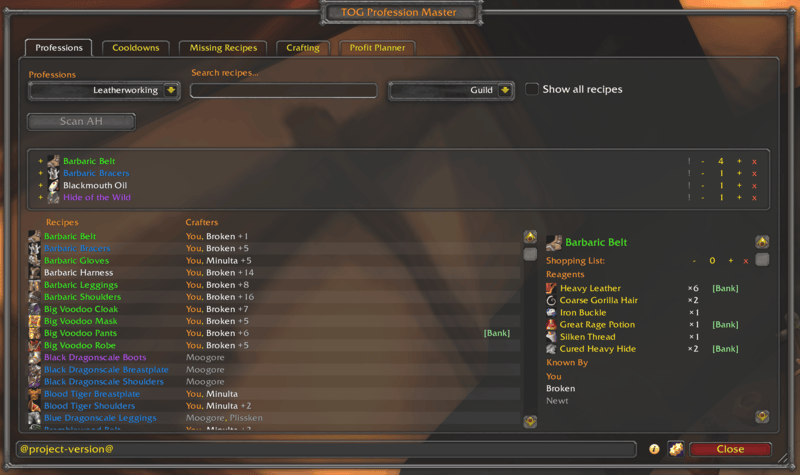
TOGPM Main Window
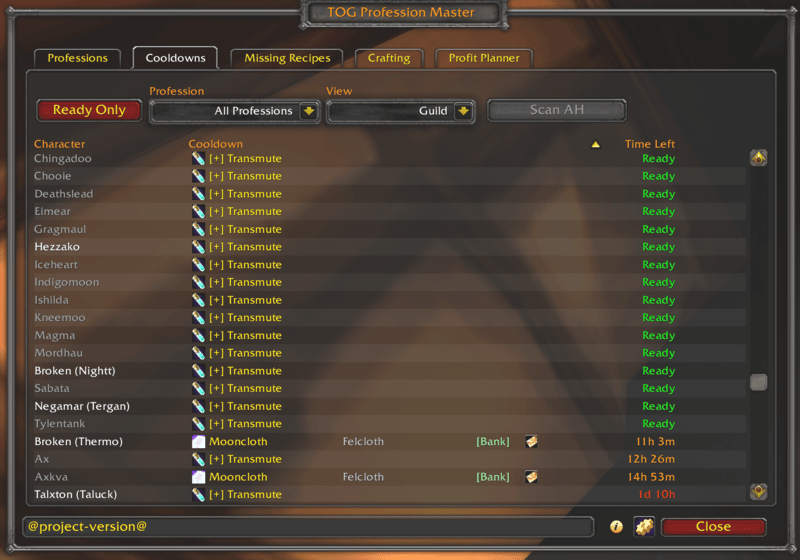
TOGPM Cooldowns Window
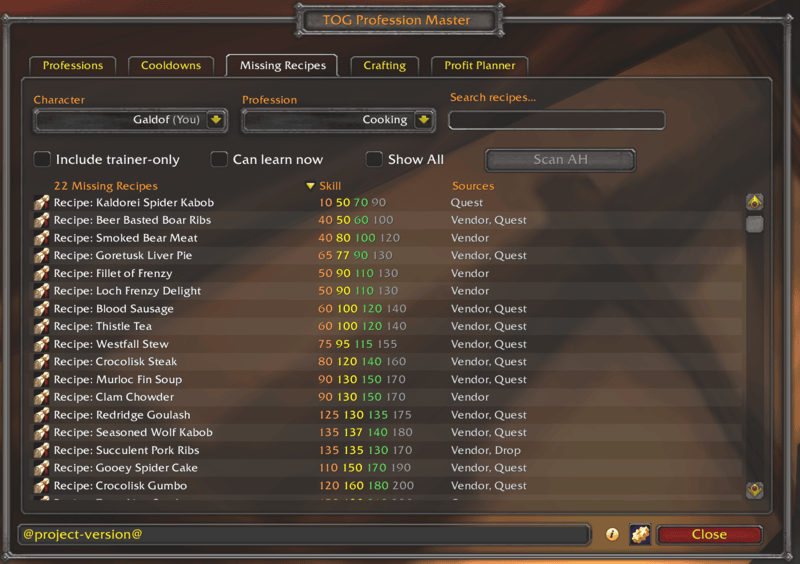
TOGPM Missing Recipes Window
Description
Ultimate Profession Master — Guild-Wide Profession & Cooldown Tracker for WoW Classic
Formerly TOG Profession Master. Same addon, same saved data, new name — nothing to reinstall.
Stop whispering every alchemist in the guild to ask "is your transmute up?" and stop opening five different alts to remember who knows the recipe you need. Ultimate Profession Master keeps a live, shared view of every guild member's professions, recipes, and cooldowns — and lets you mail reagents straight to the crafter without typing a single character name.
The Problem
WoW's built-in profession UI shows you exactly one thing: your own professions on the character you're currently logged into. The information you actually need — who in my guild can craft this, whose cooldown is up, what reagents do they need — is scattered across whisper requests and guild-chat noise.
For active guilds with crafting alts, this gets worse fast. Multiple alchemists each on a 24-hour transmute cooldown, four leatherworkers with different specialisations, alts spread across connected realms, and no good way to coordinate without spamming every member.
The Solution
Ultimate Profession Master uses a hash-then-fetch peer-to-peer sync protocol over the guild addon channel to keep every member's view of guild professions and cooldowns up to date in real time, with near-zero ongoing bandwidth. Recipe details (names, reagents, skill tiers, sources) never travel over the wire at all — they ship in the offline ProfessionDB database, correct for your exact client version — so the only things that sync are who knows what, and what is on cooldown.
Every guildmate's data is relayable — if Alice is offline, Bob's cached copy of Alice's cooldowns can serve them to Carol when she logs in. Cooldown coverage no longer requires the data owner to be online.
Core Features
Cross-Guild Profession Sharing
- Share professions between two allied guilds — for communities split across two socially-linked guilds that can't see each other over the normal guild addon channel. An officer or the guild leader sets the allied guild under Settings → Cross-Guild (members see the list read-only) and their crafters appear right alongside your own.
- Bilateral by design — data only flows when both guilds list each other. A one-sided config does nothing, and a guild you don't list can't pull or inject anything. With no allied guild configured, the addon does nothing cross-guild — purely local.
- Whole-guild, not just you — the allied-guild list propagates across your guild automatically, and allied rosters are shared, so every member sees the allied crafters — not only whoever set it up.
- One list for every TOG addon — the allied-guild list and the allied rosters live in GuildRoster (also editable with
/guildroster sisters), so Ultimate Profession Master, TOGTools and TOGBankClassic all read the same list and the same rosters instead of each keeping their own. Pull an allied roster once from any online member of that guild and GuildRoster keeps it current from then on. - Tell the guilds apart at a glance — allied guild members carry a short tag after their name (
Ahmbrai <Other>) in every list, picked automatically so two guilds never share one, or set your own under Settings → Cross-Guild → Allied guild tags. The tags come from GuildRoster, so every TOG addon that shows them uses the same ones (GuildRoster 1.4.0 or newer). - Live diagnostics — a panel on the Cross-Guild tab (and
/upm xgdiag) shows known rosters, crafter counts per guild, and dependency status at a glance. - Requires the auto-installed DeltaSync and GuildRoster (0.7.0 or newer) dependencies. Same faction only.
Crafting Tab & Cost-to-Craft
- A full crafting screen in UPM's style — a clean Crafting tab that pre-populates a dropdown from your known professions and lists every recipe with a difficulty-coloured name and an orange→yellow→green→grey skill-up tier column. By default UPM stays out of the way when you open a profession — Blizzard's window (or TSM / Skillet) keeps the window, with a UPM button on it to jump to the tab. Prefer the old behavior? One setting opens straight into the UPM tab; another hides the Crafting tab entirely if you craft with another addon.
- Craft queue — queue recipes, drag to reorder, and Craft All works down the queue one recipe's full batch per click (the game needs a click for each recipe), with completion tracking so the queue keeps itself current.
- Enchanting included, and a hunter's pets are left alone — the Enchanting window is supported with recipe tooltips. On Classic and TBC a hunter's Beast Training shares that same window; the takeover recognises it and hands it back to the game, so pets can always be trained.
- Cost-to-craft with profit preview — every recipe shows total material cost and current AH sell price, with profit calculated in real time (green if you'd profit, red if you'd lose gold). Prices come from ItemDB's price sources — Auctionator, TSM, Auctioneer or ItemDB's own Auction House scan, in the order you set with
/itemdb— and, for a reagent a vendor sells, the vendor price: the one you actually paid if you have opened that vendor, ItemDB's base price otherwise. A vendor-sold reagent is always costed at the vendor price, even if someone has listed it on the AH. - No pricing addon required — ItemDB (a required dependency) scans the Auction House itself and builds a price database shared by every TOG addon, or reads Auctionator / TSM / Auctioneer if you already use them. Your price sources are set once, in ItemDB, for all of them.
- Powered by LibProfessionDB — recipe details (names, reagents, difficulty tiers, enchant effect text) come from the standalone offline database, so crafting works for any known profession with no scan wait.
Guild Profession Browser
- Master-detail layout: scrollable recipe list on the left, full recipe drilldown on the right
- Filter by profession (Alchemy, Blacksmithing, Cooking, Enchanting, Engineering, First Aid, Leatherworking, Mining, Tailoring, Inscription, Jewelcrafting)
- Search box for fast item-name filtering, with persistent filter preference per character — and it matches more than names: type a guild member's name to list everything that player can craft, or a stat (
5 agi,12 stam,spirit) to find recipes by what the crafted item actually does - Skill-tier filter — a multi-select dropdown narrows the list to the trainer ranks you tick (Apprentice / Journeyman / Expert / Artisan, plus Master and above on later clients), so you can hide the low-level clutter
- Recipe rows show every guild crafter who knows the recipe — online (white), offline (grey), and your own characters (purple, with "You (AltName)" disambiguation when multiple alts know it)
- Drilldown panel shows reagent list with bag counts, bank stock, and shopping-list quantity controls
- Right-click a crafter row to whisper them with one click
- Virtual scrolling for performance on guilds with thousands of recipes
Guild Tab — Your Guild's Crafting Capacity
- Headcount down to the people — tallies how many guild characters have each profession, then drills in: click a profession to expand its specializations, then a specialization to list the characters in it, each with their skill level (
You (300/300)) - Coverage gaps are obvious — every profession and every specialization is listed even at 0, so "nobody's an Axesmith" jumps out instead of silently missing
- Specs are inferred, not just recorded — a crafter's specialization comes from their recorded spec or is deduced from the spec-only recipes they're known to craft, so a Tribal leatherworker who has never run the addon still lands under Tribal
- Gathering professions included — Herbalism, Skinning and Fishing (plus Archaeology on Cata/MoP) have no trade-skill window to open, so they're read straight from your skill lines and synced guild-wide on their own leaf. Now you can find out who actually herbs
- Names colour-coded exactly like the Professions tab: white online, grey offline, brand-colour You — and an online alt surfaces its offline main
- Find exactly who you need — search by profession, specialization or character name, and set Min skill / Max skill to keep only characters in a skill range in that profession ("a 250–260 tailor"). The counts update to show how many match
Missing Recipes Tab
- Personal and Guild views — My Character shows what one character hasn't learned; Guild shows recipes nobody in the guild knows, so you can spot guild-wide coverage gaps at a glance
- Pick a character and a profession and see every recipe scroll they haven't learned yet — no more wondering "what am I missing"
- Each row shows the scroll icon, the skill level required, and where to obtain it (vendor, drop, quest, crafted, container, fishing)
- Search by name, filter to a single profession, or toggle whether trainer-only scrolls show
- Where to get it — a [Where] button opens every vendor, drop and zone for the recipe's scroll, with drop chances and map coordinates (from ItemDB)
- Guided there with Questbook — with Questbook installed, a [Guide] button starts the route to the best place for the scroll in one click (one in your current zone first, then a vendor, then the best drop chance), and clicking any place in the [Where] window guides you there instead. The window's bottom row carries Questbook's own stop button, on every tab, to cancel the route
- Shift-click a row to insert the scroll's link into chat; [Bank] button when your guild bank has it in stock
- Defaults to the currently logged-in character; switch to any tracked alt on your account
- Smart filtering: rank-up books (Expert / Artisan / etc. for Cooking / First Aid / Fishing) hide automatically once you've outgrown them
- TBC content-phase filter (optional) — on The Burning Crusade Classic, a setting hides recipes from content phases that are not live yet. It ships off, so by default nothing is hidden from you
Cooldown Tracker
- Cross-character cooldown panel: every guild member's active and ready cooldowns in one view
- Tracks transmutes (per expansion), Mooncloth, Salt Shaker, Spellcloth/Shadowcloth, Northrend / Inscription Research, Icy Prism, Titansteel, Dreamcloth (all 5), Truegold, Living Steel, JC daily cuts, Magnificence — with grouped rows for multi-spell cooldowns (click [+] to expand)
- Two-level filter: pick a profession, then narrow to a specific shared-timer cooldown (Transmute, Mooncloth, Salt Shaker, Dreamcloth group, JC daily cuts, etc.)
- "Ready Only" filter to hide active cooldowns; ready cooldowns sort A-Z by name for stable ordering
- Sortable columns (Character, Cooldown, Time Left)
- Spell tooltip on hover, item tooltip on the reagent
- The reagent column tells you whether you can actually feed the cooldown — white when your bags hold enough of it to fill the mail, grey when they do not, so one glance down the list is enough. It updates live as you loot or send the reagent
- Right-click to whisper the cooldown owner
- One-click [Mail] button per cooldown — splits every reagent the cooldown needs out of your bags and attaches them all to ONE pre-composed supply mail to the cooldown owner. If you are short on any of them it tells you which, and sends nothing. Crafters on another realm get the mail on their own realm, and if the game refuses the mail, chat tells you why
- Click [Mail] again to send it — once the supply mail is attached and addressed, the next click on the same button sends it, so feeding a cooldown is two clicks
- A Sent column shows who you have already supplied — "5m ago", "3h ago", with the date and time on hover. It clears by itself once that crafter uses the cooldown
- Multi-reagent transmutes (Arcanite Bar = Thorium + Arcane Crystal) expand to one row per reagent so you can bank-request each independently; the mail button on the first row carries both
Reagent Tracker & Shopping List
- Add any recipe to your personal shopping list with the "+" button on the recipe row
- Floating Reagent Tracker window aggregates every reagent needed across all queued recipes — have from your bags, need from the shopping list, color-coded green / yellow / red
- The tracker stays on screen like Questie's tracker — Escape does not close it, it comes back after a
/reloador logout, and its - / + button folds it down to its title bar - Its own scale and opacity sliders in Settings → Display, and a dark background that keeps it readable — the opacity slider fades only the background, never the text
- Share List exports your shopping list as text and imports one from another account or a friend, adding to your list and showing who wants each item
- Shopping-list alerts: a chat notification when your bags hold every reagent for a craft on your list
- Shift-click reagent names to insert item links into chat
Auction House Scanner
- Open the Auction House and press ItemDB's scan button in its top-left corner — one pass scans the whole house, and every UPM tab reads the results
- After the scan, an [AH] button shows up on every row whose item is actually for sale right now — click to jump the AH browse search to that item with no typing
- Works on the
[+] Transmutepopup too: each transmute reagent gets its own [AH] button when listings exist, so multi-reagent transmutes like Arcanite (Thorium + Arcane Crystal) get one button per reagent - Supports Vanilla through Mists of Pandaria via the legacy AuctionFrame UI
TOGBankClassic Integration
When the optional TOGBankClassic addon is loaded, Ultimate Profession Master surfaces guild bank stock everywhere it matters:
- [Bank] button next to every reagent in the recipe drilldown, cooldown panel, shopping-list expansion, and Reagent Tracker — visible only when the bank actually has stock of that reagent, with TOG Bank's own status dot in front of it (green current, red or yellow when a newer copy of that bank is on its way) so you can see at a glance whether the stock is current; hover for each banker's count and status
- Click [Bank] to open a request dialog, pick the banker, set the quantity and send the request to TOGBankClassic. The maximum is the one TOG Bank enforces: the officer's request percentage of that banker's stock, less what you already have on order from them. View-only bankers aren't offered, and a refused order shows TOG Bank's own reason
- While TOG Bank's shop is open, a [Bank] request goes in as a shop purchase, with TOG Bank's price estimate shown in the dialog; the bank character sets the final price when the order is filled
- Auto-detects when TOGBankClassic data isn't loaded yet and refreshes bank buttons once it is
Crafter Online Alerts
- When a guildmate who can craft something on your shopping list comes online, you get a chat alert with their name
- Pick your own sound and visual — choose the alert sound (Chime, Ready Check, Raid Warning, Auction Bell, Whisper, Map Ping) and the on-screen cue (screen flash in gold / red / blue, a raid-warning banner, top-centre error text, or a taskbar flash for when you're alt-tabbed). Selecting an option previews it
- Toggle alerts on/off; configure exclusions (login-burst suppression, stealth-mode opt-out)
- Drives off real
OnMemberOnlinecallbacks fromLibGuildRoster-1.0— notWHOpolling
Sync Log
- Settings → General → Sync Log — a live, real-time view of every sync message in and out, with columns for time, event, size, peer and detail
- Entries name what actually moved (
crafters:165 (Leatherworking), a per-player transfer names the player) rather than an opaque byte count - Pause button freezes the view so a text selection survives long enough to copy; entries keep accumulating and the view catches up on unpause
- Contents are selectable and copyable, and the window remembers its position and size across
/reload— built for pasting into a bug report
Item Tooltips
- Hover any item in your bags, the AH, a vendor, or a chat link, and Ultimate Profession Master appends a list of guild crafters who know how to make it
- Includes profession, skill rank, and online status per crafter
- BoP items skipped automatically
- Recipe details on every recipe — and on the items they make. Hover a recipe scroll, or the item it produces, anywhere in the game and you get its skill-up difficulty in the game's own tier colours (orange / yellow / green / grey), where the recipe comes from (trainer, drop, vendor, quest, container), and an Unlearned list of which of your characters could still learn it, with their skill rank and specialisation
- Answers on all twelve professions. The source data is keyed by the recipe itself rather than by a scroll item, so it works for the roughly one recipe in three that is trainer-taught and has no scroll to inspect — that is 74.9% of Vanilla recipes covered, against 44.6% for an item-keyed lookup, and the single largest category is precisely those trainer-taught recipes
- It renders even if you run RecipeMaster, and that is deliberate as of v1.0.7. UPM's block is not a duplicate of RM's — only UPM tells you which of your own characters could still learn the recipe, and which guildmates can craft it, so standing down to avoid overlapping two rows also withheld the rows nothing else in the game provides. (It also could not tell RM being loaded from RM being switched on, so anyone running RM with its tooltip options off got the block from neither addon.) A setting restores the old defer-to-RM behaviour, or turns the block off entirely
- You choose what each tooltip shows. Settings → Item tooltip has an on/off switch for every line the addon adds: crafters, recipe difficulty, recipe sources, your unlearned characters, vendor buy price, vendor sell price and the item/recipe IDs
- Vendor buy price and vendor sell price on every item — not just recipes. Nobody else shows both: TradeSkillMaster and Leatrix Plus show sell only, All The Things shows neither, and the game itself shows neither in your bags. The buy figure comes from a three-tier lookup that prefers prices captured from vendors you have actually opened, so it reflects your reputation discount rather than a book value. Either heading is omitted when its number is unknown
- Other addons' lines are welcome, and they cannot stretch the tooltip. UPM's own recipe tooltips invite All The Things, TOGBankClassic and anything hooking the game's tooltip to contribute, so a trainer-taught recipe with no scroll item gets the same block a real scroll would. Anything drawn there is held to the game's own wrap width, so one long line from any addon cannot widen the frame the way it can on a stock tooltip
Profit Planner
- See which recipes make gold at a glance — dedicated Profit Planner tab shows all recipes your characters know, with craft cost, current Auction House sell price, and profit (green if profitable, red if losing gold) in one sortable view
- Live AH vs. Historical pricing — switch between real-time auction prices and long-term averages to spot short-term flips or stable moneymakers
- Filter and search — multi-select profession, crafter, and pricing source filters let you narrow to exactly what you want to see; search by recipe name to find specific crafts instantly
- Works with your pricing addons — prices come from ItemDB, which reads Auctionator, TradeSkillMaster (TSM), Auctioneer, or its own Auction House scan — use what you already have or let ItemDB handle it; pick which and in what order with
/itemdb - Smart profit tracking — recipes with missing prices stay visible (so you know what needs scanning), and the "+ Profit only" filter hides anything that's currently unprofitable
How It Works
Sync Protocol (Hash-Then-Fetch)
Most guild profession addons broadcast their full data on a timer. With 50 active guildmates each broadcasting 30+ KB every 30 seconds, that's ~1.5 MB of guild-channel traffic per minute even when nothing has changed. Ultimate Profession Master does this differently:
- L0 broadcast (every 10 minutes) — each peer sends a tiny ~600 B leaf-hash list on the guild channel. The list is differential: only leaves whose content has actually changed since the last broadcast are included. A settled guild generates near-zero traffic.
- Mismatch detection — peers compare incoming hashes against their local cache. When a hash differs, they whisper a small handshake to the broadcaster.
- Drill-down — for roll-up mismatches (e.g.,
guild:cooldowns), the broadcaster responds with per-character sub-hashes so the receiver can pinpoint exactly which characters have differing data. - Per-leaf data response — the chosen sender broadcasts only the differing leaf's data on the guild channel (BULK priority). Every peer with stale data for the same leaf merges for free; no per-recipient whisper bottleneck.
- Owner-authoritative merge — the character who owns a piece of data is the only one who mints its hash, and every other client adopts that hash verbatim rather than recomputing it from its own accumulated view. That's what makes the guild converge instead of drift: cooldowns and each character's profession set and alt list are replaced wholesale from their owner (so a dropped profession, an expired cooldown, or a removed alt actually propagates, which a grow-only union can never do), while crafter membership still union-adds for relay and recipe metadata keeps the richest non-nil value per field. Receiving from any peer converges to the same state regardless of who sent it.
Whispers carry only handshake control messages (offers, requests). All bulk data flows on the guild channel where AceCommQueue-1.0 handles throttling. The protocol scales smoothly to 300–500 character guilds with 50–100 concurrent users.
Recipe details are shipped, not synced
Recipe names, icons, reagents, skill tiers and sources come from the offline ProfessionDB database that installs alongside the addon, scoped to your exact client version. None of it goes over the wire, and none of it is scanned from your profession window — the scan only records which recipes you know. That leaves all ongoing traffic for the part that actually changes: who knows what (crafters:<profId>), each character's professions and skill (skills:<charKey>), and what's on cooldown (cooldown:<charKey>).
Multi-Version Support
All Classic versions share one codebase. Version detection via GetBuildInfo() at startup; per-expansion static tables for skills and cooldown IDs; compat shims for C_Container, C_AddOns.IsAddOnLoaded and the trade-skill APIs; and one resolver for the item API that prefers the C_Item namespace and falls back to the older bare names, so the addon works whether or not the game's deprecated-API fallbacks are switched on. Supported interface versions:
- Classic Era / Anniversary (1.x)
- The Burning Crusade Classic (2.5.x)
- Wrath of the Lich King Classic (3.4.x)
- Cataclysm Classic (4.4.x)
- Mists of Pandaria Classic (5.5.x)
- WoW Forever (early support)
- Retail / The War Within and Midnight (12.x, early support)
Slash Commands
Every command also works as /togpm, the old name.
/upm— Open the main profession browser/upm reagents— Open the floating Reagent Tracker/upm minimap— Show the minimap button/upm sync— Force a fresh broadcast now, without waiting for the 10-minute cycle or the send debounce/upm status— Print sync / comm diagnostic info/upm versioncheck— Broadcast a version check across the guild and print responses/upm purge— Open the purge-data dialog (purge all or just one character)/upm settings— Open the settings panel/upm craft— Toggle whether UPM takes over the profession window/upm debug— Toggle debug output/upm help— Show the full command list
Diagnostic commands for advanced users / bug reports:
/upm whyvisible <name>— Explain, gate by gate, why a character is still shown (or is hidden)/upm perf— How long each window open, tab draw, background build and incoming sync took this session; the game's own record of every addon's worst frame since login, with a clock time for each stall over half a second; and how large each part of the saved data is. Run it right after a pause and paste the output/upm dsstatus— DeltaSync multi-host health check (namespace / MINOR / prefixes / P2P)/upm xgdiag— Cross-guild diagnostics: known rosters, crafter counts, dependency status/upm pullroster <name>— Pull an allied guild's roster (through GuildRoster) and its crafter data from one of its online members;Name-Realmfor another realm. One pull is enough — GuildRoster keeps the roster current from then on/upm dumphashes— Print the local L0 hash list for cross-peer comparison/upm dumpcooldowns [charKey]— Dump stored cooldown bucket for a character/upm dumprecipe <name>— Dump a recipe's stored fields and full reagent table/upm dumpprice <itemId|link>— Dump full price diagnostics for an item/upm myalts— List the alt group this account broadcasts/upm commtest [name]— Probe which addon-message channels the server actually relays/upm transmutedebug— Explain how a character's transmute cooldowns were resolved/acq status— The comm queue's own view: sends in flight, idle time, stalls and refusals per queue/acq unstick— Force a stuck send queue to release and re-send, without waiting out the timeout/upm forcebroadcast— Force a full (non-differential) hash list broadcast immediately/upm backfill— Run the reagentitemIdbackfill pass/upm spellcache— Print the spellbook name→ID cache/upm itemgaps [profId]— List crafted items LibItemDB has no stat data for
Requirements
- Ace3 (AceAddon-3.0, AceComm-3.0, AceDB-3.0, AceGUI-3.0, AceTimer-3.0, AceConsole-3.0, AceConfig-3.0, AceLocale-3.0, AceHook-3.0) — auto-installed by CurseForge
- DeltaSync — v4.0.0 or newer required (LibStub MINOR ≥ 15). v4.0.0 made the library multi-host, and UPM creates its own isolated sync host so it can't clobber another DeltaSync-using addon in the same client. On an older DeltaSync, guild sync stays disabled rather than falling back — update it. Auto-installed by CurseForge; transitively pulls in
AceCommQueue-1.0 - GuildRoster — 0.7.0 or newer for cross-guild sharing (LibStub MINOR ≥ 18). Provides
LibGuildRoster-1.0, the guild-roster engine (membership, online state, roster callbacks), and since 0.7.0 the allied-guild list and allied rosters that every TOG addon shares. On an older GuildRoster the addon runs normally with cross-guild sharing off. The allied guild name tags need GuildRoster 1.4.0 or newer; without it names show no tag. Auto-installed by CurseForge - ProfessionDB — provides
LibProfessionDB, the offline recipe database (names, reagents, skill tiers, sources, enchant effect text) that lets the Crafting, Professions and Missing Recipes tabs render instantly with no scan wait. Auto-installed by CurseForge - ItemDB — the build carrying LibItemDB MINOR 25 or newer for any auction price — provides
LibItemDB, the offline item database behind crafted-item stats and consumable buff text (and the stat-based recipe search), and since v1.1.0 every auction price too: the Auction House scanner, the Auctionator / TSM / Auctioneer bridges and the price-source settings (/itemdb). On an older ItemDB, cost-to-craft still shows vendor prices, but no auction prices or [AH] buttons — update it. Auto-installed by CurseForge - VersionCheck-1.0 — auto-installed by CurseForge
- LibAceGUIWidgets — the shared window and list widgets every TOG addon draws with. Auto-installed by CurseForge
- LibDBIcon-1.0 — the minimap button. Auto-installed by CurseForge (bundled on WoW Forever, where it is not published yet)
- WoW Classic Era, TBC, Wrath, Cataclysm, MoP, WoW Forever, or Retail — all versions supported via compatibility shims
Optional integrations:
- TOGBankClassic — enables [Bank] buttons everywhere reagents appear
- GreenWall — cooldown announcements relay to the confederate guild channel
- Questbook — guides you to where a missing recipe's scroll is sold or drops, from the Missing Recipes tab, with a stop button on the main window
Recent Updates
v1.8.0 (Latest — 2026-10-21) — Share the shopping list between accounts and friends
New
- Share your shopping list. Press Share List on the Recipes toolbar to get your list as one block of text, ready to copy. Paste a shared list into the same window and press Import to add it to your character's list — nothing already on it is replaced. Use it to keep one list across several accounts, or send it to a friend on Discord.
- See who wants each item. An imported item shows "for Name" after the recipe, and its tooltip lists every character who wants it and how many, so a pattern you find on the Auction House can be mailed to the right character.
- Importing the same list twice changes nothing, and importing your own list back after clearing it brings it back whole. A recipe your game version does not have is skipped, and the window tells you how many.
v1.7.0 (2026-10-21) — Renamed to Ultimate Profession Master; supply mail sends from the Mail button and is marked Sent
New
- TOG Profession Master is now Ultimate Profession Master. Same addon, same settings and saved data, nothing to reinstall. The new name shows in the AddOns list, the window, the settings page, the minimap button and chat, which now starts each line with UPM:. Type
/upm;/togpmstill works. - A Sent column on the Cooldowns tab shows how long ago you mailed a crafter their reagents ("5m ago", "3h ago"), with the date and time on hover. It clears by itself once they use the cooldown.
- Click [Mail] again to send the supply mail. Once the reagents are attached and addressed, the next click on the same button sends it.
Changed
- A new minimap and AddOns-list icon for the new name.
- Long crafter and reagent names show in full in the Professions tab's recipe details, and a lone [Bank] or [AH] button sits right beside the count. This needs the latest LibAceGUIWidgets; with an older copy the details look as they did before.
- On Retail, the Professions tab no longer offers the skill-tier filter, which could not match Retail's recipes. Every Classic version keeps it.
Fixed
- A supply mail sometimes carried two of a reagent it needed one of, when [Mail] was clicked twice quickly.
- Clicking + on a Guild tab profession often did nothing.
- Sorting Missing Recipes by Sources could freeze the game for a moment, mostly on Retail.
- Some items showed as a number or "?" instead of their name, in the Missing Recipes tooltip, the guild bank request window and the Crafting tab's reagent list.
/upm settingsprinted the command list instead of opening the settings, though the settings tooltip pointed to it.- Hiding the minimap button from Settings gave no hint how to bring it back. Chat now tells you to type
/upm minimap.
v1.6.1 (2026-10-20) — Every tab is the same size; the Craft button works for trade skills
Changed
- The Crafting tab's Craft, Craft Max, Craft Next and Craft All buttons are greyed out during combat, like the Enchant button, and come back when combat ends.
Fixed
- The Cooldowns and Guild tabs were smaller than the others, so switching to or from them made the window jump. Every tab now shares one size, and you can still resize it.
- Clicking the main window's title bar could close the window.
- The Craft button was greyed out and ignored clicks for trade skills. It is now an ordinary button next to Craft Max and crafts the chosen quantity.
- The Craft button stayed on screen after the window closed, and could look dimmed behind the window. It now shows only while the Crafting tab is open.
- An enchant with no spell name to cast had no Craft button at all. It now gets an Enchant button that opens the game's Craft window.
v1.6.0 (2026-10-17) — Allied guild tags; Reagent Tracker scale, opacity and background; cross-realm supply mail
New
- Allied guild members show a short guild tag after their name, like
Ahmbrai <Other>, everywhere a character name appears, so you can tell at a glance who is in which guild. The tag is picked automatically from the word that tells the guild names apart (The Old Gods and The Other Gods read<Old>and<Other>). To choose your own, use Settings → Cross-Guild → Allied guild tags; if you pick a tag another allied guild already shows, chat tells you. Your own guild's members carry no tag. Needs GuildRoster 1.4.0 or newer. - Reagent Tracker scale and opacity sliders in Settings → Display, applied as you drag.
- The Reagent Tracker has a dark background so it stays readable over bright ground. The opacity slider fades only the background, never the text or icons, and 0% removes it.
- When the game refuses a supply mail from the Cooldowns tab, chat tells you why, with the recipient's name.
Changed
- Removed: the Scan AH buttons. Open the Auction House and press ItemDB's scan button in its top-left corner instead: it scans the whole house in one pass, so the [AH] buttons now find recipe patterns the old button could miss.
- Less empty space above the shopping list on the Professions tab.
Fixed
- The Professions tab kept showing the recipe list from when you logged in until a
/reload; a guildmate learning a recipe or leaving the guild now shows up on its own. - A supply mail to a crafter on another realm went to someone with the same name on your realm. The mail now keeps the crafter's realm.
- Clicking a recipe on the Professions tab did nothing while TradeSkillMaster's Crafting window was open.
- The shopping list could still show as an empty box at a large UI scale, or after another TOG addon's text size was raised.
- The Reagent Tracker showed a scroll bar and one row too few.
- Right-clicking a crafter to whisper them could whisper the wrong name; it now reaches the character, or their online alt.
- The crafter-online alert named the two characters the wrong way round when an alt of a crafter logged in.
- Closing the window could leave other addons' windows drawn wrongly — cut-off text or a panel that would not size itself.
v1.5.0 (2026-10-13) — Guild tab: search and filter by crafting skill; the Reagent Tracker stays open and minimises
New
- Search and skill filters on the Guild tab. The search box matches professions, specializations and character names (an alt's name finds its main). Min skill and Max skill keep only characters whose skill in that profession is in range, so you can find, say, a 250–260 tailor. They run up to your game version's skill cap (300 on Classic Era). While the range is narrowed, characters whose skill was never recorded are hidden.
- The Reagent Tracker stays up like Questie's tracker. Escape no longer closes it; only its own x does. It comes back after a
/reloador logout if it was open, and a new - / + button folds it down to its title bar and back. Each character remembers this separately.
Changed
- The Guild tab's character counts sit in a narrow column centred under the "Characters" header, instead of at the far right edge of the window. This needs the latest LibAceGUIWidgets; with an older copy the counts stay at the right edge.
- The Reagent Tracker can no longer be dragged off the screen. If you had moved it before, it may shift slightly the first time it opens after this update.
Fixed
- Every icon in the Reagent Tracker was greyed out. They show in colour again.
- Minimising the Reagent Tracker moved it down the screen. The title bar now stays where it is.
- The Guild tab's column headers were drawn over the first rows of the list, and profession names could be cut short to "..".
Credits
Recipe data comes from ProfessionDB, built from Blizzard's own client data via wago.tools. Two things the client simply does not know are derived from community projects and shipped as static tables: where a recipe comes from — the trainer, vendor and drop sources shown in the browser and Missing Recipes — is derived from the tested TrinityCore and AzerothCore world databases, which reverse-engineered that information because the client stores none of it; and the TBC content-phase tags behind the optional Missing-Recipes phase filter are derived from AllTheThings (that filter ships off as of v1.0.8 — by default you see every recipe, and you can switch it on if you would rather hide content that is not live yet). None of their files are redistributed — only the underlying facts are re-expressed in this addon's own format, with thanks.
Community
If you have any questions, comments, bug reports, or feature requests, please feel free to reach out on Discord!
Ultimate Profession Master Team

Owner