![Titan Panel [Attributes] Multi logo](https://media.forgecdn.net/avatars/thumbnails/143/889/64/64/636552143535916800.jpeg)
Titan Panel [Attributes] Multi
- By
Display your character stats, XP, quest counter and more in Titan Panel!
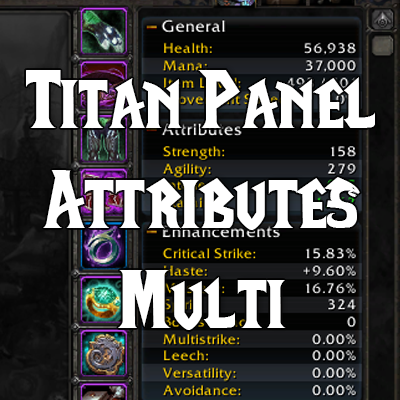
Older default project image.
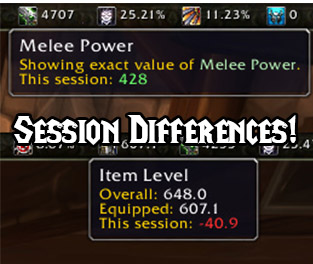
Session differences in the bar.
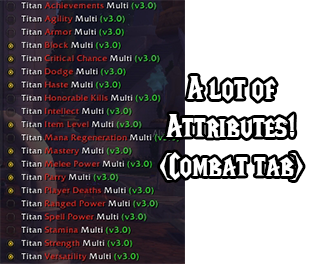
List os plugins from the v3.0
Project Image
Description
Titan Attributes Multi
Titan Attributes Multi is a collection of Titan Panel plugins for tracking character attributes, combat ratings, progression, and other character information across multiple versions of World of Warcraft.
Titan Panel is required.

Features
- Individual Titan plugins, so you can place only the attributes and information you want on the bar.
- Primary and combat statistics, including attributes, armor, critical strike, haste, mastery, versatility, speed, avoidance, leech, and more when supported by the game client.
- Session gains and losses for supported attribute plugins, optionally displayed directly on the Titan bar.
- Character information plugins for experience, quests, achievement points, deaths, honor, honorable kills, item level, PvP results, and specializations where available.
- Detailed tooltips with current values, session changes, rested experience, character item levels, and PvP win/loss totals as applicable.
- Left-click shortcuts to the relevant WoW window, such as the Character, Achievements, Quest Log, PvP, or Talents window.
- Retail specialization switching, talent-loadout selection, loot-specialization selection, and optional equipment-set and loot-specialization bindings per specialization.
- Expansion-aware loading, so each game client loads only the plugins it supports.
Supported game versions
Retail / Midnight
Includes 28 plugins with the full combat-stat set, item level, achievements, honor, honorable kills, PvP results, quests, experience, deaths, and specializations.
Mists of Pandaria Classic
Includes 20 plugins for combat stats, Hit Chance, Mastery, Spirit, quests, achievements, and experience.
The Burning Crusade Classic
Includes 18 plugins for combat stats, Hit Chance, Spirit, quests, and experience.
Classic Era
Includes 15 plugins for combat stats, Spirit, quests, and experience.
Each game client loads only the plugins listed in its corresponding .toc file.
Attribute plugins
The addon provides individual plugins for the following character statistics when they are available in your game client: Agility, Armor, Avoidance, Block, Critical Strike, Dodge, Haste, Intellect, Leech, Mana Regeneration, Mastery, Melee Power, Parry, Ranged Power, Speed, Spell Power, Stamina, Strength, and Versatility.
Hit Chance and Spirit are also available on supported Classic clients.
Most attribute plugins show the current value and can optionally show the change made during the current session. Left-click an attribute plugin to open the Character window.
Character information plugins
Retail also includes plugins for Achievement Points, player deaths, Honor, Honorable Kills, Item Level, PvP Results, Quests, Experience, and Specializations. Some of these are also available on the supported Classic clients.
- Experience displays level progress, the remaining experience needed, and rested experience. Its menu can simplify the bar text or hide rested experience.
- Item Level displays equipped and overall item level, the current-session change, and saved equipped item levels for characters from the same faction.
- PvP Results displays wins, losses, and total matches for battlegrounds, rated battlegrounds, Battleground Blitz, and arenas.
- Quests shows active, completed, and maximum quest counts.
- Honor and Honorable Kills track your current PvP progression and session changes.
Specializations (Retail)
The Specializations plugin shows your active specialization, talent loadout, equipped set, and loot specialization. Left-click it to open the Talents window.
Right-click the plugin to switch specializations, choose a saved talent loadout, use an equipment set, or change your loot specialization. You can also bind an equipment set and loot specialization to each specialization; the addon applies those bindings when you switch specializations. Changes that cannot be made in combat are applied after combat ends when possible.
How to use
- Right-click the Titan Panel.
- Open the Information category. Its name may differ depending on your game language.
- Enable the attribute or character-information plugins you want to display.
- Right-click an enabled plugin to configure its icon, label, bar position, session balance, and other options available for that plugin.
Languages
The addon currently includes translations for:
- English
- Brazilian Portuguese
- German
- Spanish (Spain)
- Korean
- Russian
Unsupported locales fall back to English.
Support
Please report problems through the GitHub issue tracker. When reporting an issue, include the WoW game version, character locale, and any error message shown by the client.
Donations
If you would like to support continued development, you can donate through PayPal.
Many thanks to the people who have helped maintain this project:
- Colleen Harper
- Patricia Rich
- Adrian Collins
- Jessica Allen
- Randol Ford
- Sebastian Edelmann
- Edwin Sutton Jr.
- Dean Grable
- Peter Cebull
- Max Toedtemeier
Titan Panel [Attributes] Multi Team

Owner


![Titan Panel [Currencies] Multi project image](https://media.forgecdn.net/avatars/thumbnails/143/886/256/256/636552136612491668.jpeg)
![Titan Panel [Spacer] project image](https://media.forgecdn.net/avatars/thumbnails/143/892/256/256/636552147391635625.jpeg)
![Titan Panel [Professions] Multi project image](https://media.forgecdn.net/avatars/thumbnails/143/888/256/256/636552140785690257.jpeg)
