Terminal
- By
Universal search with fuzzy-finder for all in-game everything including other add-ons.
Description
Terminal
Find anything in the game by typing a few letters, and go straight to it.
Press ` or type /term. Type what you're after, such as "hearthstone", "stamina food", "nearest innkeeper", "rfk helm" or "mount", and press Enter. Terminal opens the right window and points at the thing you picked: your bags on the item, the spellbook on the spell, the map on the NPC, the recipe in your profession.
Made for WoW Forever, and it works with the default Blizzard UI.
Plain words do the work
Terminal starts in Simple mode. Type the way you'd say it, and it sorts what it found into categories to pick from: Bags, Quests, Spells, Crafting, NPCs, Places, Loot, Alts & bank, Collections, Character, Emotes, Slash commands, Game and Console settings.
- stamina food, attack power food, mana potion: consumables by what they give.
- rare sword, plate boots, weapon damage: gear and items by kind, slot and quality.
- helm upgrades: helmets you can equip right now, at your level and for your class, near your item level or better.
- nearest innkeeper, repair nearby, nearest mailbox, nearest dungeon: the closest, how far, and an arrow pointing the way.
- vendor goldshire, mining trainer in org: NPCs in a place, even a town.
- use hearthstone, cast fireball, equip shield: say what to do, and Enter does it.
- brd, rfk helm, sfk: dungeon shorthand works everywhere.
- sword or axe, rare ring not boe: "or" and "not" work as you'd expect.
- skillup: recipes that still give skill (orange and yellow).
- gold: your gold, your alts', the guild banks' and the warband bank's, with the total.
- who priest undercity: asks the server, then lets you whisper or invite from the answer.
- Initials (scb for Shadow Council Bracers) and small typos (hearhtstone) are found too.
The empty prompt suggests searches made for your character: your class trainer, your professions' skill-ups, a dungeon at your level.
Right-click any result (or press Shift+Right) for everything it can do, including sending it to chat: say, party, raid, guild, instance, a whisper to your target, or the chat box. NPCs, mailboxes and dungeon entrances go with a map pin: "Nearby innkeeper: Innkeeper Allison [pin]". Loot says where it drops: "[Thunderfury] dropped by Garr in Molten Core".
Pure fuzzy finding
Hold Tab and press ` (or type .fuzzy) for a plain fzf-style finder: every list at once, matched by name only, no syntax and no extras. Go through the results with the arrow keys, then press Enter to take your pick to Simple mode or Shift+Enter to Advanced mode. A soft glow round the prompt shows it's on.
What it finds
- Your character: items in your bags and what you wear, gear, consumables, crafting materials, spells, talents, professions and recipes, reputations, currencies, gold, skills, equipment sets, titles, mounts, pets, toys, achievements (with progress) and macros.
- People: your guild (by class, rank, zone, notes or profession), your friends and Battle.net friends, and
/whoanswers. Enter whispers them, Shift+Enter invites them. - The game: slash commands and emotes, keybindings, game options, console settings, interface windows (opened straight to a tab: Guild Roster, Character Stats, Titles, the Group Browser, the Legacy window…), map zones, WoW Forever's dungeon and raid entrances (with level ranges), mailboxes, and your installed addons (Shift+Enter turns one on or off).
- Your quest log: searched by the quest's text, not just its name.
- With Questie or QuestieDB: every quest in the game (by its objectives too) and every NPC, by name, title and role. You get distances, directions and map pins.
- With AtlasLoot: every dungeon and raid drop, opened in AtlasLoot on its boss and page, including WoW Forever's own items.
- With Bagnon or Baganator (Syndicator): what your alts and banks hold, with who has how many in the tooltip, and everyone's gold.
Picking a result opens and highlights it. Bags open on the item, the spellbook turns to the spell's page, the quest log shows the quest, the map opens on the NPC with a waypoint, and the profession window opens on the recipe. Windows are opened the way your own keys open them, so Terminal never taints the game's UI.
Advanced mode
For players who like a command line, .advanced switches to the full syntax. Alt+` gives you Advanced mode for a single search.
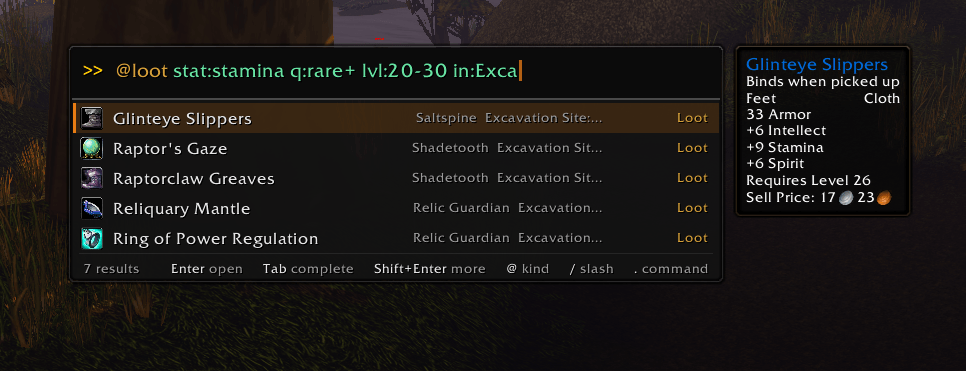
@kindsearches one list:@npc,@questie,@loot,@spell,@mailbox,@dungeon,@raid,@cvar,@keybind… Typing@lists them all.key:valuefilters:- level and quality:
lvl:20-30,ilvl:,q:rare+; - stats and slots:
stat:stamina>=10,slot:wrist,type:mace; - places and distance:
in:ratchet,near:500,sort:nearest; - NPCs:
faction:friendly,trainer:mining,sells:copper_rod; - status:
is:upgrade,is:boe,is:ready,is:skillup,is:online,standing:honored+, and more.
- level and quality:
|for or,&for and,-for not:q:rare|epic,q:rare&type:sword|q:epic&type:axe,-is:soulbound..filterslists them all.>> party,>> guild,>> w Name: send the selected result to chat.Up walks your history, and Tab completes.
Make it yours
- Themes, fonts, a blinking or solid cursor, and opening animations (smooth, snappy, floaty, cascade…).
.optionsopens the settings. - Share your look with
.style: one short string anyone can paste. .atopshows every addon's CPU and memory live, and Enter on one profiles it..changelogshows what's new, in the game.- A couple of extras for the curious:
.snake, and.wowamp, a little music player of the game's own soundtrack.
Commands
| Command | What it does |
|---|---|
/term or ` |
Open or close Terminal |
.help |
What you can type |
.advanced / .simple |
Switch modes |
.fuzzy (or Tab+`) |
Pure fuzzy finding, this once |
.filters |
Every Advanced filter |
.options |
Settings |
.style |
Export or import a look |
.atop |
Addon CPU and memory |
.changelog |
What's new |
.history |
What you've run |
.forget |
Forget which results you pick most |
.reload |
Reload the UI |
Good to know
- Opening game windows is blocked in combat, so results that open a window wait until combat is over. Using items, casting and sending to chat still work.
- WoW Forever doesn't let addons open profession windows at login, so each profession's recipes are indexed the first time you open that profession.
- Optional addons: Questie or QuestieDB, AtlasLoot (Classic, Continued or Forever), and Bagnon or Baganator. Terminal works without them; they add their lists.
Found a bug or have an idea? Let me know in the comments.
Terminal Team