TeleCast — Teleports, Mole Machines & Hearthstones in One Window
- By
One window for every way your character can travel — hearthstones, toys, portals, teleports, housing and more — with automatic gear swapping and Wowhead lookups, all searchable.
Description
TeleCast
Every way your character can travel — in one window, and now on the map.
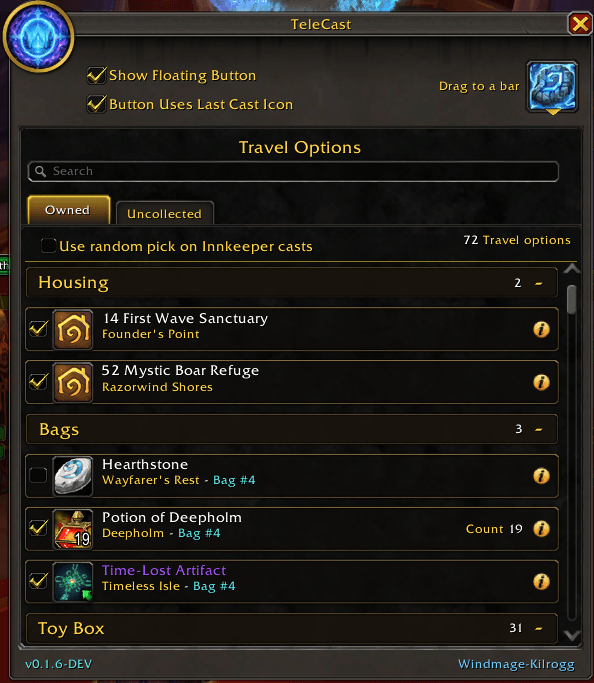
Hearthstones, toys, mage portals, engineering wormholes, class and racial teleports, housing, Hero's Path, and the rings and cloaks you have to equip first. TeleCast finds them all automatically and puts them one click away — no lists to maintain, no setup, no fuss.
One window for every journey
TeleCast reads your character straight from the game and builds your travel list for you:
- Hearthstones & toys — every teleport toy in your collection
- Mage teleports & portals — your full flyout, faction-aware
- Engineering wormholes — generators and transporters, including the choose-your-destination ones
- Class & racial teleports — Astral Recall, Death Gate, Dreamwalk, the Mole Machine, and the rest
- Housing — travel to your homes, with a one-press return while you're there
- Equippable teleports — rings, cloaks, trinkets and tabards, handled cleanly (see below)
Everything is grouped by where you keep it — bags, bank, warband bank, toy box, equipped — and each row tells you where it takes you and where it's stored. Cooldowns show right on the icon; anything you can't use is dimmed with the reason.
Because it's built from live game data, new teleport items are picked up automatically — no waiting for an update.
See every destination on the map
TeleCast pins every place you can travel right on the world map — and rolls those pins up onto the continent, world, and cosmic maps, so you can plan a hop from clear across the world.
- Colour-coded at a glance — purple for mage portals and teleports; green for hearthstones, your Innkeeper, engineering transporters and other set-location travel; red for anything you qualify for but haven't unlocked yet
- Hover any pin for everything that reaches that spot — its type, which of your characters can use it, your own status, right down to the item/spell ID
- Show them all, or just this character's — one toggle in Settings
- A built-in legend — the (i) button spells out every colour and icon
Dark Iron Dwarves — watch your Mole Machine network fill in. All 31 racial stops appear on the world map, tracked as you discover them — found ones turn green, still-missing ones red. And besides the world map, the ones you haven't found yet also show up on your minimap and the flight master map, so you can grab a new one while you're passing right by it.
Smart gear swapping — done right
Teleport rings, cloaks and trinkets need to be worn before they cast. TeleCast handles the whole dance for you:
- A green arrow marks an item that's still in your bags — one click equips it
- It glows when it's on and ready — a second click casts it
- The moment the teleport finishes, your original gear goes back on — automatically
And it's built to survive the real world. If a teleport whisks you through a loading screen, if the game lags, if you crash or log out mid-swap — TeleCast finishes the job the next time you're in the world. Your gear is never left behind.
Know your whole account
Two tabs, one clear picture:
- Owned — what this character can use right now
- Uncollected — what you're still missing, and which of your other characters already have it, shown in their class colour
Search by name, by destination, or by item/spell ID, and filter the uncollected list down to just the ones your alts hold.
Reach it your way
- A floating button you park anywhere on screen opens a compact quick-travel menu
- Put that menu on your action bars with a simple macro
- Drag any teleport straight onto an action bar for a permanent button
- Pick exactly which teleports appear in your quick menu
Handy touches
- A Wowhead info icon on every row — one click for a copyable link
- Item and spell IDs in every tooltip
- Minimap button, addon compartment entry, and an options page
- Class- and quality-coloured, clean, and quiet
TeleCast — stop hunting through bags and spellbooks. Every destination, one window, one click — now mapped, too.
/tlc to open · /tlc help for everything
Also by ArkonForge
- MountCast — group your mounts to switch automatically by zone or outfit, pair them with your favorite pets and toys, and show off your collection with a Showcase player. The perfect partner to TeleCast: TeleCast gets you there, MountCast gets you moving.
- WarbandStandings — your whole warband's gold, reputations and currencies in one clean window, with per-character detail and rank-ladder progress.
Each addon works on its own — install the ones you like.
Credits
- Arkon-Kilrogg — creator and developer of MountCast (ArkonForge).
- Special thanks to Elring-Kilrogg — for development support and testing.
TeleCast — Teleports, Mole Machines & Hearthstones in One Window Team