TargetImmunity
- By
Real-time target immunity tracker exclusively for WoW Forever 1.60.1: Elemental schools, Bleed/Poison, Crowd Control (Taunt/Stun/Silence), PvP major alerts, and self-correcting NPC memory.
Description
👁️ TargetImmunity — Real-Time Enemy Immunity Tracker & Alert Suite
Exclusivity Notice: Designed, built, and tested exclusively for World of Warcraft: Forever 1.60.1 (Interface 16001). Does not support standard Classic or Retail clients.
TargetImmunity is a high-precision combat awareness addon built for WoW Forever. Stop wasting cooldowns, mana, energy, rage, or combo points on immune targets in Raids, Dungeons, and PvP!
✨ Key Features
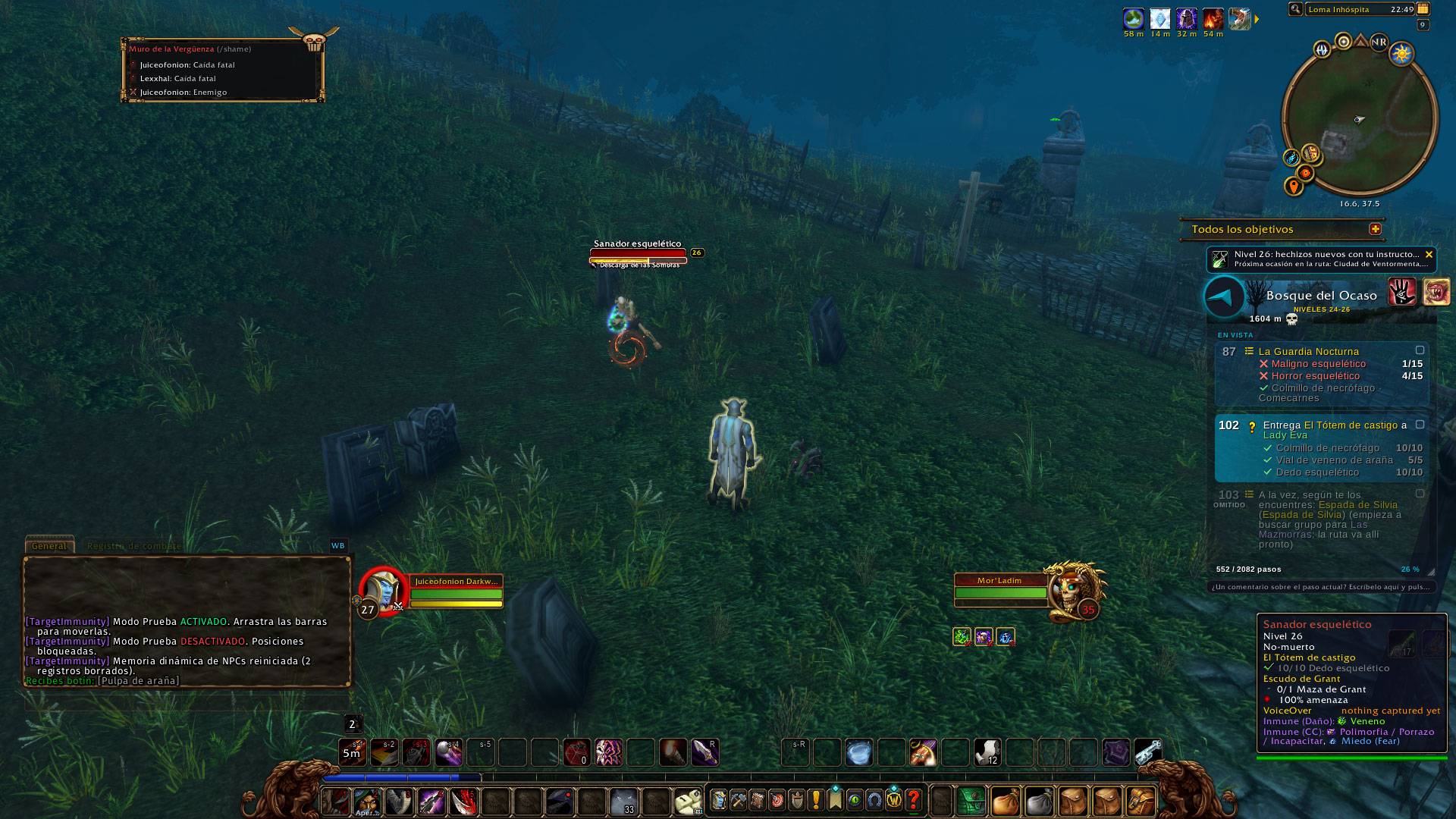
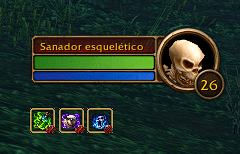
1. 🛡️ Target Frame Immunity Bar (Schools, Bleed, Poison & CC)
- Elemental & Damage Types: Tracks Fire, Frost, Nature, Shadow, Arcane, Holy, Physical, Bleed, and Poison immunities.
- Crowd Control & Mitigation: Tracks Taunt, Stun, Silence / Interrupt, Disarm, Polymorph / Sap / Incapacitate, Fear, and Slow / Root immunities.
- Forbidden Badge Overlay (
🚫) & Detailed Tooltips: Optional corner badge distinguishes immunities from normal buffs/debuffs; hover any icon to see why the target is immune.
2. ⚡ Center Screen Major PvP & Defensive Alerts
- High-contrast alert banner with a live duration progress bar when your target activates Total Immunity (Divine Shield, Divine Protection, Ice Block, Petrification), Physical Immunity (Blessing of Protection, LIP), Magic Immunity (Cloak of Shadows, Anti-Magic Shell, Spell Reflection, Grounding Totem), or Banished / Phased.
- Reactive Immunity Flash: Alerts you immediately if your own spell or ability fails with
IMMUNE.
3. 🧠 Self-Learning NPC Memory & Diminishing Returns (DR)
- Pre-loaded Classic + Forever Database: Ships with innate immunities for Molten Core, Onyxia, Blackwing Lair, Ahn'Qiraj, Naxxramas, World Bosses, and Classic dungeons.
- Dynamic Auto-Learning & Self-Correction: Automatically learns custom WoW Forever creature immunities on
IMMUNEand invalidates outdated records in real time if a previously immune spell lands. - Diminishing Returns Window: Tracks repeated Crowd Control effects on enemy players (PvP) and shows the CC immunity icon (with countdown timer) upon reaching 100% DR.
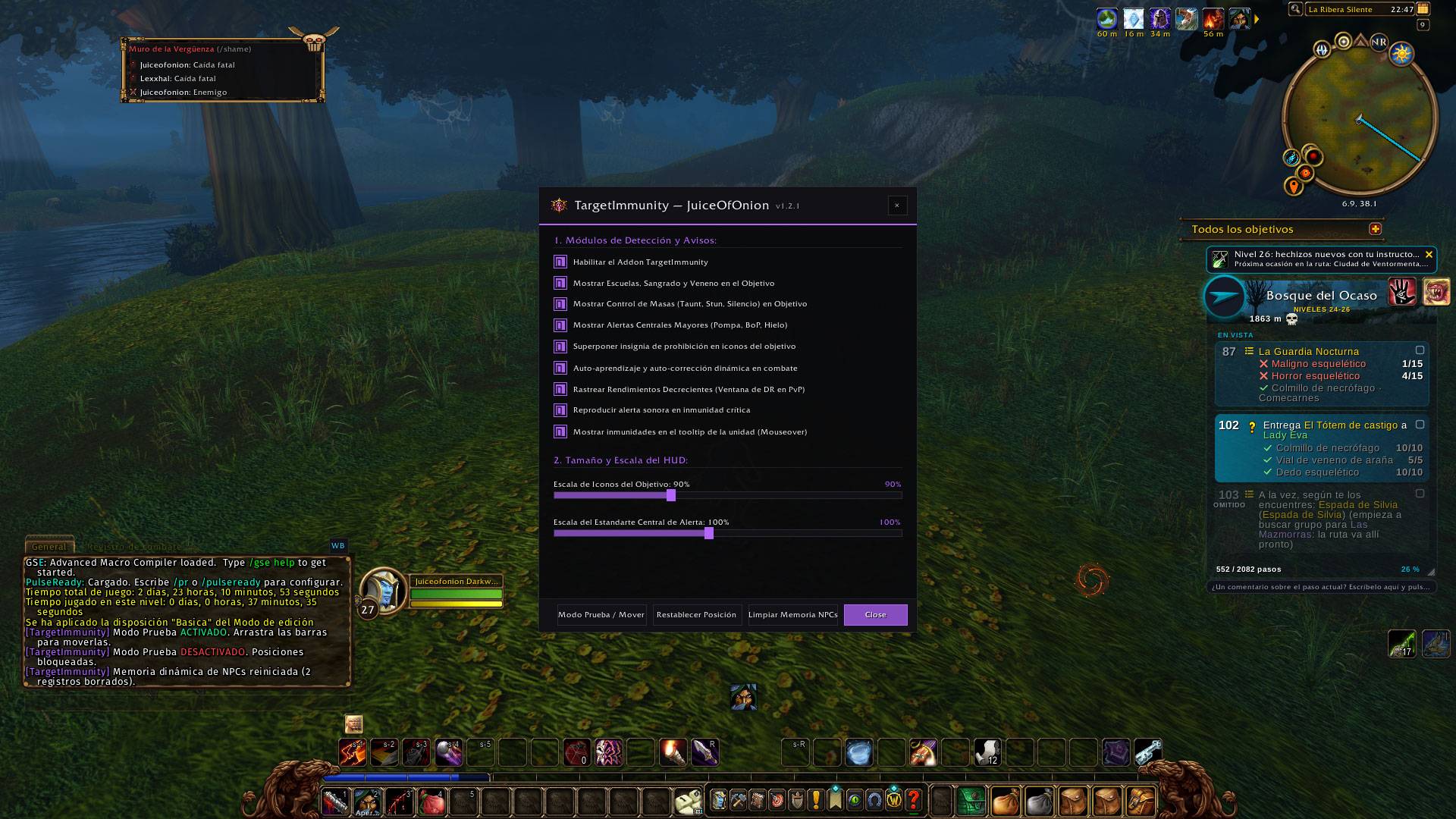
4. ⚙️ Obsidian GUI (/ti), Movable Alerts & Native AddOns Menu
- Obsidian & Arcane-Gold GUI: Modular toggles for every feature, scale sliders, automatic client localization (
GetLocale()), and database management. - Draggable HUD & Alert Banner (
/ti test): Enter Test & Move Mode to preview and reposition both the Target Immunity bar and the center Alert Banner independently with saved coordinates. - Native Blizzard Options (
Options → AddOns → TargetImmunity): Quick launcher button to open/tidirectly from Blizzard's AddOns tab.
💻 Slash Commands
| Command | Action |
|---|---|
/ti or /targetimmunity |
Opens the graphical Configuration Panel |
/ti test |
Toggles Test & Move Mode to preview and drag HUD bars |
/ti reset |
Resets HUD bar positions to default |
🌐 Global Localization (All 10 Client Locales)
Auto-detects and natively adapts UI, options, and alerts to your active client language:
🇬🇧 English • 🇪🇸 Español • 🇩🇪 Deutsch • 🇫🇷 Français • 🇮🇹 Italiano • 🇵🇹 Português • 🇷🇺 Русский • 🇰🇷 한국어 • 🇨🇳 简体中文 • 🇹🇼 繁體中文
📦 Installation
- Download
TargetImmunity.zip. - Extract the
TargetImmunityfolder into your WoW Forever directory:
World of Warcraft\_forever_\Interface\AddOns\ - Ensure the folder is named exactly
TargetImmunityand containsTargetImmunity.toc. - Launch the game and type
/ti!
☕ Support & Donations
If you enjoy my work and would like to support future updates and new features, consider buying me a coffee:

TargetImmunity Team