ChatAesthetics
- By
Purely aesthetic chat skinning addon for WoW Forever 1.60.1 featuring 5 visual themes and 5 multi-alphabet fonts, without altering any chat functionality.
Description
🎨 ChatAesthetics — Aesthetic Chat Themes & Multi-Alphabet Typography
Exclusivity Notice: Designed, built, and tested exclusively for World of Warcraft: Forever 1.60.1 (Interface 16001). Does not support standard Classic or Retail clients.
ChatAesthetics transforms your World of Warcraft chat frames with clean handcrafted themes and crisp multi-alphabet typography—without altering a single chat mechanic, filter, or message handler.
✨ Key Features
1. 🖼️ 5 Handcrafted Visual Themes
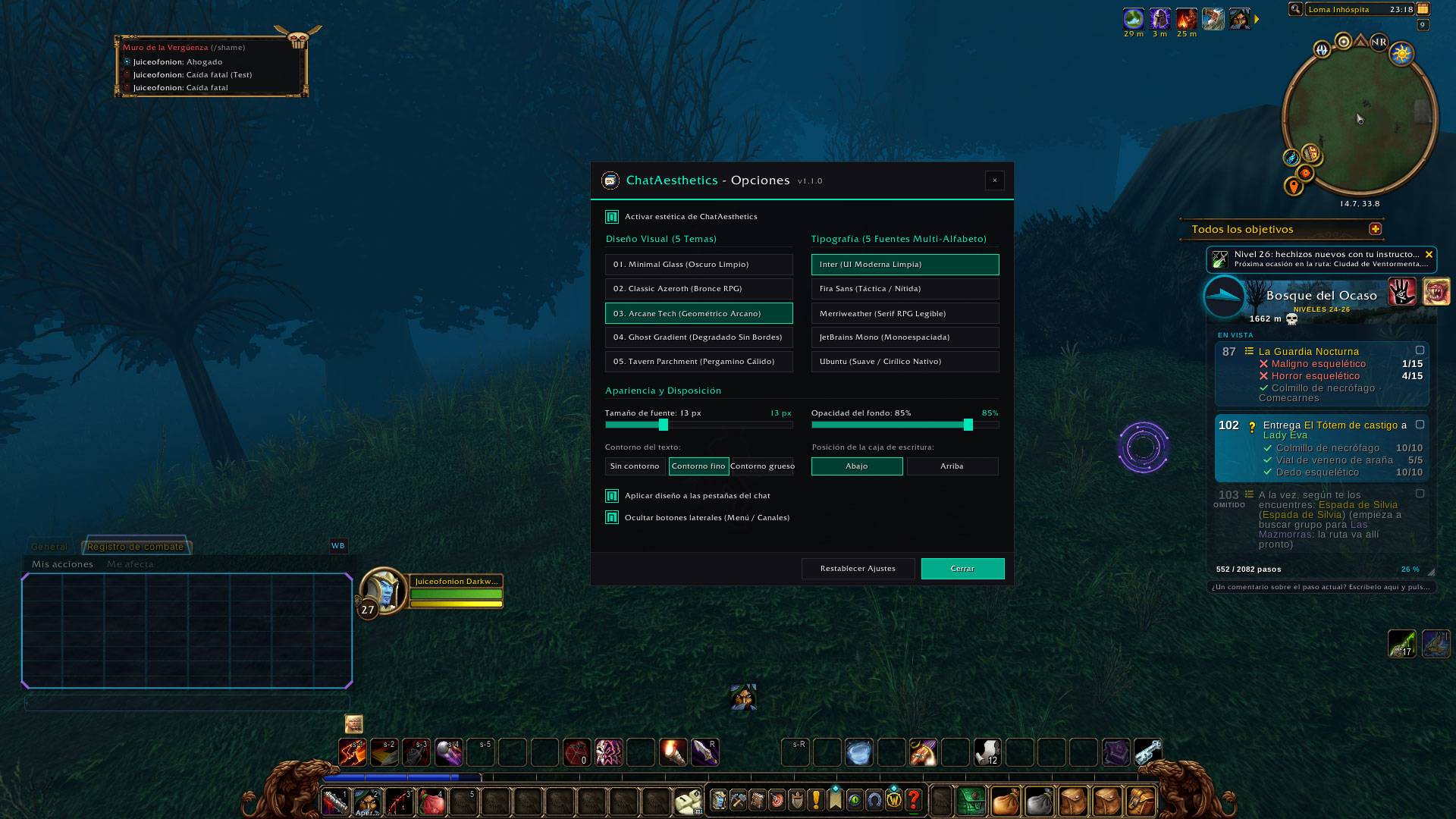
- 01. Minimal Glass (Dark Slate): Clean translucent modern slate backdrop.
- 02. Classic Azeroth (Bronze RPG): Traditional carved RPG border aesthetic.
- 03. Arcane Tech (Geometric): Sharp geometric arcane accents.
- 04. Ghost Gradient (Borderless): Smooth fade with minimal distraction.
- 05. Tavern Parchment (Warm Ink): Warm parchment look styled for roleplay and immersion.
2. 🔤 5 Multi-Alphabet Fonts (CreateFontFamily)
- Choose from Inter (Modern Clean UI), Fira Sans (Tactical / Sharp), Merriweather (Classic RPG Serif), JetBrains Mono (Aligned Monospace), and Ubuntu (Soft / Native Cyrillic).
- Uses Blizzard
CreateFontFamilyfont mappings with automatic alphabet fallback for Latin (enUS/esES/esMX/deDE/frFR/itIT/ptBR), Cyrillic (ruRU), Korean (koKR), and Chinese (zhCN/zhTW) clients.
3. 🎛️ Live Layout & Appearance Controls
- Adjust Font Size (
10–20 px), Text Outline (None, Thin Outline, Thick Outline), and Background Opacity (0%–100%) in real time. - Toggle custom Chat Tab Skinning, move the Input Box Position (Top or Bottom), and optionally hide side chat buttons (Menu / Channels).
4. ⚙️ Native Blizzard AddOns Menu & Zero Functional Footprint
- Registered cleanly in Options → AddOns → ChatAesthetics with a dedicated launcher button to open
/ca. - Purely cosmetic skinning: never modifies message sending, channel routing, or chat history behavior.
💻 Slash Commands
| Command | Action |
|---|---|
/ca or /chataesthetics |
Opens / closes the live ChatAesthetics configuration window |
🌐 Global Localization (All 10 Client Locales)
Auto-detects and natively adapts UI, options, and alerts to your active client language:
🇬🇧 English • 🇪🇸 Español • 🇩🇪 Deutsch • 🇫🇷 Français • 🇮🇹 Italiano • 🇵🇹 Português • 🇷🇺 Русский • 🇰🇷 한국어 • 🇨🇳 简体中文 • 🇹🇼 繁體中文
📦 Installation
- Download
ChatAesthetics.zip. - Extract the
ChatAestheticsfolder into your WoW Forever directory:
World of Warcraft\_forever_\Interface\AddOns\ - Ensure the folder is named exactly
ChatAestheticsand containsChatAesthetics.toc. - Launch the game and type
/ca!
☕ Support & Donations
If you enjoy my work and would like to support future updates and new features, consider buying me a coffee:

ChatAesthetics Team