TaintSentry
- By
A compact taint diagnostic tool that reports protected-action blocks and makes the latest report easy to copy and share.
taintsentryreportcopy.jpg
taintsentrychatnotification.jpg
Description
TaintSentry
TaintSentry is a lightweight World of Warcraft diagnostic addon that helps catch protected-action blocked and forbidden events, then reports the addon name and protected call/function that WoW provides.
In plain English: when WoW blocks an addon action, TaintSentry helps show what addon was reported and what protected action was involved.
That is why this addon is so fricking cool.
The default WoW UI can be painfully vague when taint happens. It may tell you that something was blocked, but it often does not clearly tell you which addon was reported, what function or call caused the block, or what details you should send to an addon author.
TaintSentry helps solve that.
For everyday players, it can help identify which addon is causing UI problems instead of randomly disabling addons one by one.
For addon developers, it can help quickly narrow down the exact protected call or function involved, making taint issues much easier to investigate and fix.
What It Does
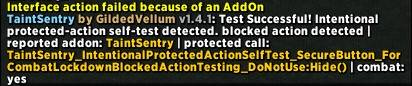
TaintSentry listens for WoW protected-action events and reports the details in chat.
It currently watches for:
- ADDON_ACTION_BLOCKED
- ADDON_ACTION_FORBIDDEN
When one of those events fires, TaintSentry reports useful information such as:
- The addon name WoW reported
- The protected call, function, or action WoW provided
- Whether the event happened in combat
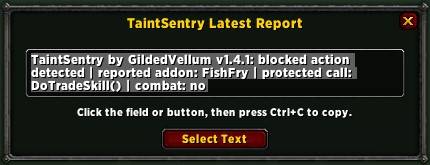
- A plain-text copy of the latest report for easy sharing
In most cases, this helps identify the exact culprit much faster than the default UI alone.
Why Use TaintSentry?
Taint problems can be annoying for everyone.
Players may see buttons stop working, actions get blocked, or strange combat-related UI issues without knowing which addon is responsible.
Developers may get vague user reports like “something broke in combat” with no useful details.
TaintSentry gives both players and developers a better starting point.
Instead of guessing, you can capture the report WoW provides and copy it directly into a bug report, Discord message, CurseForge comment, GitHub issue, or addon support thread.
Features
- Detects protected-action blocked and forbidden events
- Reports the addon name WoW provides
- Reports the protected call/function/action when available
- Prints a clear diagnostic message in chat
- Saves the latest report as plain text
- Includes a minimap button for quick access
- Right-click the minimap button to open the latest report window
- Select and copy the latest report with Ctrl+C
- Includes a combat-only protected-action self-test
- Lightweight design with no bulky settings panel
- Useful for both players and addon developers
Usage
TaintSentry is designed to be simple.
Install it, enable it, and let it listen for protected-action issues.
When WoW reports a blocked or forbidden addon action, TaintSentry prints the diagnostic report in chat and saves the latest report for copying.
Minimap Button Controls
TaintSentry includes a small minimap button.
- Left-click: Toggle TaintSentry enabled or disabled
- Right-click: Open the latest report copy window
- Shift + Right-click: Run the protected-action self-test
- Drag: Move the minimap button
Slash Commands
TaintSentry includes simple slash commands.
Slash command:
/tsentry
Toggles TaintSentry enabled or disabled.
Slash command:
/tsentry test
Runs the intentional protected-action self-test. Combat is required.
Latest Report Copy Window
The latest report copy window makes it easier to share the exact report.
To copy the latest report:
- Right-click the TaintSentry minimap button.
- Click the report text field or click Select Text.
- Press Ctrl+C.
- Paste the report wherever you need it.
This is especially helpful because manually retyping protected-action reports is annoying and easy to mess up.
For Everyday Players
TaintSentry is useful when:
- An addon seems to break your UI
- Buttons stop working in combat
- WoW says an addon blocked an action
- You do not know which addon is causing the issue
- You want to send a useful report to an addon author
- You want something better than guessing and disabling addons randomly
With TaintSentry, you can usually get a much clearer idea of what addon WoW is reporting and what protected action was involved.
For Addon Developers
TaintSentry is also very useful for addon development and debugging.
It can help developers quickly identify:
- Which addon WoW reported
- Which protected call/function/action was involved
- Whether the issue happened in combat
- What exact report the user saw
- Whether a protected-action issue is reproducible through the self-test
This makes debugging taint issues faster, cleaner, and less dependent on vague user reports.
Self-Test
TaintSentry includes an intentional protected-action self-test.
The self-test is diagnostic only. It deliberately attempts a protected operation in combat so you can confirm that TaintSentry is detecting and reporting protected-action events on your client.
Combat is required.
You can run the self-test with:
/tsentry test
Or by using:
Shift + Right-click on the minimap button
If you are not in combat, TaintSentry will warn you that the self-test cannot run yet.
Important Notes
TaintSentry reports the addon and protected-call information that WoW provides at the moment the blocked or forbidden action occurs.
In most cases, this helps identify the exact culprit quickly.
However, taint can be complicated. In rare taint-chain situations, WoW may report the addon that tripped the protected action rather than the original addon that first introduced the taint.
TaintSentry does not magically rewrite how WoW reports taint. It makes the information WoW provides easier to see, copy, and share.
Supported Clients
TaintSentry is packaged for multiple WoW clients, including:
- Retail / Midnight
- Mists Classic
- TBC Anniversary
- Classic Era / Season of Discovery
Lightweight by Design
TaintSentry is not a giant configuration suite.
It is a compact diagnostic utility with one job:
Catch protected-action reports, show useful details, and make the latest report easy to copy.
Simple. Practical. Extremely useful when taint decides to be a pain.
TaintSentry Team