TacoTip GearScore Enhancer
- By
Adds enhancement-aware GearScore, Potential GS, Average iLvl, and completion metrics to TacoTip player tooltips.
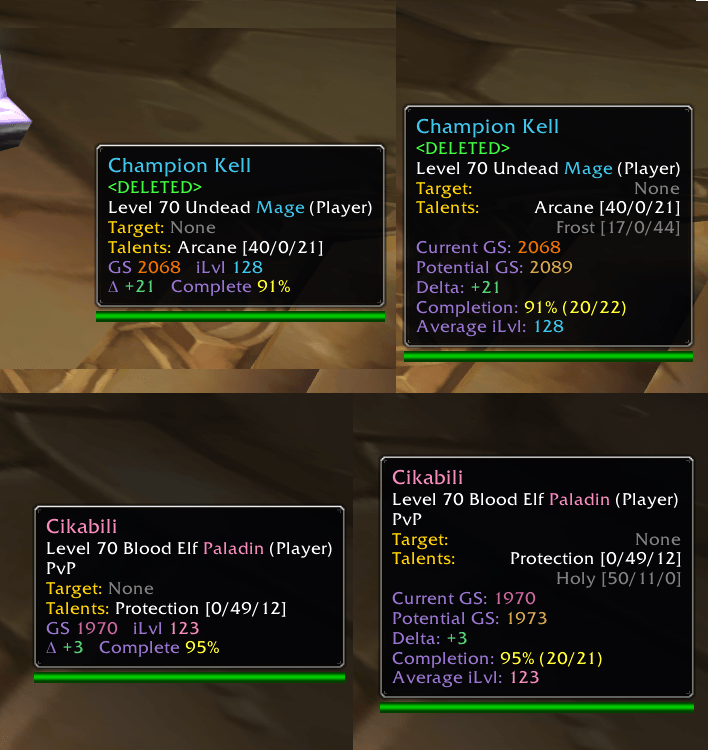
Compact player tooltips compared with the expanded Detailed layout shown while holding Shift.
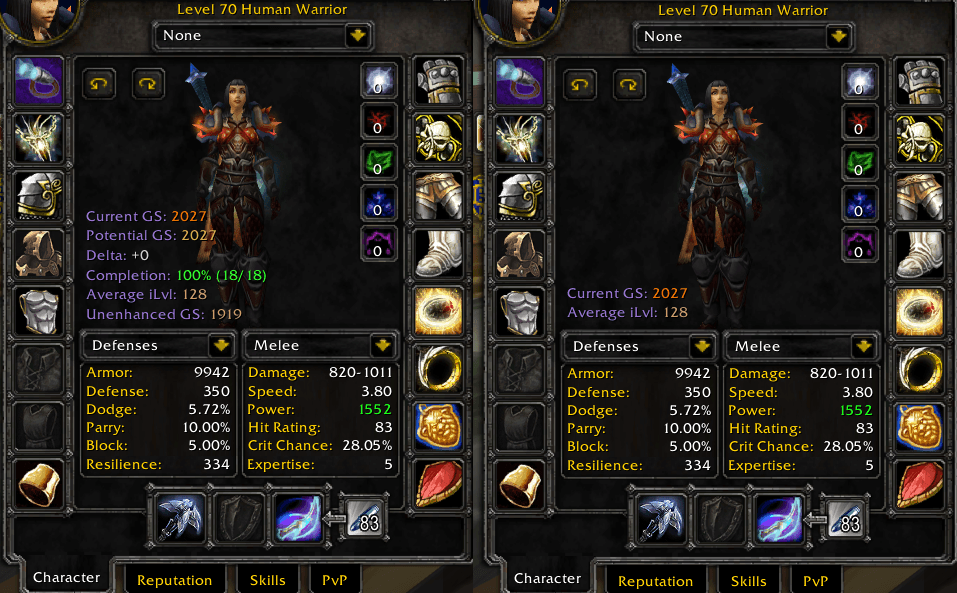
Local Character window summary shown in Detailed mode and Basic mode.
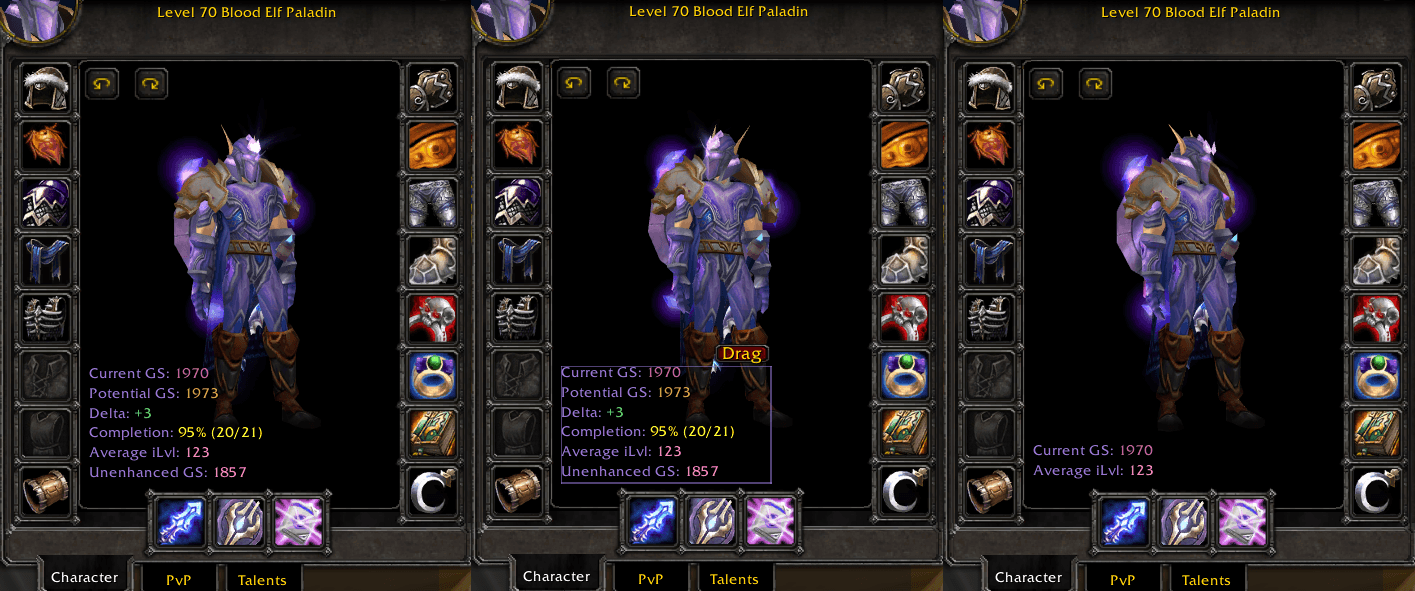
Remote Inspect summaries shown in Detailed mode, unlocked for repositioning, and Basic mode.
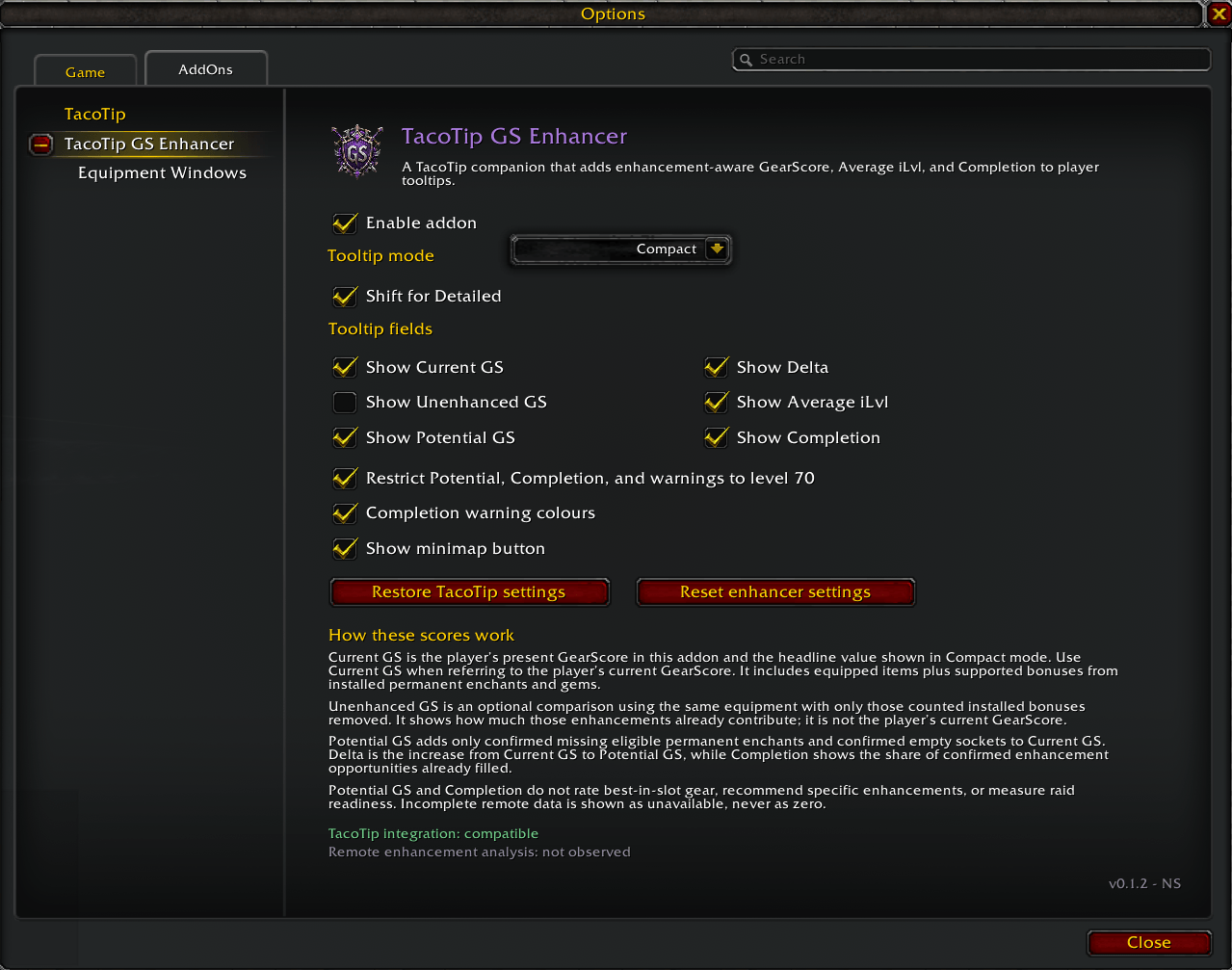
Main addon settings for tooltip layout, displayed metrics, warning colours, minimap access, and reset controls.
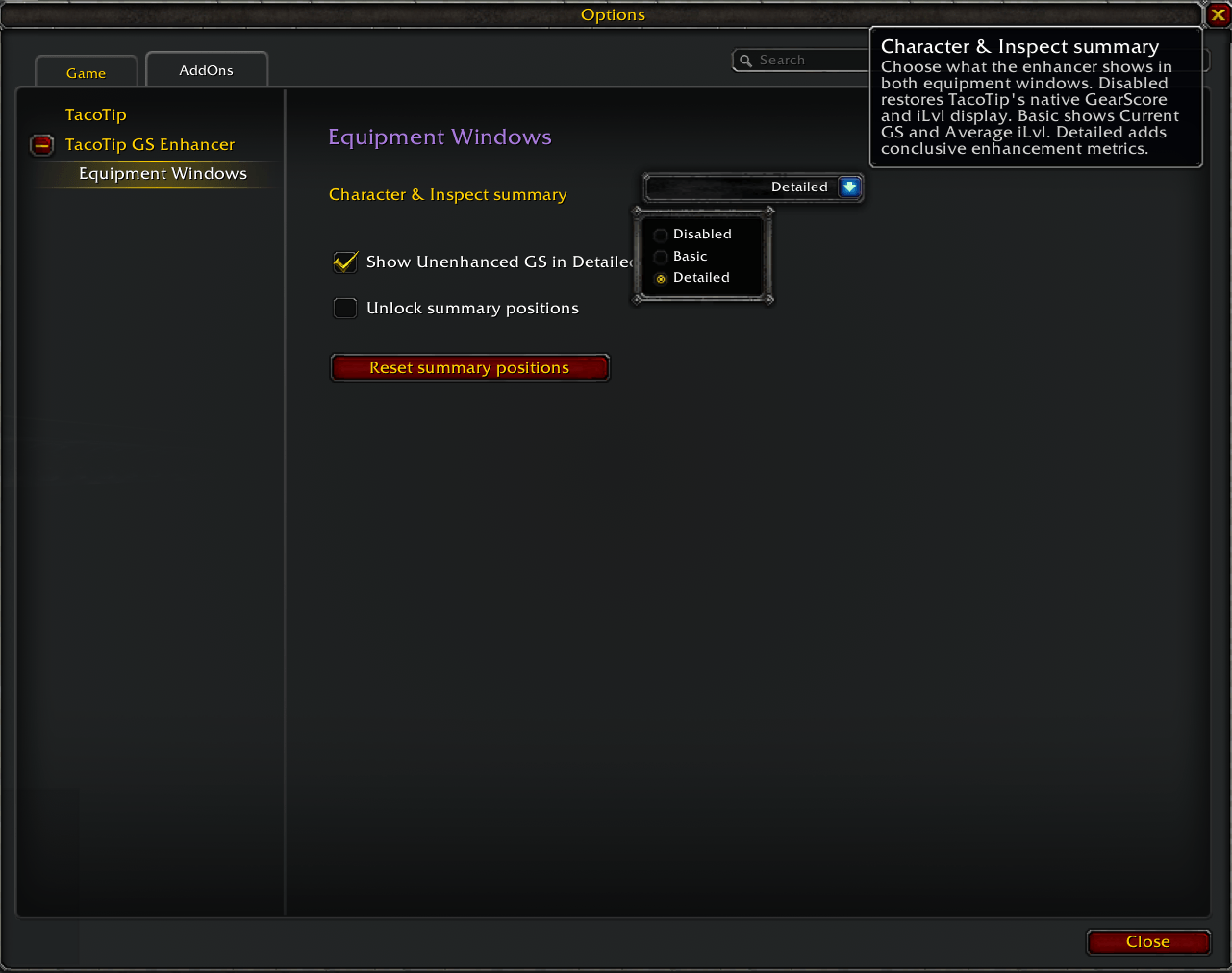
Equipment Windows settings for Character and Inspect summary mode, optional Unenhanced GS, position locking, and position reset.
Description
TacoTip GearScore Enhancer
TacoTip is required. TacoTip GearScore Enhancer is an unofficial companion addon that adds enhancement-aware GearScore information to genuine player tooltips and equipment-window summaries. TacoTip remains separately installed and continues to provide its other features.
Version: 0.1.4 Author: NS
Supported client: World of Warcraft TBC Anniversary 2.5.6
Required TacoTip version: 0.5.1
What the metrics mean
- Current GS is the player's present and main GearScore in this addon. It combines equipped-item GearScore with supported bonuses from installed permanent enchants and gems. Temporary weapon effects do not count.
- Potential GS adds only confirmed missing eligible permanent enchants and confirmed empty sockets to Current GS.
- Delta is Potential GS minus Current GS.
- Completion is the share of confirmed eligible permanent-enchant and socket opportunities that are filled.
- Average iLvl is the average item level across the addon's fixed TBC equipment-slot model.
- Unenhanced GS is an optional comparison using the same equipment with only the installed permanent enchant and gem bonuses counted by this addon removed. It is not the player's present GearScore.
Potential GS is not a best-in-slot estimate. The addon does not judge whether a particular enchant or gem is optimal, and Completion is not a measure of character or raid readiness. Potential GS, Delta, and Completion appear only when the required evidence is conclusive; unknown information is never shown as zero.
Player tooltips
Choose Disabled, Minimal, Compact, or Detailed player-tooltip layouts. Minimal provides the shortest enabled summary and Compact shows up to two concise rows. Both omit Unenhanced GS. Detailed shows enabled, available metrics in the order Current GS, Potential GS, Delta, Completion, Average iLvl, then the optional Unenhanced GS comparison. Shift for Detailed temporarily changes Minimal or Compact to the same Detailed layout while Shift is held.
The addon supports local, friendly remote, and permitted enemy remote player tooltips. Non-player units such as NPCs and pets are rejected.
Character and Inspect summaries
The enhancer can replace TacoTip's native Character and Inspect GearScore/iLvl presentation with its own enhancement-aware summary. One shared mode controls both equipment windows:
- Disabled leaves TacoTip's native equipment-window display in control.
- Basic shows only Current GS and Average iLvl, with no heading or extra rows.
- Detailed shows available metrics in the order Current GS, Potential GS, Delta, Completion, Average iLvl, and optional Unenhanced GS last.
The equipment-window Unenhanced comparison has its own preference and is off by default. When enhancement evidence is inconclusive, independently complete Current GS, Average iLvl, and enabled Unenhanced GS can remain visible while the dependent rows collapse to Enhancement analysis: Unavailable. A coherent scan in progress shows Scanning equipment...; when no usable result is available, the summary shows Equipment data unavailable.
A successfully rendered Inspect result remains visible while the same player's Inspect window stays open, but stale cached data is not reused after the Inspect context is closed or changes. Values from a previously inspected player are cleared immediately.
Character and Inspect keep independent positions. Summaries are locked by default and mouse-disabled. Unlocking positions reveals a small drag handle for each visible summary; only that handle receives the mouse, and movement is clamped to a safe area inside the corresponding equipment window.
On the exact supported TacoTip contract, native Character/Inspect score text and mover buttons are hidden only while the enhancer owns that presentation. This is an in-memory, reversible visibility lease: TacoTip's anchors, offsets, settings, and SavedVariables are not changed. Disabling the summary, disabling the addon, or losing compatibility releases ownership through TacoTip's own refresh path. If equipment-window compatibility fails, that replacement stays disabled while supported player tooltips can continue working.
Settings
Open TacoTip GS Enhancer settings with:
/ttgs- the movable minimap button
- Esc -> Options -> AddOns -> TacoTip GS Enhancer
The Equipment Windows child category contains the shared mode, optional Detailed Unenhanced comparison, position lock, and a positions-only reset. /ttgs and the minimap shortcut continue to open the main enhancer category.
Fresh profiles use Basic equipment summaries with locked default positions. Profiles upgraded from the prior schema keep the new equipment surface Disabled until it is explicitly enabled, preserving their existing native TacoTip presentation.
Compatibility and limitations
- TacoTip 0.5.1 is required, separately installed, and not bundled.
- The supported client is TBC Anniversary 2.5.6.
- Remote Potential GS and Completion may be unavailable when native inspection data is not conclusive.
- TacoTip's own
/tacotipopener may fail on the target client. Open TacoTip through Esc -> Options -> AddOns -> TacoTip instead. - Per-slot enhancement markers, equipment-slot score overlays, and item-tooltip enhancement breakdowns are not provided.
- Current GS and Potential GS follow compatibility rules; neither identifies optimal enhancements or measures raid readiness.
- Unknown TacoTip versions and mismatched Character/Inspect object contracts fail closed rather than being guessed compatible.
Privacy
Player names, GUIDs, equipment, scores, inspection history, scanner revisions, cache entries, and diagnostics are session-only. SavedVariables contain enhancer preferences, minimap state, independent Character/Inspect offsets, and minimal recovery information for the managed player-tooltip setting. Equipment-window visibility ownership is never persisted.
Credits
TacoTip GearScore Enhancer is independently written by NS. It is an unofficial companion and does not imply endorsement by TacoTip or its author.
GearScore calculation behavior is derived from the MIT-licensed GearScoreTBCClassic project. Complete attribution and license notices ship in THIRD_PARTY_NOTICES.md.
TacoTip GearScore Enhancer Team