StutterAlert - Auto detect micro stutters, FPS lag spikes, and frame drops to find the exact addons causing performance issues
- By
A lightweight, passive addon that auto-detects micro-stutters and lag spikes, instantly naming the exact addon causing your frame drops. It stays hidden when your game is smooth and only pops up during hitches. Includes a handy post-pull performance recap.
Description
StutterAlert
Auto-Detect Micro-Stutters, FPS Lag Spikes, and Frame Drops to Find the Exact Addons Causing Performance Issues
StutterAlert is a powerful, lightweight performance monitor designed to take the guesswork out of World of Warcraft UI lag. Whether you are dropping frames in a massive Mythic+ pull, freezing when opening your bags, or experiencing random open-world hitches, StutterAlert acts as a passive background detective to find the exact culprit.
Featuring a fully dynamic overlay, it replaces the tedious process of disabling addons one by one. It sits quietly when your game is running smoothly, and only pops up to name the offending addon when a frame takes too long to render.
❓ Why StutterAlert?
Unlike traditional CPU profiling addons that force you to wade through massive walls of text and complex data dumps long after a run is over, StutterAlert delivers immediate, peripheral awareness right when it matters most. Its true power lies in the live, color-coded severity pill and pop-out banner. Instead of digging through confusing logs to figure out why your game froze during a massive Mythic+ pull, you get instant, mid-fight feedback. At a glance, the UI tells you exactly what’s happening, whether it's just the game engine loading a busy zone or a specific addon causing a critical meltdown, allowing you to stay entirely focused on your rotation while the addon does the detective work for you.
⚡ Smart Detection Engine
- Zero-Garbage Profiling: StutterAlert is extremely cheap to run. It only monitors your raw frame time (
OnUpdateelapsed) and memory on calm frames. It only runs expensive per-addon profiling checks at the exact moment a lag spike occurs. - The Blame Game: When a stutter hits (default ≥ 50 ms), the addon instantly scans
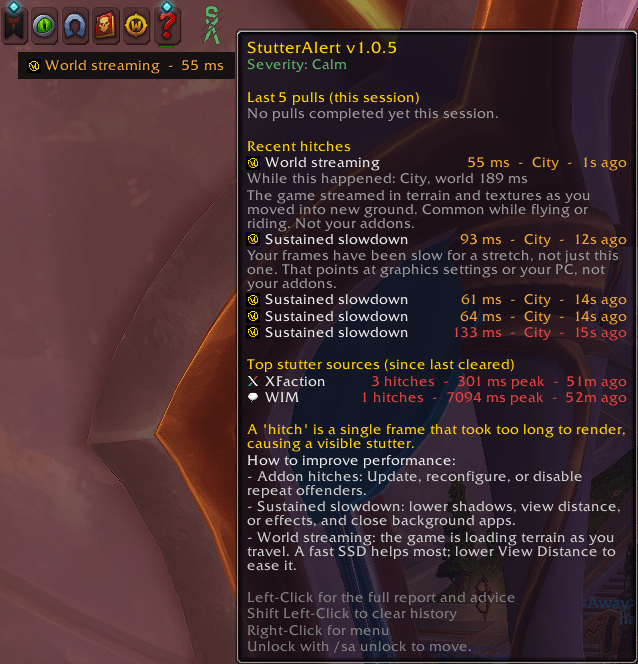
C_AddOnProfilerto find the worst-offending addon for that specific tick. - Engine & Server Tracking: Not everything is an addon's fault. StutterAlert is smart enough to recognize when a lag spike is caused by the WoW Engine (e.g., loading a busy scene, streaming assets after zoning, or running memory garbage collection). It clearly labels these as Game/Engine spikes so you don't blame your UI.
📊 Dynamic Overlay & Tooltip
- Severity-Driven UI: A smart "leaky-bucket" algorithm calculates stutter severity. The UI pill changes color based on the state: Calm (Green), Elevated (Amber), or Critical (Red).
- Pop-Out Banner: When a severe spike occurs, a sleek banner smoothly grows from the pill, naming the culprit and the exact millisecond delay. You never have to click anything mid-fight.
- Rich Diagnostic Tooltip: Hover over the UI pill during calm moments to view a beautifully formatted history of your recent hitches, context of what you were doing (Combat, Raid, Open World), and a leaderboard of your session's "Top Sources" of lag.
⚔️ Post-Pull Analytics & Exporting
- Combat Summaries: Focus on the boss, not the UI. StutterAlert suppresses interactive elements during combat and automatically flashes a clean, one-line summary the moment you leave combat (e.g., "Last pull: 5 hitches - worst WeakAuras 85 ms").
- Shareable Reports: Want to show an addon author they have a memory leak? Left-click the StutterAlert button while out of combat to generate a fully formatted text report of your session's worst offenders, ready to copy and paste.
⚙️ Quality of Life & Customization
- Smart Docking: By default, the pill dynamically anchors itself to your Micro Menu and scales to match it perfectly. It even includes collision detection to gracefully dodge the LFG Queue Eye.
- Total Layout Control: Unlock the frame to drag it anywhere. Right-click to access a native dropdown menu where you can force Custom Sizes (Default, Small or Medium), or dictate exactly which direction the alert banner grows (Up, Down, Left, Right).
- Live Preview Mode: Test your banner growth direction instantly. Clicking a layout option flashes a 5-second mock alert so you can perfect your UI placement.
🌍 Supported Languages
Features a robust localization system to ensure UI elements function across multiple regions. Missing translations elegantly fall back to visible keys so the community can easily spot gaps.
- English (US & British)
- French, German, Italian
- Spanish (EU & MX)
- Portuguese, Russian
- Chinese (Simplified & Traditional)
- Korean
💻 Slash Commands & Shortcuts
/sa lock//sa unlock— Lock or drag-move the overlay anywhere on your screen./sa reset— Factory reset the UI back to your Micro Menu with default settings.- Right-Click (UI) — Opens the quick-settings menu.
- Shift + Left-Click (UI) — Instantly clears your hitch history.
- Left-Click (UI) — Opens the Export Report window.
📝 Credits
- Author: Osiris the Kiwi (Discord: osirisnz)
The StutterAlert - Auto detect micro stutters, FPS lag spikes, and frame drops to find the exact addons causing performance issues Team


Owner