FriendGroups - Custom folders, known alt tracking, auto guild groups, smart search, mass invites, and rich realm/class info
- By
Organize friends with custom folders, auto-guild groups, and known alt tracking, all powered by a stutter-free engine featuring deep search, smart mass invites, class or faction colors, cross-region realm info, and an advanced automation suite.
Description
FriendGroups
The original FriendGroups. It has been around for over a decade, with more than 1.2 million downloads, and it has been rebuilt from the ground up for modern WoW.
FriendGroups turns your Friends List into a real contact manager. Sort friends into custom groups, arrange them however you like, and see who's behind every alt. It runs on Retail, WoW Forever and Classic from a single install.
It suits a raid leader organising rosters, someone juggling contacts across realms and games, or anyone who just wants a tidier Friends List. The list is built without per-frame garbage, so it never costs you a frame. It fits the default UI and picks up EllesmereUI and ElvUI skins automatically.
🗂️ Groups, Your Way
- Custom Groups: Tag a friend with
#GroupNamein their note, or use the right-click menu. A friend can be in as many groups as you like. Rename or remove a group from its header. - Order Them Your Way: Drag a group header to where you want it, or right-click it and use Move To ▸ (Top, Bottom, or before any other group).
- Colours: Give any group a custom banner colour and font colour.
- Filter by Group: Show only the groups you pick, from Blizzard's own Filter dropdown.
- Offline Tracker: Friends gone 30, 60 or 90+ days collect at the bottom of the list, which makes clean-ups easy.
[Favorites]is never touched. - Smart Sorting: Within each group, friends in WoW come first, then other Blizzard games, then the Battle.net app or mobile, then offline.
🕵️♂️ Know Who You're Actually Talking To
- Known Alts: A background tracker maps your Battle.net friends' characters as you see them online. Hover a friend in the Friends List, Guild Roster or Communities for a side panel of their recent alts: class, level, faction, guild, and when and where each was last seen.
- "aka" Tags: A friend on an alt shows their main right on their row:
[AltName] aka [MainName]. - Pin a Main: Right-click a friend to pick their main from their known alts.
- Nicknames: Give any friend a display name that replaces their BattleTag. Nicknamed friends sort to the top of their group.
🛡️ Guild Folders That Build Themselves
- Automatic Guild Group: Friends in your guild collect in a
[Guild] <GuildName>folder with no setup, read straight from the live roster. - Custom Guild Folders: Put
<GuildName>in a friend's note for ex-guildies, cross-realm teams, a guild on another version, or anything else. Add or remove it from the right-click menu. - Guild Memory: FriendGroups remembers which of your characters belong to which guilds, so folders stay right as you switch characters.
📝 Your Notes Are Your Data
- Groups, nicknames and guild tags are stored in the friend note itself:
@[Nickname] <GuildName> your text #Raid#Friends. - Blizzard keeps Battle.net friend notes on your account, so your groups follow you to every version of WoW and every PC with nothing to import.
- You can edit them anywhere, even from the Battle.net app on your phone.
🔍 Search That Keeps Up
- Always-visible search bar at the top of your Friends List.
- Searches everything: names, nicknames, notes, groups, guilds, classes, zones, Rich Presence, and your friends' alt characters, offline friends included.
- Type
foreveror a ruleset (pvp,normal,rp) to find friends playing WoW Forever.
👥 Invites & Contacts
- Mass Invite: Right-click a group header to invite the whole group. Only friends on your version of the game are invited, with a short delay between invites to keep you clear of Blizzard's spam disconnects.
- Online Counter: A live count of who's online above your groups. Hover it for a per-group breakdown and how close you are to your Battle.net and character friend limits.
- Smart Copy: Copy a friend's Name-Realm or BattleTag in two clicks. For a Forever character it copies just the first and last name, ready for
/w.
🌐 Retail, Forever and Classic, One Addon
- Every version, same features: Retail (Midnight), WoW Forever, Mists of Pandaria Classic, Burning Crusade Anniversary and Classic Era all run the same code. There is no cut-down version for any of them.
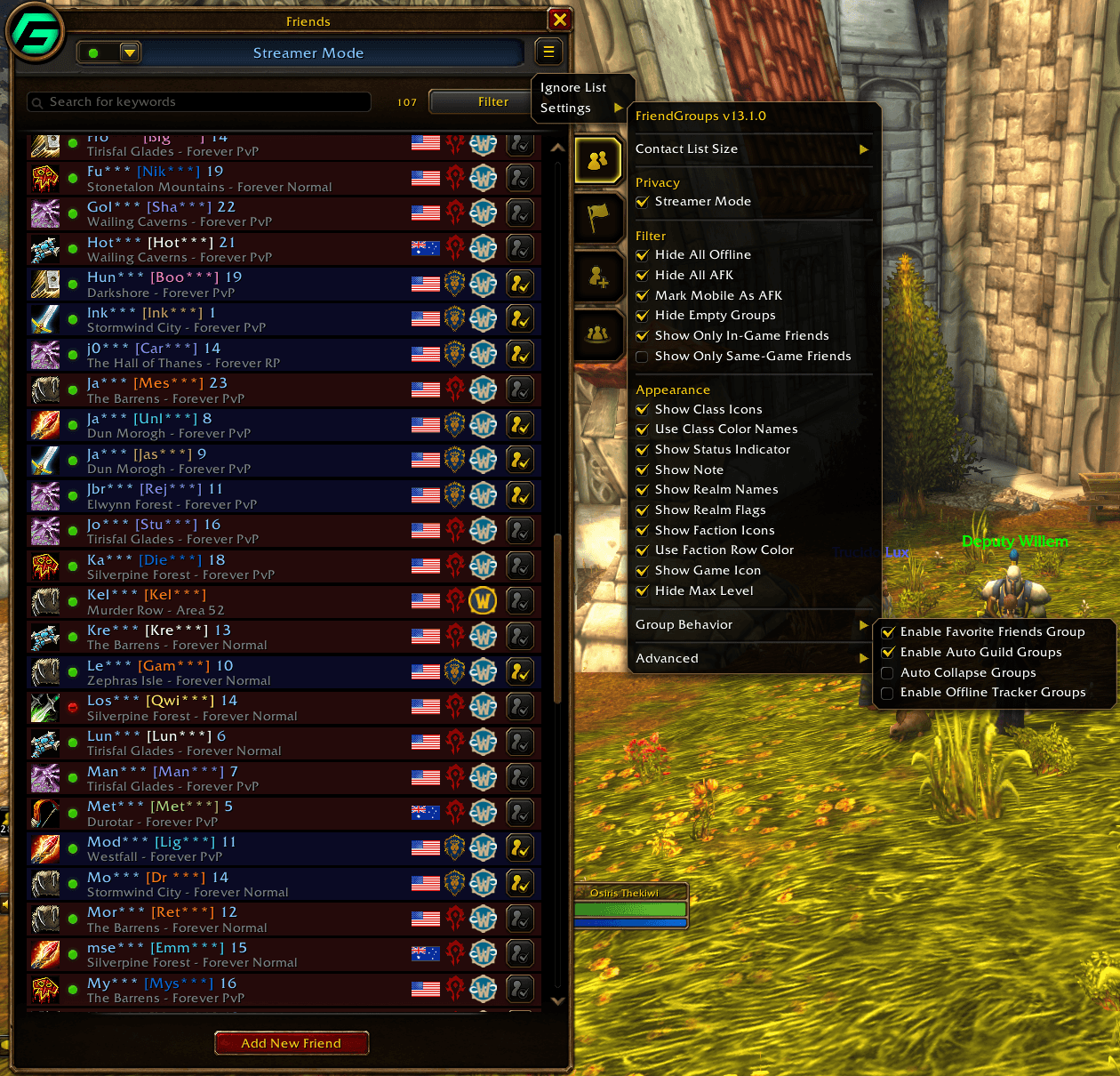
- See who's where: Retail friends show the gold WoW icon, Classic friends a green one, and Forever friends the Forever logo. Realm flags come from Blizzard's own live realm data, Anniversary realms included.
- Bring your setup across: Export on one version and import on another. Your group order, colours, mains and whole Known Alts database come with you. Classic and Forever don't know Death Knights, Monks, Demon Hunters or Evokers exist, but FriendGroups still shows their class colour and icon.
- Friends playing two games at once show the session on your game.
🌀 Built for WoW Forever
- First Last names, no realm. Each Forever character is listed once by first and last name, however many hidden shards it has been on.
- Rulesets, not shard names. Forever friends read "Zone - Forever Normal" (or PvP, RP, RP-PvP) on every version of the game, never
CAMWOWUS1Realm2PvP. - Region flags: a US or Oceania flag on every Forever friend, so you can see who's on your megaserver. Invites on Forever need the same faction, ruleset and region.
- A reminder walks you through the move: export on retail, import on Forever. Tick Don't show this again to hide it.
- Settings that don't apply are hidden. Auto Accept Party Sync is hidden on Forever, where Blizzard has Party Sync turned off.
🤖 Automation
- Auto-accept group invites with a 5-second countdown toast. Hover it to pause, or click Decline. It stands down in combat, arenas, battlegrounds, Mythic+ keys and boss fights.
- Auto-accept Party Sync requests, wherever the game has Party Sync.
🔒 Privacy & Chat
- Streamer Mode: masks names on screen, replaces your own BattleTag, and hides Blizzard's full-detail hover tooltip. It changes the display only, so search, whispers and invites still work.
- Arena-Safe Whispers (Retail): whisper from the list without chat errors in arena or anywhere else Blizzard hides player names.
💾 Settings Backup
- One code, everything: every setting, group order, banner and font colours, nicknames, chosen mains and your whole Known Alts database export to one copy/paste code. Paste it back to restore.
- Your safety net: use it before a reinstall or a new PC, to copy your setup to another account, or to move between Retail, Forever and Classic.
/fg exportand/fg importopen it directly. - Older codes always import. The format only ever grows, so a backup from an earlier version still restores correctly.
🛠 Settings Hub
- Open it from the cogwheel on the Friends List, or right-click the minimap button.
- Filter and Appearance toggles sit on the first layer for live tweaking. Contact List Size (height, width, font size), Group Behavior and Advanced (Automation, Alt Characters, Chat, Privacy, Minimap, Settings Backup, Reset) sit in sub-menus.
- Minimap button and Addon Compartment entry: left-click opens your contacts, right-click opens settings. The compartment entry is on by default and the minimap button is off.
- Independent Contact List (Classic): an opt-in mode that draws the list in its own frame, so opening Friends in combat never blocks the Raid panel.
- Turn alt tracking off entirely, or purge your alt and guild data for a clean slate.
🌍 Supported Languages
- English, French, German, Italian
- Spanish (EU & MX)
- Portuguese, Russian
- Chinese (Simplified & Traditional)
- Korean
Credits
- Maintainer: Rebuilt and optimised by Osiris the Kiwi (Discord: osirisnz).
- Original Concept: Based on the legendary work of mkp_tv, Hayato2846 and Thainii.
FriendGroups - Custom folders, known alt tracking, auto guild groups, smart search, mass invites, and rich realm/class info Team

Owner