


StockTake
stock-1-names-masked-3x.png
Description
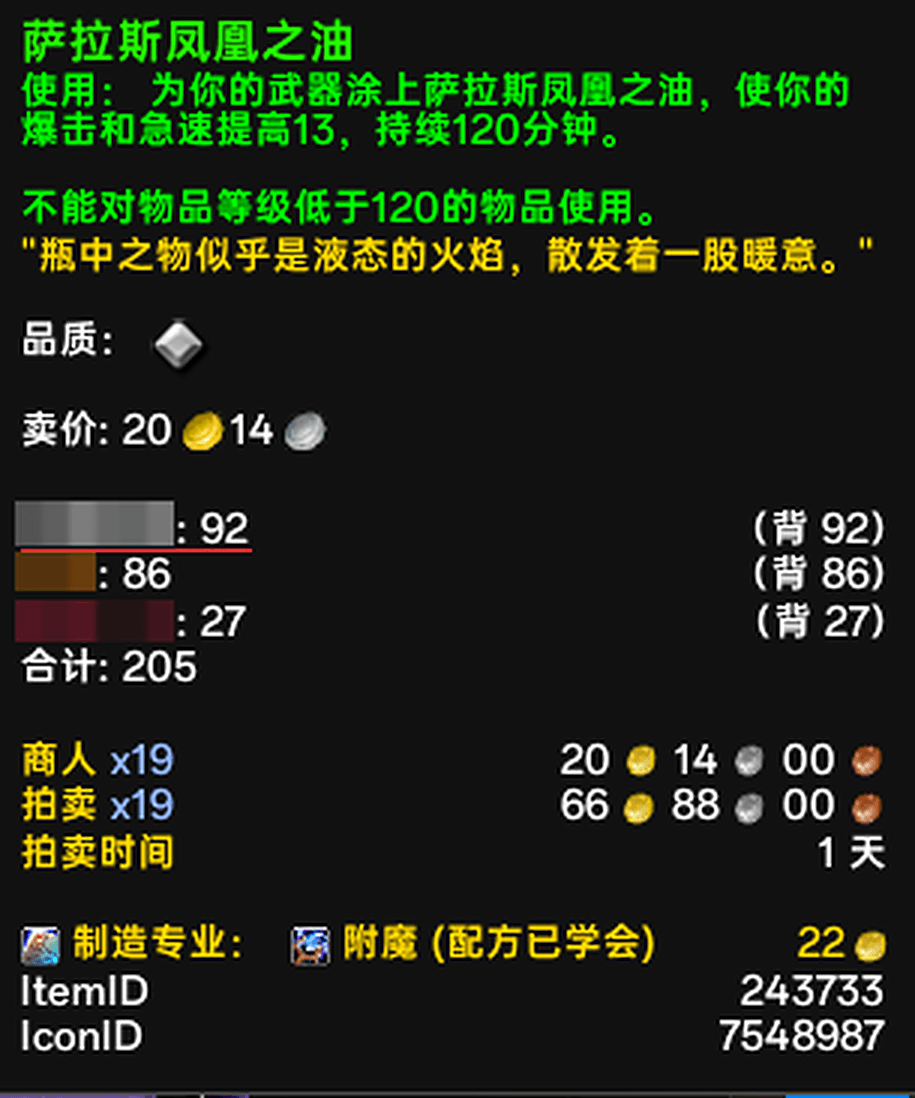
StockTake answers one question the moment you hover an item: how many of these do I actually own?
Bags, bank (warband bank included), and every character on your account — right on the tooltip, in a clean block after the game's own description. The screenshot in the project gallery shows exactly what it looks like.
What it does
Hover any item — bags, bank, auction house, chat links — and the counts appear on the tooltip, right below the game's own description: one row per character, then the total.
- Your current character is always the first row, with a red line under the name so you can find yourself at a glance.
- Character names are class-colored.
- The parentheses line up in a perfect column — no drift at 3, 12 or 170.
bankalready includes the warband bank — nothing double-counted, no mental math.- The block sits after the game's own description and before other addons' lines (Auctionator's sell price and friends).
Options
ESC -> Options -> AddOns -> StockTake, or just /sl:
| Option | What it does |
|---|---|
| Show other characters | Off = only your own counts |
| Show total line | Show or hide the Total row |
| Tooltip font size | Resizes the whole tooltip text; default "Follow game" changes nothing |
| Which characters to show | Uncheck alts you no longer care about; your current character always stays |
Extra slash commands: /sl en, /sl zh, /sl auto (language), /sl clean [days] (drop records of characters idle for N days, 30 by default).
Details
- Account-wide, zero setup. Each character is recorded when you log in (bags) and when you open your bank.
- No libraries, no network, no popups. 5 Lua files, about 38 KB zipped.
- What is stored: item IDs and counts only —
WTF\Account\...\SavedVariables\StackLedger.lua. Delete that file with the game closed for a clean slate. - Coexists with everything. By default it only adds its own lines to the tooltip; no scaling, no touching other addons' lines.
Install
Drop the StackLedger folder into World of Warcraft\_retail_\Interface\AddOns\ and /reload.
(The addon is listed in-game as StockTake; the folder name is only an internal identifier.)
Requires World of Warcraft retail (Midnight).
数量盘点 StockTake
悬停任意物品,立刻告诉你账号里一共有多少。 背包、银行(含战团银行)、以及每个角色的持有量,直接显示在物品提示框上。实际效果见项目图库里的截图。
它做什么
悬停任何物品——背包、银行、拍卖行、聊天里的物品链接——数量会出现在提示框里,就在游戏自带说明的下方:每个角色一行,最后一行是合计。
- 当前角色永远在第一行,名字下面有一条红线,一眼就能找到自己;
- 角色名按职业着色,和团队框架一个习惯;
- 括号里的背包/银行明细对齐成整齐的一列,3 位、12 位、170 位都不会漂;
bank已经包含战团银行——不重复计数,也不用自己心算;- 数量块位于游戏自带说明之后、其他插件行(比如 Auctionator 的售价)之前,不用滚到提示框底部去找。
选项
ESC → 选项 → 插件 → 数量盘点,或者直接输入 /sl:
| 选项 | 作用 |
|---|---|
| 显示其他角色 | 关掉就只看自己 |
| 显示总计行 | 控制那行 Total: 42 |
| 提示框字号 | 调整整个提示框文字大小;默认"跟随游戏"等于不动它 |
| 显示哪些角色 | 不想看的小号取消勾选即可;当前角色永远保留 |
更多命令:/sl en、/sl zh、/sl auto 切换语言;/sl clean [天数] 清理超过 N 天没登录的角色记录(默认 30 天)。
细节
- 全账号、免配置。 每个角色登录时记录背包,打开银行时记录银行。
- 不依赖任何库、不联网。 5 个 Lua 文件,压缩后约 38 KB。
- 只记录物品 ID 与数量,位置在
WTF\Account\...\SavedVariables\StackLedger.lua;想彻底重来,关掉游戏删掉该文件即可。 - 不干扰其他插件:默认只在提示框里增加自己的行,不缩放、不改动别人的行。
安装
把 StackLedger 文件夹放进 World of Warcraft\_retail_\Interface\AddOns\,然后 /reload。
(游戏内插件列表显示为数量盘点;文件夹名只是内部标识。)
需要《魔兽世界》正式服(Midnight)。
The StockTake Team
